
Introduction
This manual provides detailed instructions for the setup, operation, and maintenance of your AT&T DECT 6.0 Cordless Phone, model BL108-3. Please read this guide thoroughly to ensure proper use and to take full advantage of all features, including Smart Call Blocker, Bluetooth Connect to Cell, and the digital answering machine.
Contenu du colis
Vérifiez que votre colis contient les éléments suivants :
- Unité de base
- 3 combinés sans fil
- 3 adaptateurs d'alimentation
- 2 chargeurs (pour combinés supplémentaires)
- Cordon de ligne téléphonique
- 6 cellules de batterie
- Guide de démarrage rapide
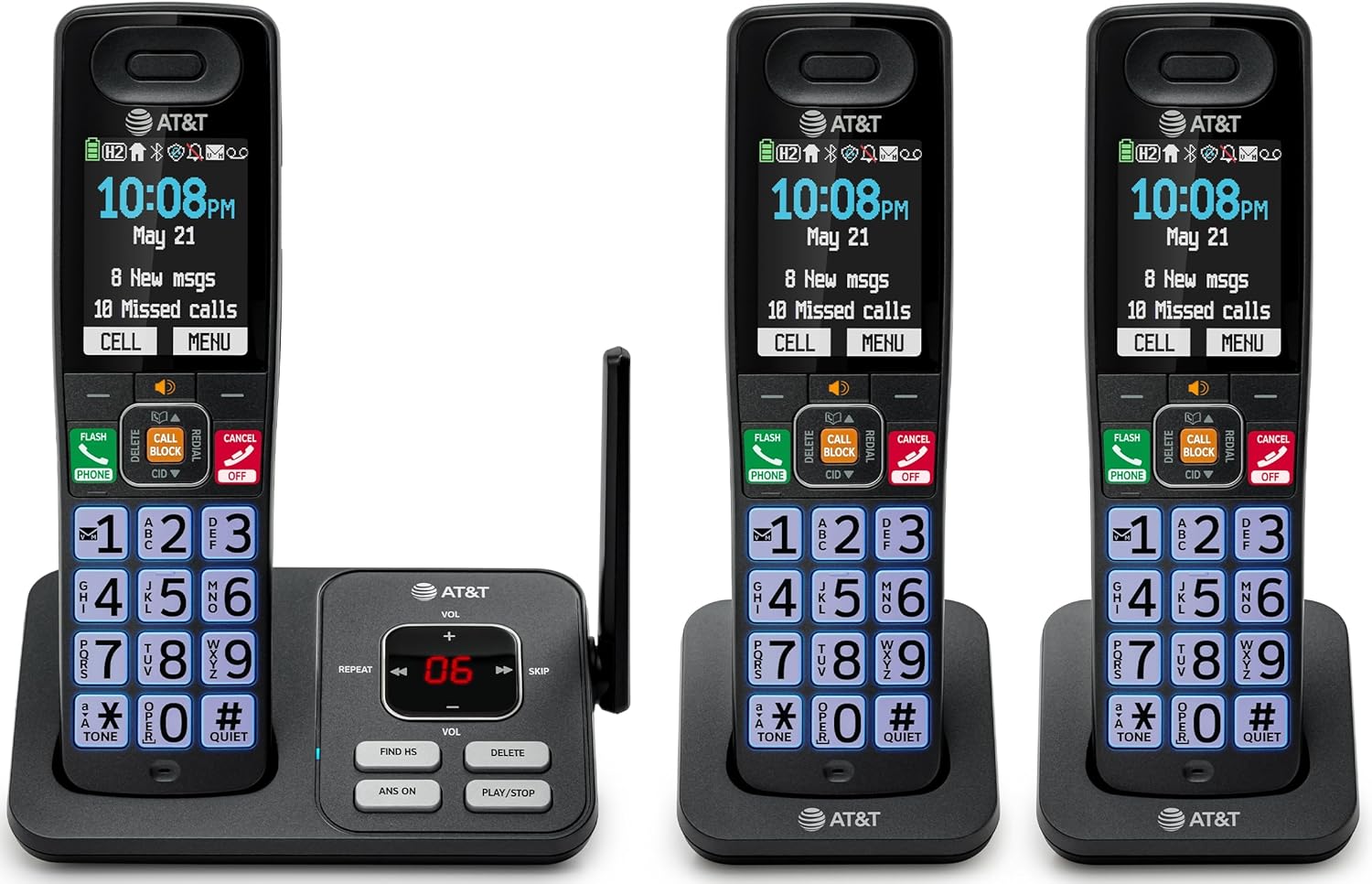
Image: The complete AT&T BL108-3 cordless phone system, showing the base unit and three handsets.
Installation
1. Base Unit and Power Connection
- Placez l'unité de base sur une surface plane et stable.
- Branchez une extrémité du cordon téléphonique à la prise TEL LINE de l'unité de base.
- Raccordez l'autre extrémité du cordon téléphonique à une prise téléphonique murale.
- Plug one power adapter into the POWER jack on the base unit.
- Plug the other end of the power adapter into an electrical outlet not controlled by a wall switch.
2. Installation et chargement de la batterie du combiné
- Ouvrez le couvercle du compartiment à piles situé à l'arrière de chaque combiné.
- Insert the provided battery cells, ensuring correct polarity (+ and -).
- Fermez le couvercle du compartiment à piles.
- Place each handset in its respective charger or the base unit cradle. The CHARGE light on the handset will illuminate.
- Veuillez laisser les combinés se charger pendant au moins 10 heures avant la première utilisation.
3. Additional Charger Setup
- Plug the power adapters for the additional chargers into electrical outlets not controlled by a wall switch.
- Place the additional handsets into these chargers to charge.
Mode d'emploi
Passer et recevoir des appels
- Pour passer un appel : appuyez sur TÉLÉPHONEComposez ensuite le numéro.
- Pour répondre à un appel : appuyez sur TÉLÉPHONE ou n'importe quelle touche de numérotation.
- Pour terminer un appel : Appuyez sur DÉSACTIVER/ANNULER or place the handset in the cradle.
Bloqueur d'appel intelligent
The Smart Call Blocker feature automatically filters out robocalls. You can also manually block unwanted numbers.
- To block a number during a call: Press the dedicated BLOC D'APPEL clé.
- The block directory can store up to 1,000 entries.

Image: A close-up of the handset displaying the "Smart Call Block" screen, with the "CALL BLOCK" button highlighted on the base unit.
Connexion Bluetooth au téléphone
Pair your smartphone with the BL108-3 system to make and receive mobile calls through any of the cordless handsets.
- Sur la base, appuyez sur MENU, then navigate to "Bluetooth" and select "Pair Cell".
- Activez Bluetooth sur votre smartphone et recherchez les appareils disponibles.
- Select the AT&T phone from the list on your smartphone to pair.
- Once paired, mobile calls can be made and received using the cordless handsets.

Image: A visual representation of the "Connect to Cell" feature, showing a handset on a nightstand wirelessly connected to a smartphone.
Video: Demonstrates the seamless Bluetooth connection to a cell phone, allowing calls to be made and received through the AT&T cordless handset.
Répondeur numérique
The integrated digital answering system records up to 22 minutes of messages.
- To play messages: Press LECTURE/ARRÊT sur l'unité de base ou le combiné.
- To skip messages: Press SAUTER.
- To delete messages: Press SUPPRIMER.

Image: The phone's base unit and handset displaying an incoming message on the answering system, with a visual of a message being left.
Annonce de l'identification de l'appelant
The handset speaks the caller's name aloud, allowing you to screen calls without picking up the phone.
- Assurez-vous que le service d'identification de l'appelant est souscrit auprès de votre fournisseur de services téléphoniques.
- The feature is active by default.

Image: The handset and base unit showing a call coming in, with a speech bubble indicating "Call from Johnson" to illustrate the Caller ID Announce feature.
Interphone entre combinés
You can use the handsets to communicate with each other, or transfer calls.
- To initiate an intercom call: Press INTERPHONE on a handset, then select the desired handset number.
- To transfer a call: During an external call, press INTERPHONE, select the handset, and then hang up after the other handset answers.

Image: Two handsets, one on the base and one on a charger, with arrows indicating communication between them, illustrating the intercom feature.
Annuaire téléphonique
Enregistrez jusqu'à 1500 noms et numéros dans le répertoire pour composer rapidement un numéro.
- To add an entry: Press MENU, navigate to "Phonebook", then "Add New Entry".
- To dial from phonebook: Press TÉLÉPHONE, alors DIRECTEUR, select the entry, and press TÉLÉPHONE encore.

Image: The handset screen showing a phonebook list with alphabetical navigation, demonstrating the phonebook directory feature.
Haut-parleur combiné duplex intégral
Allows both parties to speak and be heard simultaneously during a speakerphone call.
- To activate speakerphone during a call: Press CONFÉRENCIER.
- To switch back to handset mode: Press TÉLÉPHONE.

Image: A person using the handset in speakerphone mode while working on a laptop, with speech bubbles indicating a two-way conversation.
Mode silencieux
Temporarily silences all handset and base unit ringers for a set period.
- To activate: Press and hold #CALMER sur le combiné.
- Pour désactiver : appuyez longuement #CALMER encore.

Image: The handset screen showing "Quiet mode on" with a sleeping person in the background, illustrating the Quiet Mode feature.
Mode écologique
Reduces power consumption for optimal battery performance.
- ECO mode is typically enabled by default to conserve energy.
- Refer to the full user manual for options to adjust or disable this feature if needed.

Image: The handset and base unit in a setting with wind turbines in the background, and the screen showing "ECO mode", symbolizing energy efficiency.
Lampe de poche intégrée
For safety at night or in emergencies, the handset includes a built-in flashlight.
- To activate the flashlight: Locate the flashlight button on the side of the handset and press it.

Image: A close-up of the handset's side, showing the flashlight beam and the "FLASHLIGHT" label, indicating its location and function.
Entretien
- Nettoyage: Nettoyez le téléphone et la base avec un chiffon doux et sec.amp chiffon. N’utilisez pas de produits nettoyants en spray ni de produits chimiques agressifs.
- Entretien de la batterie: For optimal battery life, fully charge the handsets for 10 hours before first use. If the phone will be unused for an extended period, remove the batteries.
- Conditions environnementales : Évitez d'exposer le téléphone à des températures extrêmes, à la lumière directe du soleil ou à l'humidité.
Dépannage
| Problème | Solution |
|---|---|
| Pas de tonalité |
|
| Téléphone ne charge pas |
|
| Mauvaise qualité d'appel ou parasites |
|
| Cannot make/receive Bluetooth calls |
|
Caractéristiques
| Fonctionnalité | Détail |
|---|---|
| Marque | AT&T |
| Numéro de modèle | BL108-3 |
| Type de téléphone | Sans fil (DECT 6.0) |
| Couleur | Noir |
| Téléphones inclus | 3 |
| Afficher | 2.4" Color Backlit Display |
| Type de répondeur | Numérique (jusqu'à 22 minutes d'enregistrement) |
| Bloqueur d'appels | Smart Call Blocker (up to 1,000 entries) |
| Bluetooth | Connect to Cell (smartphone pairing) |
| Durée de veille du téléphone | 6 jours |
| Identification de l'appelant | Yes, with Announce feature |
| Capacité du répertoire | Jusqu'à 1500 noms et numéros |
| Haut-parleur | Haut-parleur combiné duplex intégral |
| Dimensions (unité de base) | 5.63 x 2.99 x 7.4 pouces (L xlxh) |
| Source d'énergie | Électrique avec fil |
| Matériel | Plastique |
| Code UPC | 650530034121 |

Image: Diagram showing the dimensions of the AT&T BL108-3 base unit and a handset.
Informations sur la garantie
Your AT&T BL108-3 Cordless Phone comes with a Garantie limitée de 1 ans. Please retain your purchase receipt as proof of purchase. For detailed warranty terms and conditions, refer to the full user manual or contact AT&T customer support.
Soutien
For further assistance, technical support, or to order replacement parts, please visit the official AT&T support webConsultez leur site web ou contactez leur service client. Vous y trouverez souvent des FAQ et des ressources supplémentaires.
- Support en ligne: Visite AT&T Wireless Support (or search for AT&T Landline Phone Support).
- Service client: Refer to your Quick Start Guide for specific contact numbers.