
1. Produit terminéview
The ATK N9 Tri-Mode Gaming Headset is designed for gamers requiring flexible connectivity, clear audio, and reliable communication across multiple devices. It supports 3.5 mm wired, 2.4G wireless, and Bluetooth connections, allowing seamless switching between gaming consoles, PC, and mobile devices. Stereo-tuned dynamic drivers deliver balanced sound, enhancing in-game audio cues such as footsteps, gunfire, and environmental effects. The detachable noise-canceling microphone improves voice clarity for team communication, online gaming, and voice calls. Its over-ear design, with soft ear cushions and an adjustable headband, ensures a comfortable fit for extended gaming sessions. The headset is compatible with PS5, PS4, PC, Nintendo Switch, and mobile devices. For Xbox Series X|S, audio and microphone functions are supported via the 3.5 mm wired connection.

2. Contenu du colis
Vérifiez que tous les éléments énumérés ci-dessous sont inclus dans votre colis :
- ATK N9 Pro/White Gaming Headset
- Microphone antibruit détachable
- Câble de chargement USB-C
- Câble audio 3.5 mm
- 2.4G Wireless USB Adapter
- Manuel de l'utilisateur (ce document)

3. Configuration initiale
3.1. Charger le casque
Before first use, fully charge the headset using the provided USB-C charging cable. Connect the USB-C end to the headset's charging port and the USB-A end to a compatible USB power source (e.g., PC, wall adapter). The LED indicator will show charging status.
3.2. Fixation du microphone
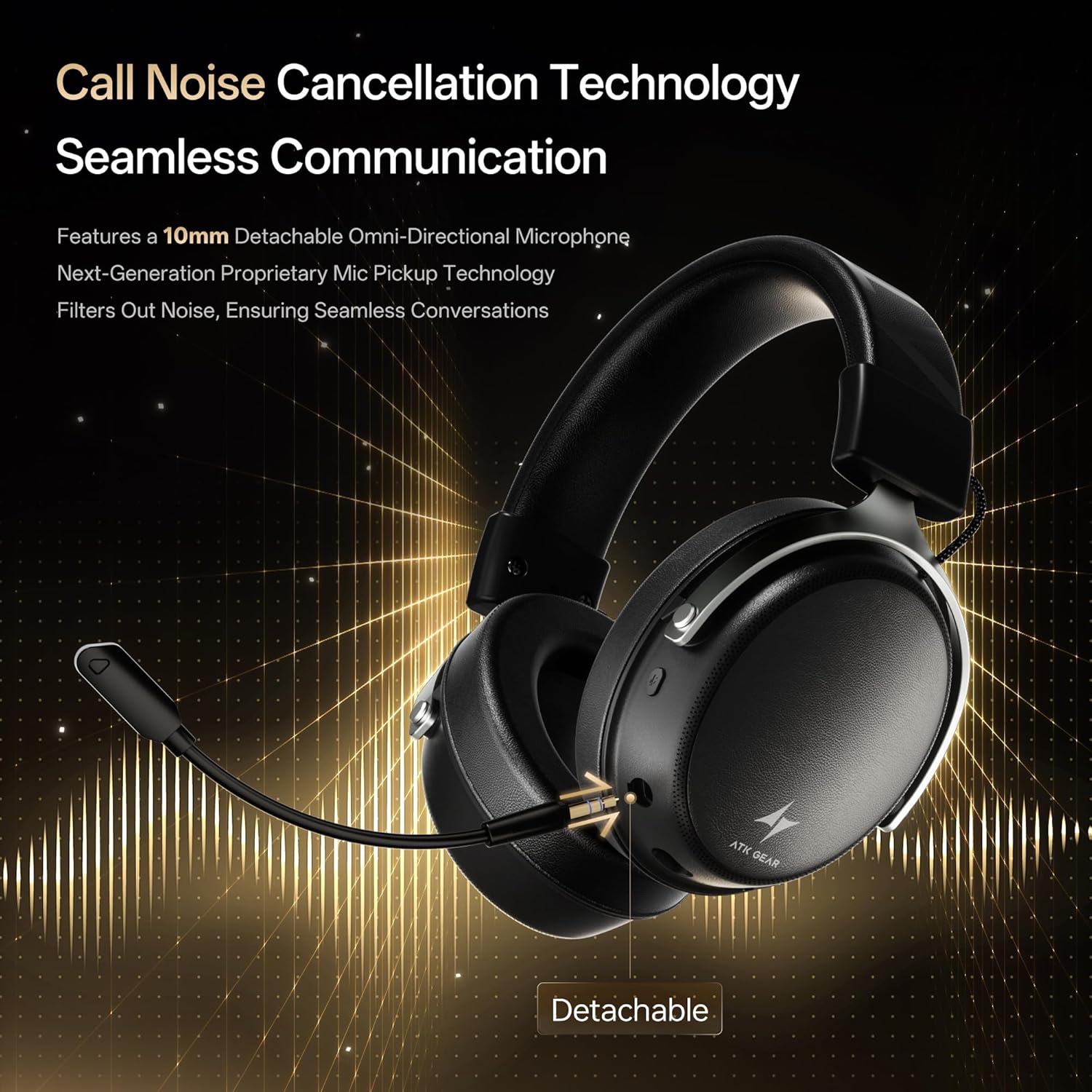
Insert the detachable boom microphone into the microphone port on the left earcup until it clicks into place. Ensure it is securely connected for optimal voice pickup.
3.3. Options de connectivité
The ATK N9 Pro/White headset offers three connectivity modes:
- Mode sans fil 2.4G : For PC, PS4, PS5, and Nintendo Switch (docked mode).
- Plug the 2.4G wireless USB adapter into an available USB port on your device.
- Mettez le casque sous tension.
- Switch the headset to 2.4G mode using the mode switch. The headset will automatically pair with the adapter.
- Adjust audio output settings on your device if necessary to select the headset.
- Mode Bluetooth: For mobile devices, PC, and Nintendo Switch (handheld mode).
- Power on the headset and switch to Bluetooth mode. The LED indicator will flash, indicating pairing mode.
- On your device, go to Bluetooth settings and select "ATK N9 Pro" from the list of available devices.
- Une fois connecté, le voyant LED affichera une lumière fixe.
- Mode filaire 3.5 mm : For Xbox Series X|S, PS4, PS5, PC, Nintendo Switch, and mobile devices.
- Connectez une extrémité du câble audio 3.5 mm à la prise jack 3.5 mm du casque.
- Connect the other end to the 3.5mm audio port on your device (e.g., controller, PC audio jack).
- Le casque fonctionnera en mode filaire, désactivant les fonctions sans fil.

4. Mode d'emploi
4.1. Commandes du casque
The ATK N9 Pro/White headset features intuitive controls located on the earcups:
- Bouton d'alimentation : Press and hold to power on/off. Short press for play/pause (in 2.4G/Bluetooth mode).
- Changement de mode : Toggle between 2.4G wireless, Bluetooth, and wired modes.
- Volume Up/Down Wheel: Tournez la molette pour régler le volume audio.
- Bouton de sourdine du microphone : Appuyez pour activer/désactiver le microphone.
- Spatial Audio Button: Press to activate/deactivate 3D Spatial Audio.
- Mic Monitoring Button: Press to enable/disable microphone monitoring (sidetone).
4.2. Utilisation du microphone
The detachable noise-canceling microphone is designed for clear communication. Position the microphone approximately 1-2 inches from your mouth for optimal voice pickup. Use the microphone mute button on the headset to quickly mute your voice when needed.
4.3. Ajustement de l'ajustement
The headset features an adjustable headband and soft ear cushions for comfort. Extend or retract the headband to achieve a snug yet comfortable fit. The earcups are designed to fully enclose your ears for passive noise isolation and comfort during long gaming sessions.
5. Spécifications techniques
| Fonctionnalité | Spécification |
|---|---|
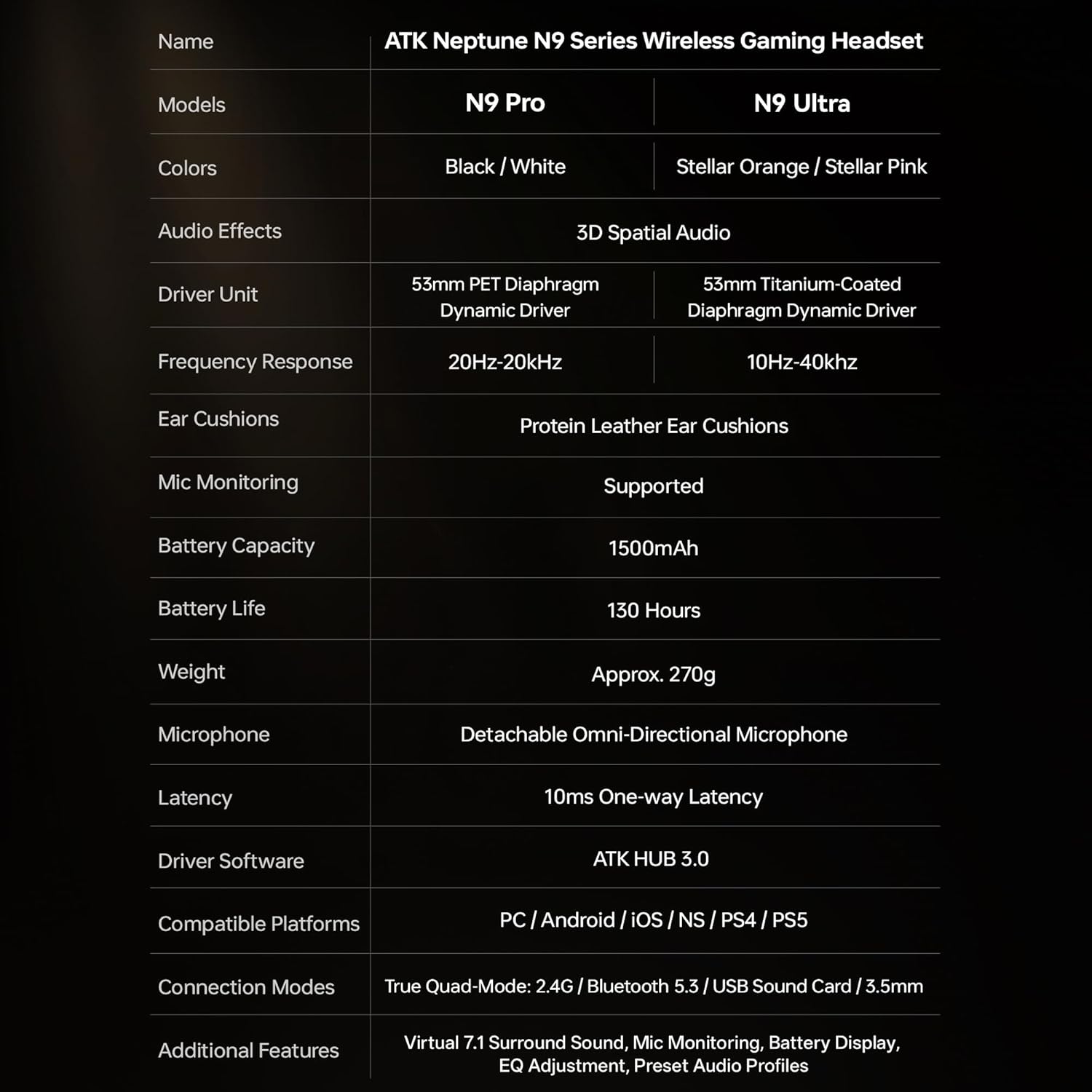
| Nom du modèle | ATK N9 Pro |
| Connectivité | 3.5mm Wired, 2.4G Wireless, Bluetooth 5.3 |
| Type de conducteur | Pilote dynamique |
| Taille du pilote | 53 mm |
| Gamme de fréquences | 20 Hz - 20,000 XNUMX Hz |
| Impédance | 64 Ohms |
| Microphone | Detachable Noise-Canceling Omni-Directional |
| Capacité de la batterie | 1500 mAh |
| Autonomie de la batterie | Jusqu'à 130 heures |
| Latency (2.4G) | 10 Milliseconds (one-way) |
| Poids | 270 gramme |
| Placement des oreilles | Sur l'oreille |
| Appareils compatibles | PS5, PS4, PC, Nintendo Switch, Mobile Devices, Xbox Series X|S (wired) |
| Fonctionnalités supplémentaires | 3D Spatial Audio, Mic Monitoring, Volume Control |

6. Entretien et maintenance
- Nettoyage: Utilisez un chiffon doux et sec pour nettoyer le casque. Évitez d'utiliser des produits chimiques agressifs ou des matériaux abrasifs.
- Stockage: Rangez le casque dans un endroit frais et sec, à l'abri de la lumière directe du soleil et des températures extrêmes.
- Entretien de la batterie: Pour prolonger la durée de vie de la batterie, évitez de décharger complètement le casque fréquemment. Rechargez-le régulièrement, même si vous ne l'utilisez pas pendant une période prolongée.
- Résistance à l'eau : Le casque n'est pas étanche. Évitez tout contact avec des liquides.
7. Dépannage
7.1. Pas de son / Volume faible
- Ensure the headset is powered on and connected in the correct mode (2.4G, Bluetooth, or 3.5mm wired).
- Vérifiez la molette de volume du casque et les paramètres de volume de votre appareil.
- For wireless modes, ensure the headset is paired correctly and selected as the audio output device in your system settings.
- If using 3.5mm wired, ensure the cable is fully inserted into both the headset and the device.
7.2. Le microphone ne fonctionne pas.
- Assurez-vous que le microphone est bien fixé au casque.
- Vérifiez si le bouton de coupure du microphone du casque est activé.
- Verify that the headset microphone is selected as the input device in your device's sound settings.
- For Xbox Series X|S, ensure you are using the 3.5mm wired connection for microphone support.
7.3. Problèmes de connectivité
- Réseau sans fil 2.4 GHz : Ensure the USB adapter is firmly plugged in. Try a different USB port.
- Bluetooth : Ensure the headset is in pairing mode. Forget the device on your phone/PC and re-pair. Keep the headset within the 5-meter Bluetooth range.
- Général: Power cycle both the headset and your connected device.
8. Garantie et assistance
8.1. Informations sur la garantie
The ATK N9 Pro/White Gaming Headset comes with a Garantie de 6 mois À compter de la date d'achat, cette garantie couvre les défauts de fabrication et de main-d'œuvre dans des conditions normales d'utilisation. Elle ne couvre pas les dommages causés par une mauvaise utilisation, un accident, des modifications non autorisées ou l'usure normale.
8.2. Assistance clientèle
For further assistance, technical support, or warranty claims, please contact ATK customer service through the retailer where the product was purchased or visit the official ATK website pour obtenir les coordonnées de l'assistance.