
Introduction
This manual provides detailed instructions for the assembly, operation, maintenance, and troubleshooting of your EUREKA ERGONOMIC 55 Inch L-Shaped Electric Standing Desk. This desk features a spacious 55-inch wide surface with a 20-inch extension, designed to accommodate multiple monitors and accessories, optimizing space in your home office or gaming setup.
Please read this manual thoroughly before assembly and use to ensure proper function and safety.
Consignes de sécurité
Précautions de sécurité importantes :
- Always ensure the desk area is clear of users, pets, and objects before adjusting the height.
- Do not place hands or other body parts near moving parts during height adjustment.
- Ensure all cables are properly managed to prevent snagging or damage during movement.
- Do not overload the desk beyond its specified weight capacity (refer to specifications section).
- Tenez les enfants et les animaux domestiques éloignés du bureau pendant son utilisation.
- Utilisez uniquement l'adaptateur secteur et les composants fournis.
- If any unusual noise or movement occurs, immediately stop operation and consult the troubleshooting guide or contact customer support.
Produit terminéview
The EUREKA ERGONOMIC L-Shaped Electric Standing Desk is designed for versatility and comfort, allowing seamless transitions between sitting and standing positions. Key features include an electric lifting system, memory presets, and a spacious L-shaped desktop.
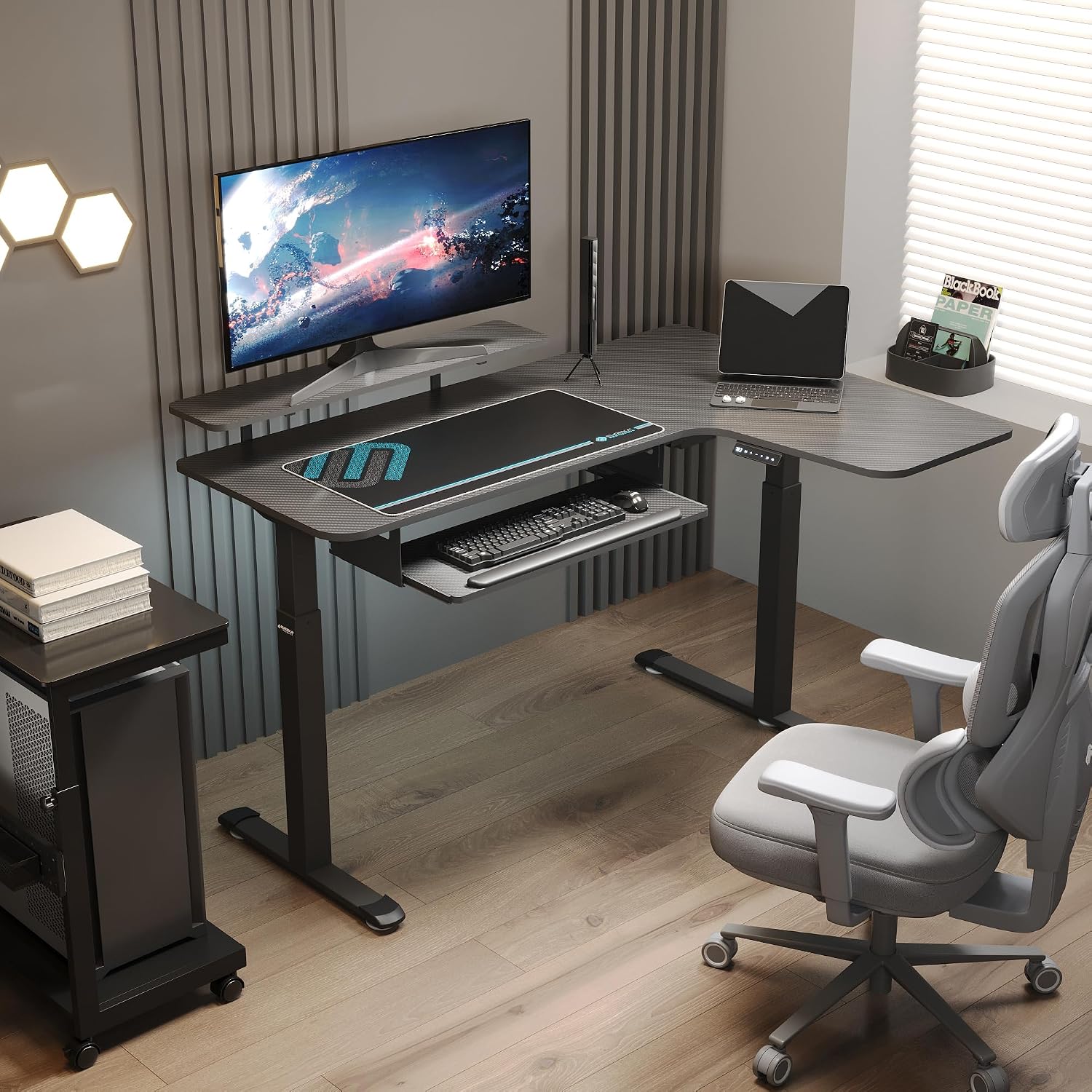
Figure 1 : Dimensions du produit. This image illustrates the overall dimensions of the L-shaped desk, including the main 55-inch surface, 20-inch extension, and height adjustment range from 29.5 inches to 48 inches. It also shows the dimensions of the keyboard tray and mouse pad.

Figure 2: Alternating Sitting and Standing. The desk allows for one-click electric height adjustment between 29.5 inches (minimum) and 48 inches (maximum) to support spinal health and reduce discomfort.

Figure 3: Professional Workstation Desk. This image demonstrates the flexibility of the L-shaped design, allowing users to choose between left or right configurations to suit their workspace needs.
Configuration et assemblage
Assembly is required for this product. Please ensure you have all components listed in the packing list before beginning. It is recommended to assemble the desk with at least two people.
Liste de vérification des composants :
- Desktop sections (main and extension)
- Leg frames and feet
- moteur électrique et boîtier de commande
- Panneau de contrôle
- Keyboard tray and rails
- Kit de quincaillerie (vis, boulons, clés Allen)
- Adaptateur secteur
Étapes d'assemblage :
- Déballer et identifier les pièces : Carefully unpack all components and verify against the packing list. Lay them out on a clean, soft surface to prevent scratches.
- Assembler les cadres de pieds : Attach the feet to the bottom of the leg frames using the provided hardware. Ensure they are securely tightened.
- Fixez les pieds du bureau : Position the desktop sections upside down. Attach the leg frames to the designated mounting points on the desktop using the appropriate screws.
- Install Electric Motor and Control Box: Mount the electric motor and control box to the underside of the desktop as indicated in the detailed assembly diagram (refer to the separate assembly guide if provided). Connect the motor cables to the control box.
- Installer le panneau de configuration : Secure the control panel to the front edge of the desk, typically on the right side for this model. Connect its cable to the control box.
- Assembler le plateau du clavier : Attach the keyboard tray rails to the underside of the desk, then slide the keyboard tray into place.
- Gestion des câbles: Route all power and control cables neatly using any included cable ties or management clips to prevent interference with desk movement.
- Placement final : Carefully flip the desk upright and place it in its desired location. Ensure it is stable and level.
Pour des instructions visuelles détaillées, veuillez vous référer aux schémas de montage inclus dans l'emballage de votre produit.
Mode d'emploi
Your EUREKA ERGONOMIC electric standing desk features an intuitive control panel for easy height adjustment and memory presets.

Figure 4 : Panneau de commande intelligent. This image highlights the control panel with its LED display, buttons for adjusting height up and down, and three memory preset buttons (1, 2, 3).
Basic Height Adjustment:
- Augmenter: Press and hold the "Up" arrow button (▲) until the desk reaches your desired standing height.
- Baisser: Press and hold the "Down" arrow button (▼) until the desk reaches your desired sitting height.
- The LED display will show the current height in inches.
Configuration des préréglages de mémoire :
Le bureau vous permet d'enregistrer jusqu'à trois réglages de hauteur préférés pour des ajustements rapides.
- Réglez le bureau à la hauteur souhaitée à l'aide des boutons Haut/Bas.
- Appuyez sur le bouton « M ». L'écran LED affichera « S- ».
- Within 3 seconds, press one of the number buttons (1, 2, or 3) to save the current height to that preset. The display will show "S-1", "S-2", or "S-3" to confirm.
Utilisation des préréglages de mémoire :
Once presets are saved, simply press the corresponding number button (1, 2, or 3) to automatically move the desk to the saved height. Pressing any button during automatic movement will stop the desk.
Keyboard Tray Operation:

Figure 5: Keyboard Tray and Mouse Pad. The integrated keyboard tray slides smoothly under the desk to maximize desktop space. A large mouse pad is also included for enhanced tracking.
The keyboard tray is designed to slide in and out smoothly. Gently pull the tray towards you to extend it for use, and push it back under the desk when not needed to free up desktop space.
Vidéo produit:
Video 1: EUREKA ERGONOMIC Electric Standing Desk Overview. This video demonstrates the electric height adjustment feature and general use of the EUREKA ERGONOMIC L-Shaped Electric Standing Desk, showcasing its smooth operation and ergonomic benefits.
Entretien
Un entretien régulier garantit la longévité et les performances optimales de votre bureau assis-debout.
- Nettoyage: Essuyez les surfaces du bureau avec un chiffon doux et sec.amp Chiffon. Évitez les produits chimiques agressifs ou les nettoyants abrasifs qui pourraient endommager la finition.
- Nettoyage du cadre : Clean the metal frame with a mild detergent and a soft cloth. Dry thoroughly.
- Gestion des câbles: Periodically check all cables for wear or damage. Ensure they are securely routed and not pinched.
- Fixations : Vérifiez régulièrement que toutes les vis et tous les boulons restent bien serrés. Resserrer si nécessaire.
- Entretien du moteur : Le moteur électrique ne nécessite aucun entretien. Ne tentez ni de l'ouvrir ni de le lubrifier.
Dépannage
Si vous rencontrez des problèmes avec votre bureau, veuillez consulter les problèmes et solutions courants suivants :
| Problème | Cause possible | Solution |
|---|---|---|
| Le bureau ne bouge pas lorsqu'on appuie sur les boutons. |
|
|
| Le bureau bouge de façon irrégulière ou fait des bruits inhabituels. |
|
|
| Les préréglages de mémoire ne fonctionnent pas ou ne s'enregistrent pas. |
|
|
If these solutions do not resolve the issue, please contact EUREKA ERGONOMIC customer support for further assistance.
Caractéristiques
Detailed technical specifications for your EUREKA ERGONOMIC L-Shaped Electric Standing Desk:
| Fonctionnalité | Détail |
|---|---|
| Marque | EUREKA ERGONOMIQUE |
| Numéro de modèle | ERK-SM-L55R-CF-FBM |
| Forme | Forme en L |
| Dimensions du bureau | 55 inch (main) + 20 inch (extension) |
| Plage de réglage de la hauteur | 29.5 pouces - 48 pouces |
| Capacité de poids | 300 livres |
| Panneau de contrôle | LED Display, Up/Down buttons, 3 Memory Presets |
| Matériau du cadre | Cold Rolled Steel, Metal |
| Matériel de bureau | Carbon Fiber (finish), Maple Wood (core/base) |
| Composants inclus | Cup Holder, Headphone Hook, Keyboard Tray, Mouse Pad |
| Assemblage requis | Oui |
| Poids de l'article | 129 livres |

Figure 6: 300 Lbs Capacity. The desk is built with a reinforced frame to support a weight capacity of up to 300 pounds.

Figure 7: Frame Construction. This image details the cold rolled steel reinforced frame, stable T-shaped foot design, and anti-slip footrests for enhanced stability and durability.
Garantie et assistance
EUREKA ERGONOMIC is committed to providing high-quality products and customer satisfaction.
Informations sur la garantie :
For specific warranty details, including coverage period and terms, please refer to the warranty card included with your product or visit the official EUREKA ERGONOMIC webConsultez le site. Conservez votre preuve d'achat pour toute réclamation au titre de la garantie.
Assistance clientèle :
If you have any questions, require assistance with assembly, or need troubleshooting beyond what is covered in this manual, please contact EUREKA ERGONOMIC customer support:
- Website: Visitez le Boutique EUREKA ERGONOMIC sur Amazon ou leur marque officielle webSite contenant les informations de contact et la FAQ.
- Courriel/Téléphone : Refer to your product packaging or the brand's official website pour les coordonnées les plus récentes.
When contacting support, please have your model number (ERK-SM-L55R-CF-FBM) and purchase date available.