
1. Introduction
Thank you for choosing the TOPTRO TP3 4K Google TV Portable Projector. This manual provides essential information for setting up, operating, and maintaining your projector. Please read it thoroughly before use to ensure optimal performance and safety.
The TOPTRO TP3 is designed to deliver a versatile and immersive viewing experience, featuring integrated Google TV, AI-powered image adjustments, and comprehensive connectivity options. Enjoy your content at home, outdoors, or on the go.
2. Produit terminéview
2.1 Principales caractéristiques
- Integrated Google TV: Access over 10,000 official streaming applications, including Netflix, Prime Video, and YouTube, without additional devices.
- Google Voice Control: Use the remote control's voice assistant button to search for content, adjust settings, and control playback hands-free.
- AI-Powered Image Adjustment: Features automatic focus, automatic keystone correction, obstacle avoidance, and automatic screen adjustment for a perfectly aligned and clear image within seconds.
- Résolution native 1080p avec décodage 4K : Delivers sharp, detailed images and natural colors, supporting 4K video decoding.
- Rapport de lancer court (0.8:1) : Projects a 60-inch image from just one meter distance, ideal for small spaces.
- 90-Degree Rotating Stand: Permet des angles de projection flexibles, y compris la projection au plafond.
- Connectivité avancée: Equipped with dual-band WiFi 6, Bluetooth 5.3, HDMI ARC, USB, and a 3.5mm audio jack for wide device compatibility.
- Conception portable : Weighing only 1.2 kg (2.6 lbs) with a hidden carry handle, making it easy to transport.
2.2 Contenu du paquet
Vérifiez que tous les articles sont présents dans le colis :
- Projecteur TOPTRO TP3
- Télécommande
- Câble HDMI
- Adaptateur secteur
- Manuel d'utilisation
3. Installation
3.1 Placement initial
Place the projector on a stable, flat surface. The 90-degree rotating stand allows for various projection angles, including wall, ceiling, or tabletop. For optimal image quality, ensure the projection surface is smooth and light-colored.

Image: The TOPTRO TP3 projector can be used in diverse environments, from living rooms to outdoor camping, showcasing son adaptabilité.
3.2 Connexion d'alimentation
- Branchez l'adaptateur secteur à l'entrée d'alimentation du projecteur.
- Plug the power adapter into a suitable electrical outlet (220V).
- Appuyez sur le bouton d'alimentation du projecteur ou de la télécommande pour l'allumer.
Connexion réseau 3.3
Upon first startup, follow the on-screen prompts to connect to your Wi-Fi network. The projector supports dual-band WiFi 6 for a fast and stable connection.
3.4 Configuration de Google TV
After connecting to Wi-Fi, sign in with your Google account to access Google TV and download applications from the Google Play Store. This step is crucial for utilizing the integrated streaming services.

Image: The projector's interface showing integrated Google TV with direct access to popular streaming applications.
4. Mode d'emploi
4.1 Fonctionnement de base
- Marche/Arrêt : Appuyez sur le bouton marche/arrêt de la télécommande ou du projecteur.
- Navigation: Utilisez les boutons directionnels de la télécommande pour naviguer dans les menus.
- Sélection: Appuyez sur le bouton « OK » pour confirmer vos sélections.
- Contrôle du volume : Utilisez les boutons de volume de la télécommande.
4.2 Ajustement des images
The TOPTRO TP3 features AI-powered automatic image adjustments:
- Mise au point automatique: Le projecteur ajuste automatiquement la netteté de l'image.
- Correction trapézoïdale automatique : Automatically corrects distorted images to a rectangular shape.
- Évitement d'obstacle: Détecte et ajuste l'image pour éviter les objets présents sur la surface de projection.
- Auto Screen Adjustment: Optimise l'image pour qu'elle s'adapte à la zone de l'écran.
These adjustments occur automatically within seconds of powering on or repositioning the projector. Manual digital zoom (80-100%) is also available for fine-tuning image size.

Image: Visual representation of the projector's AI-powered automatic image adjustment features, ensuring a clear and aligned picture.
4.3 Google Voice Control
Press the dedicated voice assistant button on your remote control and speak your command. For example, say "Open YouTube" or "Play music." The projector will respond to your voice commands for quick access to functions and content.
4.4 Mise en miroir de l'écran (Google Cast)
Utilize Google Cast technology to wirelessly mirror content from your smartphone or tablet to the projector. For iPhone users, download the "AirScreen" application from the Google Play Store on the projector for wireless screen mirroring.
4.5 Rotating Stand Usage
The integrated 90-degree rotating stand allows you to easily adjust the projection angle. Simply pivot the projector to direct the image onto a wall, screen, or ceiling. This feature is particularly useful for bedroom viewing or creative setups.
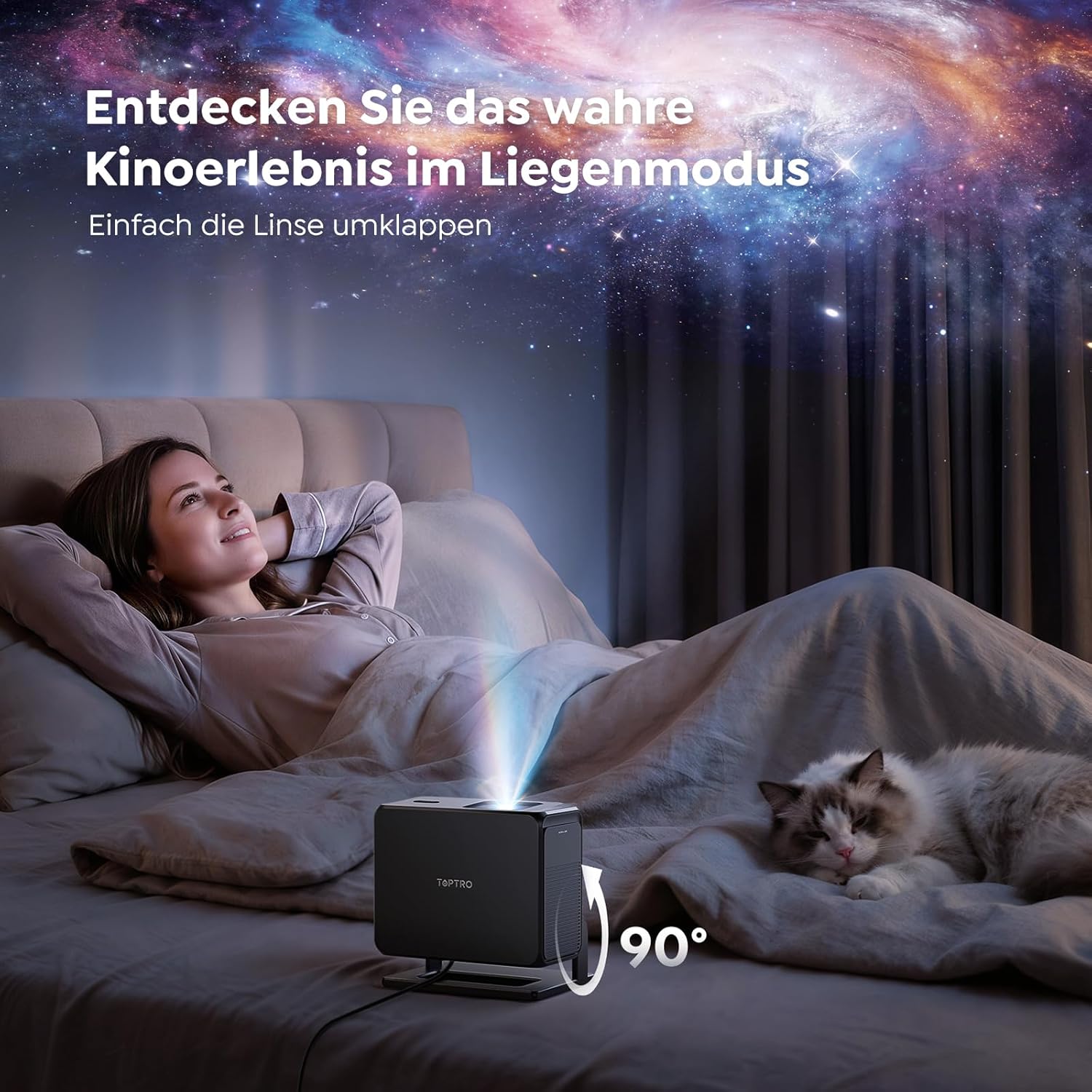
Image: The TOPTRO TP3 projector rotated 90 degrees to project content onto a bedroom ceiling, offering a unique viewexpérience de travail.
5. Connectivité
5.1 Connexions filaires
- HDMI ARC/CEC : Connect external devices like laptops, gaming consoles (Xbox/PlayStation 5), or Blu-ray players. The ARC feature allows audio to be sent back to a compatible sound system.
- USB: Connectez des clés USB pour la lecture multimédia.
- Prise audio 3.5 mm : Connectez des haut-parleurs ou des écouteurs externes filaires.
5.2 Connexions sans fil
- Wi-Fi 6 : Provides faster and more stable wireless connectivity for streaming and online content.
- Bluetooth 5.3: Connectez des écouteurs ou des haut-parleurs Bluetooth pour une expérience audio améliorée.
6. Entretien
6.1 Nettoyage de la lentille
Gently clean the projector lens with a soft, lint-free cloth designed for optical surfaces. Avoid using abrasive cleaners or excessive force, as this can scratch the lens.
6.2 Nettoyage général
Essuyez l'extérieur du projecteur avec un chiffon doux et sec. N'utilisez pas de nettoyants liquides directement sur l'appareil.
6.3 Stockage
Lorsqu'il n'est pas utilisé, rangez le projecteur dans un endroit frais et sec, à l'abri de la lumière directe du soleil et des températures extrêmes. Utilisez l'emballage d'origine ou un étui de protection pour éviter l'accumulation de poussière et les dommages.
7. Dépannage
7.1 Aucune image affichée
- Assurez-vous que le projecteur est allumé et branché à une source d'alimentation.
- Check all cable connections (HDMI, USB) to external devices.
- Verify the input source selected on the projector matches the connected device.
- Confirm the lens cap is removed.
7.2 Image floue
- Allow the auto-focus function to complete its adjustment.
- Assurez-vous que la surface de projection est plane et que le projecteur est stable.
- Clean the projector lens if smudges or dust are visible.
7.3 Pas de son
- Vérifiez le niveau sonore du projecteur et de l'appareil source connecté.
- Ensure external speakers or headphones are properly connected (wired or Bluetooth).
- If using HDMI ARC, verify your sound system is compatible and correctly configured.
7.4 Télécommande non fonctionnelle
- Remplacez les piles de la télécommande.
- Assurez-vous qu'aucun obstacle ne se trouve entre la télécommande et le récepteur infrarouge du projecteur.
Pour obtenir de l'aide supplémentaire, veuillez consulter la section de dépannage détaillée du manuel d'utilisation complet ou contacter le service client.
8. Spécifications
| Fonctionnalité | Spécification |
|---|---|
| Marque | TOPTRO |
| Nom du modèle | TP3 |
| Résolution native | 1920x1080 (1080P) |
| Video Decoding Support | 4K |
| Type d'affichage | DIRIGÉ |
| Caractéristiques spéciales | Auto Focus, Auto Keystone Correction, Obstacle Avoidance, Auto Screen Adjustment, Google TV, Google Voice Control |
| Technologie de connectivité | HDMI, USB, Bluetooth 5.3, Wi-Fi 6 |
| Interface matérielle | HDMI ARC/CEC, USB, 3.5mm Audio |
| Dimensions du produit (L x l x H) | 19.4 x 15.8 x 14.1 cm |
| Poids de l'article | 1.2 kg |
| Facteur de forme | Portable |
| Type de montage | Ceiling Mount, Tabletop, Wall |
| Taille minimale de l'image | 40 pouces |
| Taille maximale de l'image | 120 pouces |
| Distance de projection maximale | 2.13 mètres |
| Voltage | 220 volts |
| Composants inclus | Câble HDMI |
| Couleur | Noir |
| Type de contrôleur | Télécommande |
| Appareils compatibles | Xbox/PlayStation 5, Smartphone, Tablet, Laptop, Speaker, Notebook |
| Utilisations recommandées | Gaming, Business, Home Cinema, Education |
9. Garantie et assistance
9.1 Informations sur la garantie
Veuillez consulter la carte de garantie fournie avec votre produit pour connaître les conditions générales de garantie. Conservez votre preuve d'achat pour toute réclamation au titre de la garantie.
9.2 Assistance clientèle
If you encounter any issues or have questions regarding your TOPTRO TP3 projector, please contact our customer service team. We provide prompt, professional, and effective support to ensure a smooth user experience.
Contact details can typically be found on our official websur le site ou sur la carte de garantie.