
1. Introduction
This manual provides comprehensive instructions for the AirheadStorm GPS Digital Speedometer. This heads-up display (HUD) is designed to enhance driving safety by presenting essential vehicle information directly in the driver's line of sight. Featuring a 10Hz high refresh rate and Beidou dual-mode chip, it offers broad compatibility with various vehicles, including new energy cars, hybrids, motorcycles, buses, and trucks. Its automatic brightness adjustment ensures optimal visibility in diverse lighting conditions.
2. Contenu du colis
Vérifiez que tous les éléments énumérés ci-dessous sont inclus dans votre colis :
- 1 x Heads-Up Display (HUD) GPS Digital Speed Meter
- 1 x câble USB de type C
- 1 film réfléchissant
- 1 x Manuel d'utilisation
- 1 x Anti-Slip Double-Sided Tape

Figure 2.1 : Accessoires inclus avec le produit
3. caractéristiques du produit
- Clear Driving Data Display: Provides essential driving information in a clear format.
- Réglage automatique de la luminosité : Built-in light sensor automatically adjusts display brightness for optimal visibility in any lighting condition (day or night).
- Compatibilité polyvalente : Equipped with a 10Hz high refresh rate and Beidou dual-mode chip, compatible with new energy cars, HYBRIDs, motorcycles, buses, and trucks.
- Multi-Function Speedometer: Allows switching between speed units (KMh and MPH) and includes an overspeed warning feature.
- Ingénierie de précision : Features seamless assembly technology and a dual-core processor for smooth and consistent RPM displays.
- Installation sans effort : Designed for user convenience, installs easily without vehicle damage. Powers on and off automatically with your car via USB.
- Visual Overspeed Alerts: Three-level flash alarm visually warns when preset speed thresholds are exceeded. This alarm is silent to minimize distraction.

Figure 3.1: Intelligent Light Sensing for Optimal Visibility
4. Installation
Follow these steps to set up your AirheadStorm GPS Digital Speedometer:
- Déballer: Retirez soigneusement tous les composants de l'emballage.
- Fixez le support : Secure the suction cup mount to the bottom of the HUD unit. Ensure it clicks into place firmly.
- Positionnement : Choisissez un emplacement approprié sur votre tableau de bord qui ne gêne pas votre view of the road. Use the anti-slip double-sided tape for a secure placement if needed.
- Connexion électrique : Connect the Type-C USB cable to the HUD unit and plug the other end into a USB power source in your vehicle (e.g., USB port, cigarette lighter adapter). The unit will power on automatically with your vehicle.
- Film réfléchissant (facultatif) : If the display is not clear due to reflections, apply the reflective film to your windshield directly above the HUD unit. Clean the windshield thoroughly before application.

Figure 4.1: Speedometer positioned on a dashboard
Video 4.1: Unboxing and Assembly of the GPS Digital Speedometer. This video demonstrates how to unpack the device, attach the mount, and connect the power cable.
5. Mode d'emploi
The GPS Digital Speedometer is designed for simple operation. Once connected to power, it will automatically turn on and begin acquiring GPS signals to display your speed.
5.1 Mise sous/hors tension
The device powers on automatically when your vehicle starts and powers off when your vehicle is turned off, provided it is connected to a switched USB power source.
5.2 Réglage de la luminosité
The built-in light sensor automatically adjusts the display brightness to suit ambient light conditions, ensuring readability during both day and night driving.
5.3 Speed Unit Switching (KMh/MPH)
Refer to the user manual for specific button presses to switch between Kilometers per hour (KMh) and Miles per hour (MPH) display units. This is typically done via a short press of a designated button on the device.
5.4 Alarme de survitesse
L'appareil est doté d'un système à trois niveaux.tage visual overspeed alarm. When your speed exceeds a preset limit, the display will flash to alert you. This alarm is visual only and does not produce sound.
Video 5.1: Demonstration of the GPS Digital Speedometer's operation, including power-on sequence, display modes, and unit switching.
6. Modes d'affichage
The device offers multiple display modes, allowing you to customize the information shown. You can switch between interfaces to meet different needs, typically by pressing a button on the unit.
- Vitesse + Unité + Boussole : Displays current speed, speed unit (MPH/KMh), and cardinal direction.
- Vitesse + Unité : Affiche la vitesse actuelle et l'unité de vitesse.
- Vitesse + Boussole : Affiche la vitesse actuelle et la direction cardinale.
- Vitesse uniquement : Affiche uniquement la vitesse actuelle.

Figure 6.1 : Modes d'affichage multiples
7. Spécifications
| Spécification | Détail |
|---|---|
| Nom de la pièce | Affichage tête haute |
| Matériel | Acrylonitrile butadiène styrène (ABS), polycarbonate (PC) |
| Taille | 86 x 54 x 14 mm (3.4 x 2.1 x 0.5 pouces) |
| Couleur | Noir |
| Voltage | 5V (via USB) |
| Affichage léger | Vert |
| Taille de l'écran | 3 pouces |
| Fonctions | Speed, Automatic Light Sensing, Speed Unit Switching (KMH/MPH) |
| Alarme | Trois-stage speed alarm settings (flashing alarm, no sound) |
| Poids de l'article | 4.8 once (135 grammes) |
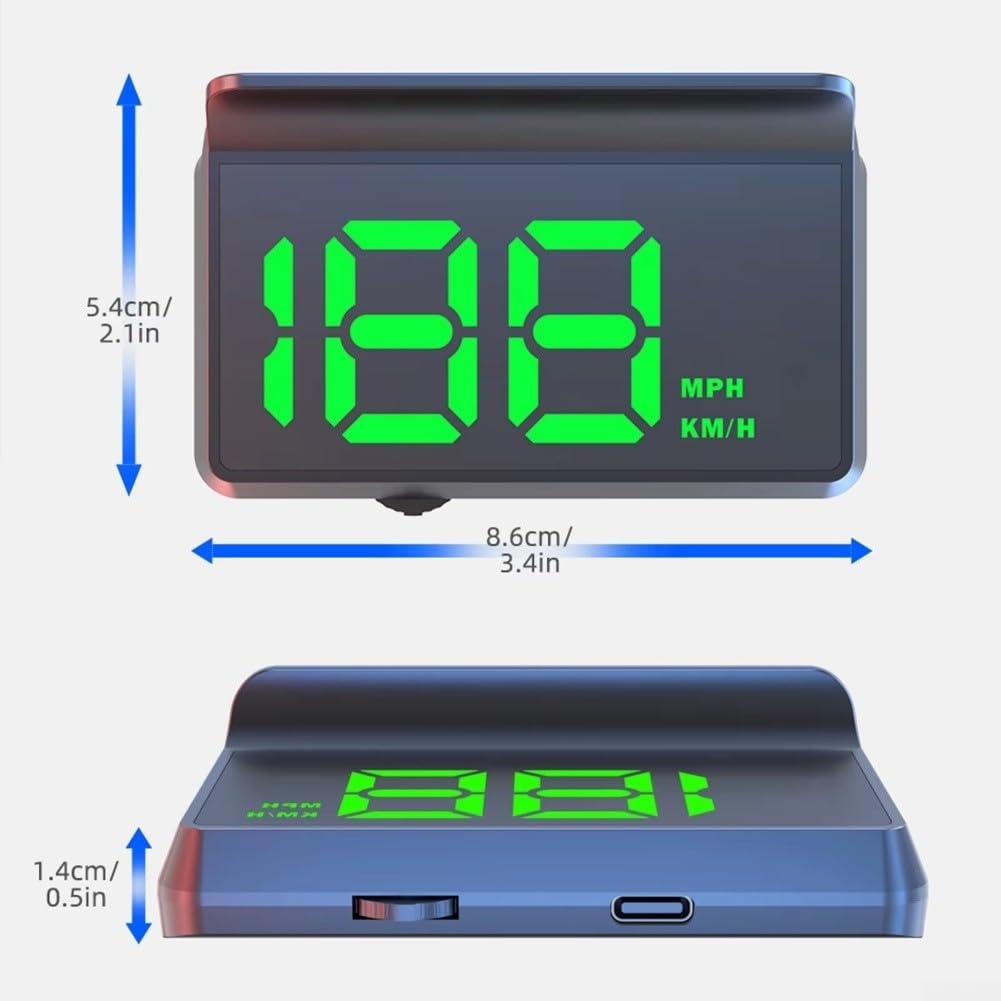
Figure 7.1 : Dimensions du produit
8. Dépannage
- Pas d'affichage : Ensure the USB cable is securely connected to both the device and a working USB power source. Check if the vehicle's ignition is on.
- Lecture rapide inexacte : Assurez-vous que l'appareil dispose d'un view of the sky for optimal GPS signal reception. Speed accuracy may vary slightly based on GPS signal strength.
- Écran trop sombre/lumineux : The device features automatic brightness adjustment. Ensure the light sensor is not obstructed.
- Aucun signal GPS : The device requires an unobstructed view of the sky to acquire GPS signals. This may take a few minutes upon initial startup or in areas with poor satellite coverage (e.g., tunnels, dense urban areas).
9. Garantie et assistance
Pour toute information relative à la garantie, à l'assistance technique ou au service après-vente, veuillez consulter les coordonnées fournies avec votre documentation d'achat ou visiter le site web officiel du fabricant. webConsultez le site. Conservez votre preuve d'achat pour toute réclamation au titre de la garantie.