
1. Introduction
This manual provides detailed instructions for the installation, operation, and maintenance of your Unifit Digital Thermostat Control Board. This control board is designed as a replacement part specifically for Pit Boss 2 Series Digital Electric Vertical Smokers, including models like the PBV2D1. Please read this manual thoroughly before installation and use to ensure proper function and safety.

Figure 1: Unifit Digital Thermostat Control Board, showing the display, buttons, and wiring.

Figure 2: Illustration of the control board's compatibility and placement within a Pit Boss 2 Series Digital Electric Vertical Smoker.
2. Consignes de sécurité
Always observe the following safety precautions when installing or operating the control board:
- Débrancher l'alimentation : Ensure the smoker is completely unplugged from the power source before attempting any installation, maintenance, or repair.
- Personnel qualifié: Installation should be performed by individuals familiar with electrical components and smoker assembly.
- Outils appropriés : Use appropriate tools for installation to prevent damage to the control board or smoker.
- Conditions environnementales : Do not expose the control board to excessive moisture or extreme temperatures outside of normal operating conditions.
- Original Smoker Manual: Refer to your original Pit Boss smoker manual for additional safety guidelines specific to your appliance.
3. Contenu du colis
Votre colis devrait contenir les éléments suivants :
- 1x Unifit Digital Thermostat Control Board
Note: Meat probes are not included with this control board and must be purchased separately if needed.
4. caractéristiques du produit
The Unifit Digital Thermostat Control Board offers the following features:
- Écran LED lumineux : Provides clear visibility of settings and temperatures, even in direct sunlight.
- Construction durable : Designed for high-temperature resistance and extended service life.
- Surveillance de la température : Displays internal smoker temperatures and supports two wired meat probes (probes not included).
- Four Cooking Modes: Select from smoking, basing, braising, and roasting modes.
- Plage de température : Adjustable temperature settings from 100°F to 400°F.
- Contrôle numérique: Push-button interface for precise temperature and time adjustments.
5. Instructions d'installation
This section outlines the general steps for replacing the control board. Always refer to your specific Pit Boss smoker's service manual for detailed disassembly and reassembly procedures.
- Coupure de courant : Ensure the Pit Boss smoker is unplugged from the electrical outlet.
- Access Old Control Board: Locate and carefully remove the existing control board from your smoker. This typically involves unscrewing fasteners and disconnecting wiring harnesses.
- Déconnecter le câblage : Systematically disconnect all wires from the old control board. It is recommended to take photos or label wires to ensure correct re-connection.
- Connect New Control Board: Connect the wiring harnesses from the smoker to the new Unifit Digital Thermostat Control Board. Ensure all connections are secure and match the original configuration.
- Secure New Control Board: Mount the new control board into the smoker's designated slot and secure it with the appropriate fasteners.
- Vérification finale : Double-check all connections and ensure no wires are pinched or exposed.
- Mise sous tension : Plug the smoker back into a grounded electrical outlet.
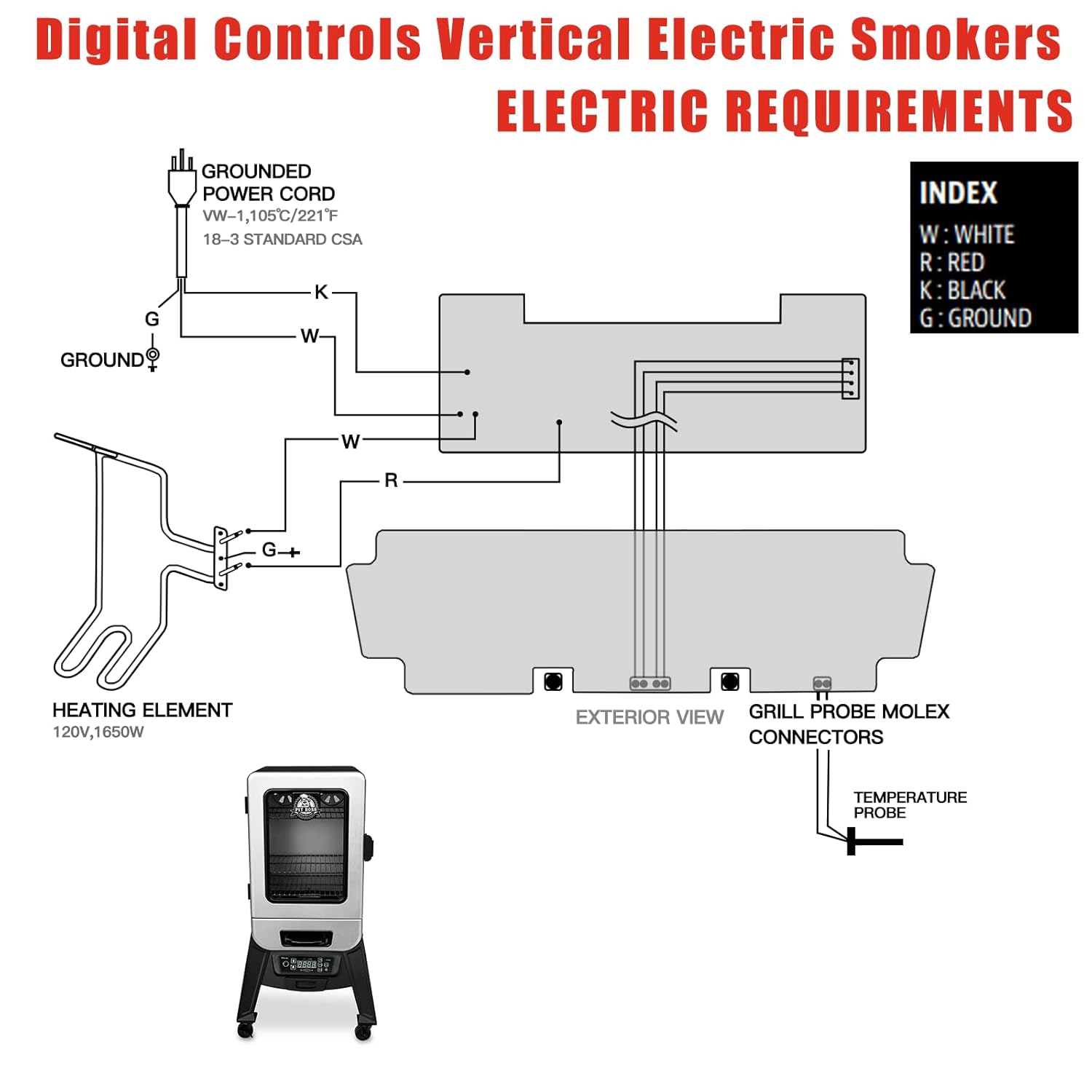
Figure 3: Electrical wiring diagram for digital controls in vertical electric smokers, showing connections for the grounded power cord, heating element, and grill probe molex connectors.

Figure 4 : Gros plan view of the Unifit control panel installed in a smoker, displaying temperature and probe readings.
6. Mode d'emploi
Familiarize yourself with the control panel buttons and their functions:

Figure 5: Diagram illustrating the functions of the control panel buttons, including Power, Temp, Time, Set/Act, Smoke, and Adjustment Arrows.
- Bouton d'alimentation : Appuyez pour allumer ou éteindre le fumoir.
- Bouton de température : Press to adjust the desired cooking temperature. Use the Up et Vers le bas flèches pour changer la valeur.
- Bouton Heure : Press to set the cooking timer. Use the Up et Vers le bas flèches pour changer la valeur.
- Set/Act Button: After setting temperature or time, press this button immediately to confirm and activate the setting.
- Bouton fumée : Activates the smoking mode.
- Bouton F/C : Press to switch the temperature display between Fahrenheit (°F) and Celsius (°C). The default setting is Fahrenheit.
- Element Light Indicator: S'allume lorsque l'élément chauffant est actif.
Réglage de la température et de la durée :
- Appuyez sur le Température bouton.
- Utilisez le Up or Vers le bas arrows to select your desired temperature (100°F – 400°F).
- Appuyez immédiatement sur la Set/Act bouton pour confirmer la température.
- Pour régler une minuterie, appuyez sur Temps bouton.
- Utilisez le Up or Vers le bas Flèches pour régler la durée de cuisson souhaitée.
- Appuyez immédiatement sur la Set/Act button to confirm the timer.
Important Note: The window of time to press the Set/Act button after adjusting temperature or time is brief. Ensure you press it promptly to save your settings.
7. Entretien
To ensure the longevity and proper function of your control board:
- Nettoyage: Wipe the control panel surface clean with a soft, damp Chiffon. N’utilisez pas de nettoyants abrasifs et n’immergez pas l’appareil dans l’eau.
- Inspection: Periodically inspect the wiring connections for any signs of wear or damage.
- Stockage: If the smoker is stored for an extended period, ensure the control board is clean and dry.
8. Dépannage
Cette section aborde les problèmes courants que vous pourriez rencontrer.
| Problème | Cause possible | Solution |
|---|---|---|
| L'écran est vide ou sombre. | No power, loose connection, or display issue. |
|
| Temperature or time settings do not save. | "Set/Act" button not pressed promptly. |
|
| Le fumoir ne chauffe pas. | Heating element issue, wiring problem, or incorrect temperature setting. |
|
9. Spécifications

Figure 6: Detailed dimensions of the Unifit Digital Thermostat Control Board, showing length, width, and height measurements.
| Fonctionnalité | Détail |
|---|---|
| Marque | Unifier |
| Compatibilité des modèles | Pit Boss 2 Series Digital Electric Vertical Smokers (e.g., PBV2D1) |
| Plage de température | 100°F – 400°F |
| Type d'affichage | LED numérique |
| Technologie de connectivité | Câblé |
| Matériau extérieur | Plastique |
| Composants inclus | Contrôleur 1x |
| Entretien du produit | Essuyer propre |
| Dimensions (environ) | 10.94 x 6.1 x 3.74 pouces (Emballage) |
10. Garantie et assistance
For warranty information or technical support regarding your Unifit Digital Thermostat Control Board, please refer to the documentation provided with your purchase or contact the manufacturer directly. Keep your purchase receipt for warranty claims.