
Devoko 0980
Manuel d'instructions du bureau en L Devoko 140 x 80 cm
Modèle: 0980
1. Introduction
Thank you for choosing the Devoko L-Shaped Desk. This manual provides detailed instructions for assembly, operation, maintenance, and troubleshooting to ensure optimal use and longevity of your product. Please read this manual thoroughly before assembly and retain it for future reference.

Image 1.1: The Devoko L-Shaped Desk (140x80 cm) in a typical home office setup, showcasinet sa conception et sa fonctionnalité.
2. Principales caractéristiques
- Conception réversible en forme de L : Adaptable configuration for left or right-hand setup to fit various room layouts.
- Solution d'alimentation intégrée : Includes two AC outlets, one USB-A, and one USB-C port for convenient device charging and power access.
- Ample Stockage : Features four spacious fabric drawers, an adjustable CPU shelf, and an under-desk grid for organized storage.
- Support de moniteur ergonomique : Elevates your monitor to a comfortable viewing height, promoting better posture.
- Construction durable : Built with high-quality wood surfaces and a stable metal frame with X-shaped support and adjustable foot pads.
3. Consignes de sécurité
Veuillez respecter les consignes de sécurité suivantes :
- Avant l'assemblage, assurez-vous que tous les composants sont présents et non endommagés.
- Assemblez le bureau sur une surface douce et propre afin d'éviter les rayures.
- Ne serrez pas trop les vis lors du montage afin d'éviter d'endommager le matériau.
- Gardez les petites pièces hors de portée des enfants.
- Ne pas dépasser la capacité de poids maximale du bureau.
- For electrical components (USB/Type-C ports, power outlets), ensure proper grounding and avoid liquid contact.
4. Contenu et composants de l'emballage
Veuillez vérifier que toutes les pièces énumérées ci-dessous sont incluses dans votre colis. Si des pièces sont manquantes ou endommagées, veuillez contacter le service client.
4.1. Liste des composants
- Desk panels (L-shaped top, monitor stand, CPU shelf)
- Éléments de cadre métallique (pieds, traverses)
- Drawer units (fabric drawers, drawer frames)
- Integrated power strip (2 AC outlets, 1 USB-A, 1 USB-C)
- Coussinets de pied réglables
- Matériel de montage (vis, boulons, clé Allen)
- Manuel d'instructions

Image 4.1: An exploded diagram illustrating the various components of the Devoko L-Shaped Desk, including panels, frame, and hardware.
5. Instructions d'installation et de montage
Suivez attentivement ces étapes pour un assemblage correct. Il est recommandé d'être deux pour certaines étapes.
5.1. Préparation
- Dégagez un espace spacieux pour le rassemblement.
- Lay out all components and hardware, comparing them with the component list.
- Keep the included Allen wrench handy. A screwdriver (not included) may also be useful.
5.2. Étapes d'assemblage
- Assembler le châssis principal : Attach the metal legs to the main desk panels using the provided screws. Ensure all connections are secure but do not fully tighten yet.
- Installer les barres transversales : Secure the X-shaped crossbars to the back of the frame for added stability.

Image 5.1: Details of the desk's construction, including the durable surface, X-shaped frame for stability, and adjustable foot pads for leveling.
- Attach L-Extension: Connect the L-shaped extension panel to the main desk frame. The design allows for reversible left or right-hand configuration. Decide your preferred orientation before securing.

Image 5.2: Illustration demonstrating the reversible L-shaped configuration, allowing the user to choose between left or right orientation for the extension.
- Installer le bloc tiroir : Assemble the drawer frames and insert the fabric drawers into their respective slots.

Image 5.3 : Un aperçu détaillé view of the four fabric drawers, highlighting their spacious design for organizing office supplies and documents.
- Fixer le support du moniteur : Secure the elevated monitor stand to the main desk surface. This stand is designed to improve ergonomics.
- Installer le châssis du processeur : Position the adjustable CPU shelf within the designated area. The height can be adjusted to accommodate different computer tower sizes.

Image 5.4: A visual guide demonstrating how to adjust the height of the CPU shelf to fit various computer tower dimensions.
- Multiprise intégrée : Insert the built-in power strip into the pre-cut opening on the desk surface. Connect its power cable to a wall outlet.

Image 5.5 : Un gros plan view of the integrated power strip, featuring two AC outlets, one USB-A port, and one USB-C port for convenient device charging.
- Serrage final : Once all components are in place and aligned, carefully tighten all screws.
- Ajuster les repose-pieds : Level the desk by adjusting the foot pads at the bottom of the legs.
6. Mode d'emploi
6.1. Utilisation de la multiprise intégrée
Le bureau est doté d'une multiprise intégrée pour un accès pratique à l'alimentation électrique. Il comprend :
- Two standard AC power outlets (220-250V/15A)
- One USB-A charging port (5V/2.1A)
- One USB-C charging port (5V/2.1A)
To use, simply plug the desk's power cord into a wall outlet. Then, connect your devices to the available ports. Avoid overloading the power strip.
6.2. Utilisation des fonctions de stockage
- Tiroirs: Use the four fabric drawers for organizing documents, stationery, and small electronic accessories. Note that these drawers are designed for lighter items.
- Support de moniteur : Place your monitor on the elevated stand for an ergonomic viewing height. The space underneath can be used for keyboards, notebooks, or other small items.
- CPU Shelf: Store your computer tower on the adjustable CPU shelf to keep it off the floor and save desk space.
- Under-desk Grid: The metal grid under the main desk surface can hold books or other frequently used items.
7. Entretien et maintenance
Proper care will extend the life of your Devoko L-Shaped Desk.
- Nettoyage: Essuyez les surfaces du bureau avec un chiffon doux et sec.amp cloth. Avoid abrasive cleaners or harsh chemicals that could damage the finish. For the fabric drawers, spot clean with a mild detergent if necessary.
- Déversements : Essuyez immédiatement tout liquide renversé afin d'éviter les taches ou les dommages à la surface du bois.
- Chaleur et humidité : Évitez de poser des objets chauds directement sur le bureau. Utilisez des sous-verres pour vos boissons. Gardez le bureau à l'abri de l'humidité excessive et de la lumière directe du soleil.
- Matériel: Vérifiez régulièrement le serrage de toutes les vis et boulons. Resserrer si nécessaire.
- La répartition du poids: Répartissez le poids uniformément sur la surface du bureau. Évitez de placer des objets trop lourds au même endroit.
8. Dépannage
| Problème | Cause possible | Solution |
|---|---|---|
| Le bureau est bancal. | Les vis sont desserrées ; le sol est inégal. | Tighten all assembly screws. Adjust the foot pads to level the desk. |
| Prises de courant/ports USB non fonctionnels. | Desk power cord not plugged in; wall outlet issue; device issue. | Ensure the desk's power cord is securely plugged into a functional wall outlet. Test the wall outlet with another device. Check if the device itself is working. |
| Les tiroirs ne coulissent pas facilement. | Drawer frame misaligned; drawer overloaded. | Check the assembly of the drawer frames. Ensure drawers are not overloaded with heavy items. |
| Rayures en surface. | Objets tranchants ; nettoyage abrasif. | Use desk mats or coasters. Avoid dragging objects across the surface. Clean with soft cloths. |
9. Spécifications du produit
| Fonctionnalité | Détail |
|---|---|
| Marque | Devoko |
| Modèle | 0980 |
| Taper | Bureau d'ordinateur en forme de L |
| Dimensions (L x l x H) | 140 x 80 x 75 cm (55.1 x 31.5 x 29.5 pouces) |
| Poids | 25 kg (55 lb) |
| Couleur | Blanc |
| Matériel | Wood (top), Metal (frame) |
| Prises de courant | 2 x CA (220-250 V/15 A) |
| Ports USB | 1 x USB-A (5 V/2.1 A), 1 x USB-C (5 V/2.1 A) |
| Caractéristiques spéciales | Reversible L-shape, 4 fabric drawers, Monitor stand, Adjustable CPU shelf, Adjustable foot pads, X-shaped stability frame. |
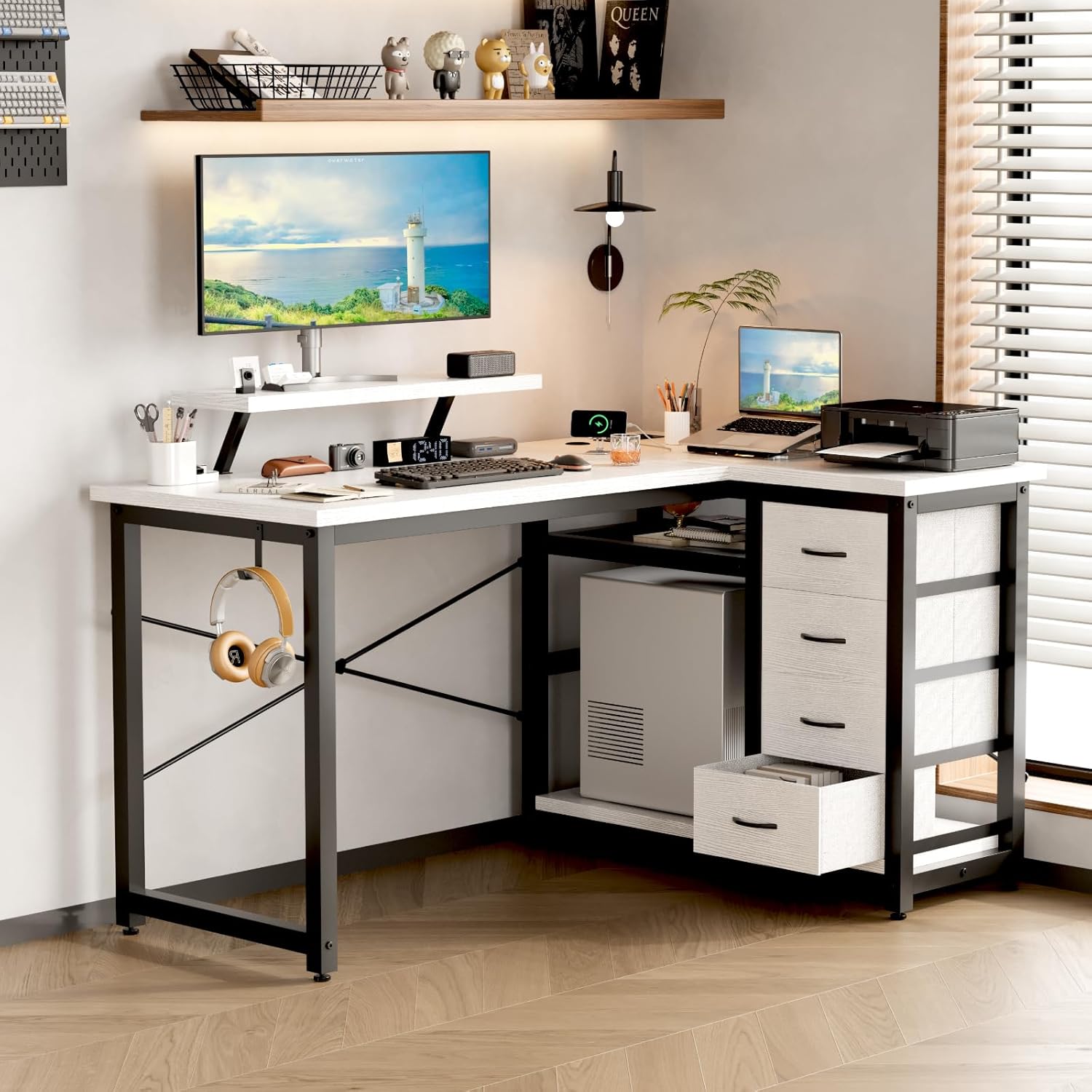
Image 9.1: A technical drawing showing the precise dimensions of the Devoko L-Shaped Desk, including length, width, and height of various sections.
10. Garantie et assistance
10.1. Informations sur la garantie
Devoko products are manufactured to high-quality standards. For specific warranty details, please refer to the warranty card included in your package or visit the official Devoko website. La garantie couvre généralement les défauts de fabrication dans des conditions normales d'utilisation.
10.2. Assistance clientèle
If you encounter any issues or have questions regarding your Devoko L-Shaped Desk, please contact our customer support team:
- E-mail: support@devoko.com
- Website: www.devoko.com
- Veuillez avoir votre numéro de modèle (0980) et la date d'achat à portée de main lorsque vous contactez le support.