
Introduction
Welcome to the HP OmniDesk M03 AI Desktop PC. This manual provides essential information for setting up, operating, maintaining, and troubleshooting your new computer. The HP OmniDesk M03 is designed for performance and efficiency, featuring an Intel Core Ultra 7 265 processor with dedicated AI cores, 16GB DDR5 RAM, and a 2TB NVMe SSD, running on Windows 11 Home.
Qu'y a-t-il dans la boîte
Vérifiez que tous les composants sont présents dans l'emballage :
- Ordinateur de bureau HP OmniDesk
- Clavier sans fil
- Souris
- Guide d'installation rapide
- Câble d'alimentation

Image: The HP OmniDesk M03 desktop PC, wireless keyboard, mouse, and power cable, illustrating the contents of the product box.
Installation
1. Connexion de périphériques
Before powering on your PC, connect your monitor, keyboard, and mouse.
- Moniteur: Connect your monitor to the PC using an HDMI or DisplayPort cable. The ports are located on the rear of the PC.
- Clavier et souris : The included keyboard and mouse are wireless. Insert batteries (if not pre-installed) and connect their USB receiver to an available USB port on the PC.
- Pouvoir: Connect the power cable to the PC's power input on the rear and then to a wall outlet.
- Réseau (facultatif) : For a wired internet connection, connect an Ethernet cable from your router to the RJ45 port on the rear of the PC.

Image: Rear panel of the HP OmniDesk M03, highlighting the DisplayPort, HDMI, USB, and Ethernet ports for connecting external devices.

Image : Côté view of the HP OmniDesk M03 AI Desktop PC, showing its compact tower design.
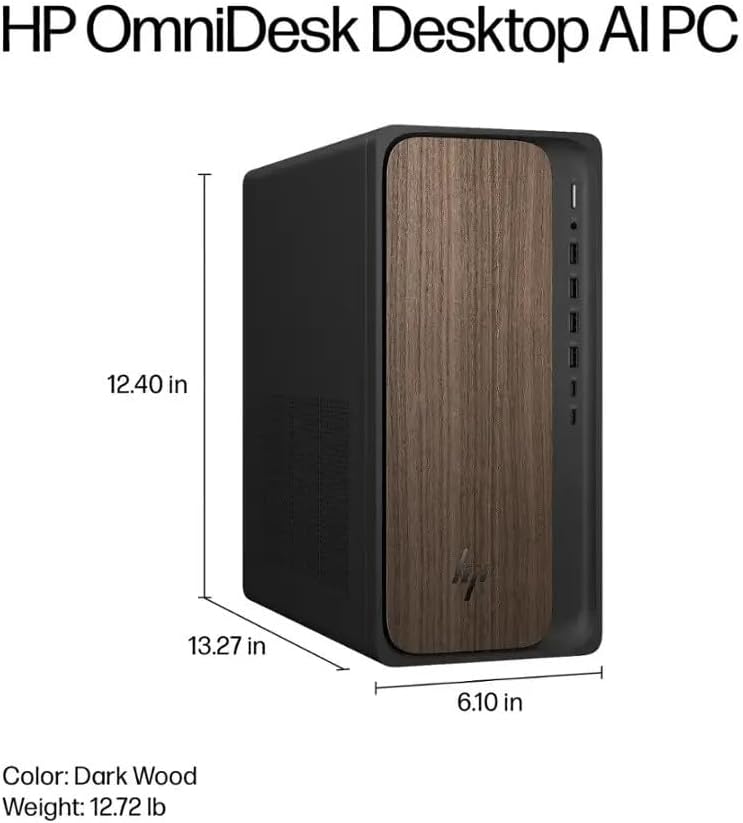
Image: Diagram illustrating the location and type of front and rear ports on the HP OmniDesk M03, including USB-A, USB-C, HDMI, DisplayPort, and audio jacks.
2. Mise sous tension et configuration initiale
Une fois tous les périphériques connectés :
- Appuyez sur le bouton d'alimentation situé à l'avant du PC.
- Follow the on-screen instructions to complete the Windows 11 Home initial setup, including language selection, network connection (if not wired), account creation, and privacy settings.

Image : Avant view of the HP OmniDesk M03, showing the power button at the top right and various USB ports below it.
Utilisation de votre PC
Windows 11 Famille
Your HP OmniDesk M03 comes pre-installed with Windows 11 Home. Familiarize yourself with the operating system's interface, Start menu, and settings. Microsoft provides extensive online resources for Windows 11 usage.
Fonctionnalités de l'IA
The Intel Core Ultra 7 265 processor includes dedicated AI cores and Intel AI Boost, enhancing performance for AI-driven applications and features within Windows 11, such as AI Copilot. These features can assist with tasks, content creation, and system optimization.
Connectivité
- Wi-Fi 6 (802.11ax) : Connectez-vous aux réseaux sans fil pour accéder à Internet. Gérez les paramètres Wi-Fi via les paramètres réseau de Windows 11.
- Bluetooth 5.4: Pair wireless devices such as headphones, speakers, or additional input devices. Access Bluetooth settings via the Windows 11 settings menu.
- Ethernet : For a stable, high-speed wired connection, ensure an Ethernet cable is connected to the RJ45 port.
Entretien
Nettoyer votre PC
- Extérieur: Utilisez un chiffon doux et non pelucheux légèrement dampRincez l'extérieur à l'eau ou avec une solution nettoyante douce. Évitez les produits chimiques agressifs.
- Vents: Nettoyez régulièrement la poussière des grilles de ventilation à l'aide d'air comprimé afin d'assurer une bonne circulation de l'air et d'éviter toute surchauffe.
- Ports: Gardez les ports exempts de poussière et de débris.
Mises à jour logicielles
Regularly update Windows 11 and device drivers to ensure optimal performance, security, and compatibility. Access Windows Update through the Settings menu.
Sauvegarde des données
Il est recommandé de sauvegarder régulièrement vos données importantes sur un disque dur externe ou un espace de stockage en nuage afin d'éviter toute perte de données.
Dépannage
Cette section aborde les problèmes courants que vous pourriez rencontrer.
- Pas d'alimentation :
- Assurez-vous que le câble d'alimentation est correctement branché à la fois à l'ordinateur et à la prise murale.
- Vérifiez le bon fonctionnement de la prise murale en y branchant un autre appareil.
- Pas d'affichage :
- Check that the monitor is powered on and correctly connected to the PC via HDMI or DisplayPort.
- Assurez-vous que la source d'entrée correcte est sélectionnée sur votre moniteur.
- Pas de connexion Internet:
- For Wi-Fi, check if the Wi-Fi adapter is enabled and if you are connected to the correct network with the right password.
- For wired connection, ensure the Ethernet cable is properly connected and your router is working.
- Clavier/souris ne répondent pas :
- Check battery levels for wireless devices.
- Ensure the USB receiver is plugged into a functional USB port.
- Essayez de redémarrer l'ordinateur.
Pour les problèmes plus complexes, veuillez consulter le support HP. website ou contacter le service client.
Caractéristiques
Detailed technical specifications for the HP OmniDesk M03 AI Desktop PC:
| Composant | Spécification |
| Processeur | Intel Core Ultra 7 265 (20-Core, up to 5.3 GHz, Intel AI Boost) |
| Système opérateur | Windows 11 Famille (64 bits) |
| Mémoire (RAM) | 16 Go de mémoire DDR5 à 5600 MHz |
| Stockage | SSD PCIe NVMe M.2 de 2 To |
| Graphique | Intel Integrated Graphics |
| Sortie vidéo | 1 ports HDMI 2.1, 1 ports DisplayPort 1.4a |
| Ports USB (avant) | 2x USB-A 5Gbps, 2x USB-A 10Gbps, 1x USB-C 5Gbps, 1x USB-C 10Gbps |
| Ports USB (arrière) | 4x USB 2.0 Type-A |
| Ports audio | 1x Headphone/Microphone Combo, 1x Line Input, 1x Line Output |
| Réseau | Wi-Fi 6 (802.11ax), Bluetooth 5.4, Gigabit Ethernet (RJ45) |
| Dimensions (H x L x P) | 13.3" x 6.1" x 12.4" (33.8 cm x 15.5 cm x 31.5 cm) |
| Poids | 11.77 lb (5.34 kg) |

Image: Diagram showing the height (13.27 inches), width (6.10 inches), and depth (12.40 inches) of the HP OmniDesk M03 desktop PC.
Garantie et assistance
Informations sur la garantie
Your HP OmniDesk M03 AI Desktop PC comes with a Garantie limitée de 90 jours. This warranty covers defects in materials and workmanship under normal use. For detailed terms and conditions, please refer to the warranty documentation included with your product or visit the official HP support website.
Assistance clientèle
For technical assistance, troubleshooting, or warranty claims, please contact HP Customer Support:
- Support en ligne: Visitez le site officiel Assistance HP Website pour les pilotes, les manuels et les guides de dépannage.
- Assistance téléphonique : Refer to the Quick Setup Guide or HP's website pour les numéros de contact régionaux.
When contacting support, please have your product model (M03) and serial number ready.