
1. Introduction
This manual provides essential information for the safe and efficient use of your suevery Prebuilt Gaming PC. Please read these instructions carefully before operating the device and retain them for future reference. This gaming PC is designed for high-performance computing, suitable for gaming, business, and everyday use.

Image 1.1 : Terminéview of the suevery Prebuilt Gaming PC with internal RGB lighting.
2. Guide de configuration
Follow these steps to set up your new suevery Prebuilt Gaming PC:
- Déballage: Retirez délicatement le PC de son emballage. Vérifiez qu'il ne présente aucun dommage visible.
- Placement: Placez l'ordinateur sur une surface stable et plane, bien ventilée. Assurez-vous qu'aucune aération n'est obstruée.
- Connectez les périphériques :
- Connect your monitor(s) to the graphics card's HDMI or DisplayPort outputs.
- Connectez votre clavier et votre souris aux ports USB disponibles.
- Branchez des haut-parleurs ou des écouteurs aux ports de sortie audio.
- For wired internet, connect an Ethernet cable to the LAN port. For Wi-Fi, ensure antennas are attached if external.
- Connexion électrique : Branchez le câble d'alimentation au bloc d'alimentation du PC, puis à une prise électrique mise à la terre.
- Premier démarrage : Press the power button on the front of the PC. The system will initiate the boot process. Follow any on-screen instructions for initial operating system setup.
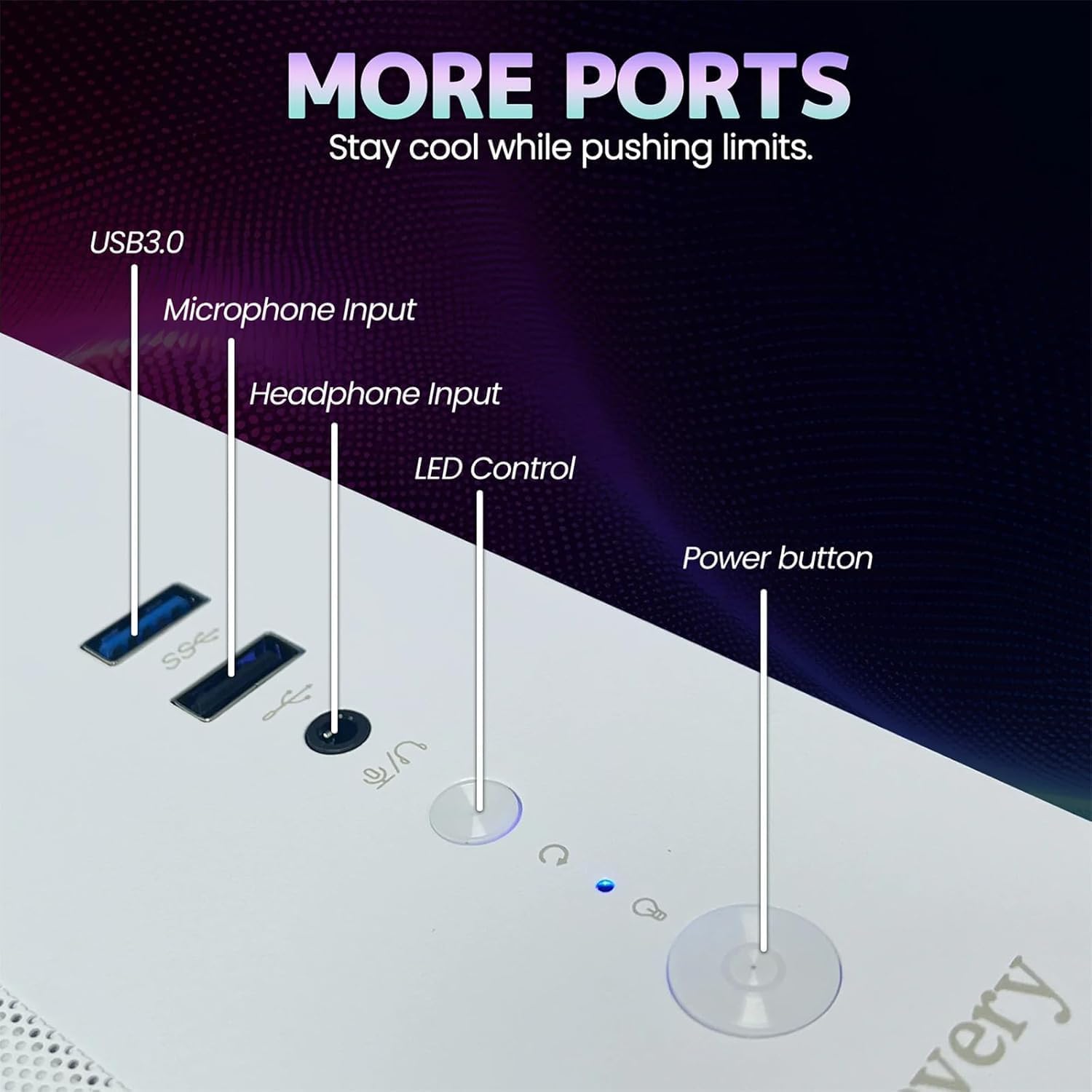
Image 2.1: Rear panel of the PC illustrating various connectivity ports including USB, HDMI, and audio jacks.
3. Mode d'emploi
Your suevery Prebuilt Gaming PC comes with a pre-installed operating system (DOS, requiring user installation of a full OS). Once your preferred operating system is installed and configured, you can begin using your PC.
- Marche/Arrêt : Press the power button to turn the PC on. To turn off, use the operating system's shutdown function. Avoid direct power-off unless necessary to prevent data loss.
- Contrôle de l'éclairage RVB : The PC features customizable RGB lighting. Refer to the specific software or physical button (if available, as indicated in Image 2.1) for adjusting lighting modes and colors.
- Installation du logiciel : Install necessary drivers for your graphics card and other components from the manufacturer's websites for optimal performance. Install your desired games and applications.
- Connectivité : Utilize the Wi-Fi 6 for high-speed wireless internet or the Ethernet port for a stable wired connection. The multiple USB ports allow for connecting various peripherals.
Video 3.1: An official video demonstrating the suevery Prebuilt Gaming PC Desktop Computer, showcasinet son design et ses fonctionnalités.
4. Entretien
Un entretien régulier garantit la longévité et les performances optimales de votre PC.
- Nettoyage de la poussière : Periodically clean dust from the internal components, especially fans and heatsinks, using compressed air. Ensure the PC is powered off and unplugged before cleaning.
- Mises à jour logicielles : Keep your operating system, drivers, and antivirus software updated to ensure security and performance.
- Gestion des câbles: Veillez à ce que les câbles internes et externes soient bien rangés afin d'améliorer la circulation de l'air et d'éviter les déconnexions accidentelles.
- Ventilation: Always ensure the PC has clear space around its vents for proper airflow.

Image 4.1 : Interne view of the PC highlighting the cooling fans and component layout, emphasizing the importance of dust removal.
5. Dépannage
Cette section aborde les problèmes courants que vous pourriez rencontrer.
| Problème | Solution possible |
|---|---|
| L'ordinateur ne s'allume pas. | Check power cable connections to the PC and wall outlet. Ensure the power supply switch on the back of the PC is in the 'On' position. Test the outlet with another device. |
| Aucun affichage sur le moniteur. | Ensure the monitor is powered on and connected to the graphics card (not the motherboard's video output). Try a different cable or monitor. |
| Le système est lent ou se bloque. | Check for background applications consuming resources. Update drivers. Scan for malware. Ensure adequate ventilation to prevent overheating. |
| Problèmes de connexion Wi-Fi. | Ensure Wi-Fi antennas are securely attached. Restart your router and PC. Update Wi-Fi drivers. |
| L'éclairage RGB ne fonctionne pas. | Check connections to the RGB controller. Use the dedicated RGB control button or software to adjust settings. |
6. Spécifications
Detailed technical specifications for your suevery Prebuilt Gaming PC.
| Fonctionnalité | Détail |
|---|---|
| Marque | surveillance |
| Nom du modèle | SU-V9W2-V9W4 |
| Modèle de processeur | AMD Ryzen 5 (6 Cores, 3.6 GHz up to 4.1 GHz) |
| Mémoire RAM | 16 Go DDR4 3200 MHz (Max 32 Go) |
| Stockage | 512 GB M.2 PCIe NVMe SSD |
| Coprocesseur graphique | RX 560 4G GDDR5 (Dedicated) |
| Système opérateur | DOS (système d'exploitation installé par l'utilisateur requis) |
| Connectivité | Wi-Fi 6 (802.11ax), USB (2x USB 3.0, 4x USB 2.0), HDMI |
| Consommation d'énergie | 400 watts |
| Dimensions (L x l x H) | 13.35 x 10.87 x 12.99 pouces |
| Couleur | Blanc |

Image 6.1: Dimensional diagram of the suevery Prebuilt Gaming PC, indicating its compact size.
7. Garantie et assistance
Your suevery Prebuilt Gaming PC comes with a Garantie d'un an à compter de la date d'achat, couvrant les défauts de fabrication.
For technical support, warranty claims, or further assistance, please contact suevery customer service through the retailer's platform or visit the official suevery website pour les coordonnées.
Please have your product model number (Ryzen5-16G-512G-RX560 4G) and proof of purchase ready when contacting support.