
Introduction
The MAIWO K3015CF6 is a versatile 6-bay CFast Card Reader and 1-to-5 Offline Cloner designed for efficient data management. It supports CFast 2.0 cards and offers both online read/write capabilities via USB 3.0 and standalone offline cloning. This manual provides detailed instructions for setting up, operating, and maintaining your device.
Contenu du colis
Veuillez vérifier que tous les articles sont présents dans votre colis :
- 1x MAIWO CFast Card Reader & Cloner (K3015CF6)
- 1x USB-C to USB-C + USB-A Cable
- 1x alimentation 12V/5A
- 1x Guide de démarrage rapide

Produit terminéview
Familiarize yourself with the physical components and indicators of your MAIWO CFast Card Reader & Cloner.
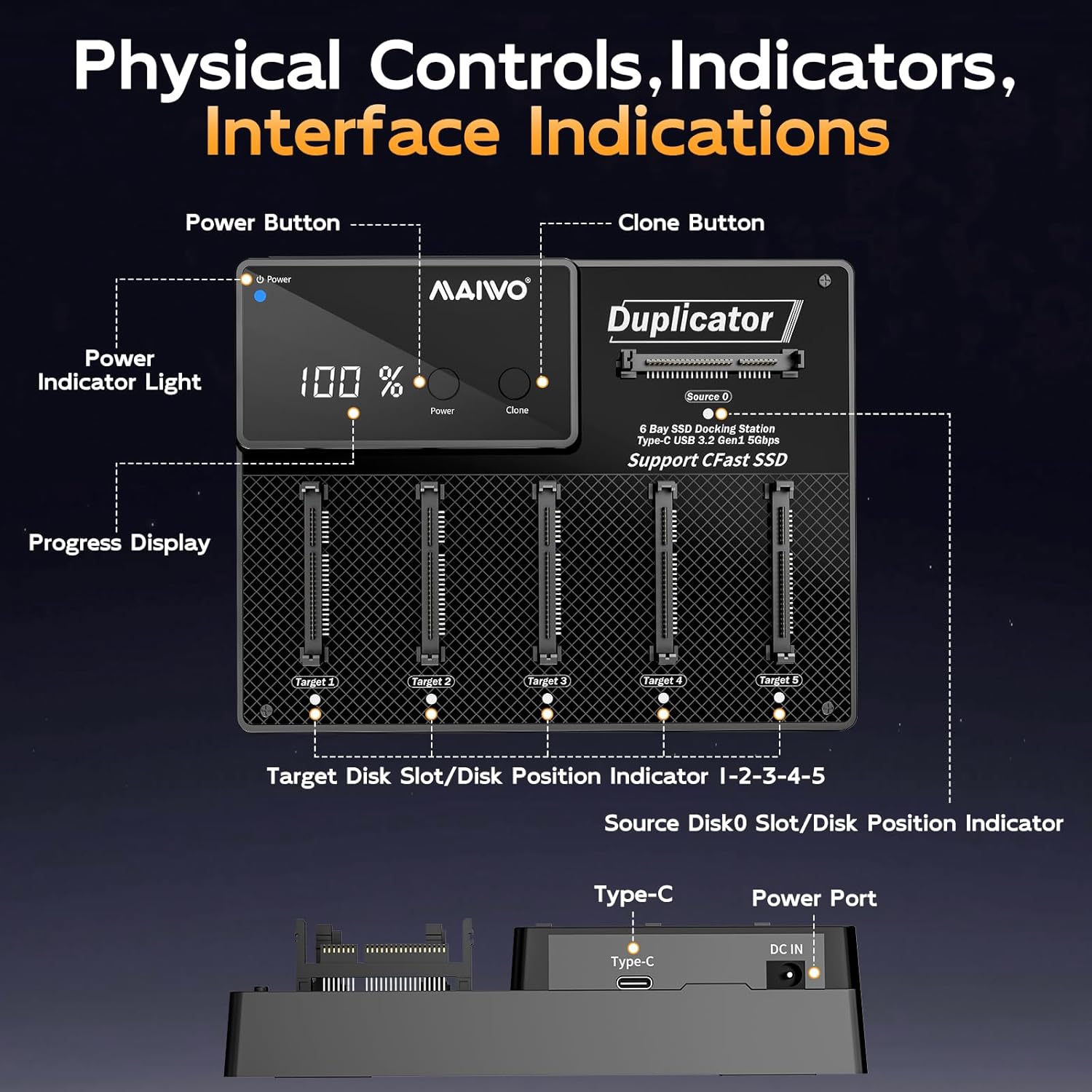
- Bouton d'alimentation : Allume ou éteint l'appareil.
- Bouton Cloner : Lance le processus de clonage hors ligne.
- Témoin lumineux d'alimentation: Indique l'état de l'alimentation.
- Affichage de la progression : Shows cloning progress or other status information.
- CFast Card Slots (Source 0, Target 1-5): Bays for inserting CFast cards.
- Port de type C: USB 3.1 data transfer interface for PC connection.
- Port d'entrée CC : For connecting the 12V/5A power supply.
Voyants lumineux
The device uses indicator lights to communicate its status:
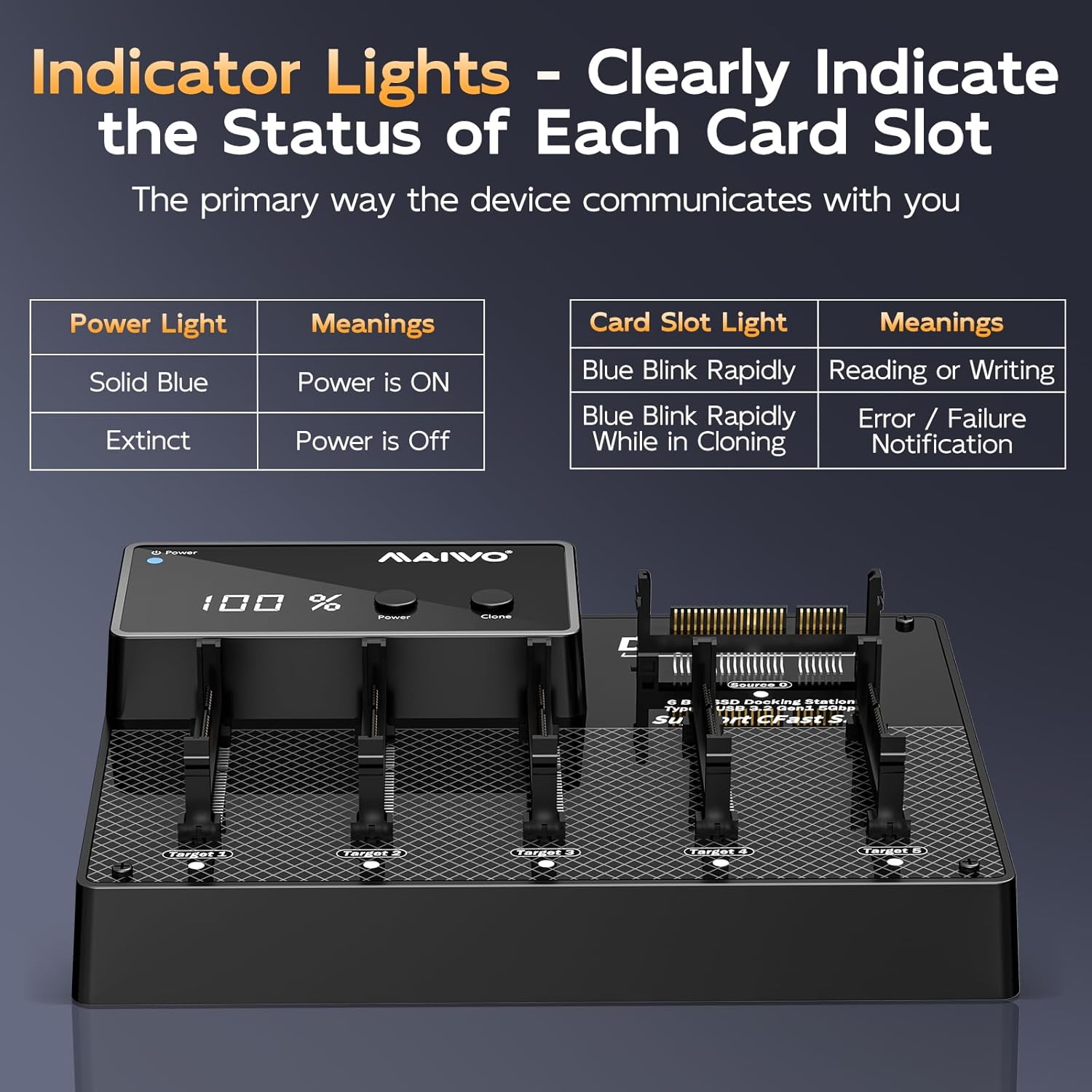
| Indicateur | Statut | Signification |
|---|---|---|
| Témoin lumineux | Bleu uni | L'alimentation est activée |
| Témoin lumineux | Éteint | L'alimentation est coupée |
| Card Slot Light | Blue Blink Rapidly | Reading or Writing |
| Card Slot Light | Blue Blink Rapidly While in Cloning | Error / Failure Notification |
Installation
Follow these steps to set up your MAIWO CFast Card Reader & Cloner:
- Connecter l'alimentation : Plug the provided 12V/5A power adapter into the DC IN port on the back of the device, then connect the adapter to a power outlet.
- Mise sous tension : Press the Power button on the device. The Power Indicator Light should turn solid blue.
- (Facultatif) Connexion au PC : If you intend to use the device as a card reader, connect the USB-C end of the provided cable to the Type-C port on the device, and the other end (USB-C or USB-A) to your computer.

Mode d'emploi
Online Read & Write Operations (PC Connected)
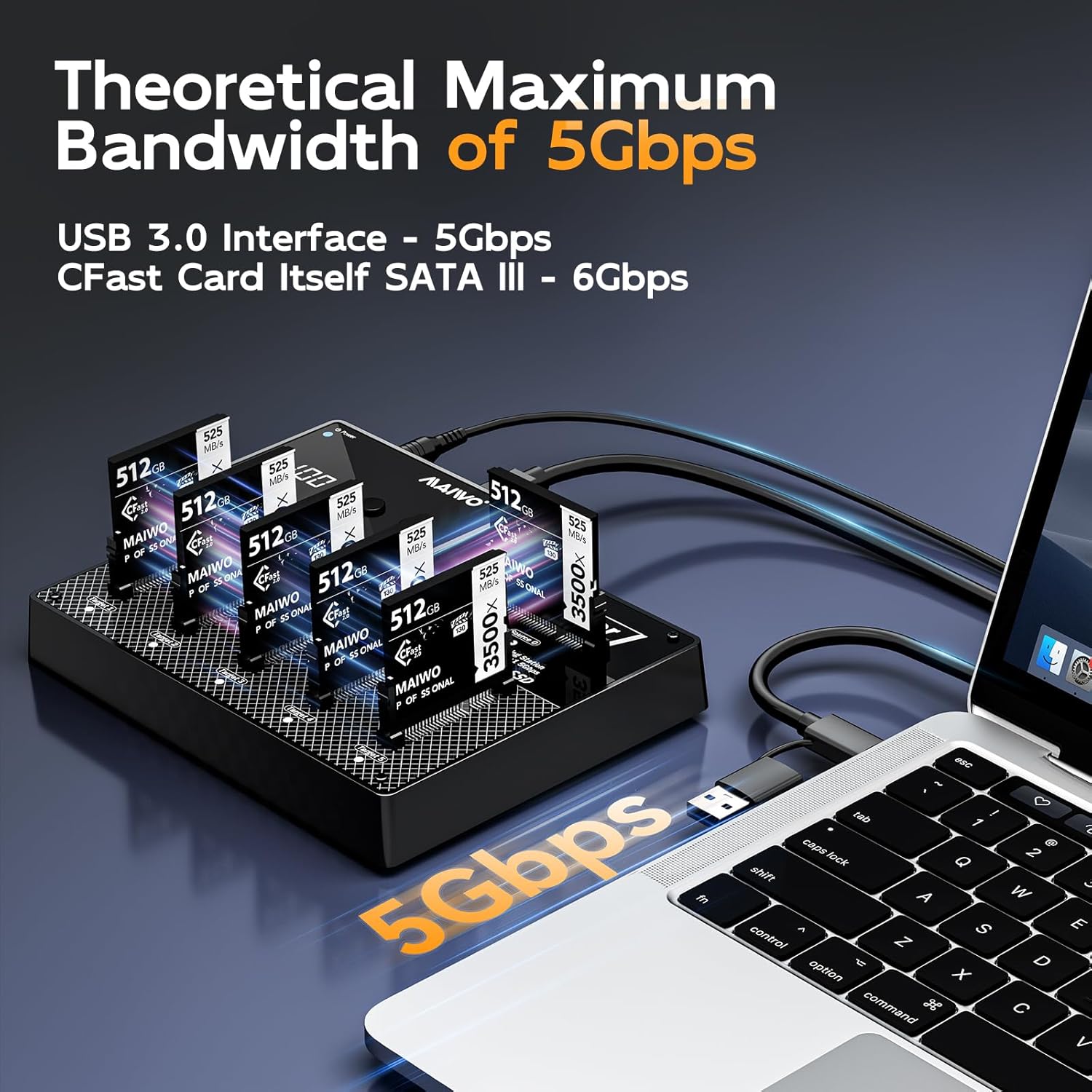
When connected to a computer, the device functions as a multi-card reader, allowing independent access to each CFast card.
- Ensure the device is powered on and connected to your computer via the USB cable.
- Insert CFast cards into any of the available slots (Source 0, Target 1-5).
- Your computer's operating system (Windows, macOS, Linux) will detect the inserted cards as separate drives.
- You can now read from or write to the CFast cards as you would with any external storage device.

Offline Cloning Process (Standalone Operation)
The device supports 1-to-5 offline cloning without requiring a computer.
- Préparer les cartes : Ensure the source CFast card (the card you want to copy from) is inserted into the Source 0 slot. Insert up to five destination CFast cards (the cards you want to copy to) into the Objectif 1 à travers Objectif 5 emplacements.
- Besoins en capacité : Each target card must have equal or greater physical storage capacity than the source card.
- Mise sous tension : Assurez-vous que l'appareil est sous tension.
- Lancer le clonage : Appuyez et maintenez enfoncé le Cloner button for approximately 3-5 seconds until the cloning process begins. The progress display will show the cloning percentage, and the target card slot lights will blink rapidly.
- Achèvement: The cloning process is complete when the progress display shows 100% and the indicator lights for the target cards stop blinking.
- Retrait en toute sécurité: Once cloning is complete, power off the device before removing the CFast cards.


Entretien
To ensure the longevity and optimal performance of your MAIWO CFast Card Reader & Cloner, follow these maintenance guidelines:
- Nettoyage: Utilisez un chiffon doux et sec pour nettoyer l'extérieur de l'appareil. Évitez d'utiliser des nettoyants liquides ou des solvants.
- Stockage: Conservez l'appareil dans un endroit frais et sec, à l'abri de la lumière directe du soleil et des températures extrêmes.
- Manutention: Handle CFast cards and the device with care to prevent physical damage to connectors and slots.
- Dissipation de la chaleur : The device features an aluminum alloy chassis for passive cooling. Ensure adequate airflow around the device during operation to prevent overheating.

Dépannage
Si vous rencontrez des problèmes avec votre appareil, reportez-vous aux problèmes courants et aux solutions suivants :
- L'appareil ne s'allume pas :
- Ensure the 12V/5A power adapter is securely connected to both the device and a working power outlet.
- Vérifiez que la prise de courant est fonctionnelle.
- CFast Cards Not Detected (PC Connected):
- Check if the USB cable is securely connected to both the device and the computer.
- Essayez un autre port USB sur votre ordinateur.
- Ensure the CFast cards are fully inserted into their respective slots.
- Test with a different CFast card to rule out card issues.
- Offline Cloning Fails or Stops:
- Ensure the source card is in the Source 0 slot and target cards are in Target 1-5 emplacements.
- Verify that all target cards have equal or greater capacity than the source card.
- Check for any error indications on the card slot lights (rapid blinking during cloning indicates an error).
- Ensure the cards are properly seated.
- Try cleaning the card contacts and reinserting.
- Vitesse de transfert de données lente :
- Pour des vitesses optimales, assurez-vous d'utiliser un port compatible USB 3.0 sur votre ordinateur.
- The actual speed may vary depending on the CFast card's speed and your computer's system performance.
Caractéristiques
| Fonctionnalité | Détail |
|---|---|
| Numéro de modèle | K3015CF6 |
| Marque | MAIWO |
| Couleur | Noir |
| Interface matérielle | USB Type C |
| Dossier spécial | Branchez et jouez |
| Appareils compatibles | Ordinateurs de bureau, consoles de jeux, ordinateurs portables, tablettes |
| Nombre total de ports USB | 6 (for CFast cards) |
| Taux de transfert de données | 5 gigabits par seconde (USB 3.1) |
| Compatibilité du système d'exploitation | Windows, Mac OS, Linux |
| Matériau de l'enceinte | Acrylonitrile butadiène styrène (ABS) |
| Dimensions de l'article (L x l x H) | 3.46"L x 2.24"l x 1.5"H |
| Poids de l'article | 2 livres |
| Alimentation électrique | 12 V/5 A |
| Capacité maximale | 3TB (6 x 512GB CFast cards) |

Garantie et assistance
The MAIWO K3015CF6 CFast Card Reader & Cloner comes with a Garantie de 12 mois from the date of purchase, covering manufacturing defects. For technical support, warranty claims, or further assistance, please contact MAIWO customer service through the retailer where you purchased the product or visit the official MAIWO website pour les coordonnées.
Veuillez conserver votre preuve d'achat à des fins de garantie.