Introduction
This manual provides essential instructions for the proper installation, operation, and maintenance of your Mouse Computer m-Book N500SD-M2SH2 keyboard. Please read this manual thoroughly before using the product to ensure optimal performance and longevity. Keep this manual for future reference.
Consignes de sécurité
- N’exposez pas le clavier à des liquides, à l’humidité ou à des températures extrêmes.
- Évitez de faire tomber le clavier ou de le soumettre à des chocs violents.
- N’essayez pas de démonter ou de réparer le clavier vous-même. Veuillez faire appel à un technicien qualifié.
- Keep the keyboard away from direct sunlight and heat sources.
- Use only with compatible Mouse Computer m-Book N500SD-M2SH2 laptops.
Contenu du colis
Vérifiez que votre colis contient les éléments suivants :
- Mouse Computer m-Book N500SD-M2SH2 Keyboard (Japanese Layout, Black, Backlit)
- Manuel d'instructions (ce document)
Installation
Before proceeding with installation, ensure your laptop is powered off and disconnected from any power source. It is recommended to consult a professional for keyboard replacement if you are unfamiliar with laptop disassembly.
- Contrôle de compatibilité: To ensure you have purchased the correct product, please verify your laptop's model or the product's part number (N500SD-M2SH2) before purchase.
- Removal of Old Keyboard: Carefully remove the existing keyboard from your laptop. This typically involves detaching retaining clips or screws and disconnecting the ribbon cables.
- Installation of New Keyboard: Align the new keyboard with the designated slot on your laptop. Gently connect the ribbon cables to their respective connectors on the motherboard, ensuring they are securely latched.
- Sécurisez le clavier : Fasten any retaining clips or screws to secure the new keyboard in place.
- Mise sous tension : Reconnect your laptop's power source and power it on to test the new keyboard.
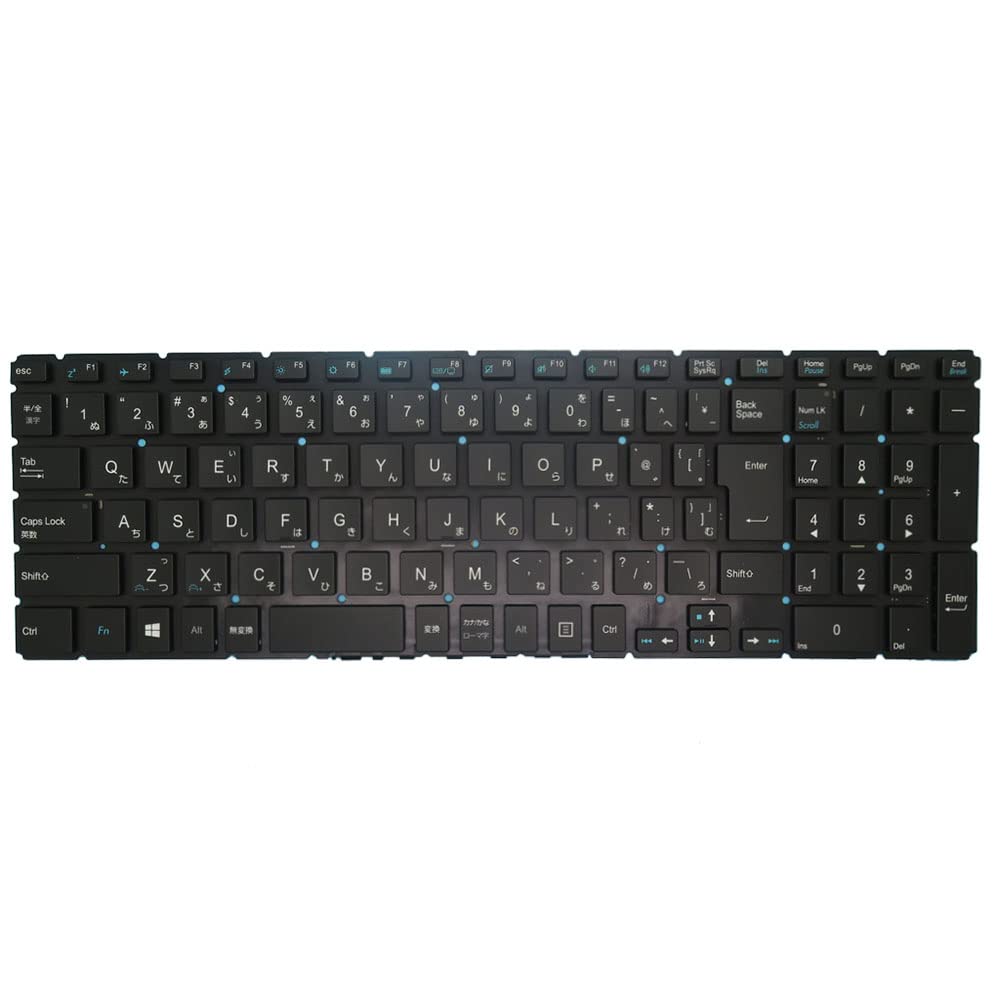
Cette image affiche l'intégralité view of the Mouse Computer m-Book N500SD-M2SH2 keyboard, showing its Japanese layout and black finish.
Mode d'emploi
Fonctions de base du clavier
The keyboard functions as a standard Japanese layout (JP JA) input device. All alphanumeric keys, symbols, and modifier keys (Shift, Ctrl, Alt, Fn) operate as expected for a Japanese keyboard.
Fonctionnement du rétroéclairage
This keyboard features a backlight. The backlight can typically be controlled using a dedicated function key combination, often Fn + Fx (where 'x' is a specific function key, usually indicated by a backlight icon). Refer to your laptop's specific documentation for the exact key combination to toggle or adjust backlight brightness.
Function (Fn) Keys
The Fn key, located typically near the left Ctrl key, can be pressed in combination with the F1-F12 keys (and sometimes other keys) to activate special functions such as:
- Contrôle du volume (muet, diminution, augmentation)
- Réglage de la luminosité
- Wireless/Bluetooth toggle
- External display output
- Mode veille
The specific functions may vary based on your laptop model. Consult your laptop's user manual for detailed information on Fn key operations.
Entretien
Nettoyage
To clean the keyboard, power off your laptop and disconnect it from the power source. Use a soft, lint-free cloth lightly dampened with water or a mild cleaning solution. Avoid spraying liquids directly onto the keyboard. For dust and debris between keys, use compressed air.
Stockage
Lorsqu'il n'est pas utilisé pendant une période prolongée, rangez le clavier dans un endroit propre et sec, à l'abri des températures extrêmes et de la lumière directe du soleil.
Dépannage
- Les touches ne répondent pas : Ensure the ribbon cables are securely connected. Restart your laptop. If the issue persists, the keyboard may be faulty.
- Le rétroéclairage ne fonctionne pas : Check your laptop's function key settings and ensure the backlight is enabled. Verify the correct Fn key combination for backlight control.
- Incorrect Key Input: Ensure the correct keyboard layout is selected in your operating system settings (Japanese layout).
- Dégâts physiques : If the keyboard has been physically damaged, replacement may be necessary.
Caractéristiques
| Marque | Générique |
| Fabricant | Générique |
| Numéro de modèle | N500SD-M2SH2 |
| Dimensions du produit | 43 x 18 x 7 cm |
| Poids de l'article | 300 g |
| Piles incluses | Non |
| ASIN | B0FVL599MC |
| Première date disponible | 10 octobre 2025 |
Garantie et assistance
This product is covered by a standard limited warranty. For warranty claims or technical support, please contact your retailer or the point of purchase. When seeking support, providing detailed information about the issue and, if applicable, any disassembled photos for inspection can assist in a quicker resolution.
For further assistance, please refer to the contact information provided by your seller or the manufacturer.