
Introduction
This manual provides detailed instructions for the installation, operation, and maintenance of your CHORTAU B-T006 4K+1080P Dual Dash Cam. Please read this manual thoroughly before using the product to ensure proper function and safety.

Image: The CHORTAU B-T006 Dash Cam showcasing its main features including 4K+1080P recording, Wi-Fi connectivity, app control, parking monitoring, WDR/HDR, G-sensor, night vision, voice recording, and a 2.99-inch IPS display.
Contenu du colis
Veuillez vérifier que tous les articles listés ci-dessous sont inclus dans votre colis. Si un article est manquant ou endommagé, veuillez contacter le service client.
- 4K Main Drive Recorder (Front Camera)
- Caméra arrière 1080P
- Chargeur de voiture USB-C
- Carte MicroSD 64 Go
- Removal Pin
- Wiring Trim Tool
- Manuel d'instructions japonais
- 3M VHB Double-Sided Tape
- Electrostatic Window Film (2 sheets)
- Carte de garantie

Image: Visual representation of all components included in the product package, such as the main dash cam unit, rear camera, car charger, microSD card, and installation accessories.
Produit terminéview
The CHORTAU B-T006 is a dual dash cam system designed to record both front and rear views of your vehicle. It features a 4K front camera and a 1080P rear camera, providing comprehensive coverage.

Image : Avant view of the dash cam, highlighting its compact size with approximate dimensions of 1.3 inches in height and 3.66 inches in width. The lens is labeled "ULTRA WIDE ANGLE LENS F1.8 DIGITAL RECORDER".
Caractéristiques principales :
- Enregistrement haute résolution : 4K (front) + 1080P (rear) for clear video evidence.
- Objectifs grand angle : Front 170° and Rear 140° to cover multiple lanes.
- Wi-Fi intégré: Connect to the 'viidure' app for real-time viewing, playback, and downloads.
- Capteur G : Verrouille automatiquement les alimentstage lors de l'impact pour éviter l'écrasement.
- Surveillance du stationnement 24 heures sur 24 : Motion detection and time-lapse recording for continuous surveillance (requires hardwire kit, sold separately).
- Enregistrement en boucle : Écrase automatiquement le fichier le plus ancien. files lorsque la carte mémoire est pleine.
- Technologie WDR/HDR : Improves video clarity in varying light conditions, especially at night.
- 2.99-inch IPS LCD Screen: Pour faciliter viewnavigation et menus.
Configuration et installation
Follow these steps to properly install your dash cam system.
1. Préparez la carte microSD :
- Insert the included 64GB microSD card into the dash cam's card slot.
- Format the microSD card within the dash cam's settings menu before first use to ensure optimal performance.
2. Install the Front Camera:
- Nettoyez la zone du pare-brise où vous comptez installer la caméra embarquée.
- Apply the electrostatic window film to the cleaned area.
- Attach the 3M VHB double-sided tape to the dash cam mount, then firmly press the mount onto the electrostatic film.
- Assurez-vous que la caméra a une vue claire view de la route et ne gêne pas votre vision de conduite.
3. Installez la caméra de recul :
- Mount the rear camera on the rear windshield using the provided adhesive, ensuring a clear view.
- Route the rear camera cable to the front dash cam, tucking it neatly along the vehicle's headliner and pillars using the wiring trim tool.
- Connectez le câble de la caméra arrière au port prévu à cet effet sur la caméra embarquée avant.
4. Connexion électrique :
- Connect the Type-C car charger to the dash cam and plug the other end into your vehicle's cigarette lighter socket.
- The dash cam will automatically power on and begin recording when the vehicle engine starts.

Image: A visual guide demonstrating the simple installation process, including connecting the Type-C car charger and the rear camera to the main unit. It also shows the detachable design of the mount using 3M VHB tape.
Mode d'emploi
Fonctionnement de base :
- Marche/Arrêt : The device powers on automatically with vehicle ignition and powers off when the engine is turned off. You can also manually power it on/off by pressing and holding the power button.
- Enregistrement: Recording starts automatically when the device is powered on. A red indicator light or icon on the screen confirms recording is active.
- Navigation dans les menus : Use the physical buttons on the device to navigate through the menu options on the IPS screen.
Enregistrement à double canal :
The dash cam records simultaneously from both the front and rear cameras. The front camera captures 4K UHD video with a 170° wide-angle view, while the rear camera records 1080P Full HD video with a 140° wide-angle view.

Image: An illustration showing the dual-channel recording capability, with the front camera capturing a 170° wide-angle view in 4K and the rear camera capturing a 140° wide-angle view in 1080P, covering both the front and rear of the vehicle.

Image: A graphic demonstrating the wide coverage of the front 4K UHD camera (170 degrees) and the rear 1080P FHD camera (140 degrees), ensuring comprehensive recording around the vehicle.
Connexion Wi-Fi et application
The dash cam features built-in Wi-Fi for seamless connection to your smartphone via the 'viidure' app (available for Android and iOS).
Connexion à l'application :
- Download the 'viidure' app from your smartphone's app store.
- Turn on the dash cam's Wi-Fi function (refer to the device's menu).
- Sur votre smartphone, accédez aux paramètres Wi-Fi et connectez-vous au réseau Wi-Fi de la caméra embarquée (le SSID et le mot de passe seront affichés sur l'écran de la caméra embarquée).
- Open the 'viidure' app. You can now view foo en temps réeltage, lire les vidéos enregistrées et les télécharger filedirectement sur votre téléphone.
The app allows for easy sharing of recorded videos to social media platforms.
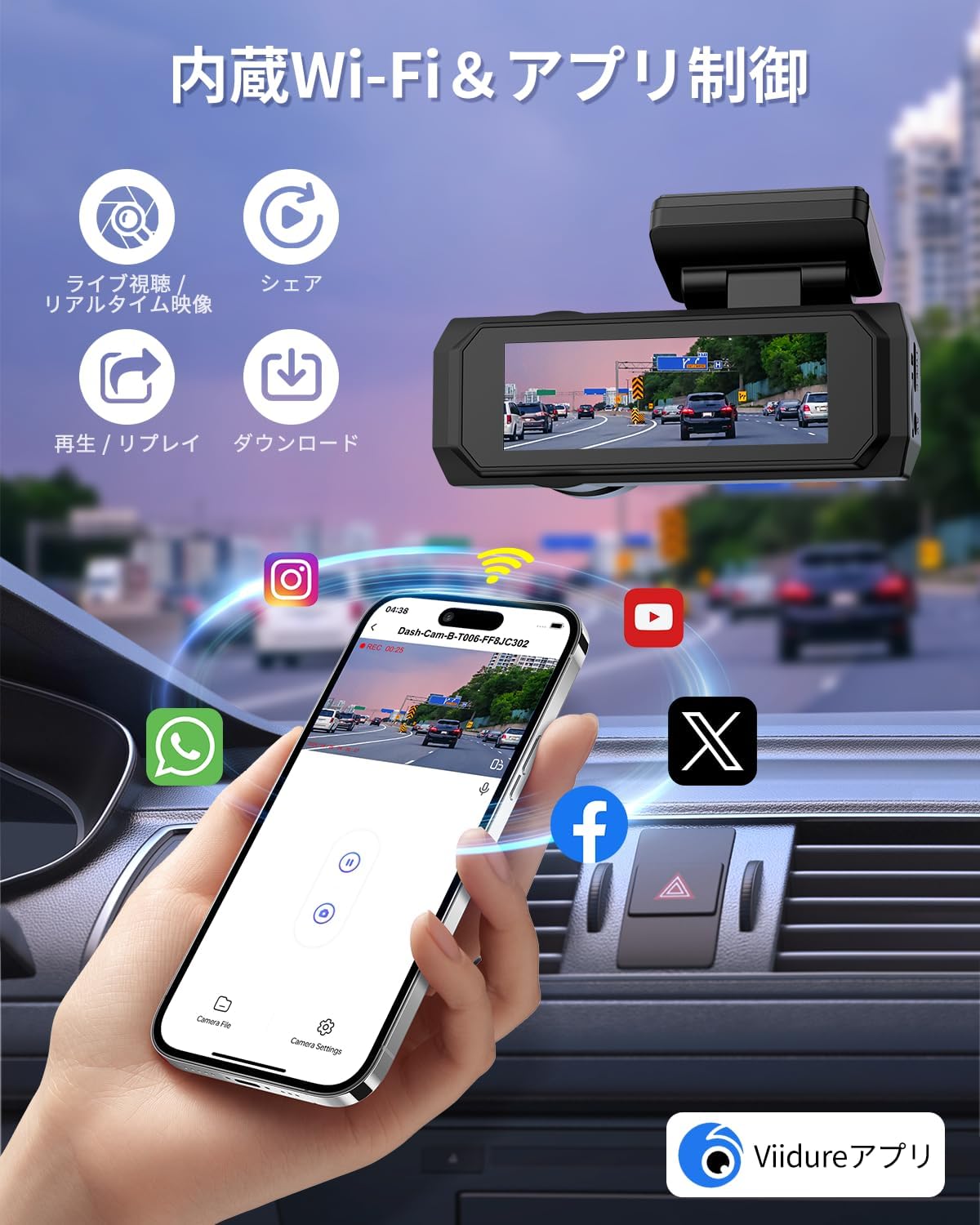
Image: A smartphone screen showing the 'viidure' app interface, connected to the dash cam, with options for live view, sharing, playback, and downloading videos. Social media icons are also visible, indicating sharing capabilities.
Surveillance du stationnement et capteur G
The dash cam offers advanced parking surveillance features to protect your vehicle when parked.
Surveillance du stationnement 24 heures sur 24 :
- When enabled, the dash cam can monitor your vehicle for 24 hours.
- This feature typically requires a hardwire kit (sold separately) to provide continuous power to the dash cam when the vehicle is off.
- It can utilize motion detection or time-lapse recording to save storage space while providing continuous coverage.
G-Sensor Protection:
- The built-in G-sensor detects sudden impacts or collisions.
- Upon detection, it automatically locks the current video segment, preventing it from being overwritten by loop recording. This ensures critical accident footage est conservé comme preuve.
- The G-sensor sensitivity can usually be adjusted in the dash cam's settings.

Image: A graphic illustrating the 24-hour parking monitoring mode, which requires a hardwire kit. It also depicts the G-sensor locking footage upon impact and the loop recording function overwriting old files.

Image: A visual representation of the 24-hour parking monitoring system, showing a car protected by the dash cam's continuous surveillance. A hardwire kit is indicated as necessary for this function.
Enregistrement en boucle
The dash cam utilizes loop recording to ensure continuous recording without manually clearing the memory card.
- When the microSD card reaches its storage limit, the system automatically overwrites the oldest unlocked video files.
- Video segments are typically recorded in 1, 2, or 3-minute intervals (configurable in settings).
- Files locked by the G-sensor or manually locked will not be overwritten.
- The device supports microSD cards up to 256GB (64GB card included).

Image: A graphic explaining seamless loop recording, where the dash cam automatically overwrites the oldest footage when the 64GB memory card is full. It also shows how G-sensor activated recordings are locked and protected.
Night Vision & WDR/HDR
The CHORTAU B-T006 is equipped with advanced technologies to ensure clear recordings even in low-light conditions.
- Super vision nocturne : The F1.8 large aperture lens and advanced sensor enhance light intake, providing clear images at night.
- WDR (plage dynamique étendue) et HDR (plage dynamique élevée) : These technologies balance exposure in scenes with both very bright and very dark areas, ensuring details are captured without overexposure or underexposure. This is crucial for identifying license plates and road signs in challenging lighting.
- The lens assembly consists of 6 layers of glass for optimal image quality.

Image: A visual demonstrating the dash cam's super night vision, highlighting the F1.8 large aperture lens, WDR&HDR technology, and 6-layer lens construction for enhanced clarity in low-light conditions.

Image: A diagram explaining the WDR (Wide Dynamic Range) function, showing how it corrects for overexposed and underexposed areas in a single frame to produce a balanced image. Features like F1.8 large aperture, WDR&HDR, and 6-layer glass lens are highlighted.
Entretien
Un entretien régulier garantit la longévité et les performances optimales de votre caméra embarquée.
- Nettoyer les lentilles : Regularly wipe the front and rear camera lenses with a soft, lint-free cloth to ensure clear recordings. Avoid abrasive materials.
- Maintenance de la carte microSD : Format the microSD card monthly to prevent data corruption and maintain recording efficiency. Back up important files avant le formatage.
- Mises à jour du micrologiciel : Consultez le site officiel de CHORTAU webConsultez régulièrement le site pour les mises à jour du micrologiciel. La mise à jour du micrologiciel peut améliorer les performances et ajouter de nouvelles fonctionnalités.
- Température de fonctionnement : Évitez d'exposer la caméra embarquée à des températures extrêmes pendant des périodes prolongées.
Dépannage
Si vous rencontrez des problèmes avec votre caméra embarquée, consultez la section suivante consacrée aux problèmes courants et à leurs solutions.
| Problème | Cause/solution possible |
|---|---|
| La caméra embarquée ne s'allume pas. |
|
| L'enregistrement s'arrête inopinément. |
|
| Vidéotage est flou ou peu clair. |
|
| Problèmes de connexion Wi-Fi. |
|
| Le capteur G est trop sensible/pas assez sensible. |
|
If the problem persists after trying these solutions, please contact CHORTAU customer support.
Caractéristiques
| Fonctionnalité | Détail |
|---|---|
| Nom du modèle | B-T006 |
| Marque | CHORTAU |
| Résolution de la caméra frontale | 4K UHD (8 Million Pixels) |
| Résolution de la caméra arrière | 1080P Full HD |
| Angle de la caméra frontale | Grand angle de 170° |
| Angle de la caméra arrière | Grand angle de 140° |
| Afficher | Écran LCD IPS de 2.99 pouces |
| Ouverture | F1.8 Large Aperture Lens |
| Connectivité | Wi-Fi 5G intégré |
| Caractéristiques spéciales | G-Sensor, HDR/WDR Technology, Parking Monitor, Loop Recording, Motion Detection, Voice Recording |
| Stockage | Supports up to 256GB microSD card (64GB included) |
| Dimensions du produit | Environ. 10 x 10 x 10 cm |
| Poids | 380 g |
| Source d'énergie | Chargeur de voiture (Type-C) |
Garantie et assistance
CHORTAU is committed to customer satisfaction and provides comprehensive support for its products.
- 12-Mois de garantie: Your CHORTAU B-T006 Dash Cam comes with a 12-month warranty from the date of purchase. This warranty covers manufacturing defects and ensures product reliability.
- Assistance technique à vie : CHORTAU offers lifetime technical support for all its products. If you encounter any issues or have questions, please do not hesitate to contact our support team.
- Coordonnées: Refer to the warranty card included in your package or the CHORTAU official website pour obtenir les coordonnées les plus récentes du service client.
Veuillez conserver votre preuve d'achat pour les réclamations au titre de la garantie.