
1. Introduction
This manual provides detailed instructions for the safe and efficient use of your Surfans F20 Pro Android Hi-Res Music Player. Please read this manual thoroughly before operating the device and retain it for future reference.
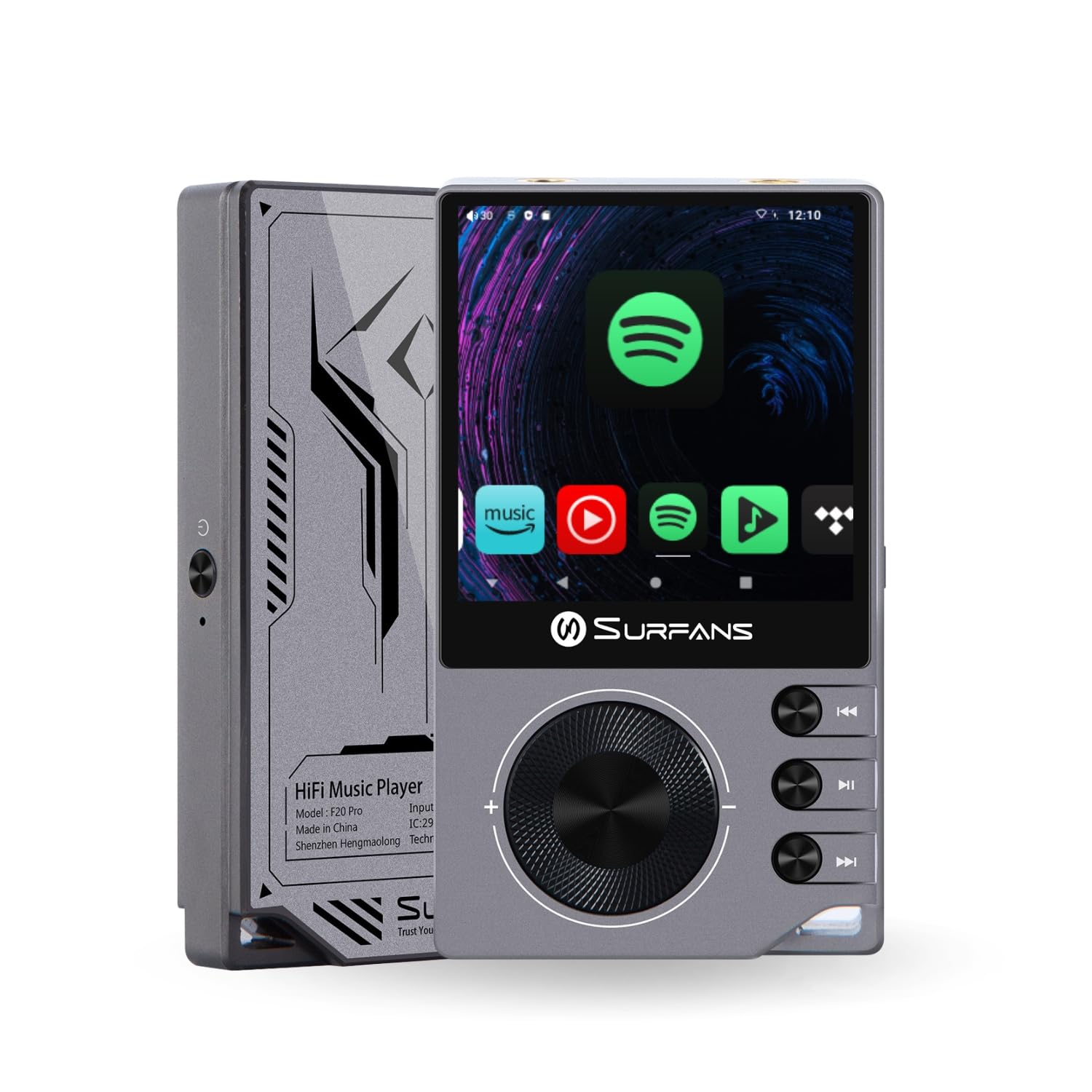
The Surfans F20 Pro Hi-Res Music Player, showcasing its compact design and touchscreen interface.
2. Contenu du colis
Vérifiez que tous les éléments sont présents dans le colis :
- Surfans F20 Pro Hi-Res Music Player
- Câble USB Type-C
- 32 GB MicroSD Memory Card (pre-installed or separate)
- Étui de protection
- Manuel de l'utilisateur (ce document)
3. Appareil terminéview
Familiarize yourself with the physical components and ports of your F20 Pro player.

Devant et derrière view of the Surfans F20 Pro, highlighting its robust CNC metal chassis and button layout.
3.1. Principales caractéristiques
- Dual ESS9018Q2M DACs: For high-fidelity audio processing.
- Octa-Core Android 12 System: Enables streaming app compatibility and smooth operation.
- 3.5mm Single-Ended & 4.4mm Balanced Outputs: Versatile headphone connectivity.
- Bluetooth 5.0 with LDAC: High-quality wireless audio transmission.
- Wi-Fi double bande (2.4 GHz et 5 GHz) : For stable internet connectivity.
- Stockage extensible : Supports up to 1TB via MicroSD card.
- Écran tactile de 2.7 pouces : Interface utilisateur intuitive.
4. Installation
4.1. Chargement de l'appareil
Before first use, fully charge the F20 Pro. Connect the included USB Type-C cable to the device's charging port and a compatible USB power adapter (not included) or computer USB port. The charging indicator will show the charging status.
4.2. Insertion d'une carte microSD
The F20 Pro supports MicroSD cards up to 1TB for expanded storage. Locate the MicroSD card slot on the side of the device. Gently insert the card until it clicks into place. To remove, push the card in again until it springs out.
4.3. Mise sous tension initiale
Press and hold the power button until the screen illuminates. Follow the on-screen prompts to complete the initial setup, including language selection and Wi-Fi connection.
4.4. Connexion au Wi-Fi
Accéder à Paramètres > Réseau et Internet > Wi-Fi. Select your desired network and enter the password if prompted. The F20 Pro supports both 2.4GHz and 5GHz Wi-Fi bands.

The Surfans F20 Pro demonstrating its dual-band Wi-Fi capability for fast and stable connections.
4.5. Couplage Bluetooth
Pour connecter des écouteurs ou des haut-parleurs Bluetooth :
- Assurez-vous que votre appareil Bluetooth est en mode de couplage.
- On the F20 Pro, go to Paramètres > Appareils connectés > Associer un nouvel appareil.
- Sélectionnez votre appareil dans la liste et confirmez le jumelage.

An illustration of the Bluetooth 5.0 chip, indicating support for high-resolution wireless audio codecs like LDAC.
5. Utilisation de l'appareil
5.1. Navigation de base
The F20 Pro features a 2.7-inch touchscreen for navigation. Swipe to scroll, tap to select, and use the physical buttons for quick controls:
- Bouton d'alimentation : Power on/off, screen on/off.
- Molette de volume : Régule le volume de sortie audio.
- Boutons de contrôle de lecture : Lecture/Pause, Piste suivante, Piste précédente.
5.2. Lecture de musique
The F20 Pro supports various audio formats including DSD512, 192kHz/24bit, FLAC, WAV, WMA, M4A, MP3, MP2, and AAC.
5.2.1. Local Files
Transférer de la musique files to the device's internal storage or MicroSD card via USB connection to a computer. Use the pre-installed music player application to browse and play your library.
5.2.2. Applications de diffusion en continu
The Android 12 operating system allows installation of streaming apps like Spotify, Apple Music, Tidal, or YouTube. Connect to Wi-Fi and download apps from the Google Play Store or other compatible sources.

The Surfans F20 Pro's screen showing various streaming application icons, demonstrating its Android capabilities.
5.3. Connexions du casque
The device offers both single-ended and balanced audio outputs.
- Sortie asymétrique 3.5 mm : Standard headphone jack (125mW/32Ω).
- Sortie équilibrée de 4.4 mm : For enhanced audio performance with compatible headphones (500mW/32Ω).

Gros plan view of the 3.5mm single-ended and 4.4mm balanced audio output ports on the Surfans F20 Pro.
6. Entretien
6.1. Nettoyage
Use a soft, dry, lint-free cloth to clean the device. Avoid using abrasive cleaners or solvents, which may damage the surface.
6.2. Mises à jour logicielles
Periodically check for software updates to ensure optimal performance and access to new features. Updates can typically be found in Paramètres > Système > Mise à jour du système.
6.3. Entretien de la batterie
Pour prolonger la durée de vie de la batterie, évitez de décharger complètement l'appareil fréquemment. Rangez-le dans un endroit frais et sec lorsqu'il n'est pas utilisé pendant une période prolongée.

Un interne view of battery cells, representing the long-lasting battery capacity of the F20 Pro.
7. Dépannage
If you encounter issues with your F20 Pro, refer to the following common problems and solutions:
| Problème | Cause possible | Solution |
|---|---|---|
| L'appareil ne s'allume pas | Batterie faible ; plantage du système | Chargez l'appareil ; maintenez le bouton d'alimentation enfoncé pendant 10 à 15 secondes pour forcer le redémarrage. |
| Pas de sortie audio | Volume too low; Incorrect output selected; Faulty headphones | Increase volume; Check headphone connection; Test with different headphones. |
| Impossible de se connecter au Wi-Fi | Mot de passe incorrect ; hors de portée ; problème de routeur | Vérifiez le mot de passe ; rapprochez-vous du routeur ; redémarrez le routeur. |
| Ralentissements/Plantages d'application | Trop d'applications ouvertes ; espace de stockage insuffisant ; logiciel obsolète | Close background apps; Free up storage; Check for system updates. |
8. Spécifications
Detailed technical specifications for the Surfans F20 Pro:
| Fonctionnalité | Détail |
|---|---|
| Marque | Surfans |
| Nom du modèle | F20 PRO |
| Puces DAC | Dual ESS9018Q2M |
| Op-Amps | Dual OPA1612 |
| Système opérateur | Android 12 |
| BÉLIER | 3 Go |
| Stockage interne | 32 Go |
| Stockage extensible | Jusqu'à 1 To via carte microSD |
| Taille de l'écran | 2.73 pouces |
| Connectivité | Aux, Bluetooth 5.0 (LDAC), USB Type-C, Wi-Fi (2.4GHz & 5GHz) |
| Sorties audio | 3.5mm Single-Ended (125mW/32Ω), 4.4mm Balanced (500mW/32Ω) |
| Formats audio pris en charge | DSD512, 192kHz/24bit, FLAC, WAV, WMA, M4A, MP3, MP2, AAC |
| Couleur | Gris |

An illustration of the dual ESS9018K2M DAC chips, central to the F20 Pro's high-resolution audio capabilities.
9. Informations sur la garantie
The Surfans F20 Pro comes with a Garantie d'un an À compter de la date d'achat, cette garantie couvre les défauts de fabrication et de main-d'œuvre dans des conditions normales d'utilisation. Elle ne couvre pas les dommages causés par une mauvaise utilisation, un accident, des modifications non autorisées ou l'usure normale. Veuillez conserver votre preuve d'achat pour toute réclamation au titre de la garantie.
10. Assistance clientèle
For further assistance, technical support, or warranty inquiries, please contact Surfans customer service through the official website or your retailer. You may also find additional resources and FAQs online.