
1. Introduction
This manual provides detailed instructions for the installation, operation, and maintenance of your VSTARCAM CS995 Pan/Tilt Smart Security Camera. This indoor camera is designed to provide comprehensive surveillance with features such as 2K QHD resolution, full-color night vision, motion detection, and two-way audio. Please read this manual thoroughly before using the product to ensure proper setup and functionality.
2. Contenu du colis
Veuillez vérifier que tous les articles listés ci-dessous sont inclus dans votre colis. Si un article est manquant ou endommagé, veuillez contacter le service client.
- VSTARCAM CS995 Pan/Tilt Smart Security Camera
- Adaptateur secteur
- Câble de chargement
- Kit de vis de montage
- Rester
- Manuel d'instructions (ce document)
3. Produit terminéview
The VSTARCAM CS995 camera offers advanced features for indoor monitoring.
3.1 Principales caractéristiques
- Couverture PTZ à 360° : Pan 310° horizontally and tilt 115° vertically for complete room coverage.
- Résolution 2K QHD : Captures clear, detailed video footage.
- Vision nocturne en couleur : Provides clear, colored images up to 15ft in low-light conditions using dual light sources.
- Détection de mouvement et de présence humaine : AI-powered detection sends real-time alerts to your mobile phone upon detecting motion or human figures.
- Audio bidirectionnel: Built-in microphone and speaker allow for clear communication with family or pets.
- Stockage flexible : Supports local storage via Micro SD card (up to 256GB, not included) and cloud storage (7-day trial available).
- Connectivité Wi-Fi 2.4 GHz : Connects to your home network for remote access and control.
3.2 Composants de la caméra
Familiarize yourself with the physical components of your camera.

Image: VSTARCAM CS995 camera illustrating its 310° pan and 115° tilt capabilities. The image shows the camera in a living room setting, monitoring a child playing.
- Lentille: Objectif principal de la caméra pour la capture vidéo.
- LED infrarouges/Spots : Pour la vision nocturne et l'éclairage.
- Microphone: Pour l'entrée audio lors d'une communication bidirectionnelle.
- Conférencier: For audio output during two-way communication and alerts.
- Emplacement pour carte micro SD : Pour le stockage vidéo local.
- Port d'alimentation: Pour connecter l'adaptateur secteur.
- Bouton de réinitialisation : Utilisé pour la réinitialisation d'usine (généralement un petit trou d'épingle).
4. Guide de configuration
4.1 Mise sous tension de l'appareil photo
- Branchez le câble de chargement au port d'alimentation de l'appareil photo.
- Branchez l'adaptateur secteur sur une prise électrique standard.
- The camera will power on and initiate its self-test, indicated by a rotating motion and status light.
4.2 Installing the O-KAM Pro App
- Download the "O-KAM Pro" app from your smartphone's app store (App Store for iOS, Google Play Store for Android).
- Créez un nouveau compte ou connectez-vous si vous en avez déjà un.
4.3 Connexion de la caméra au Wi-Fi
Assurez-vous que votre smartphone est connecté à un réseau Wi-Fi 2.4 GHz. L'appareil photo n'est pas compatible avec le Wi-Fi 5 GHz.
- Open the O-KAM Pro app and tap the "+" icon to add a new device.
- Follow the on-screen instructions to select your camera model and begin the pairing process.
- You may be prompted to scan a QR code displayed on your phone with the camera, or to enter your Wi-Fi credentials.
- Wait for the camera to connect to your Wi-Fi network. A voice prompt or status light change will indicate a successful connection.
4.4 Installing a Micro SD Card (Optional)
For local storage, insert a Micro SD card (up to 256GB, not included) into the designated slot on the camera. Ensure the camera is powered off before inserting or removing the card.
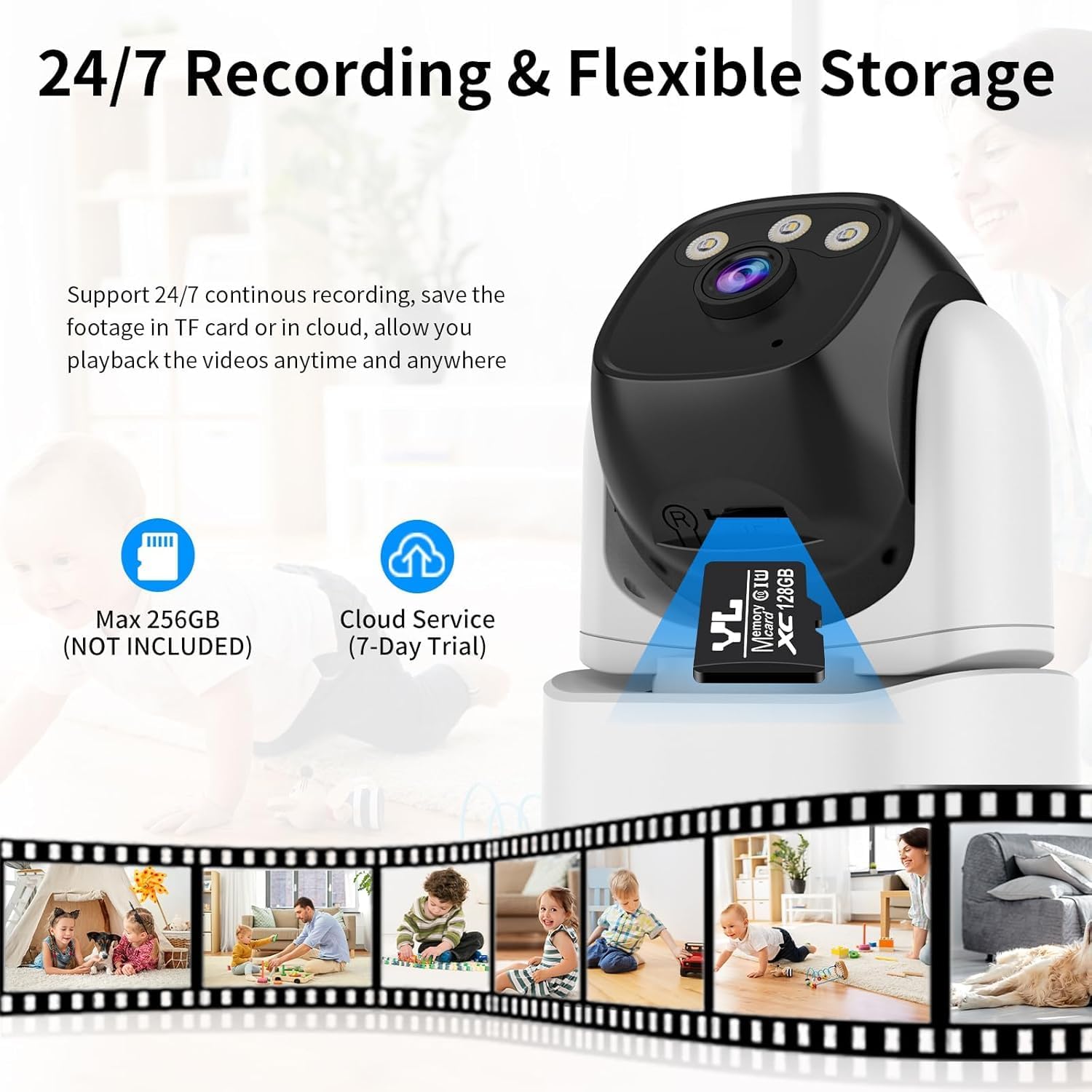
Image: VSTARCAM CS995 camera highlighting the Micro SD card slot and indicating support for both local (SD card) and cloud storage options.
5. Mode d'emploi
5.1 En direct View et commande PTZ
Once connected, open the O-KAM Pro app to view le flux vidéo en direct de votre caméra.
- Panoramique/Inclinaison : Faites glisser votre doigt sur le live view screen to remotely adjust the camera's horizontal (pan) and vertical (tilt) angles.
- Zoom: Use pinch-to-zoom gestures on the live view to digitally zoom in or out.
Image: VSTARCAM CS995 camera illustrating its 310° pan and 115° tilt capabilities. The image shows the camera in a living room setting, monitoring a child playing.
5.2 Audio bidirectionnel
The camera supports two-way communication.
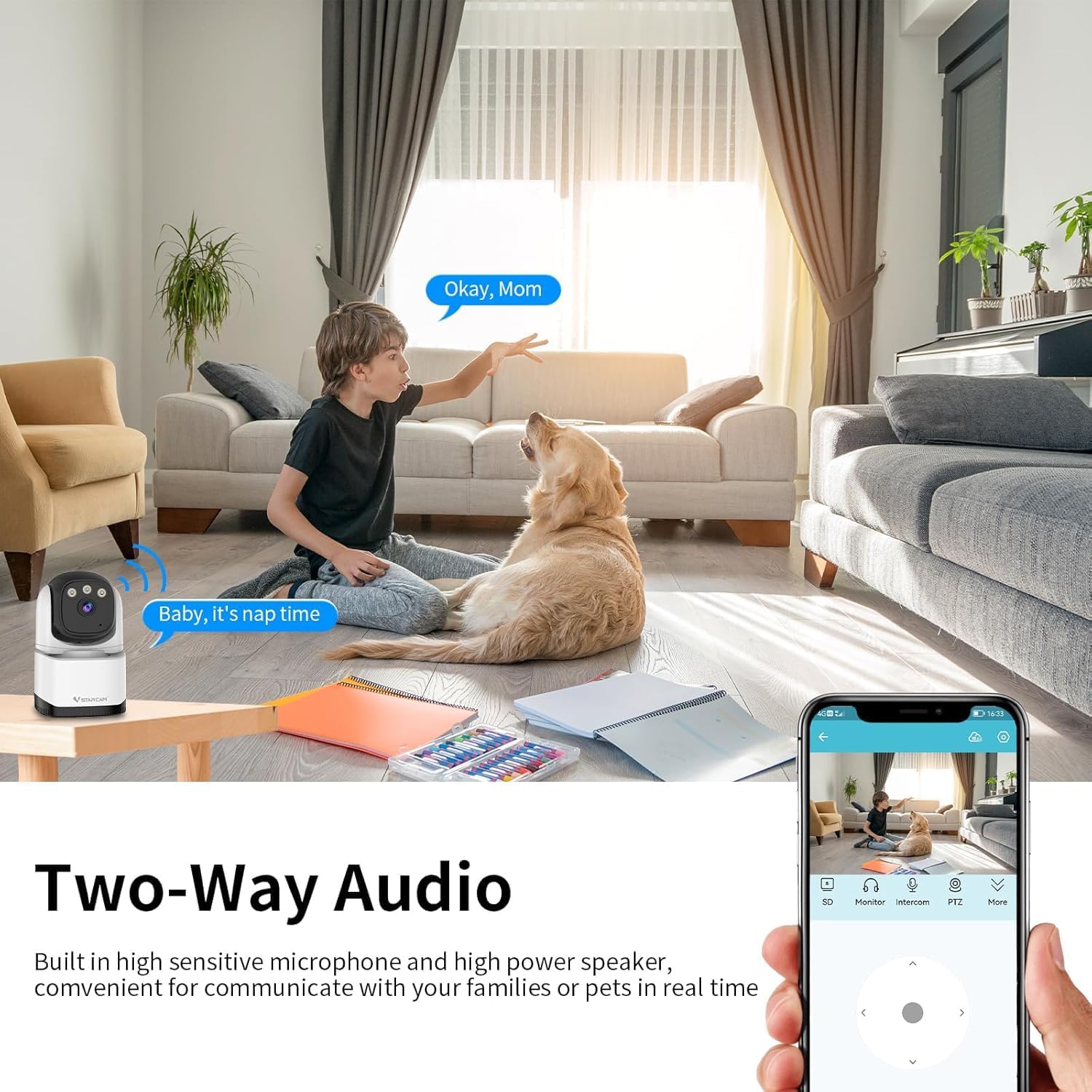
Image: VSTARCAM CS995 camera demonstrating its two-way audio function, showing a child communicating with an adult via the camera.
- Appuyez sur l'icône du microphone dans l'interface en direct de l'application. view Parler via le haut-parleur de la caméra.
- Appuyez sur l'icône du haut-parleur pour écouter le son provenant de l'environnement de la caméra.
5.3 Détection de mouvement et de présence humaine
The camera can detect motion and human figures, sending alerts to your phone.

Image: VSTARCAM CS995 camera demonstrating AI-powered motion and human detection, showing the camera tracking a person in a living room.
- Activer les alertes : In the app settings, navigate to "Detection Settings" to enable motion and human detection.
- Personnaliser les zones : Définir des zones spécifiques à l'intérieur de la caméra view pour la détection de mouvement.
- Sensibilité: Ajustez la sensibilité de détection pour minimiser les fausses alarmes.

Image: VSTARCAM CS995 camera illustrating real-time alert notifications, including spotlight activation, alarm alerts, and push notifications to a smartphone when motion is detected.
5.4 Modes de vision nocturne
La caméra offre plusieurs options de vision nocturne :

Image: VSTARCAM CS995 camera demonstrating its three night vision modes: Infrared (black and white), Full Color (using ambient light or spotlights), and Smart Light (activates spotlights upon detection for color vision).
- Mode infrarouge : Vision nocturne standard en noir et blanc.
- Mode couleur : Utilizes built-in spotlights to provide color images in the dark.
- Mode éclairage intelligent : The camera remains in infrared mode and switches to full color with spotlights upon detecting motion.
You can switch between these modes in the O-KAM Pro app settings.
5.5 Enregistrement et lecture
The camera supports 24/7 continuous recording to a Micro SD card or cloud storage.
- Enregistrement sur carte SD: Ensure a Micro SD card is inserted and formatted via the app. Recordings will be saved locally.
- Stockage dans le cloud : Activate the cloud storage service (7-day trial available) through the app for remote backup.
- Lecture: Accéder aux photos enregistréestage through the "Playback" section in the O-KAM Pro app.
5.6 Partage multi-utilisateurs
You can share live views of your camera with other users through the O-KAM Pro app.
- In the app, go to the camera settings and find the "Share Device" option.
- Invite other users by entering their O-KAM Pro account details.
- Shared users will receive an invitation and can view the live feed and access certain features based on permissions granted.
6. Entretien
- Nettoyage: Utilisez un chiffon doux et sec pour nettoyer l'objectif et le boîtier de l'appareil photo. Évitez les nettoyants abrasifs et les solvants.
- Mises à jour du micrologiciel : Regularly check the O-KAM Pro app for available firmware updates to ensure optimal performance and security.
- Placement: Ensure the camera is placed in a stable, dry indoor environment, away from direct sunlight or extreme temperatures.
7. Dépannage
7.1 La caméra ne se connecte pas au Wi-Fi
- Assurez-vous que votre réseau Wi-Fi fonctionne sur la fréquence 2.4 GHz. La caméra n'est pas compatible avec les réseaux 5 GHz.
- Vérifiez que le mot de passe Wi-Fi saisi dans l'application est correct.
- Lors de l'installation, rapprochez la caméra de votre routeur Wi-Fi.
- Redémarrez votre routeur et la caméra, puis réessayez la procédure de connexion.
- Perform a factory reset on the camera by pressing and holding the reset button for several seconds until a voice prompt confirms.
7.2 Aucune alerte de détection de mouvement
- Check if motion detection is enabled in the O-KAM Pro app settings.
- Adjust the detection sensitivity. Higher sensitivity may be needed for subtle movements.
- Ensure notification permissions are enabled for the O-KAM Pro app on your smartphone.
- Vérifiez que la caméra dispose d'une connexion internet stable.
7.3 Issues with Two-Way Audio
- Assurez-vous que le microphone et le haut-parleur de votre téléphone ne sont pas coupés ou bloqués.
- Check the volume settings within the O-KAM Pro app.
- Verify the camera's internet connection stability.
7.4 Unable to Share Camera with Family Members
- Ensure the family member has downloaded the O-KAM Pro app and created their own account.
- Double-check the account details (email/username) entered when sending the share invitation.
- The invited user must accept the sharing invitation within the app.
- Verify that both your device and the invited user's device have a stable internet connection.
8. Spécifications
| Fonctionnalité | Détail |
|---|---|
| Nom du modèle | CS995 |
| Utilisation intérieure/extérieure | Intérieur |
| Résolution de capture vidéo | 1440p (2K QHD) |
| Technologie de connectivité | Câblé (alimentation), Wi-Fi (données) |
| Technologie de communication sans fil | Wi-Fi (2.4 GHz uniquement) |
| Source d'énergie | Électrique avec fil |
| Gamme de vision nocturne | 15 mètres (environ 49 pieds) |
| Fréquence d'images | 20 images par seconde |
| Options de stockage | Carte microSD (256 Go max.), stockage cloud |
| Méthode de contrôle | App (O-KAM Pro) |
| Plage de panoramique/inclinaison | Pan 310 °, inclinaison 115 ° |
| Dimensions de l'article (L x l x H) | 5 x 3 x 3 pouces |
| Poids de l'article | 11.2 onces |
| Matériel | Plastique |
9. Garantie et assistance
VSTARCAM provides professional customer service. If you encounter any issues or have questions regarding your CS995 camera, please contact our support team.
- Coordonnées: Refer to the contact details provided on the product packaging or the official VSTARCAM website.
- Garantie: Information regarding product warranty can be found on the official VSTARCAM website ou en contactant le service client.