
Introduction
This manual provides detailed instructions for the installation, operation, and maintenance of your Reobiux 2K Outdoor WiFi Surveillance Camera, Model K6Q-1P. Please read this manual thoroughly before using the product to ensure proper functionality and safety.
Contenu du colis
Veuillez vérifier que tous les articles listés ci-dessous sont inclus dans votre colis. Si un article est manquant ou endommagé, veuillez contacter le service client.
- 1 x caméra de surveillance
- 1 x adaptateur secteur
- 1 x jeu de vis de montage
- 1 x Waterproof Cover Kit
- 1 x Manuel d'utilisation
Produit terminéview
The Reobiux 2K Outdoor WiFi Surveillance Camera (Model K6Q-1P) is an advanced security solution featuring a dual-lens design for comprehensive monitoring. It offers 2K resolution, color night vision, motion detection, two-way audio, and compatibility with Amazon Alexa.
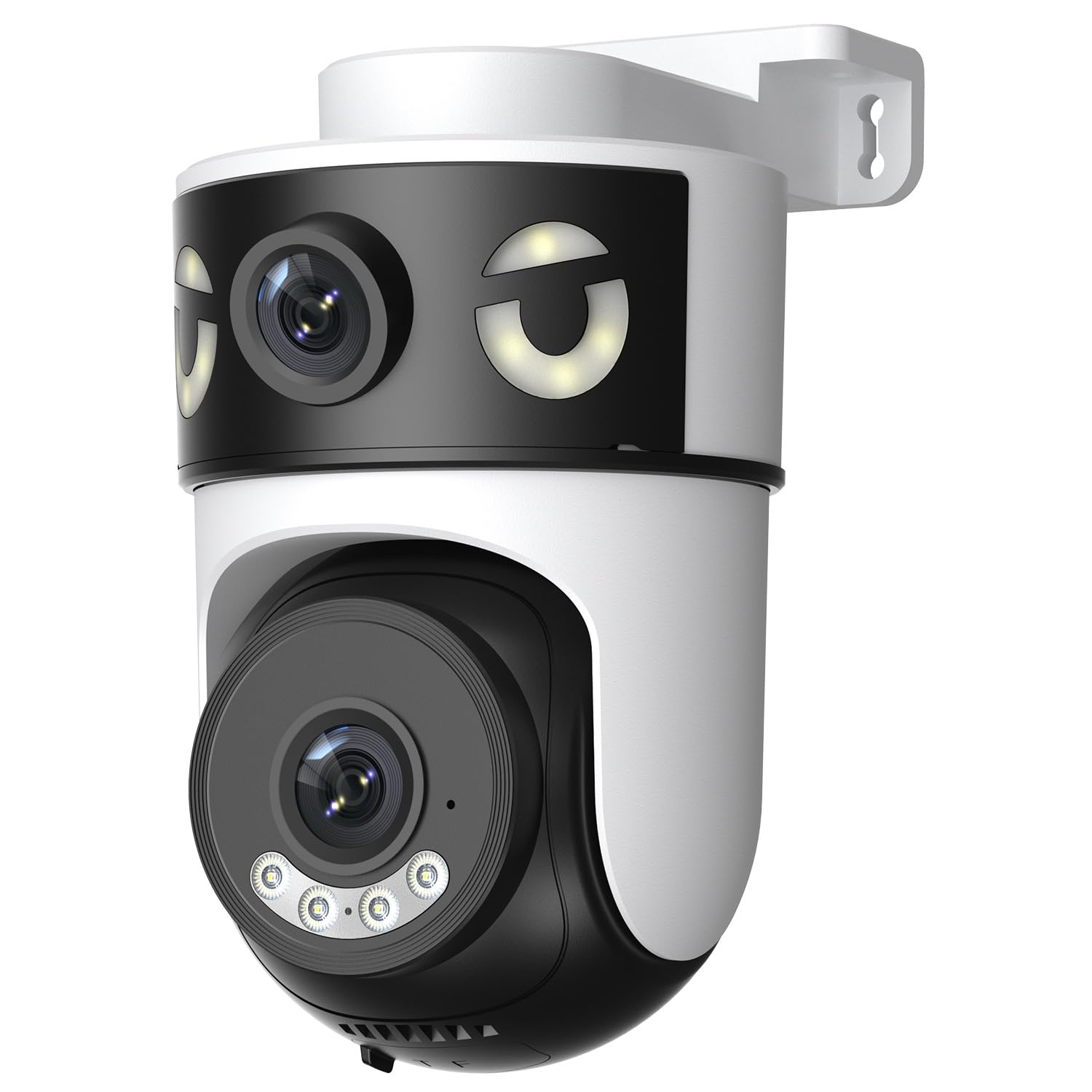
Image: Reobiux 2K Outdoor WiFi Surveillance Camera, Model K6Q-1P. This image shows the camera unit with its dual lenses, two external antennas, and a wall-mount bracket.
Caractéristiques principales
- Dual Lens & 355° View: Unique 2-in-1 design supporting fixed area surveillance and mobile full-view monitoring. Features two high-resolution lenses; one fixed and one rotatable for wide panoramic views.
- Résolution 2K et vision nocturne couleur : Delivers clear and detailed images and videos. Offers three night vision modes: Infrared, Color, and Smart Night Vision for reliable 24-hour surveillance.
- Motion Detection & Alarm Siren: Advanced motion detection sends real-time alarm notifications to your mobile device upon detecting movement.
- Two-Way Audio & Multi-User Access: Built-in microphone and speaker allow for remote communication. Supports sharing camera access with multiple users.
- SD Card/Cloud Storage & Alexa Compatibility: Supports 24-hour continuous recording to a Micro SD card (max 128GB) or cloud server. Compatible with Amazon Alexa for voice control.
Guide d'installation
1. Montage de la caméra
The camera is designed for wall mounting. Choose a suitable location that provides the desired surveillance coverage and is within range of your Wi-Fi network and a power outlet.
- Marquez les points de perçage sur le mur en utilisant la base de la caméra comme gabarit.
- Percez des trous et insérez les chevilles si nécessaire.
- Secure the camera to the wall using the provided mounting screws.
- Ensure the camera is firmly attached and the waterproof cover kit is properly installed to protect connections.
2. Mise sous tension
Connect the provided power adapter to the camera's power input and then plug it into a standard electrical outlet. The camera will power on and initiate its startup sequence.
3. Connexion réseau (Wi-Fi)
The camera connects via 2.4GHz Wi-Fi. Follow these steps to connect your camera to your home network:
- Téléchargez le O-kam Pro application from the App Store (iOS) or Google Play Store (Android) on your smartphone or tablet.
- Créez un nouveau compte ou connectez-vous si vous en avez déjà un.
- Suivez les instructions de l'application pour ajouter votre nouvelle caméra. Cela implique généralement de scanner un code QR sur la caméra ou de saisir manuellement son identifiant.
- Select your 2.4GHz Wi-Fi network and enter the password when prompted.
- Wait for the camera to connect to the network. A voice prompt or indicator light will confirm a successful connection.

Image: Reobiux camera with a smartphone displaying the O-kam Pro app interface, demonstrating remote control and live view capacités.
Mode d'emploi
En direct View et commande panoramique/inclinaison
Once connected, open the O-kam Pro app to access the live feed from your camera. The dual-lens system provides both a fixed wide view and a movable PTZ (Pan-Tilt-Zoom) view.
- Appuyez sur l'appareil photo dans l'application pour view le flux en direct.
- Use the on-screen controls to pan (horizontal rotation up to 355°) and tilt (vertical movement) the movable lens to adjust the viewangle de vue.
- Switch between the fixed and movable lens views within the app interface.
Modes de vision nocturne
La caméra propose trois modes de vision nocturne :
- Vision nocturne infrarouge: Provides black and white images in low-light conditions using infrared LEDs.
- Vision nocturne couleur: Utilise des projecteurs intégrés pour fournir des images en couleur la nuit.
- Vision nocturne intelligente : Bascule automatiquement entre la vision nocturne infrarouge et la vision nocturne couleur en fonction des mouvements détectés ou des conditions de luminosité.
- You can select your preferred night vision mode in the O-kam Pro app settings.
Détection de mouvement et alertes
Configure motion detection settings and receive alerts on your mobile device:
- Navigate to the camera settings in the O-kam Pro app.
- Activez la détection de mouvement et ajustez les niveaux de sensibilité selon vos besoins.
- Set up alert notifications to be sent to your smartphone.
- You can also enable the alarm siren to deter intruders.
Audio bidirectionnel
Use the two-way audio feature to communicate through the camera:
- En direct view interface of the O-kam Pro app, tap the microphone icon to speak. Your voice will be transmitted through the camera's speaker.
- Appuyez sur l'icône du haut-parleur pour écouter les sons provenant de l'environnement de la caméra.
Enregistrement et stockage vidéo
The camera supports continuous 24-hour recording. You have two storage options:
- Carte Micro SD: Insert a Micro SD card (up to 128GB, not included) into the designated slot on the camera. The camera will automatically begin recording to the card.
- Stockage dans le cloud : Subscribe to a cloud storage plan through the O-kam Pro app for secure off-site video storage.
- Accéder aux photos enregistréestage via the O-kam Pro app.
Intégration Amazon Alexa
Integrate your Reobiux camera with Amazon Alexa for voice control:
- Ouvrez l'application Amazon Alexa sur votre appareil mobile.
- Go to "Skills & Games" and search for the "O-kam Pro" skill.
- Enable the skill and link your O-kam Pro account.
- Discover devices. You can now use voice commands like "Alexa, show me the front door camera" to view le flux en direct sur les appareils Alexa compatibles.
Entretien
- Nettoyage: Essuyez régulièrement l'objectif et le boîtier de l'appareil photo avec un chiffon doux et sec.amp Utiliser un chiffon pour enlever la poussière et la saleté. Ne pas utiliser de produits chimiques agressifs ni de nettoyants abrasifs.
- Protection contre les intempéries : The camera is waterproof, but ensure all connections are sealed properly, especially the power cable and any SD card slots, to maintain its weather resistance.
- Mises à jour du micrologiciel : Check the O-kam Pro app periodically for firmware updates to ensure optimal performance and security.
Dépannage
- La caméra ne s'allume pas :
- Ensure the power adapter is securely connected to both the camera and a working electrical outlet. Verify the outlet has power.
- Impossible de se connecter au Wi-Fi :
- Ensure your Wi-Fi network is 2.4GHz. Check your Wi-Fi password for accuracy. Move the camera closer to your Wi-Fi router to improve signal strength. Restart your router and the camera.
- Pas de direct view or recording:
- Check your internet connection. Ensure the camera is connected to Wi-Fi. Verify that the Micro SD card is inserted correctly and not full, or that your cloud storage subscription is active.
- Aucune alerte de détection de mouvement reçue :
- Check app notification settings on your phone and within the O-kam Pro app. Ensure motion detection is enabled and sensitivity is set appropriately. Verify your phone has an active internet connection.
- L'audio bidirectionnel ne fonctionne pas :
- Ensure your phone's microphone and speaker are enabled for the O-kam Pro app. Check the volume settings on your phone and within the app. Ensure there are no obstructions blocking the camera's microphone or speaker.
Caractéristiques
| Fonctionnalité | Spécification |
|---|---|
| Marque | Réobiux |
| Nom du modèle | K6Q-1P |
| Numéro de modèle | REO-K6Q-1P |
| Type de montage | Support mural |
| Résolution d'enregistrement vidéo | 2K |
| Nombre d'articles | 1 |
| Technologie de communication sans fil | Wi-Fi (2.4 GHz) |
| ViewAngle d'attaque | 355 degrés (Poêle) |
| Type d'installation | Visser |
| Matériel | Plastique |
| Voltage | 5 volts (CC) |
| Pouvoir | 5 watts |
| Niveau de résistance à l'eau | Étanche |
| Caractéristiques spéciales | Two-Way Audio, Local Recording, HD Resolution, PTZ Technology |
| Utilisation recommandée | Sécurité extérieure |
| Appareils compatibles | Ordinateur portable, smartphone, tablette, télévision |
| Source d'énergie | Câble électrique |
| Protocole de connectivité | RTSP |
| Type de contrôleur | O-kam Pro App |
Garantie et assistance
For warranty information and technical support, please refer to the official Reobiux website or contact Reobiux customer service directly. Keep your purchase receipt as proof of purchase for warranty claims.
Manufacturer: Reobiux