
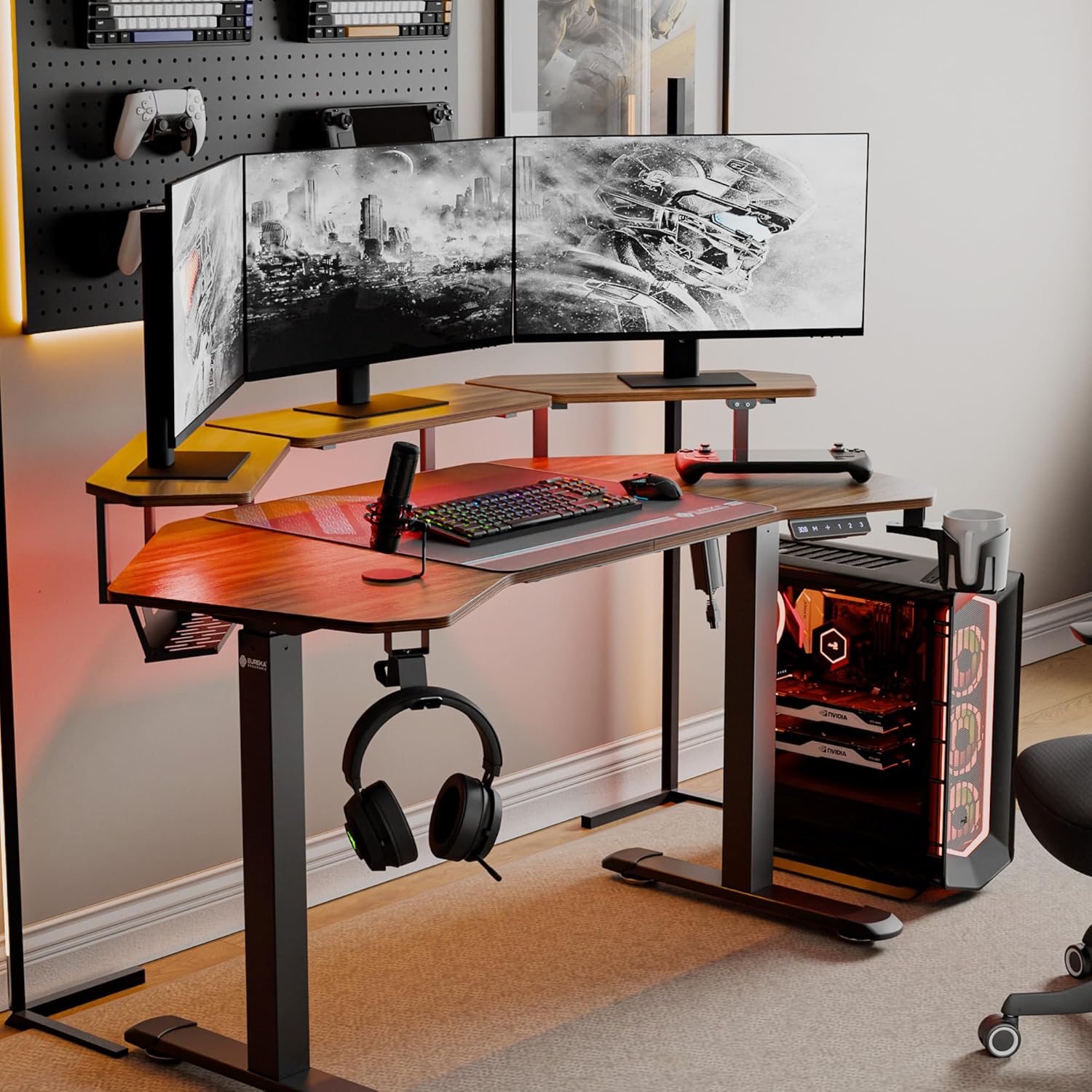
Image: The EUREKA ERGONOMIC Aero 55 Inch Electric Standing Desk in a gaming setup, showcasing its W-shaped desktop, monitor shelves, LED lighting, and accessories like headphone hook and cup holder.
1. Informations importantes sur la sécurité
Please read this manual carefully before assembly and use to ensure safe and correct operation of your EUREKA ERGONOMIC Aero Electric Standing Desk. Keep this manual for future reference.
- Avant l'assemblage, assurez-vous que tous les composants sont présents et en bon état. Ne pas utiliser si des pièces sont manquantes ou endommagées.
- This desk is designed to support a maximum weight of 176 livres (80 kg)Ne dépassez pas cette limite.
- Tenez les enfants et les animaux domestiques éloignés du bureau pendant son utilisation afin d'éviter tout risque de blessure.
- Ensure there are no obstructions in the desk's path during height adjustment to avoid damage or injury. The desk is equipped with Smart Anti-Collision Technology, but caution is still advised.
- Utilisez uniquement l'adaptateur secteur fourni. Débranchez l'alimentation avant tout nettoyage ou entretien.
- Ne vous asseyez pas et ne vous tenez pas debout sur le bureau.
2. Contenu du colis
Veuillez vérifier que tous les éléments listés ci-dessous sont inclus dans votre colis. Si des pièces sont manquantes ou endommagées, veuillez contacter le service client.
- Desktop (W-shaped)
- Cadre de bureau (pieds et traverse)
- Convertible Monitor Shelves (3 units)
- Panneau de contrôle avec affichage numérique
- Adaptateur secteur et câble
- Full-Desk Mouse Pad
- Crochet pour casque
- Porte-gobelet
- Plateau de gestion de câbles
- Quincaillerie de montage (vis, boulons, etc.)
- Manuel d'instructions
Note: Assembly tools are not included. Please prepare a screwdriver and wrench for assembly.
3. Configuration et assemblage
Follow these steps to assemble your EUREKA ERGONOMIC Aero Electric Standing Desk. It is recommended to have two people for assembly.
- Déballer les composants : Retirez soigneusement toutes les pièces de leur emballage et disposez-les sur une surface propre et douce afin d'éviter les rayures.
- Assembler le cadre du bureau : Attach the desk legs to the crossbar using the provided hardware. Ensure all connections are secure.
- Attacher un ordinateur de bureau : Place the W-shaped desktop onto the assembled frame. Align the pre-drilled holes and secure the desktop to the frame using the appropriate screws.
- Installer le panneau de configuration : Mount the control panel to the underside of the desktop in a convenient location using the provided screws. Connect the control panel cable to the motor.
- Connecter l'alimentation : Plug the power adapter into the desk's control box, then plug the power cable into a wall outlet.
- Installer les étagères pour écrans : The three convertible shelves can be installed in various configurations (center, left/right, or side extensions). Choose your preferred layout and secure them to the desktop using the provided brackets and screws.

Image: Various installation methods for the convertible monitor shelves, showing options for left/right, by the side, and sides and edges configurations.
- Fixez les accessoires : Install the headphone hook and cup holder to the desired locations on the desk frame. Place the full-desk mouse pad on the desktop.

Image : Gros plan view of the desk accessories including the convertible shelf with RGB lights, cable management tray, flexible headphone hook, desk mouse pad, and flexible cup holder.
- Organiser les câbles : Use the integrated cable management tray and power socket holders to neatly route and secure all cables.
4. Mode d'emploi
Your EUREKA ERGONOMIC Aero Electric Standing Desk offers advanced features for a customized workspace.
4.1 Réglage de la hauteur

Image: The electric standing desk shown at its minimum and maximum adjustable heights (29 inches to 47 inches), illustrating the range of motion.
- Boutons haut/bas : Utilisez le + et - buttons on the control panel to raise or lower the desk. The digital display will show the current height.
- The desk can be adjusted smoothly from 29 pouces à 48 pouces.
4.2 Préréglages de mémoire
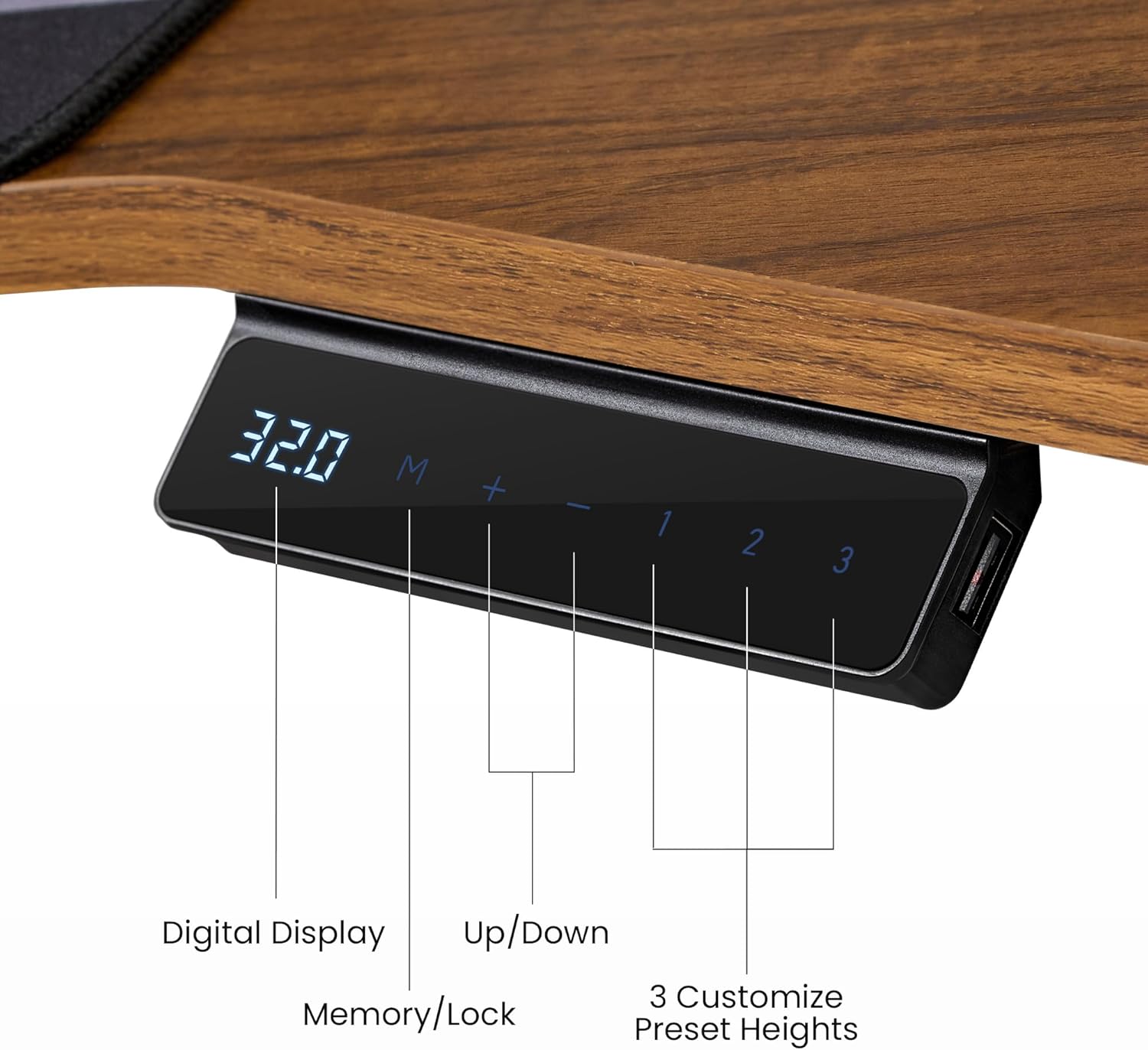
Image: Close-up of the desk's control panel, showing the digital height display, up/down buttons, memory/lock button, and three customizable preset height buttons (1, 2, 3).
- Your desk can store up to 3 favorite height settings.
- Pour définir un préréglage de mémoire : Réglez le bureau à la hauteur souhaitée. Appuyez sur M bouton, puis appuyez sur l'une des touches numériques (1, 2, ou 3) within 3 seconds. The height is now saved.
- Pour utiliser un préréglage de mémoire : Il suffit d'appuyer sur la touche numérique correspondante (1, 2, ou 3), and the desk will automatically move to the saved height.
4.3 Smart Anti-Collision Technology
- The desk features a built-in Hall Sensor that detects obstacles during height adjustment.
- If an obstruction is detected, the desk will automatically stop and reverse slightly to prevent damage.
- Always ensure the area around the desk is clear during movement, even with this safety feature.
4.4 RGB LED Ambient Lighting
- The convertible shelves include integrated RGB LED lighting.
- Use the intuitive light controller (located on the desk) to switch between 6 vibrant colors and 1 neutral white mode.
- Adjust the lighting to suit your work or gaming atmosphere.
4.5 Accessories Usage
- Crochet pour casque : The rotatable hook keeps your headphones conveniently stored and within reach.
- Porte-gobelet: Use the cup holder to keep beverages secure and prevent spills on your desktop.
- Tapis de souris : The full-desk mouse pad provides a smooth and consistent surface for precise mouse control.
4.6 Vidéo produitview
Vidéo : Un overview of the EUREKA ERGONOMIC Aero 55 Inch Electric Standing Desk, demonstrating its features, design, and functionality in a workspace setting.
5. Entretien
Un entretien adéquat garantit la longévité et les performances optimales de votre bureau assis-debout.
- Nettoyage: Essuyez le bureau et le cadre avec un chiffon doux et sec.amp chiffon. Évitez les produits chimiques agressifs ou les nettoyants abrasifs qui pourraient endommager la surface.
- Contrôles réguliers : Vérifiez régulièrement le serrage de toutes les vis et boulons. Resserrer si nécessaire.
- Gestion des câbles: Ensure cables are neatly organized and not pinched or strained, which could affect desk movement or damage wiring.
- Cordon d'alimentation : Vérifiez que le cordon d'alimentation ne présente aucun signe de dommage. S'il est endommagé, cessez immédiatement l'utilisation et contactez le service client.
6. Dépannage
Si vous rencontrez des problèmes avec votre bureau, consultez les problèmes courants et leurs solutions ci-dessous :
| Problème | Cause possible | Solution |
|---|---|---|
| Le bureau ne bouge pas. | Câble d'alimentation débranché, coupure de couranttage, motor malfunction. | Check if the power cable is securely plugged into the wall outlet and the desk's control box. Verify the power outlet is functional. If the issue persists, contact support. |
| Le bureau bouge de façon irrégulière ou fait des bruits inhabituels. | Loose connections, uneven weight distribution, damaged motor. | Ensure all assembly screws are tightened. Redistribute weight evenly on the desktop. If noises persist, contact support. |
| Le système anti-collision se déclenche trop facilement ou pas du tout. | Sensor obstruction, sensitivity setting (if adjustable). | Ensure no objects are near the desk's legs or frame. If the desk has adjustable sensitivity, refer to the control panel instructions (not detailed in this manual, but a general point). |
| L'écran numérique affiche un code d'erreur. | System fault, overload, or specific component issue. | Note the error code and refer to the full product manual (if available) or contact customer support with the code. Try unplugging the desk for 10 seconds and plugging it back in to reset. |
If these solutions do not resolve the issue, please contact EUREKA ERGONOMIC customer support.
7. Spécifications

Image: Detailed diagram showing the dimensions of the EUREKA ERGONOMIC Aero 55 Inch W Shaped Electric Standing Desk, including desktop width, depth, and shelf measurements, along with the 176 lbs max load capacity.
| Fonctionnalité | Détail |
|---|---|
| Marque | EUREKA ERGONOMIQUE |
| Numéro de modèle | ERK-SM02-WN |
| Conception de bureau | Bureau d'ordinateur, bureau debout |
| Forme | Wing Shape |
| Dimensions du produit (P x L x H) | 18"P x 55"L x 35"H |
| Plage de hauteur réglable | 29 pouces (min) à 48 pouces (max) |
| Poids maximum recommandé | 176 livres (80 kg) |
| Type de matériau supérieur | Wood (Laminated Walnut) |
| Matériau de base | Métal (acier au carbone) |
| Nombre d'étagères | 3 (Convertible Monitor Shelves) |
| Caractéristiques spéciales | Adjustable Height, RGB Ambient Lighting, Memory Presets, Anti-Collision Technology, Headphone Hook, Cup Holder, Cable Management |
| Poids de l'article | 93 livres |
| Assemblage requis | Oui |
8. Informations sur la garantie
EUREKA ERGONOMIC provides a Garantie de service limitée de 1 ans for this product. This warranty covers manufacturing defects and workmanship under normal use.
The warranty does not cover damage caused by misuse, accidents, unauthorized modifications, or failure to follow the instructions in this manual. Please retain your proof of purchase for warranty claims.
9. Assistance clientèle
For any questions, concerns, or assistance with your EUREKA ERGONOMIC Aero Electric Standing Desk, please contact our customer support team.
- Website: Visit the official EUREKA ERGONOMIC webSite de FAQ et de ressources d'assistance.
- E-mail: [Insérer ici l'adresse e-mail du service client, si disponible]
- Téléphone: [Insérer ici le numéro de téléphone du service client, si disponible]
Our dedicated team is available to provide timely assistance.