
1. Produit terminéview
The GHB Wireless Baby Car Camera and Home Monitor (Model ABM721) provides a reliable and portable solution for monitoring infants, children, and pets in various environments. This system features a 5-inch HD display monitor and a 720P camera, both equipped with long-lasting rechargeable batteries for true wireless operation. It utilizes 2.4GHz FHSS technology for a secure, non-WiFi connection, ensuring privacy and ease of use without internet dependency. Key functionalities include two-way audio, night vision, temperature alerts, VOX mode, and digital zoom, making it suitable for both in-car and home use.

Image: The GHB Wireless Baby Car Camera and Home Monitor system, showing the monitor, camera, and various accessories.
2. Contenu du colis
Veuillez vérifier que tous les articles listés ci-dessous sont inclus dans votre colis. Si un article est manquant ou endommagé, veuillez contacter le service client.
- 5-inch Monitor (1 unit)
- Camera Unit (1 unit)
- Adaptateur secteur (1 unité)
- Car Charger Converter (1 unit)
- 6ft Charging Cable (2 units)
- Suction Mount (1 unit)
- Monitor Clip (1 unit)
- Strap Mount Base (1 unit)
- Straps (2 units)
- Manuel d'utilisation (1 unité)
- Vis (2 unités)
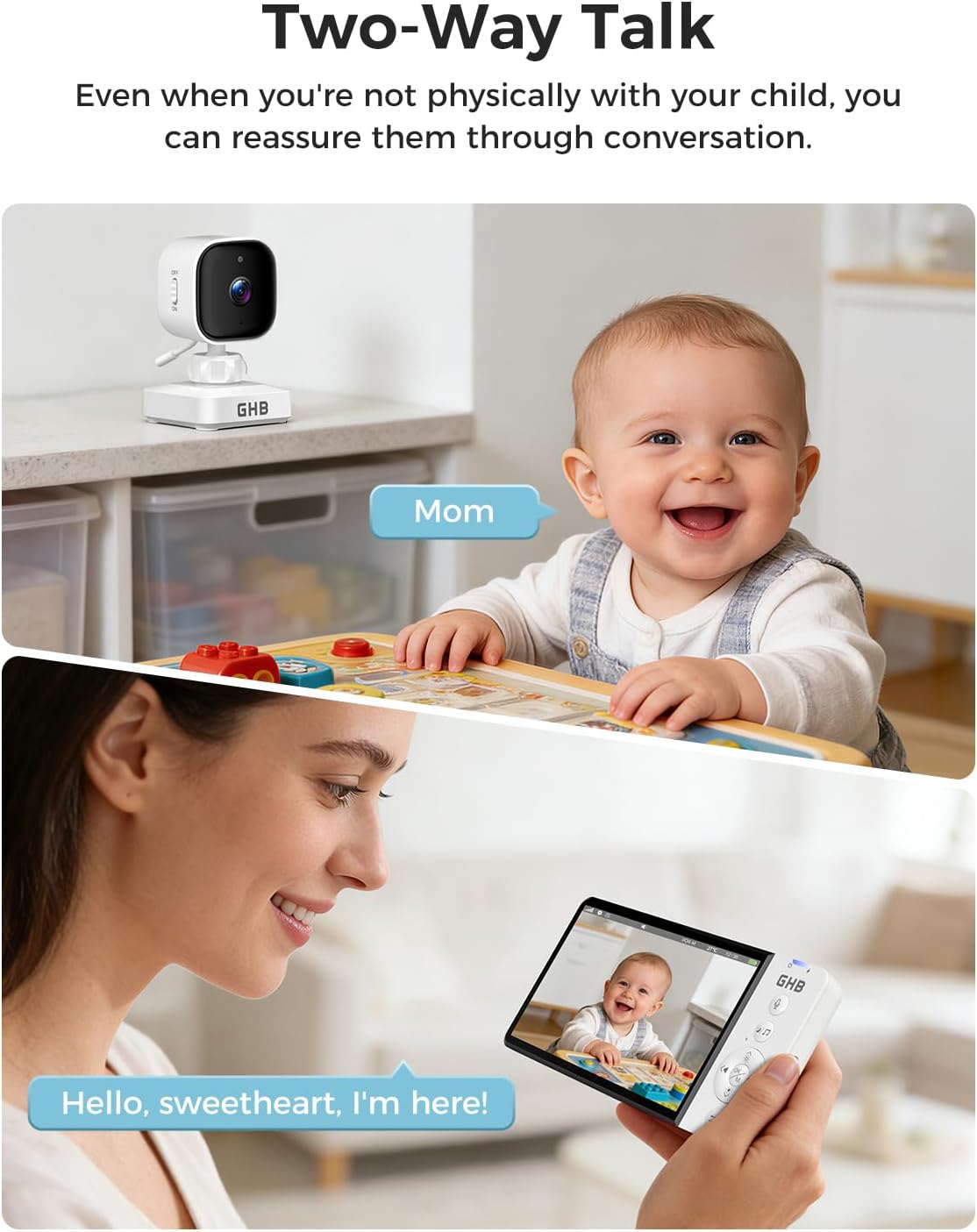
Image: A visual representation of all items included in the GHB Baby Monitor package, laid out neatly.
3. Guide de configuration
3.1 Chargement des appareils
Before initial use, fully charge both the monitor and camera units. The monitor has a 3500mAh battery, and the camera has a 2000mAh battery. Use the provided charging cables and power adapter or car charger.
- Connect one end of the charging cable to the monitor's charging port and the other end to the power adapter or car charger.
- Connect the second charging cable to the camera's charging port and the power adapter.
- Allow both units to charge until the battery indicator shows full.

Image: The monitor screen displaying battery life, indicating long screen battery life with VOX mode on or off.
3.2 Camera Installation (Car Seat Headrest)
The camera can be securely mounted on a car seat headrest to monitor a rear-facing infant or other passengers.
- Adjust the headrest: Raise the car seat headrest to an appropriate height.
- Install horizontal straps: Wrap the horizontal straps around the headrest and secure them.
- Install vertical straps: Attach the vertical straps, ensuring a snug fit.
- Attach camera: Secure the camera to the strap mount base. Adjust the camera angle as needed and tighten the fixing screw on the camera neck. The camera can be manually rotated 350 degrees for optimal viewing.

Image: Visual steps demonstrating how to install the camera unit onto a car seat headrest using the provided straps.
3.3 Monitor Installation (Suction Cup Mount)
The monitor can be mounted on your car's windshield or dashboard using the suction cup mount.
- Install the clip: Attach the monitor clip to the suction cup mount.
- Préparer la surface : Remove the protective film from the suction cup and select a clean, flat glass surface (windshield) or dashboard area.
- Secure mount: Press the suction cup firmly against the chosen surface and lock it into place.
- Attach monitor: Secure the monitor to the clip on the mount.
- Connecter l'alimentation : Connect the monitor to the car charger using one of the 6ft charging cables.

Image: Visual steps illustrating the installation of the monitor using the suction cup mount on a car's windshield or dashboard.

Image : Examples of the monitor installed on both the windshield and the dashboard of a car.
4. Mode d'emploi
4.1 Mise sous/hors tension
- Moniteur: Press and hold the power button on the monitor until the screen turns on/off.
- Caméra: Use the independent power switch on the camera unit to turn it on or off.

Image: The camera unit highlighting its independent power switch and built-in 2000mAh battery.
4.2 VOX Mode (Sound Activated)
VOX mode conserves battery by automatically turning off the monitor screen in quiet environments. The screen will activate when sound is detected from the camera's vicinity.
- Activate VOX mode via the monitor's menu settings.
- Adjust the sensitivity level (3 levels available) to suit your environment and preferences.

Image: Illustration of VOX mode, showing the monitor screen in sleep mode and activating upon sound detection.
4.3 Audio bidirectionnel
Use the two-way audio feature to communicate with your baby or pet through the camera's speaker.
- Press and hold the microphone button on the monitor to speak.
- Relâchez le bouton pour écouter.
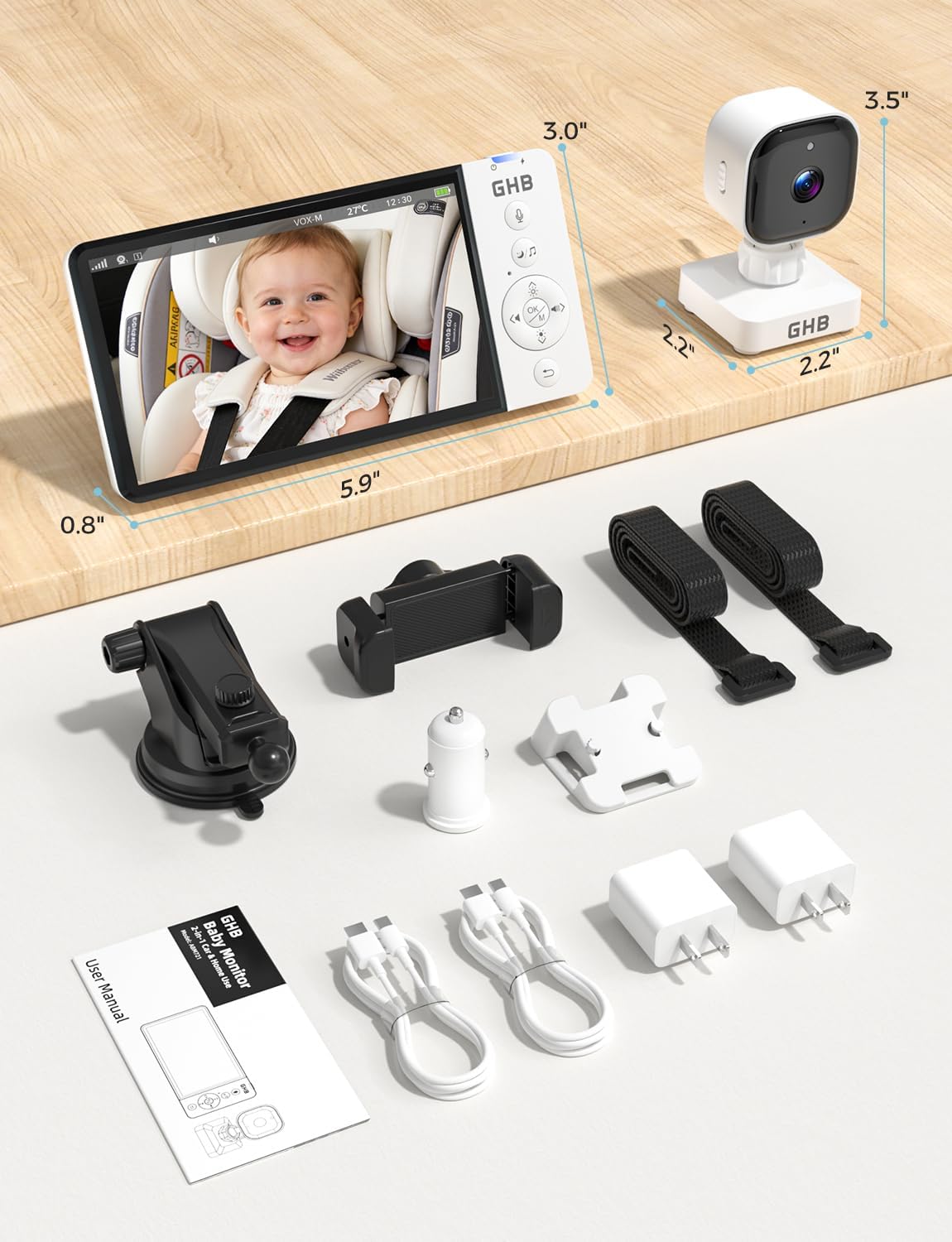
Image: A visual representation of the two-way talk feature, showing a parent speaking into the monitor and a baby reacting.
4.4 Zoom numérique
The monitor supports up to 4X digital zoom to view plus de détails.
- Access the zoom function through the monitor's controls.
- Toggle between 2X and 4X zoom levels.

Image: The monitor screen displaying a normal view, 2X zoom, and 4X zoom of a baby in a car seat.
4.5 Lullabies and Temperature Monitoring
- Berceuses: Select from 8 built-in lullabies to soothe your baby. Control playback and volume through the monitor.
- Température: The monitor displays the room temperature detected by the camera. Set alerts for temperature deviations in the settings.

Image: Icons representing features like feeding reminder, temperature monitoring, lullaby function, and two-way intercom.
5. Principales caractéristiques
- Fonctionnement véritablement sans fil : Both monitor (3500mAh) and camera (2000mAh) are battery-powered, offering portability for travel and home use.
- Durée de vie prolongée de la batterie : Up to 8 hours of continuous use or 30 hours in power-saving VOX mode.
- Vidéo haute définition : 5-inch 720P HD display for clear real-time monitoring.
- Connexion sécurisée : 2.4GHz FHSS technology ensures a private, interference-free connection without requiring WiFi or apps.
- Vision nocturne : Vision nocturne infrarouge claire pour la surveillance en conditions de faible luminosité.
- Audio bidirectionnel: Allows for clear communication between the monitor and camera units.
- Mode VOX : Sound-activated screen with adjustable sensitivity to conserve battery.
- Surveillance de la température : Displays real-time room temperature with alert functionality.
- Fonction berceuse : 8 built-in lullabies to help soothe your baby.
- Zoom numérique : 2X and 4X zoom levels for closer inspection.
- Montage polyvalent : Includes suction cup mount for car and strap mount for headrest, suitable for various vehicles and home setups.

Image: Comparison of day and night vision quality for both home and car use, highlighting 720P HD image clarity.

Image: The monitor and camera being used to monitor infants, children, and pets in different vehicle types like sedans, SUVs, and RVs.
6. Entretien
- Nettoyage: Utilisez un chiffon doux et sec pour nettoyer l'écran et l'objectif de la caméra. N'utilisez pas de produits abrasifs ni de solvants.
- Stockage: When not in use for extended periods, store the device in a cool, dry place away from direct sunlight. Ensure both units are fully charged before storage.
- Entretien de la batterie: To prolong battery life, avoid fully discharging the batteries frequently. Recharge them regularly.
- Conditions environnementales : Avoid exposing the device to extreme temperatures, humidity, or dust. The device is not water-resistant.
7. Dépannage
| Problème | Cause possible | Solution |
|---|---|---|
| Aucune image sur le moniteur. | Camera is off or out of range. Low battery on camera or monitor. | Ensure camera is powered on. Move camera closer to monitor. Charge both units. |
| Aucun son ou mauvaise qualité audio. | Volume too low. Obstruction between units. Interference. | Increase monitor volume. Reduce distance between units. Move away from other electronic devices. |
| Le mode VOX ne s'active pas. | Sensibilité VOX trop faible. | Adjust VOX sensitivity to a higher level in the settings. |
| Monitor not holding charge. | Battery degradation. Faulty charging cable/adapter. | Ensure charging cable and adapter are working correctly. Contact support if battery life significantly decreases. |
8. Spécifications techniques
- Nom du modèle : ABM721
- Marque: GHB
- Utilisations recommandées : Surveillance de bébé
- Technologie de connectivité: FHSS (2.4GHz)
- Affichage du moniteur : HD 5 pouces
- Résolution de capture vidéo : 720p (1280x720p)
- Fréquence d'images : 30 images par seconde
- ViewAngle d'attaque : 75 degrés
- Type de mise au point : Mise au point automatique
- Technologie de capteur photo : 1/4 CMOS, 1 MP
- Batterie du moniteur : 3500mAh
- Batterie de l'appareil photo : 2000mAh
- Source d'alimentation : Battery Powered, 5 Volts, 2.3 Watts
- Caractéristiques spéciales : 2-Way Audio, Noise Reduction, Cry Detection, Feeding Reminder, 8 Lullabies, Infrared Night Vision, 4X Zoom, Temperature Alert
- Utilisation intérieure/extérieure : Oui
- Type de monture : Suction Cup Mount, Strap Mount
- Matériel: Plastique
- Niveau de résistance à l'eau : Non résistant à l'eau
- Dimensions de l'article : 5.9 x 2.9 x 0.79 pouces (Moniteur)
9. Garantie et assistance
9.1 Garantie du fabricant
This GHB product is covered by a Garantie constructeur d'un an À compter de la date d'achat, cette garantie couvre les défauts de matériaux et de fabrication dans des conditions normales d'utilisation. Elle ne couvre pas les dommages causés par une mauvaise utilisation, un accident, des modifications non autorisées ou l'usure normale.
Veuillez conserver votre preuve d'achat pour les réclamations au titre de la garantie.
9.2 Assistance clientèle
For any questions, technical assistance, or warranty claims, please contact GHB customer support:
- E-mail: support@ghb-group.com
- Support en ligne: Visit the official GHB webSite de FAQ et de ressources supplémentaires.
Notre équipe d'assistance est dédiée à vous fournir une aide rapide et efficace.