
Introduction
Thank you for choosing the TWOMEOW KM802 K Cup Coffee Maker. This manual provides essential information for the safe and efficient operation, maintenance, and troubleshooting of your new coffee machine. Please read it thoroughly before first use and keep it for future reference.
Consignes de sécurité importantes
- Lisez toutes les instructions avant d’utiliser l’appareil.
- Do not immerse the power cord, plug, or the appliance in water or other liquids to protect against electrical shock.
- Une surveillance étroite est nécessaire lorsqu’un appareil est utilisé par ou à proximité d’enfants.
- Débranchez l'appareil de la prise lorsqu'il n'est pas utilisé et avant de le nettoyer. Laissez-le refroidir avant d'ajouter ou de retirer des pièces et avant de le nettoyer.
- N’utilisez pas d’appareil dont le cordon ou la fiche est endommagé, ou après un dysfonctionnement de l’appareil ou après qu’il a été endommagé de quelque manière que ce soit.
- L’utilisation d’accessoires non recommandés par le fabricant de l’appareil peut entraîner un incendie, un choc électrique ou des blessures corporelles.
- Ne pas utiliser à l'extérieur.
- Ne laissez pas le cordon pendre du bord d’une table ou d’un comptoir, ni toucher des surfaces chaudes.
- Ne pas placer sur ou à proximité d'un brûleur à gaz ou électrique chaud, ni dans un four chaud.
- Branchez toujours d'abord la fiche à l'appareil, puis branchez le cordon à la prise murale. Pour débrancher, mettez l'appareil hors tension, puis retirez la fiche de la prise murale.
- N'utilisez pas l'appareil à d'autres fins que celles prévues.
- Des brûlures peuvent survenir si le couvercle est retiré pendant les cycles d'infusion.
Contenu du colis
- TWOMEOW KM802 Coffee Maker
- Support pour dosettes K
- Ground Coffee Holder (Reusable Filter)
- Manuel d'instructions
Produit terminéview
The TWOMEOW KM802 is a versatile single-serve coffee maker designed for convenience and quality. It features a sleek design, a large removable water reservoir, and a user-friendly control panel.
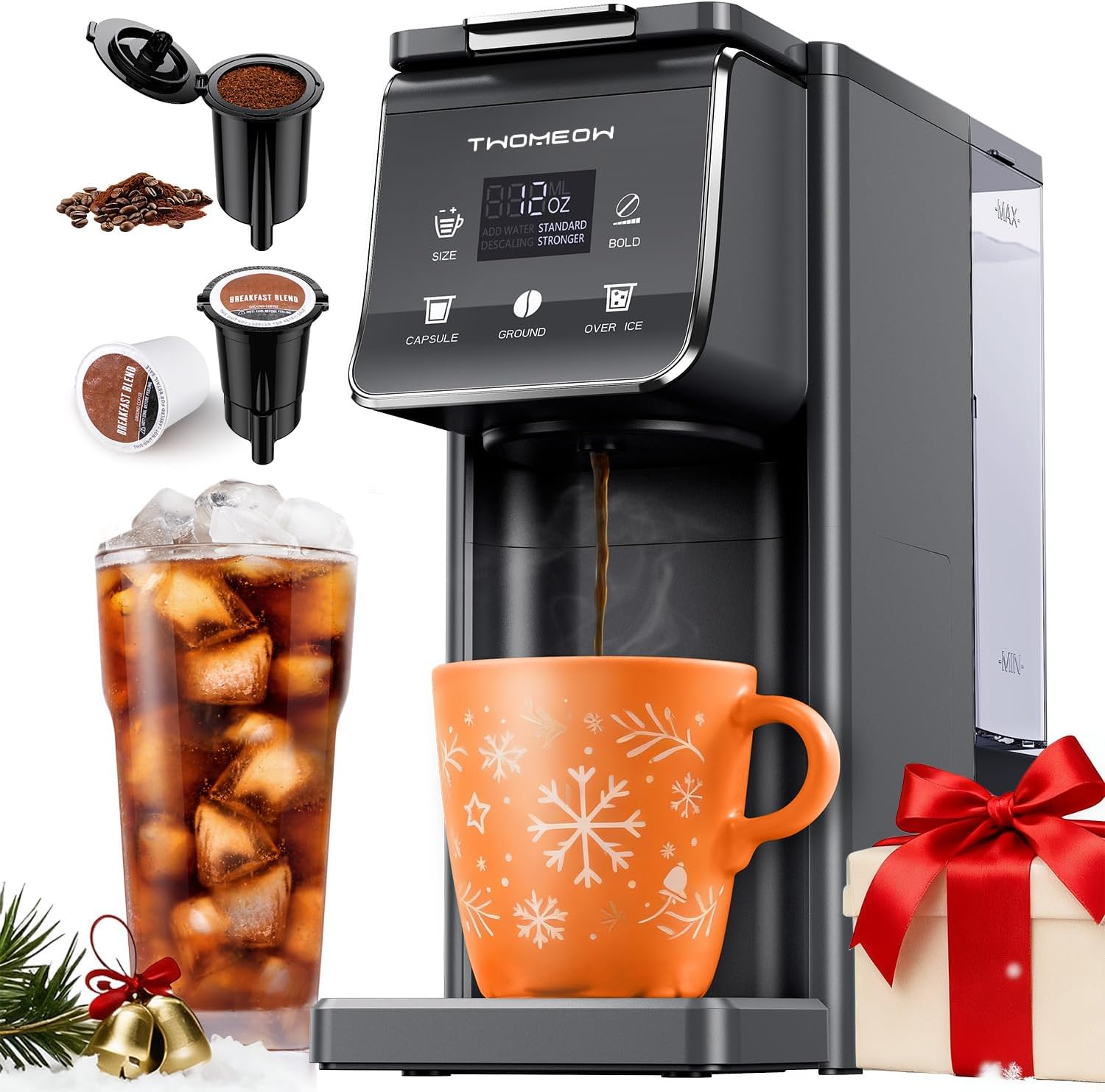
Figure 1 : Devant view of the TWOMEOW KM802 K Cup Coffee Maker, showcasing its compact design and brewing capabilities for both K-cups and ground coffee.

Figure 2 : Détaillé view of the intuitive touch control panel, allowing users to select brew size, coffee type (capsule or ground), and strength (standard or bold).
Installation et première utilisation
- Déballage: Carefully remove all packaging materials and labels from the unit.
- Premier nettoyage : Thoroughly clean both the water reservoir and the brew basket before first use. It is recommended to run 3-4 full water cycles without coffee to flush the internal system.
- Remplissez le réservoir d'eau : Remove the 52oz water reservoir from the back of the unit. Fill it with fresh, cold water up to the 'MAX' line. Place it back securely onto the coffee maker.
- Connexion électrique : Plug the power cord into a grounded electrical outlet. The machine will power on and enter standby mode.
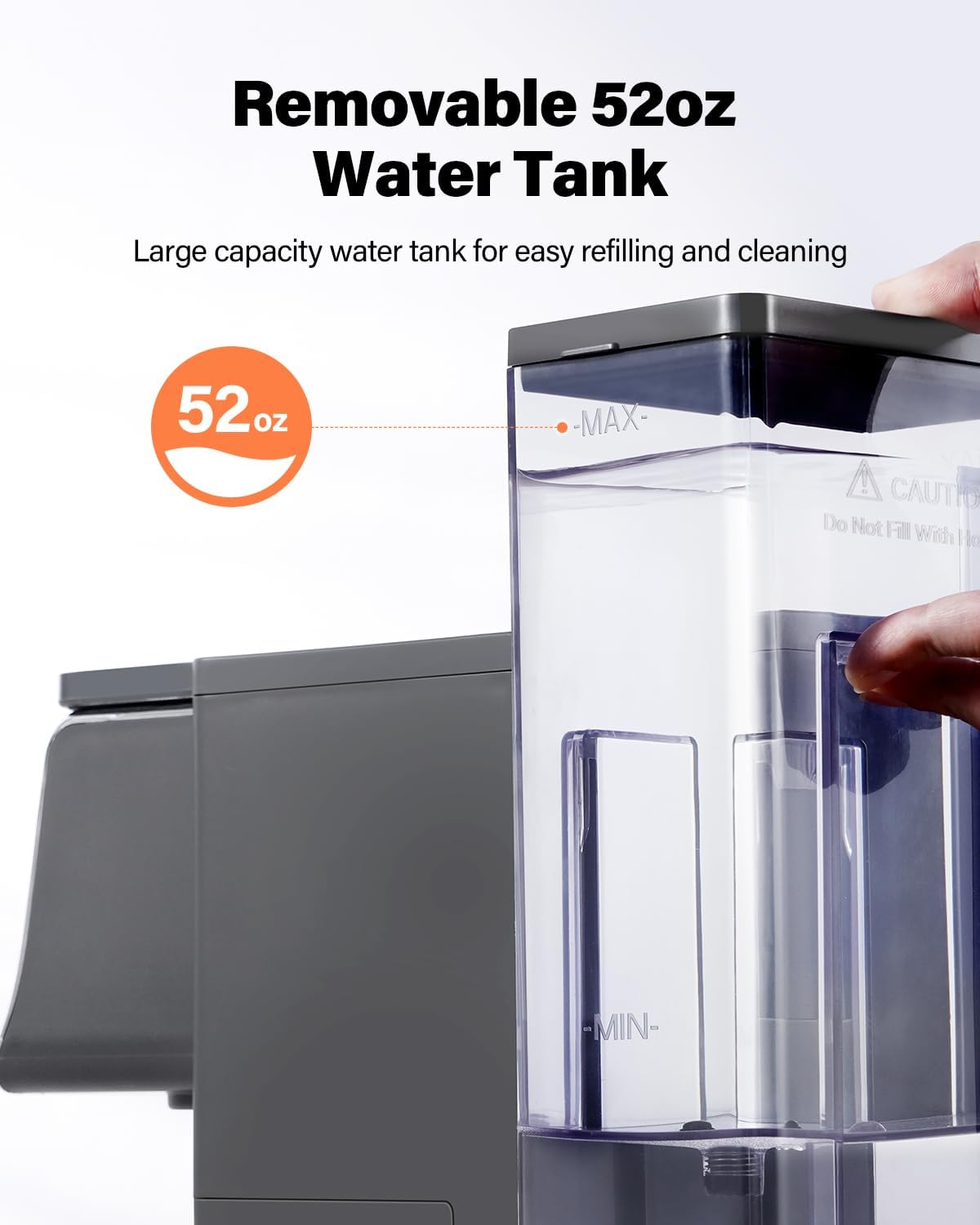
Figure 3 : The 52oz removable water tank, designed for easy refilling and cleaning, minimizing the need for frequent refills.
Mode d'emploi
Préparer du café chaud
Your TWOMEOW KM802 coffee maker offers flexibility to brew hot coffee using either K-cups or your preferred ground coffee.
Using K-Cups
- Lift the handle to open the K-cup chamber.
- Insert a standard K-cup into the K Pod Holder.
- Place the K Pod Holder with the K-cup into the chamber and close the handle firmly.
- Placez votre tasse à café sur le plateau égouttoir.
- Select your desired brew size (6, 8, 10, 12, or 14 oz) using the 'SIZE' button.
- Press the 'CAPSULE' button to begin brewing.
Utiliser du café moulu
- Lift the handle to open the K-cup chamber.
- Fill the reusable Ground Coffee Holder with your desired amount of ground coffee (refer to specifications for recommended ratios).
- Place the Ground Coffee Holder into the chamber and close the handle firmly.
- Placez votre tasse à café sur le plateau égouttoir.
- Select your desired brew size (6, 8, 10, 12, or 14 oz) using the 'SIZE' button.
- Press the 'GROUND' button to begin brewing.

Figure 4 : The 3-in-1 compatibility feature, allowing use of K-pods, ground coffee, or tea with dedicated holders.
Vidéo 1: Official TWOMEOW video demonstrating the K Cup Coffee Maker with Bold Setting, including how to use both K-cups and ground coffee.
Préparer du café glacé
- Fill your cup with ice cubes.
- Prepare your K-cup or ground coffee as described above.
- Place the cup with ice on the drip tray.
- Select your desired brew size (6, 8, 10, 12, or 14 oz) using the 'SIZE' button.
- Press the 'OVER ICE' button to begin brewing. The machine will brew a concentrated coffee over ice.
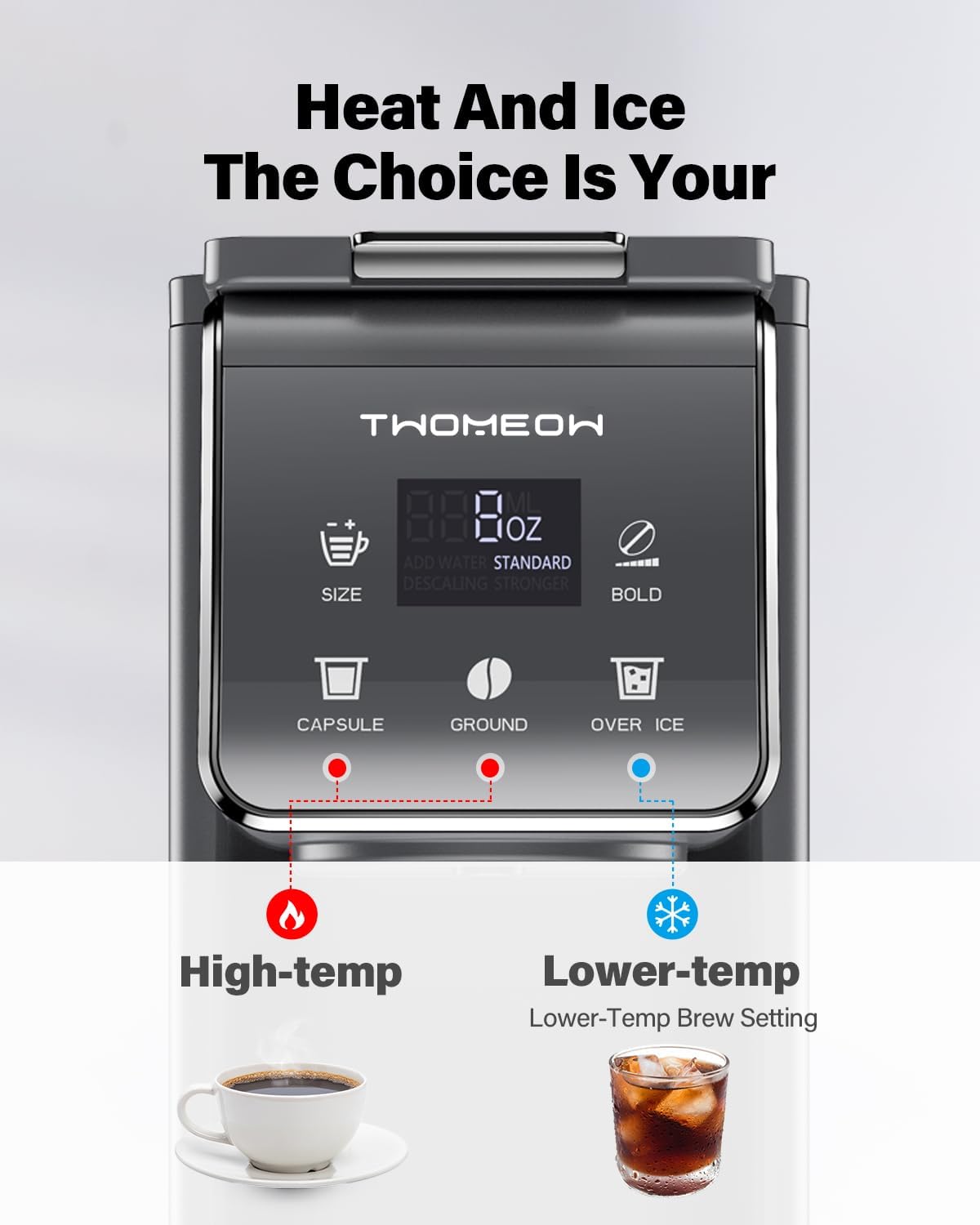
Figure 5 : The control panel highlighting the 'OVER ICE' option for brewing refreshing iced coffee.
Brew Size Selection
The coffee maker offers five brewing capacities to suit your preference:
- 6 onces
- 8 onces
- 10 onces
- 12 onces
- 14 onces
Use the 'SIZE' button to cycle through the available options until your desired volume is displayed.

Figure 6 : The display showing the different brew size options available for customization.
Réglage audacieux
For a stronger flavor, activate the 'BOLD' setting. This option is available for both hot and iced coffee brewing.
- After selecting your brew size, press the 'BOLD' button to toggle between 'STANDARD' and 'STRONGER' strength.
- The display will indicate the selected strength.
Figure 7 : Visual representation of the 'BOLD' setting, offering a choice between standard and stronger coffee flavors.
Bac d'égouttage amovible
The removable drip tray accommodates various cup heights, including travel mugs up to 6.8 inches, minimizing spills and ensuring compatibility.

Figure 8 : The removable drip tray, designed to fit taller cups and travel mugs.
Entretien
Nettoyage
- Extérieur: Essuyez l'extérieur de la cafetière avec adamp chiffon. N'utilisez pas de nettoyants abrasifs.
- Réservoir d'eau: The water reservoir can be removed and washed with warm, soapy water. Rinse thoroughly.
- K Pod Holder & Ground Coffee Holder: These components are removable and dishwasher safe for easy cleaning.
- Bac de récupération: The drip tray and its cover can be removed and washed with warm, soapy water.
Détartrage
Over time, mineral deposits can build up in your coffee maker, affecting performance and taste. The TWOMEOW KM802 features a descaling reminder.
- When the 'DESCALING' indicator light flashes, it is time to descale your machine.
- To descale, fill the water reservoir with a descaling solution (e.g., vinegar and water mixture) or a commercial descaling agent according to the product instructions.
- Placez une grande tasse sur le plateau d'égouttage.
- Press and hold the 'OVER ICE' button for 3 seconds to initiate the descaling cycle.
- Repeat the process with fresh water to rinse the system thoroughly.

Figure 9 : The descaling indicator on the control panel, prompting users to perform a descaling cycle.
Vidéo 2: A video demonstrating the descaling process and the descaling indicator on the TWOMEOW KM802 coffee maker.
Dépannage
| Problème | Cause possible | Solution |
|---|---|---|
| La cafetière ne s'allume pas. | Non branché ou hors tensiontage. | Assurez-vous que le cordon d'alimentation est bien branché dans une prise fonctionnelle. Vérifiez votre disjoncteur. |
| Le café ne coule pas. | Water tank empty or not properly seated. K-cup/Ground holder not properly inserted. | Fill the water tank and ensure it is correctly placed. Verify the K-cup or Ground holder is securely in place and the lid is closed. |
| Le café a un goût faible. | Incorrect coffee-to-water ratio or 'BOLD' setting not activated. | Adjust the amount of ground coffee or select the 'STRONGER' option using the 'BOLD' button. Consider a smaller brew size. |
| Le café n'est pas assez chaud. | Pre-heating cycle not complete. | Allow the machine to complete its pre-heating cycle before brewing. Ensure the water reservoir is filled with cold water. |
| 'DESCALING' light is flashing. | Accumulation de minéraux dans la machine. | Effectuez un cycle de détartrage comme décrit dans la section Maintenance. |
Caractéristiques
- Marque: TWOMEOW
- Nom du modèle : KM802
- Couleur: Gris
- Dimensions du produit : 11.4"P x 5.28"L x 13"H
- Capacité du réservoir d'eau : 52 oz (amovible)
- Brewing Capacities: 6, 8, 10, 12, 14 onces
- Compatibilité: K-pods, Ground Coffee, Tea
- Caractéristiques spéciales : 3-in-1, Removable Water Tank, Bold Setting, 5 Brewing Capacities, Removable Drip Tray, Energy Efficient (Auto-off after 5 minutes)
- Mode de fonctionnement : Entièrement automatique
- Entrée de l'interface humaine : Écran tactile
- Poids de l'article : 4.91 livres
Garantie et assistance
The TWOMEOW KM802 K Cup Coffee Maker comes with a Garantie de 2 ans et un Service de remplacement de 6 mois. For technical support or any inquiries, please contact us directly via email at support@twomeow.com. Our customer service team is dedicated to providing prompt assistance.