
1. Introduction et plusview
The Jackery Explorer 240D is a compact and portable power station designed to provide reliable power for various devices. It features a 256Wh lithium battery, multiple output ports, and flexible charging options, making it suitable for outdoor activities, travel, and emergency backup power.
This manual provides essential information for the safe and efficient operation, maintenance, and troubleshooting of your Jackery Explorer 240D.
2. Contenu de la boîte
- 1 x Jackery Explorer 240D Portable Power Station
- 1 x câble USB-C vers USB-C
- 1 x 10²W GaN Fast Charger
- 1 x E240D User Manual

Image: The Jackery Explorer 240D power station shown with its included USB-C to USB-C cable and 102W GaN Fast Charger.
3. caractéristiques du produit
- Haute capacité : 256Wh energy storage, equivalent to 8 standard power banks.
- Sortie polyvalente : 4 ports (3x USB-C, 1x USB-A) delivering up to 200W pure DC output (max 140W per port).
- 2-in-1 USB-C Cable: Functions as a carrying strap and a 140W fast-charging cable.
- Conception ultra-portable : Weighs only 4.85lbs, significantly lighter and smaller than comparable AC portable power stations.
- Batterie LiFePO4 durable : Upgraded lithium battery with a 10-year lifespan, maintaining ≥70% capacity after 6,000 charge cycles. Operates reliably from -4°F to 113°F.
- Plusieurs options de chargement : USB-C, solar, car charging, and AC-DC dual input. AC-DC dual input charges 0% to 80% in just one hour. Supports up to 100W solar charging.
- Connectivité : Powers laptops, smartphones, tablets, GoPros, drones, and can keep devices like Starlink Mini online for up to 10 hours.
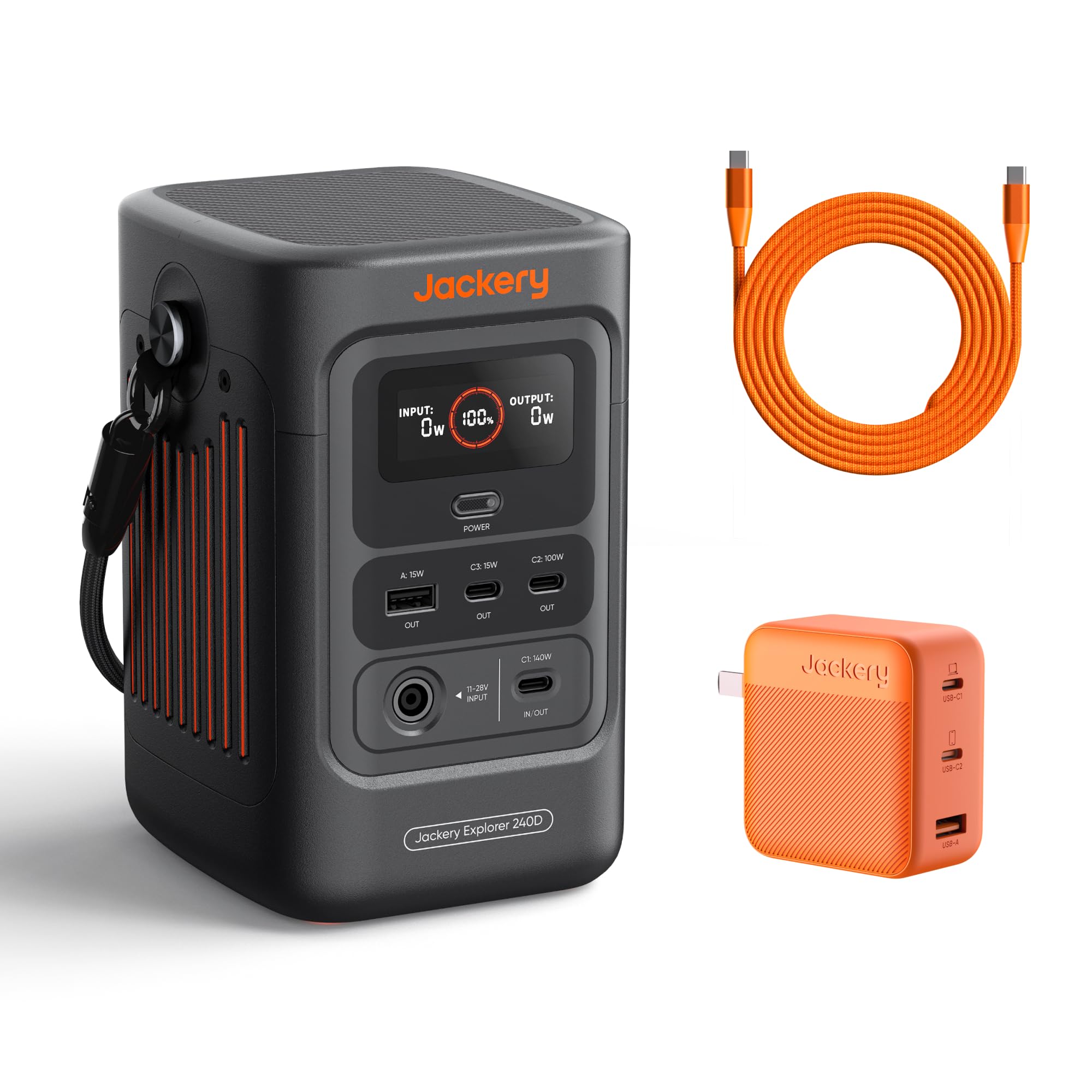
Image: The Jackery Explorer 240D, a compact and portable power station with multiple ports.
4. Installation
- Déballer: Retirez soigneusement tous les composants de l'emballage.
- Charge initiale: Before first use, fully charge the Explorer 240D using any of the available charging methods. It is recommended to fully charge the unit every 3 months to maintain battery health.
- Mise sous tension : Press the "POWER" button to turn on the unit. The display will show battery percentage, entrée et sortie wattage.
- Activate Outlets: Press the individual power buttons for DC/USB or AC outlets to activate them before connecting devices.
5. Mode d'emploi
5.1 Appareils de charge
- Connect your device's charging cable to the appropriate output port (USB-A, USB-C, or AC).
- Press the corresponding power button (DC/USB or AC) to activate the output.
- L'écran affichera la puissance de sortietage.
- When finished, turn off the output ports to conserve battery.
5.2 Mode d'économie d'énergie
The Explorer 240D features a Smart Energy-Saving Mode to efficiently extend power supply duration. This mode is activated by default upon first use.
- To activate the maximum 200W output, press the "POWER" button three times.
- The display will indicate when power saving mode is active or inactive.

Image: The Jackery Explorer 240D connected to and charging a laptop, smartphone, and other devices, demonstrating its multi-device charging capability.
6. Méthodes de charge
The Jackery Explorer 240D offers flexible charging options:
- Chargement USB-C: Use the included USB-C to USB-C cable and 102W GaN Fast Charger for rapid charging.
- AC-DC Dual Input: Achieve 0% to 80% charge in approximately one hour using both AC and DC inputs simultaneously.
- Charge solaire: Connect compatible solar panels (up to 100W input) for eco-friendly charging. Charging time depends on weather conditions and solar panel wattage.
- Recharge de voiture : Charge the unit using a 12V car charger (DC cable not included in all packages).

Image: The Jackery Explorer 240D demonstrating its multiple charging methods: AC wall outlet, solar panel, and car charger.
7. Galerie multimédia
7.1 Images du produit

The Explorer 240D features 3 USB-C ports (1x 140W, 1x 100W, 1x 15W) and 1 USB-A port (15W) for fast charging.

The innovative 2-in-1 USB-C strap cable serves as both a convenient carrying handle and a powerful 140W fast-charging cable.

Equipped with a LiFePO4 battery, the Explorer 240D boasts a 10+ year lifespan and 6,000 charge cycles, ensuring long-term durability.

Weighing only 4.85lbs, the Explorer 240D is 46% lighter and 70% smaller than other AC portable power stations of similar capacity.
7.2 Vidéos officielles du produit
Vidéo : Un overview of the Jackery Explorer 240D, highlighting its features and portability. This video is provided by Jackery Inc.
Vidéo : Un court pré-view montrerasing the Jackery Explorer 240D's compact size and ease of use. This video is provided by Jackery Inc.
8. Spécifications
| Marque | Jackie |
| Nom du modèle | Jackery Explorer 240D + 102W GaN 3-Port Fast Charger |
| Numéro de modèle | JE-240B |
| Capacité de la batterie | 256 Wh (80,000 mAh) |
| Puissance de sortietage | 200W (DC output, up to 140W per port) |
| Type de connecteur | USB Type C |
| Nombre de ports | 5 (3x USB-C, 1x USB-A, 1x DC 12V 10A) |
| Source d'énergie | Alimenté par batterie, alimenté par énergie solaire |
| Poids de l'article | 4.85 livres |
| Dimensions de l'article | 4.73 x 6.69 x 4.19 pouces |
| Type de batterie | Batterie au lithium LiFePO4 |
| Température de fonctionnement | -4°F à 113°F (-20°C à 45°C) |
9. Entretien
- Stockage: Store the Explorer 240D in a cool, dry place away from direct sunlight and extreme temperatures.
- Fréquence de recharge : To prolong battery life, fully recharge the unit at least once every 3 months, even if not in use.
- Nettoyage: Utilisez un chiffon doux et sec pour nettoyer l'extérieur de l'appareil. N'utilisez pas de nettoyants liquides et n'immergez pas l'appareil dans l'eau.
- Évitez les décharges excessives : Do not allow the battery to completely drain for extended periods.
10. Dépannage
- L'appareil ne s'allume pas : Assurez-vous que la batterie est chargée. Si elle est complètement déchargée, il faudra peut-être quelques minutes de charge avant que l'appareil ne s'allume.
- Aucune sortie des ports : Confirm that the specific output port (DC/USB or AC) has been activated by pressing its respective power button. Check if the device connected is within the power station's wattage limites.
- Chargement lent : Verify that the charging cable and adapter are functioning correctly and are properly connected. For solar charging, ensure panels are in direct sunlight and free from obstructions.
- Protection contre les surcharges : If the unit detects an overload, it may automatically shut down. Disconnect the overloaded device and restart the power station.
11. Garantie et assistance
The Jackery Explorer 240D comes with a Garantie constructeur d'un an. For technical support, warranty claims, or additional information, please contact Jackery Inc. directly or visit their official website.
Manufacturer: Jackery
For further assistance, refer to the official Jackery support channels.