
Introduction
This manual provides essential information for the setup, operation, maintenance, and troubleshooting of your suevery Gaming Desktop Computer. Please read this manual thoroughly before using your new computer to ensure proper function and longevity.
Consignes de sécurité
- Ensure the computer is placed on a stable, level surface with adequate ventilation. Do not block any ventilation openings.
- Connect the power cable to a grounded electrical outlet. Do not overload power strips.
- Tenez l'ordinateur éloigné des liquides, des sources de chaleur excessive et de la lumière directe du soleil.
- Do not open the computer case unless you are a qualified technician. High voltagLes composants sont présents.
- Unplug the computer from the power outlet before cleaning or performing any maintenance.
Qu'y a-t-il dans la boîte
Vérifiez que tous les articles sont présents lors du déballage :
- suevery Gaming Desktop Computer (16G-512G-Vega R5 5600GT)
- Câble d'alimentation
Additional peripherals such as a monitor, keyboard, and mouse are sold separately.
Installation
1. Déballage
Carefully remove the computer from its packaging. Retain all packaging materials for future transport or servicing.
2. Connexion de périphériques
- Moniteur: Connect your monitor to the computer using an HDMI or VGA cable. Ensure the monitor's input source is set correctly.
- Clavier et souris : Connect your USB keyboard and mouse to any available USB ports on the rear or front of the computer.
- Pouvoir: Connect the provided power cable to the power supply unit (PSU) at the rear of the computer, then plug the other end into a grounded electrical outlet.

Image : Arrière view of the suevery Gaming Desktop Computer, highlighting the available ports including USB, HDMI, and VGA connections, along with the power input.
3. Mise sous tension initiale
Press the power button located on the front of the computer. The system will boot up. Follow any on-screen instructions for initial operating system setup (if applicable).
4. Connexion réseau
This computer supports Wi-Fi connectivity. Once the operating system is loaded, navigate to the network settings to connect to your wireless network.
Utilisation de votre ordinateur
Système terminéview
Your suevery Gaming Desktop Computer is equipped with an AMD Ryzen 5 5600GT processor, featuring integrated Radeon Vega Graphics, 16GB of DDR4 RAM, and a 512GB NVMe SSD for fast performance and storage.

Image : Intérieure view of the suevery Gaming Desktop Computer, illustrating the 16GB DDR4-3200MHz high-frequency memory and the M.2 NVMe 512GB SSD hard disk.

Image: A visual representation of the AMD Radeon Vega Graphics 7, detailing its Zen 3 architecture, 1900MHz graphics card frequency, Vega 7 GPU core, and 7nm process technology, suitable for various applications including gaming and professional work.
Éclairage RVB
The computer features customizable RGB lighting effects for its chassis fans. A button on the top of the case (often the reset button) can be used to cycle through various lighting modes and colors.
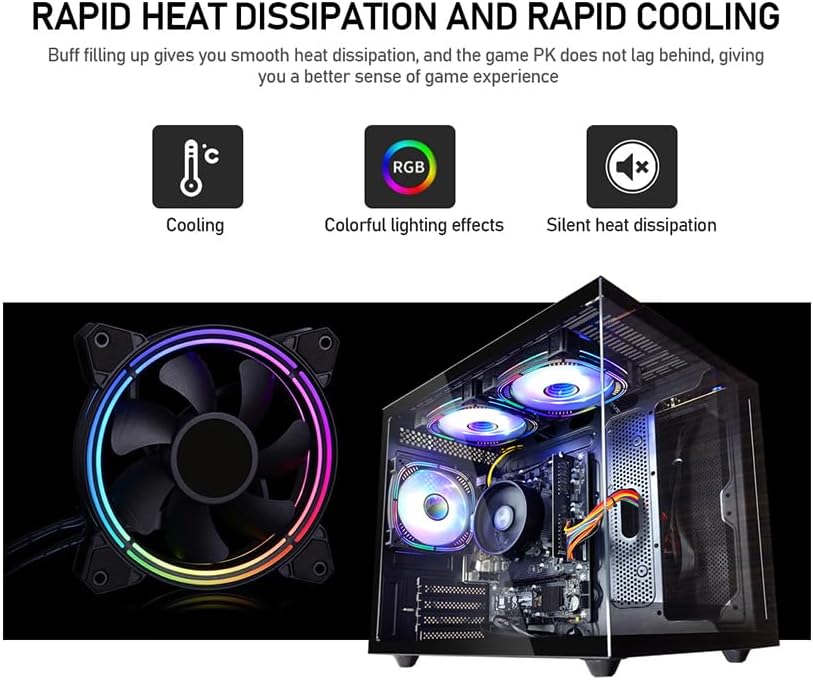
Image: Demonstrates the rapid heat dissipation and cooling capabilities of the system, featuring a close-up of an RGB fan and an internal view of the computer with multiple illuminated RGB fans, indicating colorful lighting effects and silent operation.
Entretien
Nettoyage
- Regularly clean the exterior of the computer with a soft, dry cloth.
- Use compressed air to clear dust from ventilation grilles and fan blades to maintain optimal airflow. Perform this with the computer powered off and unplugged.
Mises à jour logicielles
Keep your operating system, drivers, and applications updated to ensure system stability, security, and performance. Check for updates regularly.
Ventilation
Ensure the computer is placed in an area with good airflow. Avoid placing it in enclosed spaces or directly against walls that could obstruct vents. Proper ventilation is crucial for preventing overheating.
Sauvegarde des données
Regularly back up important data to an external drive or cloud storage. This protects your files in case of hardware failure or other unforeseen issues.
Dépannage
Pas de courant
- Check if the power cable is securely connected to both the computer and the electrical outlet.
- Vérifiez que la prise de courant fonctionne en y branchant un autre appareil.
- Assurez-vous que l'interrupteur d'alimentation situé à l'arrière du bloc d'alimentation (le cas échéant) est en position « ON ».
Aucun affichage sur l'écran
- Confirm that the monitor is powered on and its video cable (HDMI/VGA) is securely connected to both the computer and the monitor.
- Check the monitor's input source setting to ensure it matches the cable type you are using (e.g., HDMI 1, VGA).
Problèmes de performance du système
- Fermez les applications inutiles en arrière-plan pour libérer des ressources système.
- Assurez-vous que votre système d'exploitation et vos pilotes sont à jour.
- Check for adequate ventilation to prevent thermal throttling.
Error Codes or Unexpected Shutdowns
If you encounter persistent error codes or unexpected shutdowns, note down the error message and contact customer support for assistance. This may indicate a hardware issue requiring professional diagnosis.
Caractéristiques

Image: Specifications diagram for the suevery Gaming Desktop Computer, illustrating its physical dimensions (339mm x 276mm x 330mm), USB 3.0 and 2.0 port configurations, HDMI and VGA signal interfaces, and the presence of built-in 3 x 120cm chassis fans.
| Fonctionnalité | Détail |
|---|---|
| Marque | surveillance |
| Numéro de modèle | SUV9W1-SUV9W9 |
| Processeur | AMD Ryzen 5 5600GT (3.6 GHz) |
| BÉLIER | 16 Go de mémoire SDRAM DDR4 (3200 MHz) |
| Stockage | Disque SSD NVMe de 512 Go |
| Coprocesseur graphique | AMD Radeon Vega (Integrated) |
| Taille de la mémoire RAM de la carte graphique | 2 Go |
| Système opérateur | DOS (User may install preferred OS) |
| Ports USB 2.0 | 4 |
| Ports USB 3.0 | 2 |
| Sortie vidéo | HDMI, VGA |
| Plateforme matérielle | PC |
| Poids de l'article | 19.8 livres |
| Dimensions du colis | 15.83 x 14.49 x 12.76 pouces |
| Couleur | Noir |
| Wifi | Oui |
Garantie et assistance
Informations sur la garantie
This suevery Gaming Desktop Computer comes with a Garantie de 1 ans. This warranty covers manufacturing defects and hardware malfunctions under normal use conditions. Please retain your proof of purchase for warranty claims.
Assistance clientèle
For technical assistance, troubleshooting, or warranty inquiries, please contact suevery customer service. Refer to the product packaging or the seller's website pour les coordonnées spécifiques.


