
Introduction
The Zelaclock Sunrise Alarm Clock (Model YF01-C) is a versatile 4-in-1 device designed to enhance your sleep and wake-up experience. It functions as a sunrise alarm clock, white noise sound machine, night light, and Bluetooth speaker. This manual provides detailed instructions for setting up and operating your device, ensuring you can fully utilize its features for a peaceful morning and restful night.
Caractéristiques principales :
- Simulation du lever du soleil : Gradually brightens before your alarm, mimicking a natural sunrise.
- White Noise & Nature Sounds: Features 30 non-looping sounds for relaxation and sleep.
- Veilleuse RGB : Offers 9 dynamic light themes and 20 adjustable brightness levels.
- Haut-parleur Bluetooth 5.3 : Connects seamlessly to your phone for music playback and automatic time synchronization.
- Smart Sleep Timer: Allows setting a fade-out timer for lights and sounds (10-480 minutes).
Consignes de sécurité
- This device must be plugged into a power source to operate. It is not battery-operated.
- N’exposez pas l’appareil à l’eau ou à une humidité excessive.
- Évitez de placer l'appareil près de sources de chaleur ou en plein soleil pendant des périodes prolongées.
- Utilisez uniquement l’adaptateur secteur fourni.
- Tenir hors de portée des enfants et des animaux domestiques.
- N'essayez pas de démonter ou de réparer l'appareil vous-même. Contactez le service client pour obtenir de l’aide.
Produit terminéview
Familiarize yourself with the components and controls of your Zelaclock Sunrise Alarm Clock.

Image: The Zelaclock Sunrise Alarm Clock, highlighting its functions as an alarm clock, wake-up light, white noise machine, and Bluetooth speaker. It is shown plugged into a wall outlet, emphasizing that it requires continuous power.
Video: An official Zelaclock video demonstrating the features and operation of the Sunrise Alarm Clock, including its light and sound functions.
The device features intuitive buttons and a scroll wheel for easy navigation and setting adjustments. The LED display shows the time and various indicators for active functions.

Image : Gros plan view of the Zelaclock Sunrise Alarm Clock, illustrating the various buttons and their corresponding functions for light, sound, and alarm settings.
Installation
- Connexion électrique : Connect the provided USB cable to the device and plug the adapter into a standard wall outlet. The device will power on automatically.
- Réglage de l'heure :
- Appuyez et maintenez enfoncé le Réglage de l'heure Appuyez sur le bouton (souvent indiqué par une icône d'horloge) pendant 2 secondes pour entrer en mode de réglage de l'heure.
- Rotate the scroll wheel to adjust the hour, then press the Réglage de l'heure bouton pour confirmer.
- Rotate the scroll wheel to adjust the minute, then press the Réglage de l'heure bouton pour confirmer.
- The time will be set.
- Jumelage Bluetooth:
- Appuyez et maintenez enfoncé le Bluetooth button (often indicated by a Bluetooth icon) for 2 seconds to enable Bluetooth pairing mode. The Bluetooth indicator on the display will flash.
- On your smartphone or other Bluetooth-enabled device, search for "Zelaclock YF01-C" (or similar name) in the Bluetooth settings.
- Sélectionnez l'appareil à appairer. Une fois la connexion établie, le voyant Bluetooth cessera de clignoter et restera allumé en continu.
Mode d'emploi
Setting the Alarm and Sunrise Simulation
- Définir l'heure de l'alarme :
- Appuyez et maintenez enfoncé le Alarme button (bell icon) for 2 seconds. The hour display will flash.
- Rotate the scroll wheel to set the desired hour, then press the Alarme bouton pour confirmer.
- Rotate the scroll wheel to set the desired minute, then press the Alarme bouton pour confirmer.
- Set Sunrise Duration:
- After setting the alarm time, the display will show the sunrise duration (e.g., "00").
- Rotate the scroll wheel to select a sunrise duration from 10 to 60 minutes. This determines how long the light will gradually brighten before your alarm time.
- Appuyez sur le Alarme bouton pour confirmer.
- Activer/Désactiver l'alarme : Appuyez sur le Alarme Appuyez brièvement sur le bouton pour activer ou désactiver l'alarme. Une icône d'alarme apparaîtra/disparaîtra sur l'écran.
- Fonction de répétition: When the alarm sounds, press the scroll wheel (or a dedicated snooze button if present) to activate snooze. The alarm will sound again after 5-20 minutes (duration may be configurable, refer to specific button diagram).
- Arrêter l'alarme : Pour arrêter complètement l'alarme, appuyez sur le bouton et maintenez-le enfoncé. Alarme bouton pendant 3 secondes.

Image: Illustration of the sunrise simulation feature, showing the alarm clock gradually increasing light intensity from dim to bright over a set period before the alarm time.
Using White Noise and Nature Sounds
- Sélectionnez Son : Appuyez sur le Son button (wave icon) to cycle through the 30 available white noise and nature sounds.
- Régler le volume : Rotate the scroll wheel to increase or decrease the volume of the selected sound.
- Désactiver le son : Appuyez et maintenez enfoncé le Son button for 3 seconds to turn off the sound.
Image: The Zelaclock Sunrise Alarm Clock displaying sound options, with a person sleeping peacefully in the background, illustrating the white noise feature.
Adjusting Light Themes and Brightness
- Allumer/éteindre la lumière : Appuyez sur le Lumière Appuyez brièvement sur le bouton (icône soleil) pour allumer ou éteindre la lumière.
- Change Light Theme: Lorsque la lumière est allumée, appuyez sur Lumière button repeatedly to cycle through the 9 dynamic light themes, including music-reactive modes.
- Régler la luminosité : Rotate the scroll wheel to adjust the light brightness through 20 levels.

Image: The Zelaclock Sunrise Alarm Clock showcasing its 9 dynamic light themes, including gradient and solid color options.
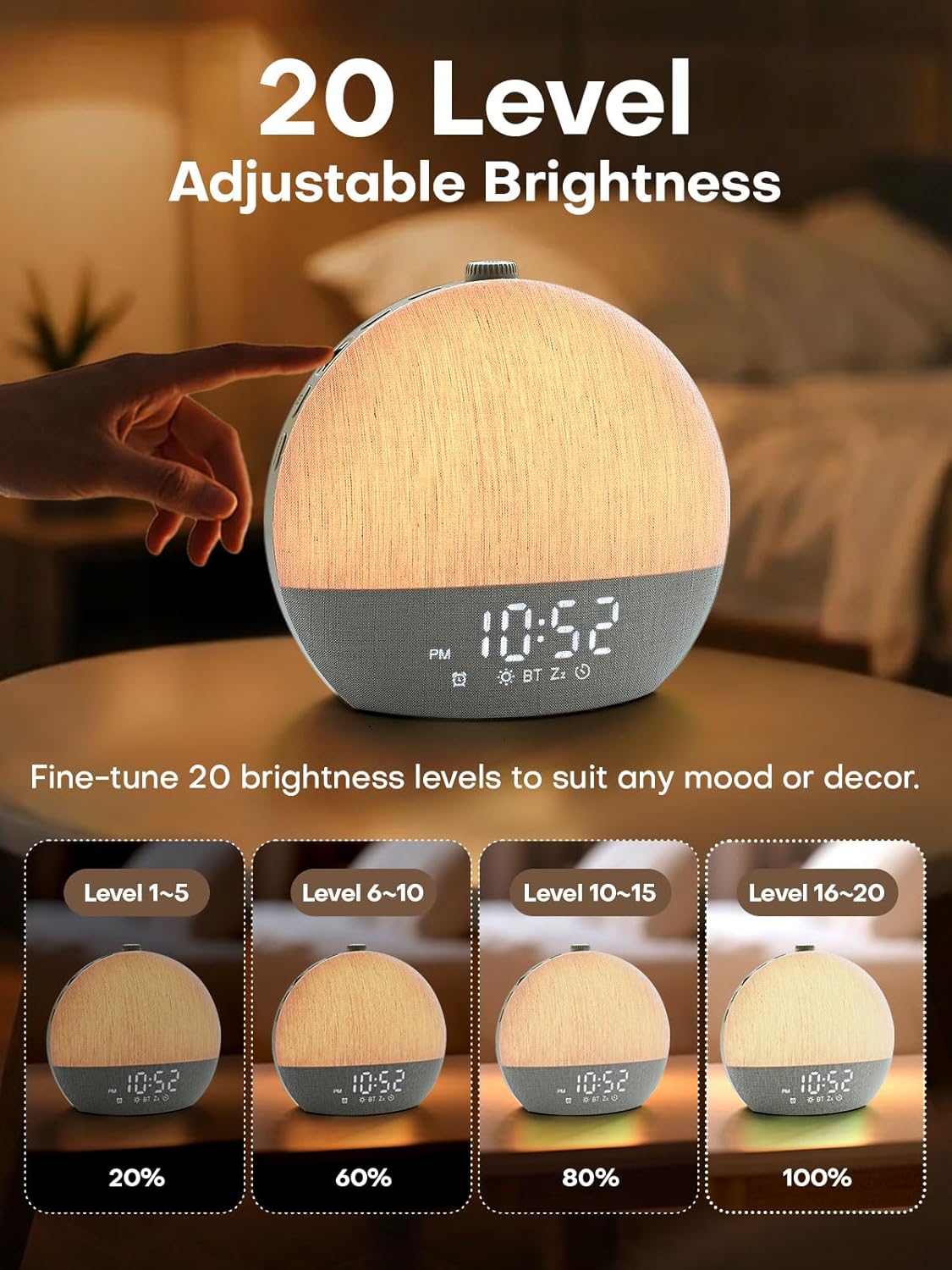
Image: Visual representation of the 20 adjustable brightness levels of the Zelaclock Sunrise Alarm Clock, from 20% to 100% illumination.
Using the Smart Sleep Timer
- Régler la minuterie de mise en veille : Appuyez sur le Minuterie de mise en veille button (moon icon) to activate the sleep timer.
- Ajuster la durée : Rotate the scroll wheel to set the desired fade-out duration from 10 to 480 minutes. Both light and sound will gradually decrease and turn off after this period.
- Cancel Sleep Timer: Appuyez et maintenez enfoncé le Minuterie de mise en veille button for 3 seconds to cancel the active sleep timer.

Image: The Zelaclock Sunrise Alarm Clock in a bedroom setting, illustrating the gradual fade-out timer for both light and sound, with a person sleeping.
Fonction haut-parleur Bluetooth
Once paired with your device (see Setup section), you can use the Zelaclock as a Bluetooth speaker.
- Play music directly from your phone or tablet.
- Use the scroll wheel on the Zelaclock to adjust the playback volume.
- Pour déconnecter Bluetooth, maintenez enfoncée la touche Bluetooth bouton pendant 2 secondes.

Image: A couple relaxing on a couch, with the Zelaclock Sunrise Alarm Clock playing music via Bluetooth from a smartphone.
Entretien
- Nettoyage: Essuyez l'appareil avec un chiffon doux et sec. N'utilisez pas de nettoyants abrasifs ni de solvants.
- Stockage: Rangez l'appareil dans un endroit frais et sec lorsqu'il n'est pas utilisé pendant une période prolongée.
- Pouvoir: Always ensure the device is unplugged before cleaning or moving.
Dépannage
| Problème | Cause possible | Solution |
|---|---|---|
| L'appareil ne s'allume pas. | Not plugged in; power adapter faulty. | Ensure the device is properly plugged into a working power outlet. Check the power adapter and cable for damage. |
| L'alarme ne sonne pas. | Alarm is disabled; volume is too low. | Check if the alarm is enabled (alarm icon on display). Increase the alarm volume using the scroll wheel. |
| Sunrise light does not work. | Sunrise feature not enabled for alarm; light brightness set too low. | Ensure sunrise duration is set during alarm setup. Adjust light brightness using the scroll wheel. |
| Impossible de se connecter via Bluetooth. | Bluetooth not in pairing mode; device too far; interference. | Ensure the device is in Bluetooth pairing mode (flashing icon). Move your phone closer to the alarm clock. Try restarting both devices. |
| La qualité sonore est médiocre. | Low quality audio source; device placement. | Ensure the audio source (e.g., phone) is playing high-quality audio. Adjust device placement to avoid obstructions. |
Caractéristiques
| Fonctionnalité | Détail |
|---|---|
| Numéro de modèle | YF01-C |
| Marque | Zelaclock |
| Type d'affichage | DIRIGÉ |
| Source d'énergie | Électrique avec fil |
| Dimensions du produit | 6 po L x 6 po H |
| Connectivité | Bluetooth 5.3, USB |
| Caractéristiques d'éclairage | Sunrise Simulation, 9 Dynamic RGB Light Themes, 20 Brightness Levels |
| Caractéristiques sonores | 30 Non-Looping Sleep Sounds (10 White Noise, 20 Nature Sounds/Melodies) |
| Fonctions de minuterie | Alarm Clock, Smart Sleep Timer (10-480 minutes) |
| Matériel | Plastique |
Garantie et assistance
For warranty information and customer support, please refer to the official Zelaclock webConsultez le site web ou contactez directement le service client. Les informations sont généralement fournies sur l'emballage du produit ou sur les plateformes en ligne officielles du fabricant.
Fabricant: Zelaclock
ASIN: B0FPRL993V
Pour obtenir de l'aide supplémentaire, vous pouvez consulter le Zelaclock Store on Amazon.