
Introduction
This manual provides essential information for the safe and efficient use of your Getac B300 G7 Fully Rugged Notebook. Please read this manual thoroughly before operating the device and retain it for future reference.
The Getac B300 G7 is designed for demanding environments, featuring MIL-STD-810G and IP65 certifications for resistance against shock, vibration, dust, and water.
Installation
1. Déballage et inspection initiale
Carefully remove the notebook and all accessories from the packaging. Inspect the device for any signs of damage. If any damage is found, contact your vendor immediately.
2. Connexion de l'alimentation
Before initial use, ensure the battery is fully charged. Connect the AC adapter to the notebook's DC-in jack and then to a power outlet.
- Adaptateur pour courant alternatif: 90 W
- Batterie: Li-on 10.8V

Figure 1: Left side of the Getac B300 G7, showing various ports including the power input.
3. Premier démarrage
Press the power button to turn on the notebook. The device will boot into Windows 11 Pro. Follow the on-screen instructions to complete the initial setup of the operating system.
4. Connexion de périphériques
The Getac B300 G7 offers multiple ports for connecting external devices:
- USB 3.0 : 3 ports for connecting USB devices like external drives, keyboards, or mice.
- Réseau local (RJ45) : Pour connexion réseau filaire.
- HDMI: Pour la connexion à des écrans externes.
- External VGA: Pour la connexion à des écrans externes plus anciens.
- Port série: 2 ports for legacy device connectivity.
- Microphone (Mini-jack): For external microphone input.
- Audio Output (Mini-jack): Pour des écouteurs ou des haut-parleurs externes.
- Connecteur d'accueil : Pour la connexion à une station d'accueil compatible.
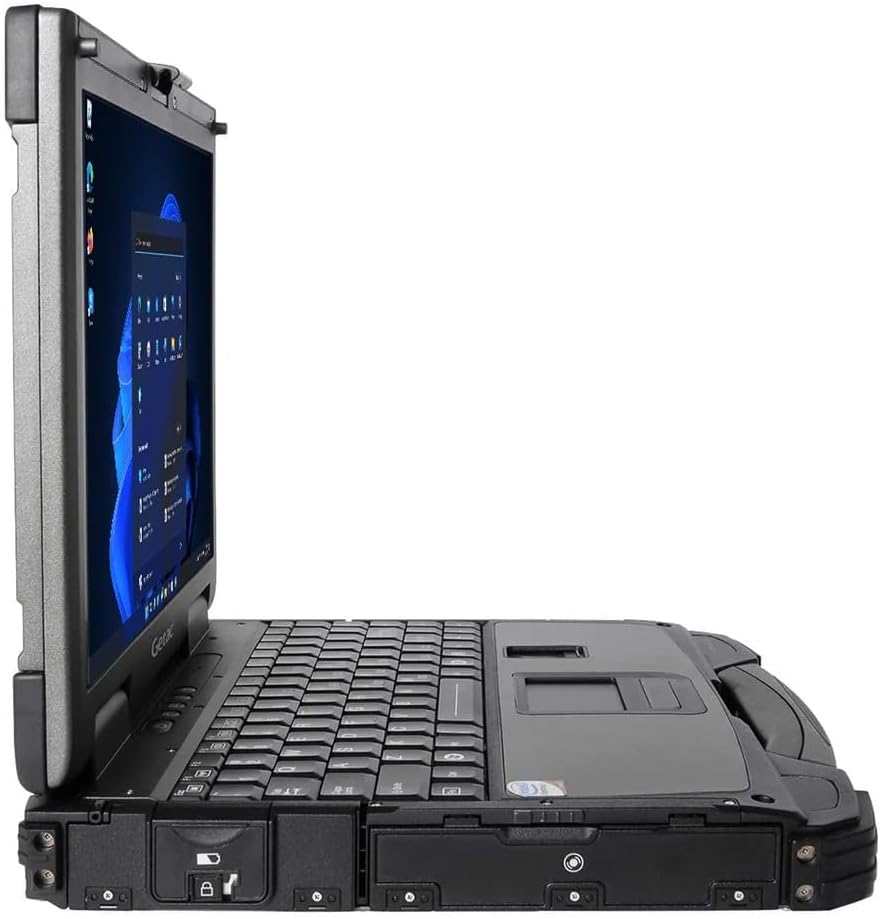
Figure 2: Right side of the Getac B300 G7, showing additional ports.
Utilisation de l'ordinateur portable
1. Marche/Arrêt
- Pour allumer : Appuyez sur le bouton d'alimentation situé sur l'appareil.
- Pour éteindre : Use the Windows Start menu to select 'Shut down'. Avoid forced shutdowns unless necessary to prevent data loss.
2. Display and Touchscreen
The notebook features a 13.3-inch TFT LCD XGA (1024 x 768) touchscreen display with 700 nits brightness. You can interact with the display using your finger or a compatible stylus (not included).
- Gestes tactiles : Standard Windows 11 touch gestures are supported.
- Réglage de la luminosité : Adjust display brightness through Windows settings or dedicated function keys (if available).
3. Clavier et périphériques d'entrée
The Getac B300 G7 includes a backlit keyboard for use in low-light conditions. The integrated touchpad can be used for cursor control. An Insertable Smartcard Reader is also available for secure access applications.
- Contrôle du rétroéclairage : Use the appropriate function key combination to toggle or adjust keyboard backlight.
- Smartcard Reader: Insert your smartcard into the designated slot for authentication or data access.
4. Optical Drive
The notebook is equipped with a DVD Super Multi Drive. This allows you to read and write various CD and DVD formats.
- Insertion d'un disque : Gently push the disc into the drive until it clicks into place.
- Éjecter un disque : Use the eject button on the drive or the eject option in Windows File Explorateur.
5. Système d'exploitation
Your Getac B300 G7 comes with Windows 11 Pro pre-installed. Refer to Microsoft's documentation for detailed information on using Windows 11 Pro features and functionalities.
Entretien
1. Cleaning the Notebook
- Extérieur: Utilisez un chiffon doux et sec.amp Utilisez un chiffon imbibé d'une solution nettoyante douce. Évitez les produits chimiques agressifs et les matériaux abrasifs.
- Afficher: Use a microfiber cloth specifically designed for screens. Do not spray cleaners directly onto the screen.
- Ports: Ensure ports are free of dust and debris. Use compressed air if necessary, holding the can upright.
2. Entretien de la batterie
Pour optimiser l'autonomie et les performances de la batterie :
- Évitez les températures extrêmes.
- Ne déchargez pas complètement la batterie fréquemment.
- If storing the notebook for an extended period, charge the battery to approximately 50-60% before storage.
3. Caractéristiques robustes
While the B300 G7 is designed to be rugged, proper care is still essential:
- Ensure all port covers are securely closed to maintain IP65 dust and water resistance.
- Avoid unnecessary drops or impacts, even though the device is MIL-STD-810G certified.
- Clean any mud or dirt from the casing promptly.

Figure 3 : Haut view of the Getac B300 G7, showcasing sa conception robuste.
Dépannage
This section addresses common issues you might encounter with your Getac B300 G7 notebook.
1. Notebook Does Not Power On
- Assurez-vous que l'adaptateur secteur est correctement connecté à la fois à l'ordinateur portable et à une prise de courant fonctionnelle.
- Verify the battery is charged. If the battery is completely drained, it may take a few minutes of charging before the notebook can power on.
- Try removing and reinserting the battery (if user-removable) to reset it.
2. Problèmes d'affichage
- Pas d'affichage : Connect an external monitor to the HDMI or VGA port to check if the issue is with the internal display.
- Affichage faible: Adjust the brightness settings in Windows or using the keyboard function keys.
- Écran tactile non réactif : Restart the notebook. If the issue persists, check for driver updates in Windows Device Manager.
3. Peripheral Devices Not Working
- Ensure the device is properly connected to the correct port.
- Try connecting the device to a different port or another computer to rule out device malfunction.
- Check Windows Device Manager for any driver issues related to the peripheral.
4. Problèmes de performance du système
- Fermez les applications inutiles qui s'exécutent en arrière-plan.
- Assurez-vous que Windows et vos pilotes sont à jour.
- Lancez un nettoyage et une défragmentation du disque (pour les disques durs, inutile pour les SSD).
- Vérifiez la présence de logiciels malveillants ou de virus.
Caractéristiques
| Fonctionnalité | Description |
|---|---|
| Nom du modèle | B300 G7 |
| Processeur | Intel Core i5-8350U (1.7 GHz, up to 3.6 GHz with Turbo Boost, 6MB Cache) |
| BÉLIER | 16 Go de mémoire DDR4 (2400 MHz), jusqu'à 32 Go. |
| Stockage | Disque SSD 512 Go |
| Afficher | 13.3-inch TFT LCD XGA (1024 x 768), 700 nits, Touchscreen |
| Graphique | Carte graphique Intel UHD 620 intégrée |
| Système opérateur | Windows 11 Pro |
| Lecteur optique | DVD Super Multi Drive |
| Ports | USB 3.0 x 3, LAN (RJ45), HDMI, External VGA, Serial Port x 2, Microphone (Mini-jack), Audio Output (Mini-jack), DC-in Jack, Docking Connector |
| Caractéristiques spéciales | Backlit Keyboard, Insertable Smartcard Reader |
| Certification robuste | MIL-STD-810G, IP65 |
| Dimensions (L x l x H) | 11.9" x 10.35" x 2.36" |
| Poids | 7.7 livres |
| Connectivité | Ethernet (No Wi-Fi, No Bluetooth) |
| Articles inclus | Li-on battery 10.8V, AC Adapter 90W |

Figure 4 : Haut view of the Getac B300 G7, highlighting its robust casing and integrated handle for portability.
Informations sur la garantie
This Getac B300 G7 notebook comes with a Garantie limitée de 90 joursCette garantie couvre les défauts de matériaux et de fabrication dans des conditions normales d'utilisation pendant la période de garantie.
La garantie ne couvre pas :
- Dommages causés par un accident, un abus, une mauvaise utilisation, une inondation, un incendie, un tremblement de terre ou d'autres causes externes.
- Damage caused by operating the product outside the permitted or intended uses described by Getac.
- Damage caused by service performed by anyone who is not an authorized service provider.
- Products or parts that have been modified to alter functionality or capability without the written permission of Getac.
For specific terms and conditions, please refer to the warranty documentation provided with your purchase or contact your vendor.
Soutien
If you encounter issues that cannot be resolved using the troubleshooting guide in this manual, please contact your vendor or an authorized service center for assistance. When contacting support, please have your model number (B300 G7) and serial number ready.
For the latest drivers, software updates, and additional support resources, please visit the official Getac support website.