
Introduction
The BEREST A10 Baby Lovey Music Box is designed to provide a soothing environment for newborns and infants, aiding in peaceful sleep. This device features 10 calming sounds, a smart cry sensor, an adjustable timer, a recording function, and a rechargeable battery. This manual provides essential information for the safe and effective use of your BEREST A10.
Consignes de sécurité
- N’utilisez pas l’appareil dans le bain ou à proximité de l’eau.
- Do not use the USB cable while the machine is in use.
- Cet appareil n'est pas un jouet. Tenir hors de portée des enfants.
- Use the device within recommended noise levels to prevent potential hearing damage.
Contenu du colis
Veuillez cocher la case correspondant aux éléments suivants :
- BEREST A10 Music Box
- Câble de charge de type C
- Manuel d'utilisation
- Gifted Box

Image: Contents of the BEREST A10 package, including the music box, charging cable, and manual.
Produit terminéview
The BEREST A10 is a compact and versatile sleep soother. Its main features include:
- 10 sons apaisants : Includes 2 heartbeat sounds, white noise, rain, shushing, and 5 different lullabies.
- Smart Baby Cry Sensor: Automatically detects baby's crying and plays soothing sounds for 30 minutes.
- Minuterie réglable : Set for 15, 30, or 60 minutes, or enable continuous play.
- Fonction d'enregistrement : Allows for up to 120 seconds of personalized recording.
- Batterie au lithium rechargeable : Provides long-lasting power, eliminating the need for disposable batteries.
- Contrôle du volume réglable : Fine-tune the sound level to protect infant hearing.
- Conception compacte : Measures 2.52 x 2.52 x 1.38 inches, designed to fit seamlessly into most plush toys and loveys.

Image: The BEREST A10 Music Box shown with various plush toys, highlighting its small size and versatility.
Installation
1. Chargement de l'appareil
Before first use, fully charge the BEREST A10 using the provided Type-C charging cable. Connect the cable to the device and a suitable USB power source. The charging indicator light will show the charging status.
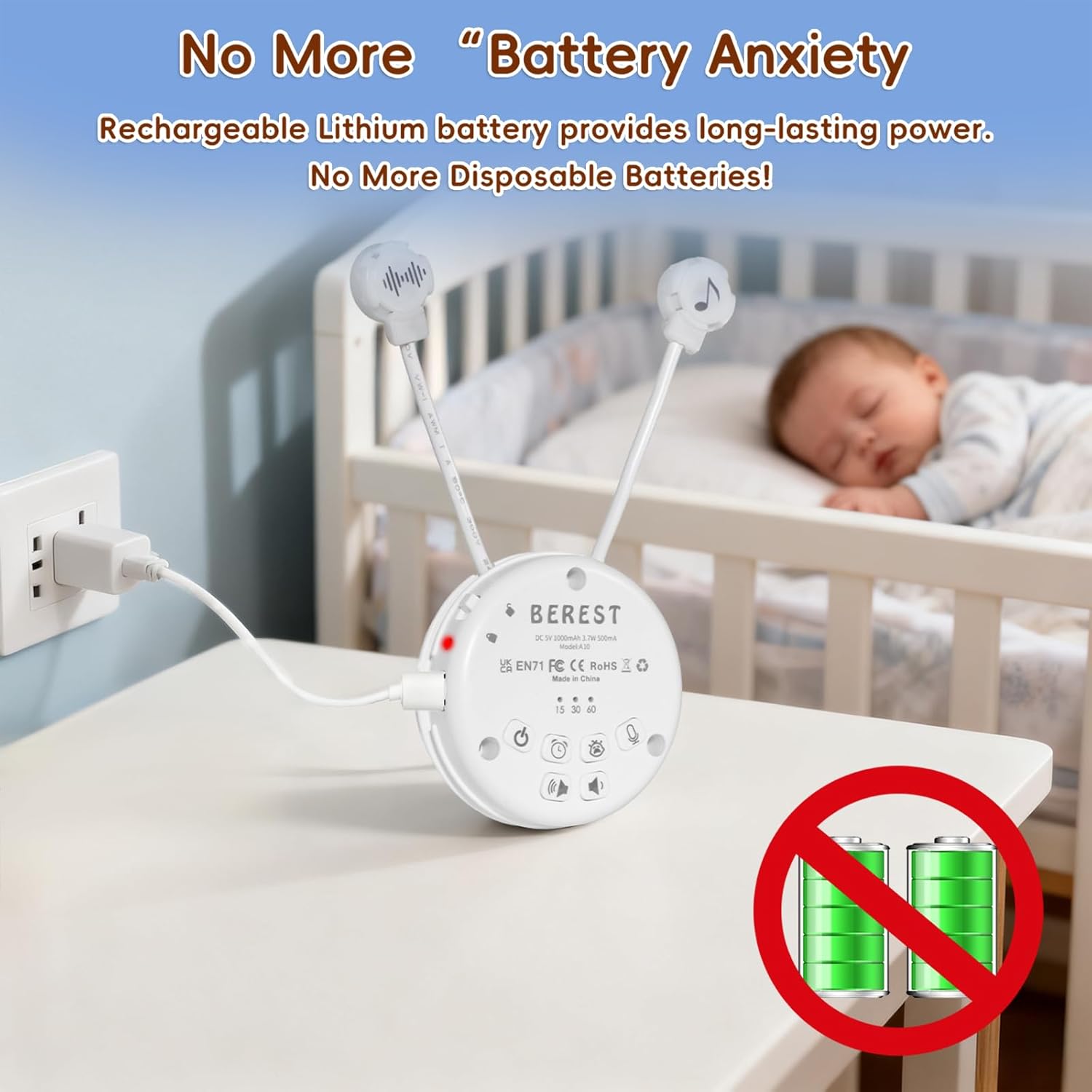
Image: The BEREST A10 Music Box being charged with its Type-C cable, indicating its rechargeable nature.
2. Inserting into a Plush Toy (Optional)
The compact design of the A10 allows it to be inserted into most plush toys or loveys. Locate the opening in your plush toy, gently insert the music box, and secure it if possible. Ensure the buttons are accessible if you plan to operate it while inside the plush.

Image : Un gros plan view of the BEREST A10 Music Box being placed inside a plush toy for integrated use.
Mode d'emploi
Familiarize yourself with the control buttons on the device:
Image: Labeled diagram of the BEREST A10 Music Box controls.
1. Marche/Arrêt
- Appuyez sur le Bouton marche/arrêt once to turn the device on.
- Appuyez et maintenez enfoncé le Bouton marche/arrêt pendant 3 secondes pour éteindre l'appareil.
2. Sélection du son
- When the device is on, short press the Bouton marche/arrêt to cycle through the 10 available soothing sounds (2 heartbeats, white noise, rain, shushing, 5 lullabies).
- Appuyez longuement sur le Bouton marche/arrêt for 3 seconds (while on) to enable continuous loop playing of all songs.

Image: The BEREST A10 Music Box providing 10 soothing sounds for a sleeping baby.
3. Contrôle du volume
- Appuyez sur le Bouton d'augmentation du volume pour augmenter le niveau sonore.
- Appuyez sur le Bouton de réduction du volume to decrease the sound level.
4. Fonction de minuterie
- Appuyez sur le Bouton de minuterie to set the auto-off timer. The available options are 15, 30, or 60 minutes.
- If no timer is set, the device will play continuously until manually turned off or the battery runs out.

Image: The BEREST A10 Music Box with its timer function set to 15, 30, or 60 minutes.
5. Smart Baby Cry Sensor
- Appuyez sur le Baby Cry Sensor button pour activer cette fonctionnalité.
- When activated, the device will automatically detect a baby's crying and play soothing sounds for 30 minutes to help calm the baby back to sleep.
- The sensor will reactivate if crying is detected again after the 30-minute cycle.

Image: The BEREST A10 Music Box's cry sensor feature, designed to soothe a crying baby.
6. Fonction d'enregistrement
- Appuyez et maintenez enfoncé le Bouton d'enregistrement to begin recording. The device supports up to 120 seconds of recording.
- Relâchez le bouton pour arrêter l'enregistrement.
- Appuyez brièvement sur le Bouton d'enregistrement to play back your recorded message.
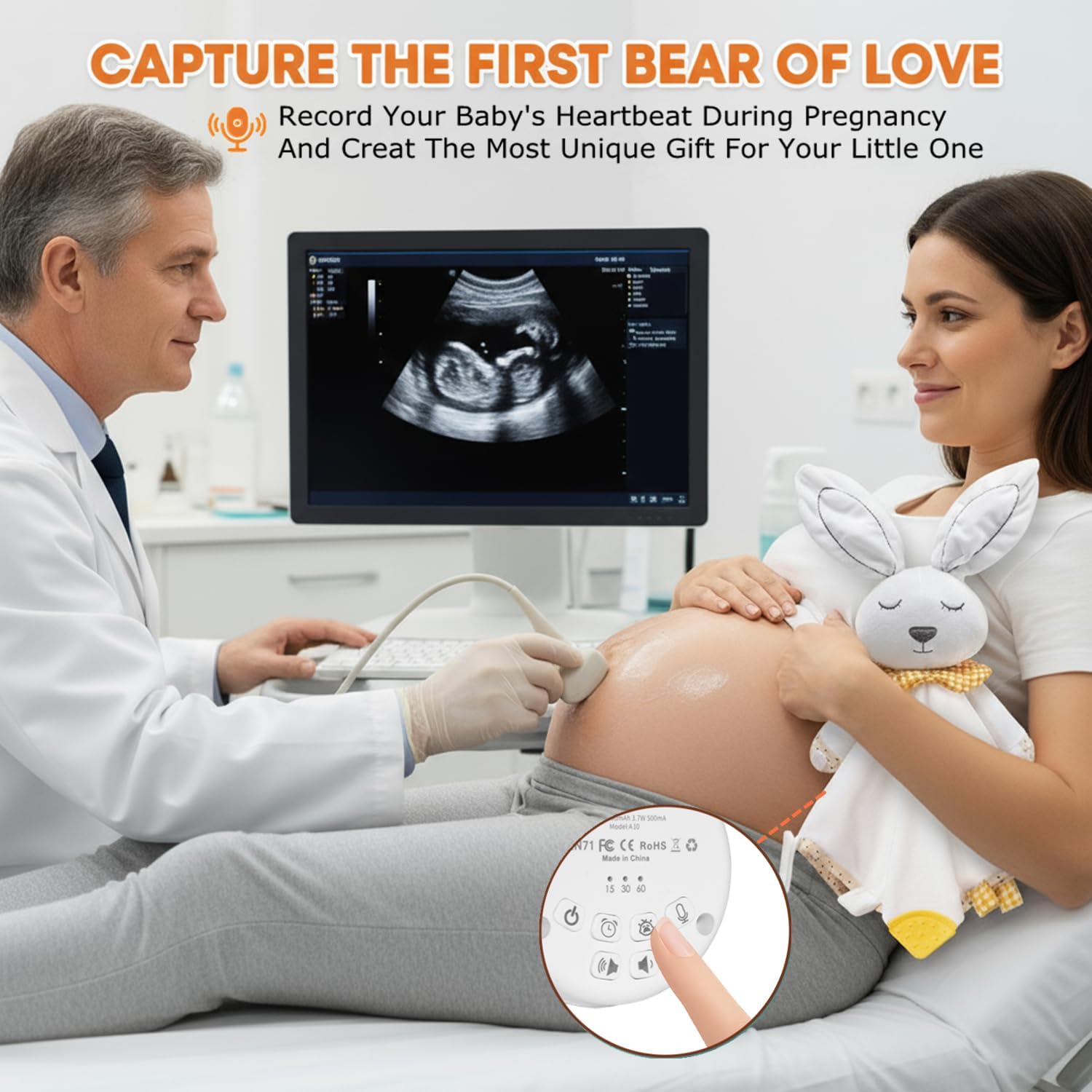
Image: The BEREST A10 Music Box's recording function being used to capture a heartbeat.
7. Verrouillage enfant
- Localisez le Children Lock switch sur le côté de l'appareil.
- Slide the switch to the lock position to prevent accidental changes to settings by children.
Entretien
Nettoyage
- Essuyez l'appareil avec un chiffon doux et sec.
- N’utilisez pas de nettoyants liquides et n’immergez pas l’appareil dans l’eau.
Entretien de la batterie
- Pour prolonger la durée de vie de la batterie, évitez de la décharger complètement et fréquemment.
- Rangez l'appareil dans un endroit frais et sec lorsqu'il n'est pas utilisé pendant une période prolongée.
Dépannage
| Problème | Cause possible | Solution |
|---|---|---|
| L'appareil ne s'allume pas. | Batterie faible ou déchargée. | Chargez l'appareil à l'aide du câble Type-C fourni. |
| Aucun son ou volume faible. | Le volume est réglé trop bas. | Augmentez le volume à l'aide du bouton Volume +. |
| Le capteur de pleurs ne s'active pas. | Cry sensor not enabled or ambient noise is too high. | Ensure the Baby Cry Sensor button is pressed. Reduce other noise sources. |
| L'appareil s'éteint inopinément. | Timer is set, or battery is low. | Check timer settings. Recharge the device if the battery is low. |
Caractéristiques
| Numéro de modèle | A10 |
| Dimensions du produit | 2.52 x 2.52 x 1.38 pouces |
| Poids de l'article | 3.2 onces |
| Type de matériau | Plastique |
| Couleur | Blanc crémeux |
| Type de batterie | Rechargeable Lithium-ion (1 AA battery included, likely referring to internal rechargeable equivalent) |
Garantie et assistance
For warranty information or technical support, please refer to the contact details provided with your purchase or visit the official BEREST webConsultez le site. Conservez votre preuve d'achat pour toute réclamation au titre de la garantie.