
1. Introduction
This manual provides essential information for the safe and effective operation of your LASER TREE K1 Mini 5W Laser Engraver. Please read this manual thoroughly before assembly, operation, or maintenance to ensure proper usage and to prevent damage or injury. This device is designed for high-precision engraving and cutting on various materials, offering a 12x12 inch (300x300mm) work area.
2. Consignes de sécurité
The LASER TREE K1 Mini 5W is a Class 4 laser product. Improper use can result in serious injury, including eye damage, skin burns, and fire. Always adhere to the following safety guidelines:
- Protection des yeux : Always wear the provided laser safety goggles when the laser is operating. Never look directly at the laser beam or its reflection.
- Ventilation: Utilisez la graveuse dans un endroit bien ventilé afin de dissiper les fumées et les émanations produites pendant la gravure ou la découpe.
- Risque d'incendie : Keep a fire extinguisher nearby. Do not leave the machine unattended during operation. Certain materials are highly flammable.
- Compatibilité matérielle : Only engrave or cut approved materials. Avoid reflective, transparent, or blue/purple/white materials, and non-anodized bare aluminum, as these can cause unpredictable laser behavior or damage.
- Enfants et animaux domestiques : Gardez les enfants et les animaux domestiques éloignés de la zone d’opération.
- Arrêt d'urgence: Familiarisez-vous avec l'emplacement de l'interrupteur d'alimentation pour un arrêt immédiat en cas d'urgence.
3. Produit terminéview
The LASER TREE K1 Mini 5W Laser Engraver features a 5W output power blue laser diode, offering stable and efficient performance for various DIY projects. It boasts a large 300x300mm engraving area and a full metal aluminum design for durability and precision.
Caractéristiques principales :
- Powerful 5W Laser: Equipped with a 5W output power blue laser diode for high-efficiency engraving and cutting, with a lifespan of up to 20,000 hours.
- Haute précision : Utilizes beam compressed spot technology for enhanced accuracy, with a fixed 23mm focal length and a spot size of 0.16*0.04mm.
- Fonctionnement rapide : Supports engraving speeds up to 25,000 mm/min.
- Large compatibilité des matériaux : Engraves and cuts plywood, pine wood, stone, coated glass, brushed/mirror stainless steel, black acrylic, plastic, leather, anodized aluminum, and lacquered metal.
- Conception de protection oculaire : Includes safety goggles and a magnetic cover to minimize eye irritation.
- Pieds de support réglables : Four support feet increase the working height for engraving and cutting operations.
- Réglage facile de la mise au point : A dedicated knob allows for simple adjustment of the laser module height to achieve optimal focus based on material thickness.
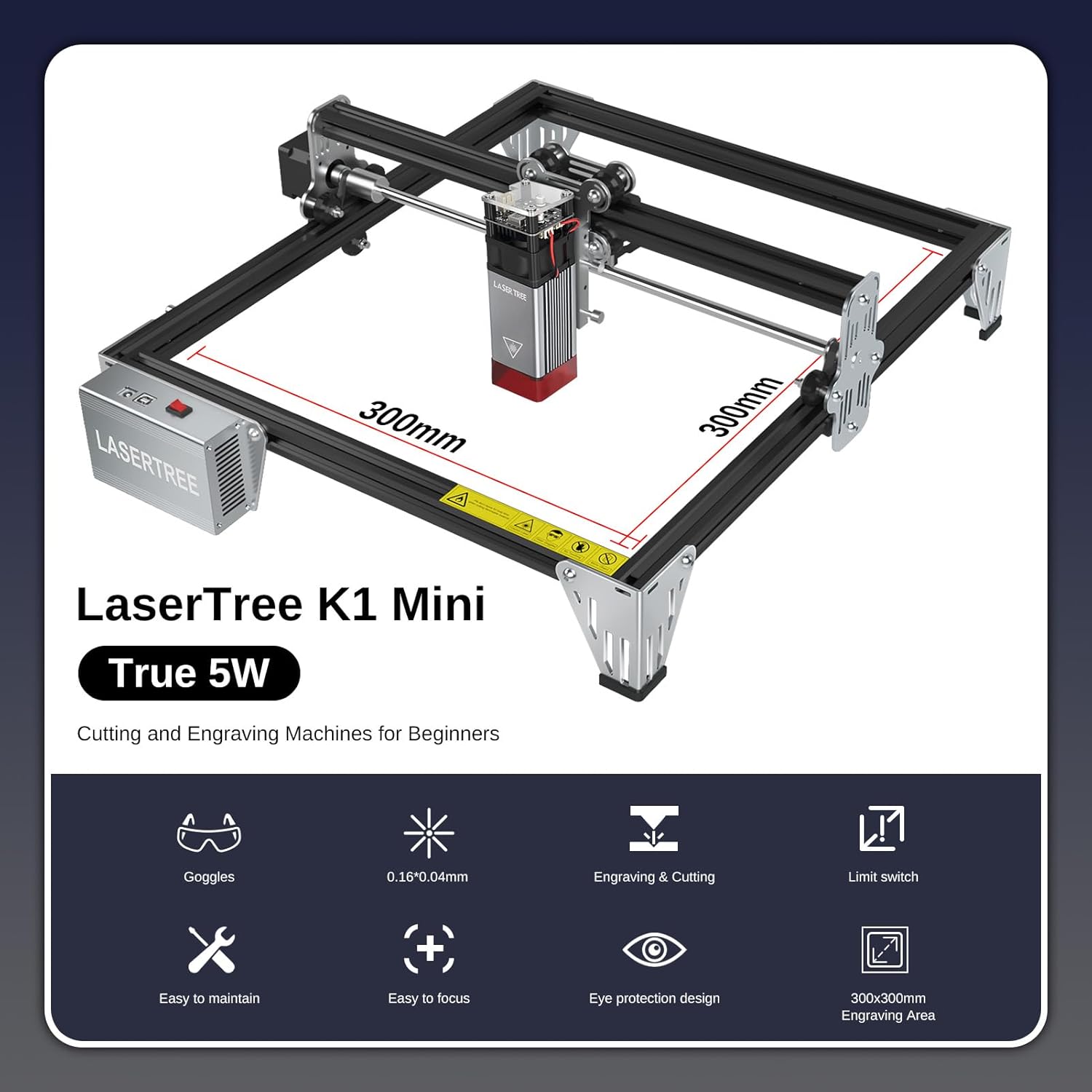
Figure 3.1 : Plusview of the LASER TREE K1 Mini 5W Laser Engraver, highlighting its 300x300mm work area.

Figure 3.2: The 5W output power laser module demonstrating its cutting capabilities on various materials such as 3mm acrylic, 3mm MDF, and 4mm plywood.

Figure 3.3: Illustration of the laser's fine spot size (0.16x0.04mm), enabling high-precision engraving.

Figure 3.4: The laser engraver in operation, emphasizing the importance of eye protection with safety goggles and the laser module's protective cover.

Figure 3.5: Detail of the adjustable support feet, designed to increase the working height for various engraving and cutting tasks.
4. Installation
The LASER TREE K1 Mini 5W is designed for quick and easy installation. All parts are pre-packaged in clearly labeled bags. Refer to the detailed illustrated user manual included in your package for specific step-by-step assembly instructions.
Étapes générales d'assemblage :
- Déballez tous les composants et vérifiez-les par rapport à la liste de colisage.
- Assemble the frame according to the provided diagrams.
- Installez le module laser sur le portique.
- Connect all necessary cables (power, USB).
- Ensure the machine is placed on a stable, level surface in a well-ventilated area.
5. Mode d'emploi
The K1 Mini 5W laser engraver is compatible with popular engraving software such as LaserGRBL (Windows XP/7/8/10) and LightBurn (Mac OS, Linux). LightBurn is paid software.
Software and Connection:
- Install your preferred software (LaserGRBL or LightBurn) on your computer.
- Connectez la graveuse à votre ordinateur à l'aide du câble USB fourni.
- Mise sous tension de la graveuse.

Figure 5.1: The LASER TREE 5W laser engraver connects to a computer via USB and is compatible with LightBurn and LaserGRBL software.
Étapes de fonctionnement de base :
- Préparer le matériel : Place your chosen material on the engraving bed.
- Ajuster la mise au point : Use the focus adjustment knob to set the correct focal length for your material. The fixed focal length is 23mm.
- Conception de la charge : Ouvrez votre conception file dans le logiciel de gravure.
- Définir les paramètres : Adjust engraving/cutting parameters (speed, power, DPI) based on the material. Refer to the Material Compatibility & Settings section.
- Démarrer l'opération : Initiate the engraving or cutting process from the software. Always supervise the machine during operation.
Video 5.1: This video demonstrates the LASER TREE 5W laser engraver in action, showcasing its engraving capabilities on various materials like stainless steel, leather, and wood (zelkova). It highlights the precision and speed of the machine for different applications.
6. Compatibilité des matériaux et paramètres
The LASER TREE K1 Mini 5W is compatible with a wide range of materials. Optimal settings vary depending on the material type and desired outcome (engraving vs. cutting). Always perform test engravings on scrap material to find the best parameters.
Matériaux compatibles :
- Plywood, Pine wood, Bamboo, Walnut
- Stone, Coated glass
- Brushed/Mirror stainless steel, Anodized aluminum, Lacquered metal
- Black acrylic, Plastic
- Cuir
Matériaux incompatibles :
- Blue, Purple, White, or Transparent materials
- Non-anodized bare aluminum
Recommended Engraving Parameters:

Figure 6.1: A table outlining recommended settings for different materials, including focus fixed plate distance, speed (mm/min), power (%), and interval/quality (Lines/mm).
| Matériel de gravure | Plaque de mise au point fixe (mm) | Vitesse recommandée (mm/min) | Pouvoir (%) | Intervalle (mm) / Qualité (Lignes/mm) |
|---|---|---|---|---|
| Acrylique | 5 | 6,000 | 30 | 0.04 / 10 |
| Contre-plaqué | 5 | 6,000 | 50 | 0.1 / 10 |
| MDF | 5 | 6,000 | 20 | 0.05 / 10 |
| planche de pin | 5 | 6,000 | 50 | 0.06 / 10 |
| Bambou | 5 | 6,000 | 40 | 0.05 / 10 |
| Acier inoxydable | 5 | 1,200 | 100 | 0.04 / 10 |
| Alumine anodique | 5 | 6,000 | 50 | 0.05 / 10 |
| Cuir | 5 | 6,000 | 10 | 0.05 / 10 |
Note: These parameters are starting points. Fine-tuning may be required for specific material batches or desired effects.
7. Entretien
Un entretien régulier garantit la longévité et les performances optimales de votre graveur laser.
- Nettoyage: Regularly clean the engraving bed, gantry rails, and laser lens. Use a soft, lint-free cloth and appropriate cleaning solutions for the lens.
- Lubrification: Periodically lubricate the moving parts (e.g., linear rails) as recommended in the detailed manual to ensure smooth operation.
- Mises à jour du micrologiciel : Check the LASER TREE official webConsultez ce site pour connaître les mises à jour du micrologiciel disponibles pour votre appareil.
8. Dépannage
En cas de problème, consultez les conseils de dépannage courants suivants :
- Laser non fonctionnel : Check power connection, USB connection, and ensure the laser module is properly seated. Verify software settings for laser power.
- Qualité de gravure/découpe médiocre : Re-check focus, adjust speed/power settings, ensure material is flat and secure, and clean the laser lens.
- Problèmes de connexion logicielle : Ensure correct drivers are installed, try a different USB port or cable, and restart both the engraver and computer.
- Machine immobile : Check cable connections to motors, ensure no physical obstructions, and verify software commands.
For further assistance, contact LASER TREE customer support.
9. Spécifications
| Spécification | Détail |
|---|---|
| Numéro de modèle | K1 Mini 5w |
| Puissance de sortie du laser | 5 W (5000 mW) |
| Espace de travail | 12 x 12 pouces (300 x 300 mm) |
| Dimensions du produit | 13 x 13 x 6 pouces |
| Poids de l'article | 9.26 livres |
| Distance focale | Fixe 23 mm |
| Taille du spot | 0.16*0.04mm |
| Vitesse de gravure maximale | 25,000 mm/min |
| Compatibilité logicielle | LaserGRBL (Windows), LightBurn (Mac OS, Linux) |
| Fabricant | ARBRE LASER |
10. Garantie et assistance
LASER TREE is committed to providing high-quality products and customer satisfaction. Your product is supported by a professional engineer team ready to provide timely troubleshooting and after-sales support for all pre-sale and usage questions.
For warranty information or technical support, please refer to the contact details provided with your product packaging or visit the official LASER TREE website.