
1. Introduction
Thank you for choosing the T-Wolf T61 60% Wired Mechanical Gaming Keyboard. This manual provides detailed instructions for setting up, operating, and maintaining your keyboard to ensure optimal performance and longevity. Please read this manual carefully before using the product.
2. Produit terminéview
2.1 Principales caractéristiques
- Interrupteurs mécaniques : Delivers precise tactile feedback and long-lasting performance.
- Connexion USB filaire : Stable USB 2.0 plug-and-play interface; no drivers required.
- Disposition compacte à 60 % : Functional design that saves space while maintaining key usability.
- Multi-Key Rollover: Supports simultaneous key presses without input errors, ensuring precise performance during intense typing or gaming sessions.
- Rétroéclairage RVB : Customizable vibrant RGB backlighting for enhanced aesthetics.
- Fonctionnement à faible bruit : Moderate sound level suitable for various environments.
- Conception anti-éclaboussures : Helps protect against light spills (not waterproof).
2.2 Contenu du paquet
- 1 x T-Wolf T61 60% Wired Mechanical Gaming Keyboard
- 1 x Manuel d'utilisation (ce document)
2.3 Schéma du clavier
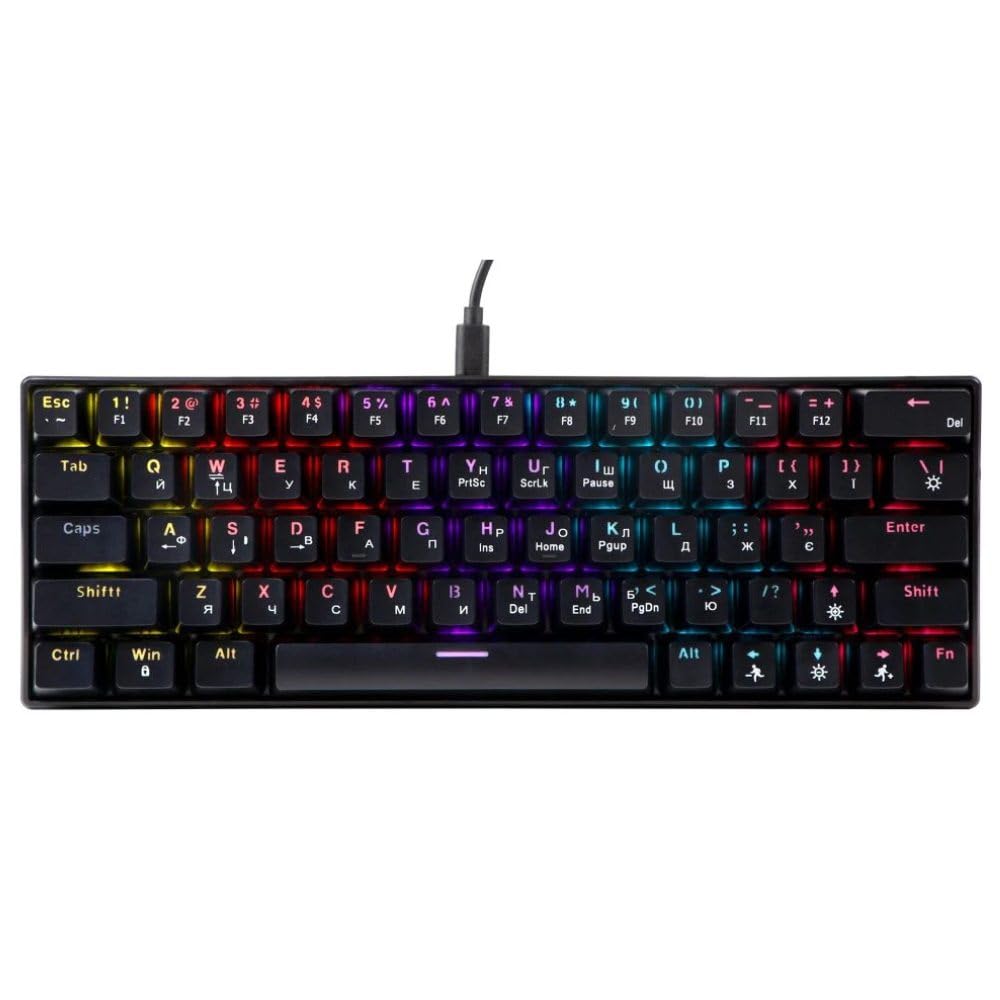
An image showing the T-Wolf T61 60% Wired Mechanical Gaming Keyboard, highlighting its compact layout and design.
3. Installation
- Déballer le clavier : Retirez soigneusement le clavier et tous les accessoires de leur emballage.
- Connectez-vous à votre appareil : Locate an available USB port on your computer (PC, laptop) or gaming console. Insert the USB connector of the T-Wolf T61 keyboard into the USB port.
- Installation automatique du pilote : The keyboard is plug-and-play. Your operating system will automatically detect and install the necessary drivers. This process may take a few moments.
- Prêt à l'emploi : Une fois les pilotes installés, le clavier est prêt à être utilisé immédiatement.
4. Mode d'emploi
The T-Wolf T61 keyboard functions as a standard QWERTY layout keyboard. Its 60% compact design means some functions are accessed via key combinations.
4.1 Contrôle du rétroéclairage RVB
The keyboard features customizable RGB backlighting. Specific key combinations are used to change lighting modes and effects. Refer to the keyboard's function layer markings for exact controls, typically involving the Fn key combined with other keys (e.g., Fn + \| for mode changes, Fn + [{ or Fn +]} for brightness/speed adjustments).
- Changement de modes d'éclairage : Presse Fn + \| faire défiler différents effets d'éclairage RVB.
- Réglage de la luminosité : Utiliser Fn + [{ pour diminuer la luminosité et Fn +]} pour augmenter la luminosité.
- Réglage de la vitesse : Utiliser Fn +; pour diminuer la vitesse d'effet et Fn + '" pour augmenter la vitesse d'action.
4.2 Multi-Key Rollover
The T61 keyboard supports multi-key rollover, allowing multiple keys to be pressed simultaneously without ghosting or missed inputs. This feature is particularly beneficial for fast typing and complex gaming commands.
5. Entretien
Un entretien approprié garantit la longévité et les performances de votre clavier.
- Nettoyage: Use a soft, dry cloth to wipe the surface of the keyboard. For deeper cleaning, use a can of compressed air to remove dust and debris from between the keycaps. For stubborn dirt, a slightly damp Un chiffon imbibé d'une solution nettoyante douce peut être utilisé, en veillant à ce qu'aucun liquide ne pénètre dans le clavier.
- Conception anti-éclaboussures : While the keyboard features a spill-resistant design to protect against light spills, it is pas étanche. In case of a spill, immediately disconnect the keyboard from your device, gently wipe away any liquid, and allow it to air dry completely before reconnecting.
- Stockage: Rangez le clavier dans un endroit frais et sec, à l'abri de la lumière directe du soleil et des températures extrêmes.
6. Dépannage
If you encounter issues with your T-Wolf T61 keyboard, please refer to the following common solutions:
- Le clavier ne répond pas :
- Assurez-vous que le câble USB est correctement connecté à la fois au clavier et à votre appareil.
- Essayez de connecter le clavier à un autre port USB.
- Testez le clavier sur un autre ordinateur pour exclure un problème lié à l'appareil.
- Redémarrez votre ordinateur.
- Rétroéclairage RGB défectueux/incorrect :
- Vérifiez que le clavier est correctement alimenté.
- Cycle through the RGB modes using the designated key combinations (e.g., Fn + \|).
- Adjust brightness settings (e.g., Fn + [{ / Fn +]}).
- Touches non enregistrées ou saisie en double :
- Clean the affected keycap and switch area using compressed air to remove any debris.
- Ensure no software conflicts are present (e.g., other keyboard drivers or utilities).
Si le problème persiste après avoir suivi ces étapes, veuillez contacter le service client.
7. Spécifications
| Fonctionnalité | Description |
|---|---|
| Marque | T-LOUP |
| Modèle | T61 |
| Technologie de connectivité | USB filaire |
| Description du clavier | Mécanique |
| Nombre de clés | 65 |
| Disposition du clavier | QWERTY |
| Caractéristiques spéciales | RGB Backlit, Multi-Key Rollover, Low-Noise Operation, Spill-Resistant Design |
| Appareils compatibles | PC, laptop, gaming consoles |
| Matériel | Métal, plastique |
| Couleur | Noir |
| Pays d'origine | Chine |
8. Garantie et assistance
The T-Wolf T61 keyboard comes with a standard manufacturer's warranty. Please refer to the warranty card included with your purchase or contact your retailer for specific warranty terms and conditions.
For technical support, troubleshooting assistance, or warranty claims, please contact the retailer where you purchased the product or visit the official T-Wolf website de ressources d'assistance.