
1. Introduction
This manual provides detailed instructions for the installation, operation, and maintenance of your new XTRONS Android 14 Qualcomm 665 Car Stereo. Please read this manual thoroughly before using the product to ensure proper functionality and safety.
1.1 Modèles et années concernés
Cet autoradio est compatible avec les modèles et années de véhicules suivants :
- For BMW: E46 4-door Sedan (1998-2005), E46 2-door Coupe (1999-2006), E46 2-door Convertible (1999-2006), E46 5-door Touring (1999-2005), E46 3-door Hatchback (2000-2004), E46 M3 (2000-2006)
- For Rover: Rover 75 (1999-2005)
- For MG: ZT (2001-2005)

Figure 1 : Modèles et années concernés
1.2 Remarques importantes concernant la compatibilité
Before installation, please check your car's center console and air-conditioning cover for compatibility. If necessary, remove the air-conditioning cover to fit the unit perfectly. Additional cables may be required depending on your vehicle's original setup.

Figure 2: Important Notes on Compatibility and Required Cables
2. Principales caractéristiques
- Écran QLED IPS de 9 pouces : 1280*800 high-definition QLED display with a capacitive touchscreen, 178° wide viewing angle, powered by Adreno 610 GPU for ultra-smooth 4K entertainment.
- Processeur haute performance : Qualcomm Snapdragon 665 Octa-Core processor with 8GB RAM and 256GB ROM storage, running Android 14 for responsive performance.
- Connectivité des smartphones : Built-in Wireless Car Auto Play, Built-in Wireless & Wired Android Auto, and Bluetooth 5.0 for calls and voice control.
- DSP intégré : Numérique Amplifier Processing (TDA7808) and DTS Digital Sound (Si47925) for enhanced audio fidelity and interference immunity.
- Décodage CANbus optimisé : Seamless integration with vehicle features like steering wheel control, ACC control, reversing control, and door status.
- Écran partagé et image dans l'image : Run two applications side-by-side or watch videos while multitasking.
- Wi-Fi double bande : Supports both 2.4GHz and 5GHz bands for faster and more stable internet connectivity.
2.1 Caractéristiques visuelles

Figure 3: 9-inch QLED IPS Screen
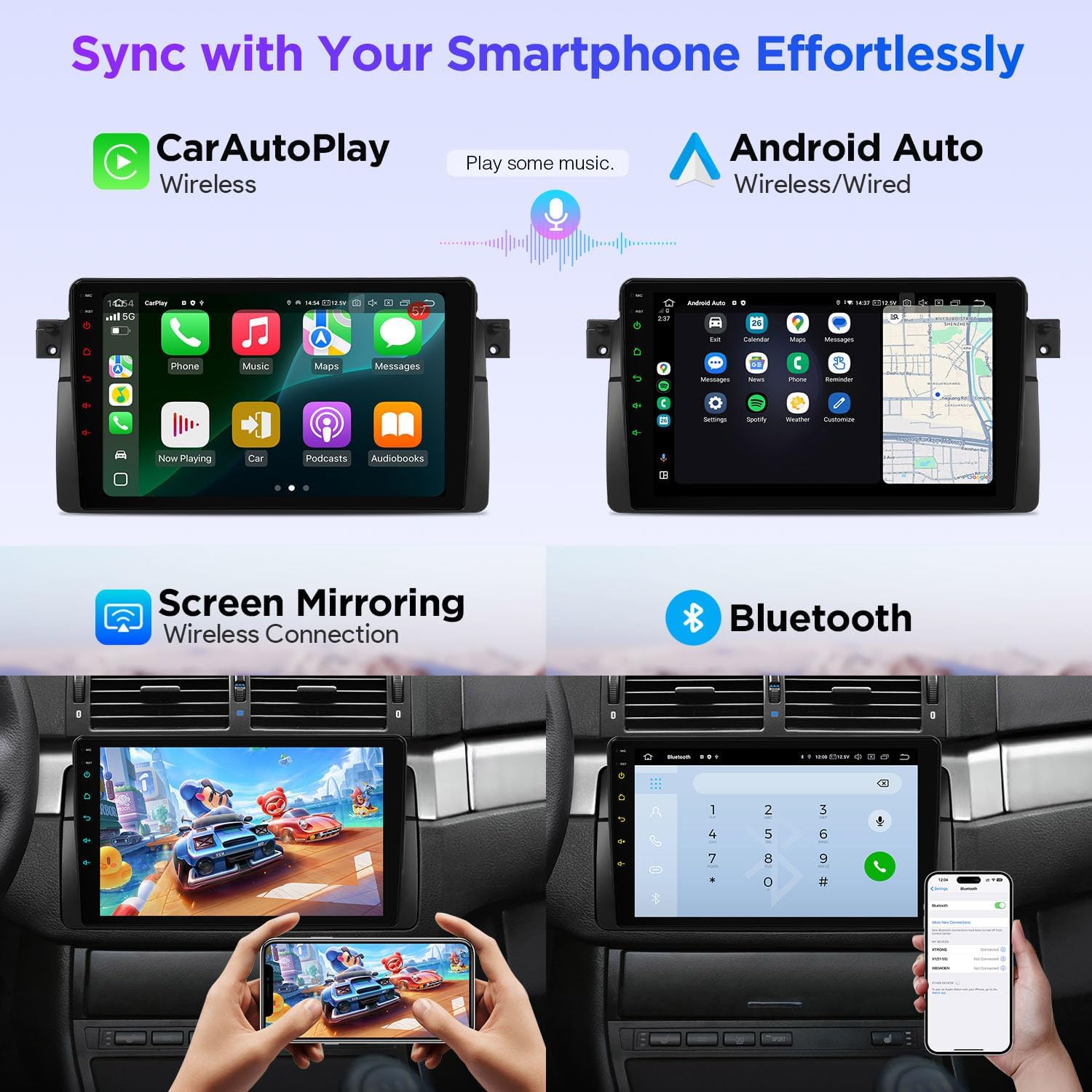
Figure 4: Smartphone Connectivity (CarPlay & Android Auto)

Figure 5: Smart and Intuitive UI with Day/Night Mode
2.2 Fonctionnalités audio

Figure 6: DTS Digital Sound and DSP Controls
2.3 Intégration du véhicule
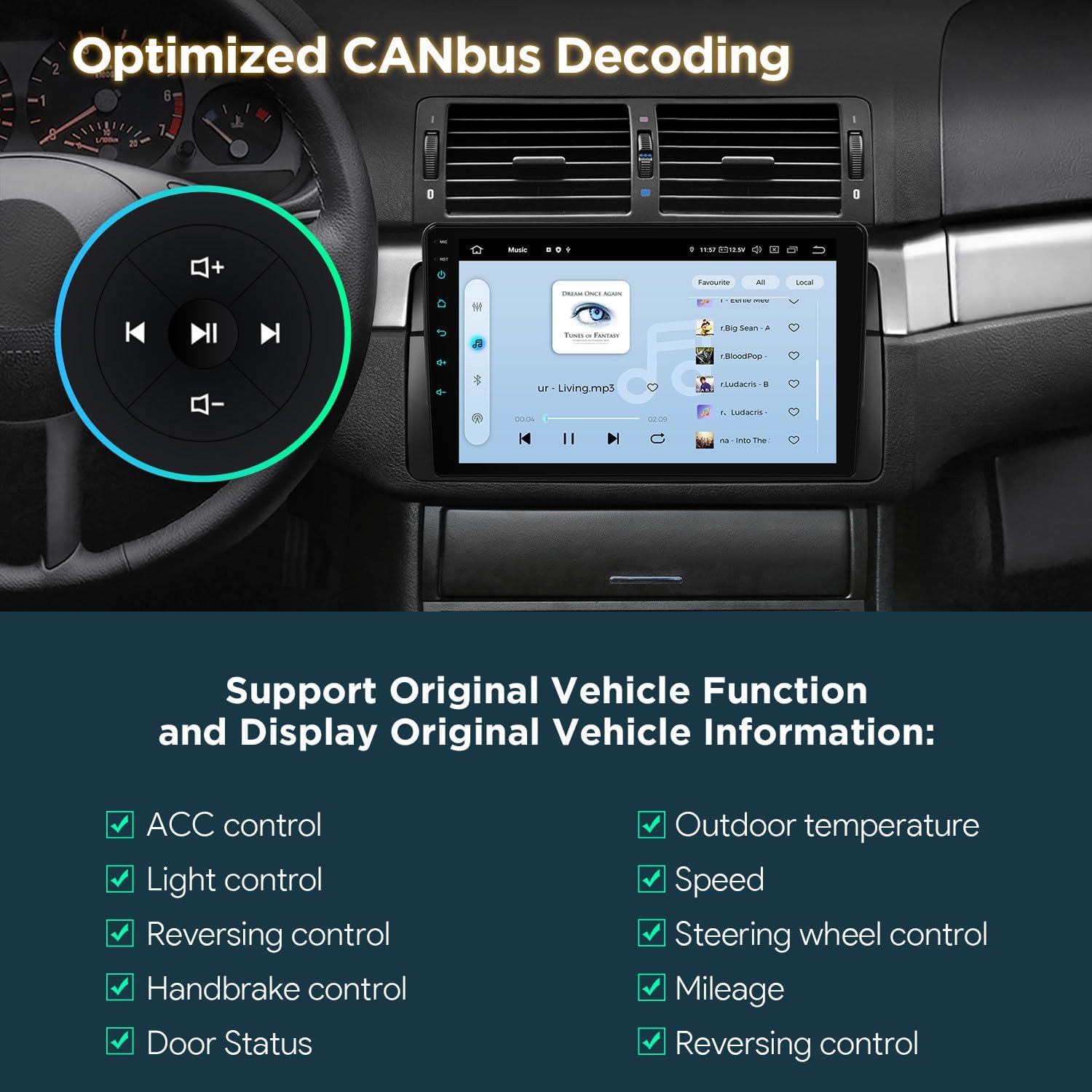
Figure 7: Optimized CANbus Decoding
3. Configuration et installation
Cette section donne un aperçu généralview of the installation process. For detailed, step-by-step instructions, please refer to the included English Manual and German Manual.
3.1 Déballage et composants

Figure 8: Package Content and Accessories
3.2 Processus d'installationview
Installation typically involves removing the existing car stereo, connecting the provided wiring harness and accessories, and securing the new head unit. Ensure all connections are secure before reassembling the dashboard.
Video 1: XTRONS 9 Inch Qualcomm Car Stereo for BMW E46 M3 Rover 75 MG ZT - Product Overview and Features. This video provides a visual overview of the product's features and how it integrates into the car environment.
Video 2: Eonon Car Stereo for E46X6S - Installation Guide. This video demonstrates the installation process for a car stereo in a BMW E46, which is highly relevant for this product.
4. Mode d'emploi
4.1 Navigation dans l'interface utilisateur (IU)
The unit features a smart and intuitive UI with customizable day/night modes and quick access toggles for your favorite applications. Navigate through menus by swiping and tapping the QLED touchscreen.
4.2 Intégration smartphone (CarPlay et Android Auto)
Connect your smartphone wirelessly via Bluetooth for Wireless Car Auto Play (iPhone) or Wireless & Wired Android Auto (Android phones). This allows access to navigation, calls, music, and voice assistants (Siri/Google Assistant) directly from the head unit.
4.3Bluetooth 5.0
Utilize Bluetooth 5.0 for hands-free calling and audio streaming. Pair your device through the Bluetooth settings menu on the head unit.
4.4 Built-in DSP Audio Control
Access the built-in Digital Sound Processor (DSP) to fine-tune your audio experience. Adjust equalizer settings, sound field, and other audio parameters to your preference.
4.5 Split Screen & Picture-in-Picture
To activate split-screen mode, long-press an app icon and drag it to one side of the screen. For Picture-in-Picture, start a video and then navigate to another app; the video will continue playing in a small, movable window.
4.6 Navigation GPS
The unit supports various GPS navigation applications. Download your preferred navigation app from the Play Store and follow its instructions for route planning and guidance.
Entrée caméra AHD 4.7 pouces
Connect an AHD (Analog High Definition) camera for clear rearview ou devantview display. The system automatically switches to the camera view en marche arrière.
4.8 Wi-Fi double bande
Connect to available Wi-Fi networks (2.4GHz or 5GHz) to access online features, download apps, and browse the internet.
5. Entretien
Pour garantir la longévité et les performances optimales de votre autoradio XTRONS, suivez ces consignes d'entretien :
- Nettoyage de l'écran : Utilisez un chiffon doux non pelucheux pour essuyer délicatement l'écran tactile QLED. Pour les traces tenaces, frottez légèrement.ampNettoyez le chiffon avec un produit nettoyant pour écrans conçu pour les appareils électroniques. Évitez les produits chimiques agressifs et les matériaux abrasifs.
- Mises à jour logicielles : Periodically check for software updates through the unit's settings menu to ensure you have the latest features and performance enhancements.
- Contrôle de la température : Évitez d'exposer l'appareil à des températures extrêmes pendant des périodes prolongées.
- Vérifications de connexion : Vérifiez régulièrement tous les branchements électriques pour vous assurer qu'ils sont bien fixés et exempts de corrosion.
6. Dépannage
Si vous rencontrez des problèmes avec votre autoradio, veuillez vous référer aux étapes de dépannage courantes suivantes :
- Pas d'alimentation : Vérifiez toutes les connexions électriques et assurez-vous que le contact du véhicule est mis. Vérifiez que le fusible est intact.
- Pas de son : Vérifiez les connexions des haut-parleurs, les niveaux de volume et les paramètres audio (y compris le traitement numérique du signal). Assurez-vous que la source audio correcte est sélectionnée.
- Écran tactile non réactif : Essayez de redémarrer l'appareil. Si le problème persiste, effectuez une réinitialisation d'usine (attention : cette opération effacera toutes les données utilisateur).
- Signal GPS perdu : Assurez-vous que l'antenne GPS est correctement installée et qu'elle est dégagée. view du ciel.
- Problèmes de connectivité Bluetooth/Wi-Fi : Ensure Bluetooth/Wi-Fi is enabled on both the head unit and your device. Try re-pairing or reconnecting.
- CANbus Functions Not Working: Verify the CANbus box and cable are correctly installed and configured.
For more detailed troubleshooting or persistent issues, please consult the full English Manual or contact XTRONS customer support.
7. Spécifications
| Fonctionnalité | Description |
|---|---|
| Marque | Xtrons |
| Modèle | B0FMJSN8NP |
| Système opérateur | Android 14 |
| Processeur | Qualcomm Snapdragon 665 Octa Core |
| BÉLIER | 8 Go |
| Capacité de stockage de la mémoire | 256 Go |
| Taille de l'écran | 9 pouces |
| Type d'affichage | QLED, IPS Panel |
| Résolution | 1280*800 |
| Technologie de connectivité | Bluetooth 5.0, USB, Dual Band Wi-Fi (2.4GHz & 5GHz) |
| Caractéristiques spéciales | Bluetooth, Touchscreen, Built-in DSP, Wireless CarPlay, Android Auto, Optimized CANbus Decoding, Split Screen, Picture-in-Picture |
| Système de navigation par satellite pris en charge | GPS |
| Méthode de contrôle | Tactile, Voix |
8. Contenu de la boîte
The following components are included with your XTRONS Car Stereo:
- 1 × Faisceau de câblage ISO
- 1 câble RCA
- 1 × Câble d'antenne radio
- 1 × 4G +Antenna (4G Function not supported in USA)
- 1 × 4G -Antenna
- 1 × Antenne GPS
- 2 × Câble USB
- 1 × Boîtier CANbus
- 1 câble pour appareil photo
- 1 câble CANbus
- 1 × Manuel en anglais
- 1 × German Manual
9. Garantie et assistance
9.1 Informations sur la garantie
Ce produit est livré avec un Garantie constructeur de 1 ansVeuillez conserver votre preuve d'achat pour toute réclamation au titre de la garantie.
9.2 Assistance clientèle
Pour toute assistance technique, dépannage ou question relative à la garantie, veuillez contacter le service client XTRONS via son site officiel. website ou les coordonnées fournies dans l'emballage de votre produit.