
1. Introduction
This manual provides essential information for the safe and efficient operation of your Tornado 65UA5300E 65-inch 4K Frameless Android Smart TV. Please read it thoroughly before using the product and retain it for future reference.

Illustration 1.1 : Avant view of the Tornado 65UA5300E Smart TV, showcasing its frameless design and included stand.
2. Consignes de sécurité
Respectez toujours les consignes de sécurité de base lors de l'utilisation de ce téléviseur afin de réduire les risques d'incendie, d'électrocution et de blessure.
- N'exposez pas le téléviseur à la pluie ou à l'humidité.
- Assurez une ventilation adéquate ; ne bloquez pas les ouvertures de ventilation.
- Ne placez pas le téléviseur sur un chariot, un support, un trépied, un support mural ou une table instable.
- Débranchez le téléviseur pendant les orages ou lorsqu'il n'est pas utilisé pendant de longues périodes.
- Confiez toute intervention d'entretien à un personnel qualifié.
3. Contenu du colis
Vérifiez que tous les éléments sont présents dans le colis :
- Tornado 65UA5300E 65-inch 4K Frameless Android Smart TV
- Télécommande
- Câble d'alimentation
- Meuble TV (2 pièces)
- Vis pour l'assemblage du support
- Manuel de l'utilisateur (ce document)
4. Installation
4.1 Déballage
Carefully remove the TV from its packaging. It is recommended to keep the original packaging for potential future transport or servicing.
4.2 Fixation du support
If you are not wall-mounting the TV, attach the included stand pieces. Place the TV face down on a soft, flat surface to prevent screen damage. Align each stand piece with the corresponding slots on the bottom of the TV and secure them with the provided screws.
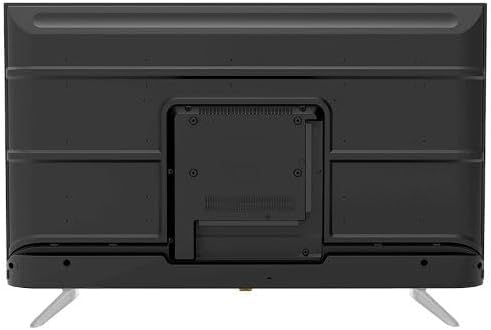
Image 4.1 : Bas view of the TV, illustrating the designated areas for stand attachment.
4.3 Montage mural
For wall mounting, remove the stand (if attached). Use a VESA-compatible wall mount (not included) that supports the TV's weight and dimensions. Consult a professional for wall mounting to ensure safety and proper installation.

Image 4.2 : Arrière view of the TV, highlighting the VESA mounting pattern and various input/output ports.
4.4 Connexion de périphériques
Connectez vos appareils externes au téléviseur à l'aide des ports appropriés :
- HDMI: For high-definition devices like Blu-ray players, gaming consoles, or set-top boxes. The TV has 3 HDMI ports, one with ARC support.
- USB: For connecting USB storage devices to play media (video, photos, music). The TV has 2 USB ports.
- LAN: Pour une connexion internet filaire.
- Entrée RF : For connecting an antenna or satellite dish for the built-in digital receiver.
- Sortie audio numérique (optique) : Pour la connexion à un système audio externe.
- Prise casque (3.5 mm) : Pour connecter un casque.

Image 4.3 : Côté view of the TV, illustrating the accessible side input ports.
4.5 Assistant de mise sous tension et de configuration initiale
After connecting the power cable, press the power button on the remote control or TV. The TV will guide you through an initial setup wizard, including language selection, network connection (Wi-Fi or LAN), channel scanning, and Google account setup for Android TV features.
5. Utilisation du téléviseur
5.1 Télécommande surview
The included remote control allows you to navigate the TV's functions. It features dedicated buttons for power, volume, channel, input selection, smart TV apps (Netflix, YouTube, Prime Video, Disney+), Google Assistant voice search, and menu navigation.
5.2 Fonctions de base
- Marche/Arrêt : Appuyez sur le bouton d'alimentation.
- Contrôle du volume : Utilisez les boutons de volume +/-.
- Sélection des chaînes : Use the Channel Up/Down buttons or numeric keypad.
- La source d'entrée: Press the 'Input' button to select between HDMI, AV, TV, etc.
5.3 Smart TV Features (Android 11)
Your TV runs on Android 11, providing access to a wide range of smart features:
- Applications : Access pre-installed apps like Netflix, YouTube, Prime Video, Disney+, Shahid VIP, and download more from the Google Play Store.
- Assistant Google : Utilisez les commandes vocales via la télécommande pour la recherche, le contrôle et l'obtention d'informations.
- Chromecast intégré : Diffusez du contenu depuis votre smartphone ou votre tablette directement sur votre téléviseur.
- Web Navigateur: Naviguez sur Internet directement depuis votre téléviseur.
- Bluetooth 5.0: Connectez des écouteurs sans fil, des haut-parleurs ou d'autres appareils Bluetooth.
5.4 Paramètres d'image et de son
Personnalisez votre viewexpérience audio et vidéo via le menu des paramètres du téléviseur :
- Modes d'image : Select from Dynamic, Game, Sports, Cinema, or User-defined modes.
- Température de couleur: Adjust to Normal, Cool, or Warm.
- Modes sonores : Choose from Smart, User, Game, Movie, Music, or News.
- Dolby Digital Plus : Enhanced audio processing for compatible content.
6. Entretien
6.1 Nettoyage du téléviseur
- Écran: Essuyez délicatement l'écran avec un chiffon doux non pelucheux. Pour les taches tenaces, utilisez un nettoyant pour écrans spécialement conçu pour les téléviseurs, à appliquer sur le chiffon et non directement sur l'écran.
- Corps: Wipe the TV's frame and back panel with a soft, dry cloth. Do not use abrasive cleaners or solvents.
6.2 Mises à jour logicielles
Ensure your TV's software is up to date for optimal performance and security. Connect the TV to the internet and check for updates periodically through the settings menu.
7. Dépannage
En cas de problème, consultez les solutions courantes suivantes :
| Problème | Solution possible |
|---|---|
| Pas de courant | Check if the power cable is securely plugged into the TV and the wall outlet. Ensure the outlet is functional. |
| Pas d'image, mais le son est présent. | Vérifiez la source d'entrée. Assurez-vous que les périphériques externes sont allumés et correctement connectés. |
| Pas de son, mais l'image est présente. | Check the volume level and mute status. Verify audio settings and external audio connections. |
| La télécommande ne fonctionne pas | Remplacez les piles. Assurez-vous qu'aucun obstacle ne se trouve entre la télécommande et le capteur infrarouge du téléviseur. |
| Impossible de se connecter au Wi-Fi | Vérifiez votre routeur et votre modem. Saisissez à nouveau le mot de passe Wi-Fi. Essayez de redémarrer le téléviseur et le routeur. |
Si le problème persiste, contactez le service client.
8. Spécifications
| Fonctionnalité | Détail |
|---|---|
| Numéro de modèle | 65UA5300E |
| Taille de l'écran | 65 pouces |
| Technologie d'affichage | DIRIGÉ |
| Résolution | 4K UHD (3840 2160 x XNUMX XNUMX) |
| Rapport hauteur/largeur | 16:9 |
| ViewAngle d'attaque | 178 degrés |
| Luminosité | 250 cd/m² |
| Taux de rafraîchissement | 50/60 Hz |
| Prise en charge HDR | HDR10, HLG |
| Technologie audio | Dolby Digital Plus, Surround Sound |
| Puissance de sortie audio | 10W x 2 |
| Système opérateur | Android 11 |
| Mémoire interne | 16 Go |
| Connectivité | Wi-Fi, Bluetooth 5.0, LAN |
| Entrées | RF Input (Digital) x1, Video Input x1, HDMI x3 (ARC), USB x2, LAN x1 |
| Sorties | Digital Audio Output (Optical) x1, Headphone Jack (3.5mm) x1 |
| Alimentation électrique | CA 90-240V / 50Hz |
| Alimentation en veille | 0.5 W |
| Dimensions (L x H x P) sans support | 1446 x 832 x 84 mm |
| Dimensions (L x H x P) avec support | 1446 x 892 x 305 mm |
| Poids net | 15.32 kg |
| Poids brut | 21.32 kg |
| Pays d'origine | Egypte |
9. Garantie
This Tornado TV comes with a Garantie complète gratuite de 3 ans. Please retain your proof of purchase for warranty claims. For specific terms and conditions, refer to the warranty card included with your product or contact Tornado customer service.
10. Assistance
For further assistance, technical support, or service inquiries, please contact Tornado customer service. Contact details can typically be found on the manufacturer's official websur le site ou sur la carte de garantie.