
Introduction
Merci pour votre achatasing the UPERFECT 23.8-inch 120Hz Portable Touch Monitor. This device is designed to enhance your productivity and entertainment experience with its large display, high refresh rate, and versatile connectivity. Please read this manual carefully before use to ensure proper operation and to maximize the monitor's potential.
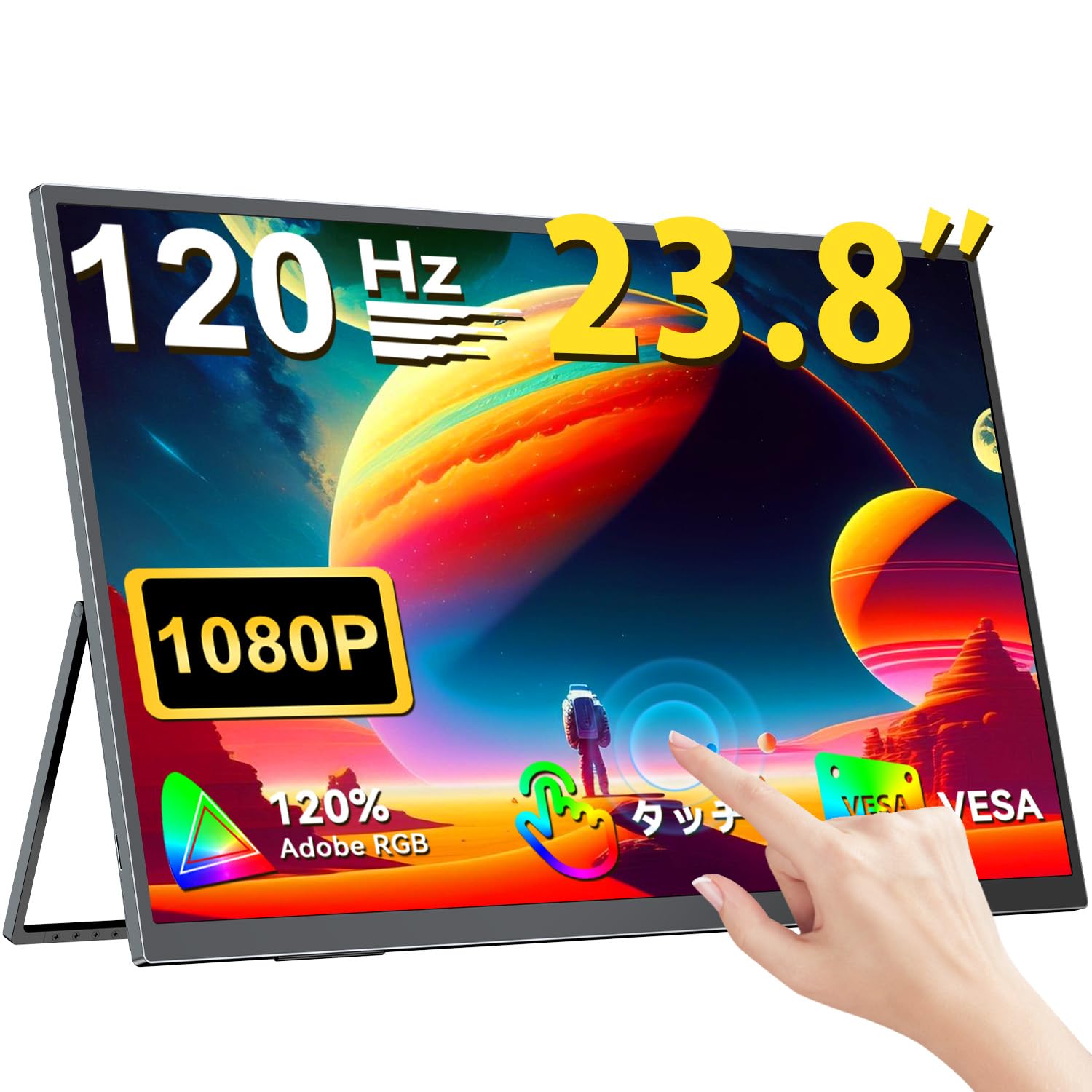
The UPERFECT 23.8-inch 120Hz Portable Touch Monitor.
Consignes de sécurité
Pour éviter tout dommage et garantir un fonctionnement sûr, veuillez respecter les précautions suivantes :
- N’exposez pas le moniteur à la pluie, à l’humidité ou à des températures extrêmes.
- Évitez de placer des objets lourds sur le moniteur.
- Utilisez uniquement l'adaptateur secteur et les câbles fournis.
- N’essayez pas de démonter ou de réparer vous-même le moniteur. Contactez le service client pour obtenir de l’aide.
- Assurez une ventilation adéquate autour du moniteur pour éviter toute surchauffe.
- When adjusting the stand, ensure the monitor is stable to prevent tipping.

ergonomie recommandée viewing angles for comfortable use. Avoid upward viewing angles to prevent tipping and eye strain.
Contenu du colis
Vérifiez que tous les éléments sont présents dans le colis :
- Moniteur tactile portable UPERFECT de 23.8 pouces
- Adaptateur secteur
- USB Type-C Cable (Full-featured)
- Câble mini HDMI vers HDMI
- USB-A to USB-C Cable (for power/OTG)
- Manuel d'utilisation
Produit terminéview
Caractéristiques du moniteur
- 23.8-inch IPS Panel: Large display with 178° wide viewangles d'inclinaison.
- Taux de rafraîchissement de 120 Hz: Provides smooth visuals, ideal for gaming and fast-paced content.
- Multi-touch à 10 points : Intuitive interaction with supported devices.
- Gamme de couleurs sRGB à 120 % : Offre des couleurs éclatantes et précises.
- Support intégré : Adjustable from 0° to 180° for flexible viewpositions de travail.
- Compatibilité avec le montage VESA : Supports 75x75mm VESA standard for alternative mounting options.
- Non-Glare Screen: Reduces reflections for comfortable long-term use.
- Haut-parleurs intégrés : Pour la sortie audio.
Ports et boutons

Surview des ports et des boutons de commande du moniteur.
- Prise d'écouteur: Sortie audio 3.5 mm.
- Bouton Menu : Permet d'accéder au menu d'affichage à l'écran (OSD).
- Boutons Plus/Moins : Navigate OSD menu, adjust volume/brightness.
- Indicateur d'alimentation : Affiche l'état de l'alimentation.
- Bouton Marche/Retour : Powers the monitor on/off, or returns to previous OSD menu.
- Ports de type C (x2) : Full-featured USB-C for power, video, and touch signal.
- Port mini-HDMI : Entrée vidéo.
- Port micro USB-B OTG : For connecting peripherals like mouse or keyboard.
Installation
Connexion aux appareils
The monitor supports various devices including laptops, desktops, smartphones, and gaming consoles (PS4, PS5, Xbox, Nintendo Switch).

The monitor can be connected to various devices using a single Type-C cable for power and display, provided the device supports DP Alt Mode.
- Connexion USB Type-C : Connect a full-featured USB Type-C cable from your device (laptop, smartphone, Switch) to one of the monitor's Type-C ports. If your device supports DP Alt Mode, a single cable can transmit video, audio, touch, and power. If your device does not support DP Alt Mode, or for stable power delivery, connect the included power adapter to the other Type-C port.
- Connexion Mini HDMI : Connect a Mini HDMI to HDMI cable from your device (PC, game console) to the monitor's Mini HDMI port. For power, connect the included power adapter to one of the monitor's Type-C ports.
- Port OTG : Use the Micro USB-B OTG port to connect a mouse or keyboard for enhanced control, especially when using the monitor with a smartphone in desktop mode.
Remarque importante :
- For optimal performance, especially when increasing contrast, brightness, or color saturation, always connect the monitor to an external power source using the provided power adapter.
- If your device's USB-C port does not support DP Alt Mode, a Type-C cable alone cannot transmit video. Refer to your device's specifications for compatibility.
Stand Adjustment and VESA Mounting

The monitor features a smart integrated stand for flexible positioning and VESA compatibility for arm mounts.
- Support intégré : The monitor features a durable aluminum alloy integrated stand. Adjust the viewing angle freely within a 0° to 180° range. The base includes anti-slip rubber pads for stability.
- Montage VESA : The monitor is compatible with VESA 75x75mm mounts (M4*4mm screw holes). This allows for attachment to monitor arms or wall brackets for a customized setup.
Mode d'emploi
Marche/Arrêt
Press the Power/Return button to turn the monitor on or off.
Menu d'affichage à l'écran (OSD)
Press the Menu button to access the OSD menu. Use the Plus/Minus buttons to navigate and adjust settings such as brightness, contrast, color temperature, and input source.
Fonctionnalité tactile

The monitor supports 10-point multi-touch gestures for intuitive control. For MacBook connections, 2-point gestures (pinch zoom/rotate) are supported.
The monitor supports 10-point multi-touch for Windows and Android devices. For MacBook connections, 2-point gestures (pinch zoom/rotate) are fully supported. This allows for direct interaction with the screen for tasks like sketching, document navigation, and presentations.
Modes d'affichage

Easily switch between horizontal (landscape) and vertical (portrait) display modes to suit your content and workflow. Portrait mode settings are configured on your PC.
Le moniteur prend en charge différents modes d'affichage pour répondre à vos besoins :
- Mode étendu: Extend your PC desktop across both screens for increased workspace.
- Mode de duplication : Mirror your PC screen for presentations or shared viewing.
- Mode portrait : Rotate the monitor vertically for document review or coding. (Settings for portrait mode are typically configured on the connected PC).
Fonctionnalités de jeu

The monitor supports FreeSync technology to eliminate screen tearing and stuttering during gaming.
- Taux de rafraîchissement de 120 Hz: Experience smoother gameplay and action sequences compared to standard 60Hz displays.
- Prise en charge de FreeSync : Compatible with FreeSync technology to reduce screen tearing and stuttering, providing a more fluid gaming experience.
- Temps de réponse rapide : Enjoy a quick response time of 1ms, minimizing motion blur.
Entretien
Follow these guidelines to maintain your monitor:
- Nettoyage de l'écran : Essuyez délicatement l'écran avec un chiffon doux non pelucheux. Pour les taches tenaces, frottez légèrement.ampNettoyez le chiffon avec de l'eau ou une solution nettoyante pour écrans. Ne vaporisez pas de liquide directement sur l'écran.
- Nettoyage du Casing: Utilisez un chiffon doux et sec pour nettoyer le moniteur.asing. Évitez les nettoyants ou solvants abrasifs.
- Stockage: Lorsqu'il n'est pas utilisé pendant une période prolongée, rangez le moniteur dans un endroit frais et sec, à l'abri de la lumière directe du soleil et des températures extrêmes.
- Résistance aux empreintes digitales : The screen features an anti-fingerprint coating to help maintain cleanliness in business environments.
Dépannage
En cas de problème, veuillez consulter la liste des problèmes courants et leurs solutions ci-dessous :
| Problème | Cause possible | Solution |
|---|---|---|
| Aucun affichage/Aucun signal | Incorrect input source selected; Cable not connected properly; Device not outputting signal; Insufficient power. | Check cable connections; Select correct input source via OSD; Ensure device is powered on and configured to output to external display; Connect external power adapter to monitor. |
| La fonction tactile ne fonctionne pas | USB-C cable not full-featured; Device does not support touch output; Driver issue (Windows); Cable connection issue. | Ensure a full-featured USB-C cable is used; Verify device compatibility with touch output; Reconnect USB-C cable; For Windows, ensure touch drivers are installed (usually automatic). |
| Screen flickering/Unstable image | Cable issue; Graphics card issue; Refresh rate mismatch; Insufficient power. | Try a different cable; Update graphics drivers; Adjust refresh rate in device settings; Ensure external power is connected. |
| Aucun son ne sort des haut-parleurs de monitoring. | Volume trop faible ; Mode muet ; Sortie audio incorrecte sélectionnée sur l’appareil. | Adjust monitor volume via OSD; Check device's audio output settings. |
| Monitor keeps restarting | Puissance insuffisante. | Ensure the monitor is connected to the provided power adapter for stable power delivery. |
Caractéristiques
| Fonctionnalité | Spécification |
|---|---|
| Marque | PARFAIT |
| Numéro de modèle | M238T02 |
| Taille de l'écran | 23.8 pouces |
| Résolution | FHD 1080p (1920 x 1080) |
| Rapport hauteur/largeur | 16:9 |
| Type de panneau | Écran LCD IPS |
| Surface de l'écran | Antireflet |
| Rapport de contraste | 1000:1 |
| Taux de rafraîchissement | 120 Hz |
| Temps de réponse | 1 ms |
| ViewAngle d'attaque | 178 degrés |
| Valeur de gamme de couleurs | 120 % sRGB |
| Connectivité | 2x USB Type-C (Full-featured), 1x Mini HDMI, 1x Micro USB-B (OTG), 1x 3.5mm Audio Jack |
| Compatibilité VESA | 75x75mm (vis M4*4mm) |
| Dimensions (L x P x H) | 1.7 x 54.5 x 32.7 cm |
| Synchronisation adaptative | Synchronisation libre |
Garantie et assistance
UPERFECT offre une assistance complète pour votre produit :
- Garantie du fabricant : Ce produit est assorti d'une garantie constructeur d'un an.
- Garantie de satisfaction de 90 jours : If you are not completely satisfied within 90 days, a full refund is available.
- Support dédié : Contact our dedicated support team for any questions or issues.
- Free Accessory Replacement: Genuine cables and adapters are provided free of charge for life.
- PSE Certified: The product is PSE certified, ensuring safety standards.
For any inquiries or if you encounter an initial defect within the warranty period, please contact us through your order history. We are committed to providing the best possible assistance.