
karuisrc K610
Manuel d'utilisation du drone GPS Karuisrc K610
Modèle: K610
1. Introduction
This manual provides essential information for the safe operation and maintenance of your karuisrc K610 GPS Drone. Please read this manual thoroughly before operating the drone to ensure proper usage and to prevent damage or injury. The K610 is a foldable GPS quadcopter equipped with a 4K camera, designed for both beginners and experienced users, featuring intelligent flight modes and stable performance.

Image 1.1: The karuisrc K610 GPS Drone in flight.
2. Consignes de sécurité
Operating a drone requires responsibility. Adhere to the following safety guidelines to ensure a safe flight experience for yourself and others:
- Vérification avant vol : Avant chaque vol, inspectez toujours le drone, les hélices et la batterie. Assurez-vous que tous les composants sont bien fixés et en bon état.
- Conditions environnementales : Fly in open areas, away from people, animals, buildings, and obstacles. Avoid flying in strong winds, rain, snow, or fog.
- Sécurité des batteries : Utilisez uniquement des piles et des chargeurs homologués. Ne surchargez pas les piles et ne les percez pas. Cessez l'utilisation si les piles sont endommagées ou gonflées.
- Ligne de mire: Maintenez un contact visuel permanent avec le drone.
- Respecter la vie privée : Do not use the drone to invade privacy.
- Réglementations locales : Prenez connaissance et respectez toutes les lois et réglementations locales relatives à l'utilisation des drones.
3. Contenu du colis
Vérifiez que tous les éléments sont présents dans votre colis :
- K610 Drone x 1
- Télécommande x 1
- Batteries x 1 (Nonstandard Battery)
- Hélices de rechange x 4
- Tournevis x 1
- Câble USB x 1
- Étui de transport x 1
- Manuel d'instructions x 1

Image 3.1: Included items in the karuisrc K610 drone package.
4. Composants terminésview
4.1 drone
The K610 drone features a foldable design for portability, brushless motors for stable flight, and an integrated 4K camera.

Image 4.1: The karuisrc K610 drone and remote control.
Télécommande 4.2
The remote control provides intuitive flight control and a mount for your smartphone to view le flux FPV.
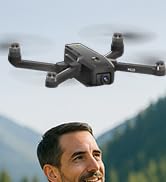
Image 4.2: Remote control with smartphone for FPV viewing.
5. Installation
5.1 Installation et charge de la batterie
- Insert the modular battery into the drone's battery compartment until it clicks into place.
- Pour recharger la batterie, retirez-la du drone. Branchez le câble de chargement USB à la batterie et à un adaptateur secteur USB compatible (non fourni).
- The charging indicator on the battery will show its status. Ensure the battery is fully charged before flight.

Image 5.1: Modular battery for the K610 drone.
5.2 Installation de l'hélice
Attach the propellers according to the markings (A and B) on the propellers and motor arms. Ensure they are securely fastened with the provided screwdriver.
5.3 Configuration de la télécommande
- Install 3x AA batteries (not included) into the remote control.
- Déployez le support de téléphone et fixez votre smartphone en toute sécurité.
5.4 Installation et connexion de l'application
- Download the official karuisrc drone app from your smartphone's app store.
- Mettez le drone sous tension, puis la télécommande.
- On your smartphone, connect to the drone's Wi-Fi network (usually named 'K610-XXXXXX').
- Ouvrez l'application pour établir une connexion et view le flux FPV en direct.

Image 5.2: 5GHz WiFi transmission for real-time viewing.
5.5 Étalonnage
Before the first flight and after any significant change in location, perform compass and gyroscope calibration as instructed in the app or quick start guide. This ensures stable flight and accurate GPS positioning.
6. Fonctionnement
6.1 Commandes de vol de base
Refer to the remote control diagram in the quick start guide for specific joystick and button functions. Generally:
- Left Joystick: Controls altitude (up/down) and rotation (yaw left/right).
- Right Joystick: Controls forward/backward and left/right movement (pitch/roll).
6.2 Décollage et atterrissage
- Décollage en une seule touche : Press the designated take-off button on the remote or in the app. The drone will automatically ascend to a safe height and hover.
- Décollage manuel : Push both joysticks to the bottom-outer corners to unlock motors, then slowly push the left joystick up to ascend.
- Atterrissage en une seule touche : Press the designated landing button. The drone will descend and land automatically.
- Atterrissage manuel : Slowly pull the left joystick down to descend. Once landed, push both joysticks to the bottom-outer corners to stop motors.
6.3 Fonctionnalités GPS
The K610 drone utilizes GPS for enhanced stability and intelligent flight functions.
- Retour automatique au point de départ (RTH) : The drone can automatically return to its take-off point if the signal is lost, battery is low, or the RTH button is pressed.

Image 6.1: GPS Auto Return Home functionality.
6.4 Modes de vol avancés
Access these modes via the drone's app:
- Suis-moi: The drone will automatically follow the remote control or smartphone, capturing footage à mesure que vous vous déplacez.
- Waypoint Flight (Tap Fly): Tap points on the map in the app, and the drone will fly along the specified path.
- Point-of-Interest (Circle Fly): Select a point on the map, and the drone will circle around it at a set radius and altitude.

Image 6.2: Advanced flight modes: Follow Me, Circle Fly, and Tap Fly.
6.5 4K Camera Operation
The K610 is equipped with a 4K UHD camera with 90° adjustable tilt for capturing high-quality aerial footage et photos.
- Capture photo/vidéo : Utilisez les boutons dédiés de la télécommande ou de l'interface de l'application pour prendre des photos ou démarrer/arrêter l'enregistrement vidéo.
- Angle de caméra réglable : The camera's tilt can be adjusted remotely via the app or remote control.
- Prise en charge de la carte SD: Insert an SD card (not included) into the drone for direct storage of high-resolution media.

Image 6.3: The K610's 4K HD Camera.
6.6 Produit terminéview Vidéo
Watch this video for a visual guide on the karuisrc K610 GPS Drone's features and operation.
Vidéo 6.4 : Terminéview of the karuisrc K610 GPS Drone's features and capabilities.
7. Entretien
Un entretien régulier garantit la longévité et les performances optimales de votre drone.
- Nettoyage: Gently wipe the drone and remote control with a soft, dry cloth after each use. Avoid using harsh chemicals.
- Inspection de l'hélice : Vérifiez régulièrement l'état des hélices (fissures, déformations, dommages). Remplacez immédiatement les hélices endommagées à l'aide des pièces de rechange fournies.
- Entretien de la batterie: Conservez les piles dans un endroit frais et sec. Ne stockez pas des piles complètement chargées ou déchargées pendant une période prolongée. Chargez-les à environ 50-60 % pour un stockage de longue durée.
- Stockage: Lorsqu'il n'est pas utilisé, pliez le drone et rangez-le dans son étui de transport pour le protéger de la poussière et des dommages physiques.
8. Dépannage
En cas de problème, veuillez consulter la liste des problèmes courants et leurs solutions ci-dessous :
| Problème | Cause possible | Solution |
|---|---|---|
| Le drone ne décolle pas et ne répond pas aux commandes. | Low battery, improper calibration, motors locked. | Charge drone/remote batteries. Perform calibration. Unlock motors (refer to section 6.2). |
| Vol instable ou dérive. | Poor calibration, strong winds, damaged propellers. | Recalibrate the drone. Fly in calm conditions. Inspect and replace damaged propellers. |
| Aucun flux vidéo FPV sur smartphone. | Wi-Fi not connected, app not open, drone/phone too far apart. | Ensure phone is connected to drone's Wi-Fi. Open the app. Move closer to the drone. |
| GPS features (RTH, Follow Me) not working. | Insufficient GPS signal, drone not calibrated. | Fly in an open area with clear sky. Wait for sufficient GPS satellites to connect (indicated by app). Perform GPS calibration. |
9. Spécifications
Key technical specifications for the karuisrc K610 GPS Drone:
| Fonctionnalité | Détail |
|---|---|
| Nom du modèle | K610 |
| Poids de l'article | 204 grammes (7.2 onces) |
| Caméra | 4K UHD (4096×3072P images), 12 MP Effective Still Resolution, 90° Adjustable, CMOS Sensor |
| Résolution de capture vidéo | 1080p (format MP4) |
| Technologie de connectivité | Wi-Fi, RF (5GHz FPV Transmission) |
| Type de contrôle | Télécommande |
| Caractéristiques spéciales | Adjustable, Auto-Landing, Portable, GPS Auto Return, Follow Me, Waypoint Flight, Point-of-Interest Circle |
| Type de moteur | Moteur sans balais |
| Batterie | 1 Nonstandard Lithium Ion Battery (included) |
| Durée du vol | Up to 20 minutes (typical 18 minutes) |
| Matériel | Plastique |
| Dimensions du produit | 7"L x 2"l x 8"H |

Image 9.1: Brushless motor technology for the K610 drone.
10. Garantie et assistance
For warranty information or technical support, please contact karuisrc customer service. Keep your purchase receipt as proof of purchase.
- Téléphone: +44 7419 298225
- E-mail: Karuisrc@gmail.com

Image 10.1: karuisrc customer support.
Ask a question about this manual
Ask about setup, troubleshooting, compatibility, parts, safety, or missing instructions. Manuals+ will review the question and use this page’s manual context to help answer it.