
1. Introduction
This manual provides detailed instructions for the setup, operation, and maintenance of your KiiBoom Phantom 81 V3 Pink Mechanical Gaming Keyboard. Please read this manual thoroughly before using the product to ensure optimal performance and longevity.
Contenu du colis
- KiiBoom Phantom 81 V3 Pink Mechanical Gaming Keyboard
- Câble USB Type-C (1.5 m)
- Extracteur de capuchon
- Extracteur de commutateur
- Tournevis
- Interrupteurs de rechange
- Extra Nails

2. Installation
Connexion initiale
The KiiBoom Phantom 81 V3 supports three connectivity modes: Type-C Wired, Bluetooth 5.0, and 2.4GHz wireless. Locate the connectivity switches on the back of the keyboard.

Wired Mode (Type-C)
- Connectez le câble USB Type-C fourni au port Type-C du clavier.
- Connectez l'autre extrémité du câble à un port USB disponible sur votre ordinateur.
- Ensure the connectivity switch on the keyboard is set to the 'USB' position.
Mode Bluetooth
- Set the connectivity switch on the keyboard to the 'BT' position.
- Sur votre appareil (ordinateur, tablette, smartphone), activez le Bluetooth et recherchez de nouveaux appareils.
- Select 'KiiBoom Phantom 81' from the list of available devices to pair.
- The keyboard supports up to three Bluetooth devices. Switch between them using Fn + 1/2/3.
Mode sans fil 2.4 GHz
- Repérez le récepteur USB 2.4 GHz (généralement rangé dans un compartiment du clavier).
- Branchez le récepteur USB dans un port USB disponible sur votre ordinateur.
- Set the connectivity switch on the keyboard to the '2.4G' position.
- Le clavier doit se connecter automatiquement au récepteur.
Compatibilité du système d'exploitation
The KiiBoom Phantom 81 V3 is compatible with both Windows and Mac operating systems. Use the dedicated 'Win/Mac' switch on the back of the keyboard to select your operating system for proper key mapping.

3. Mode d'emploi
Fonctions de base
- Contrôle du volume : Use the rotary knob on the top right of the keyboard to adjust volume. Press the knob to mute/unmute.
- NKRO (N-Key Rollover): The keyboard supports N-Key Rollover, allowing all keys to register simultaneously for fast and accurate typing.

Contrôle du rétroéclairage RVB
The KiiBoom Phantom 81 V3 features 16.8 million RGB backlights with south-facing LEDs for reduced glare and enhanced illumination. Use the following key combinations to control the lighting effects:
- Fn + V: Activer/désactiver les effets de rétroéclairage.
- Fn + J : Changer les couleurs du rétroéclairage.
- Fn + P : Toggle bottom light mode.
- Fn + B : Toggle bottom light colors.

Personnalisation du logiciel
The keyboard supports software for advanced customization, including key remapping, light effects, macro programming, and sharing settings. Refer to the official KiiBoom website for software downloads and detailed instructions.

4. Commutateurs remplaçables à chaud
The KiiBoom Phantom 81 V3 features a full-key hot-swappable PCB, allowing you to easily change mechanical switches without soldering. This keyboard is compatible with both 3-pin and 5-pin mechanical switches.
Changer les interrupteurs
- Retirez délicatement la touche à l'aide de l'extracteur de touche fourni.
- Utilisez l'extracteur d'interrupteur pour saisir délicatement les clips supérieur et inférieur de l'interrupteur.
- Tirez l'interrupteur vers le haut pour le retirer du circuit imprimé.
- Alignez les broches du nouvel interrupteur avec les trous du circuit imprimé. Assurez-vous que les broches sont bien droites pour éviter qu'elles ne se plient.
- Enfoncez délicatement le nouvel interrupteur jusqu'à ce qu'il s'enclenche correctement.
- Remplacez la touche.


Spécifications du commutateur
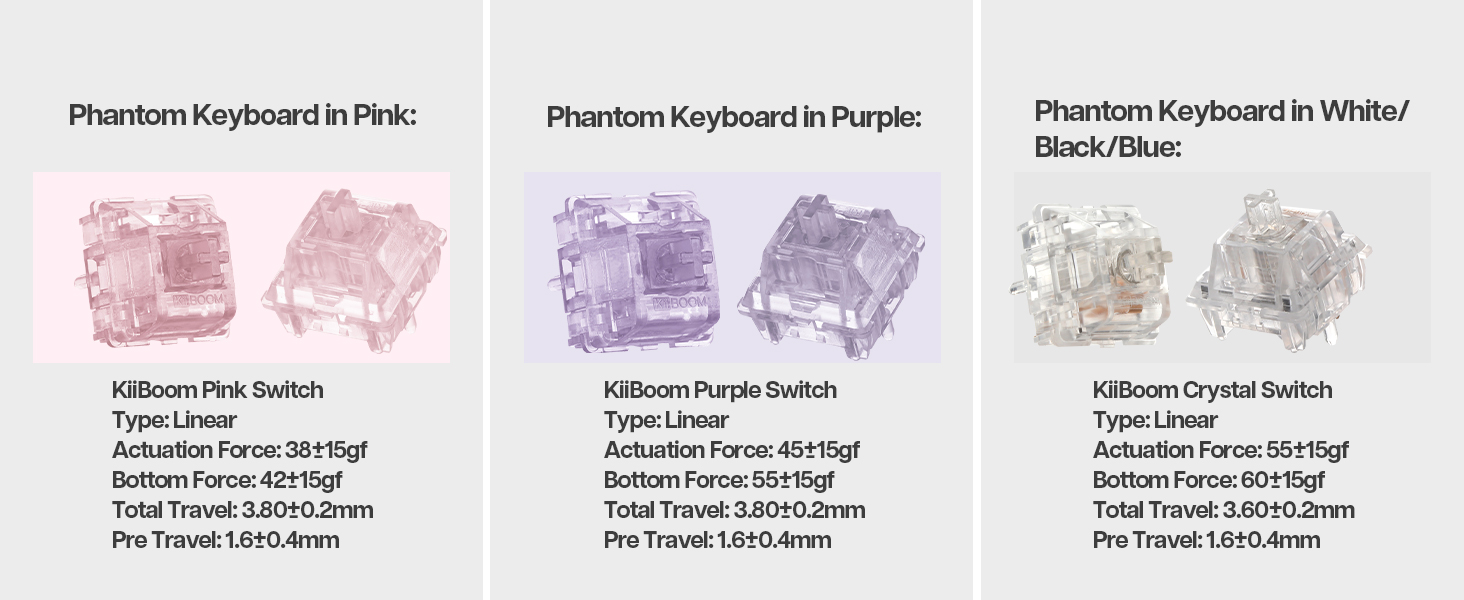
The Phantom 81 V3 Pink model typically comes with KiiBoom Pink Switches. Other KiiBoom switches are also compatible.
| Type de commutateur | Taper | Force d'actionnement | Force de fond | Voyage total | Avant le voyage |
|---|---|---|---|---|---|
| KiiBoom Pink Switch | Linéaire | 38±15gf | 42±15gf | 3.80 ± 0.2 mm | 1.6 ± 0.4 mm |
| KiiBoom Purple Switch | Linéaire | 45±15gf | 55±15gf | 3.80 ± 0.2 mm | 1.6 ± 0.4 mm |
| KiiBoom Crystal Switch | Linéaire | 55±15gf | 60±15gf | 3.60 ± 0.2 mm | 1.6 ± 0.4 mm |


5. Gestion de la batterie
The KiiBoom Phantom 81 V3 is equipped with an 8000mAh rechargeable battery, providing extended wireless usage.
Charger le clavier
Connect the keyboard to a power source using the provided USB Type-C cable. The keyboard will indicate charging status through its RGB lighting.
Vérification de la charge de la batterie
Pour vérifier le niveau actuel de la batterie, appuyez sur Fn + Retour arrière. The RGB lights will display the approximate battery percentage.

6. Construction and Design
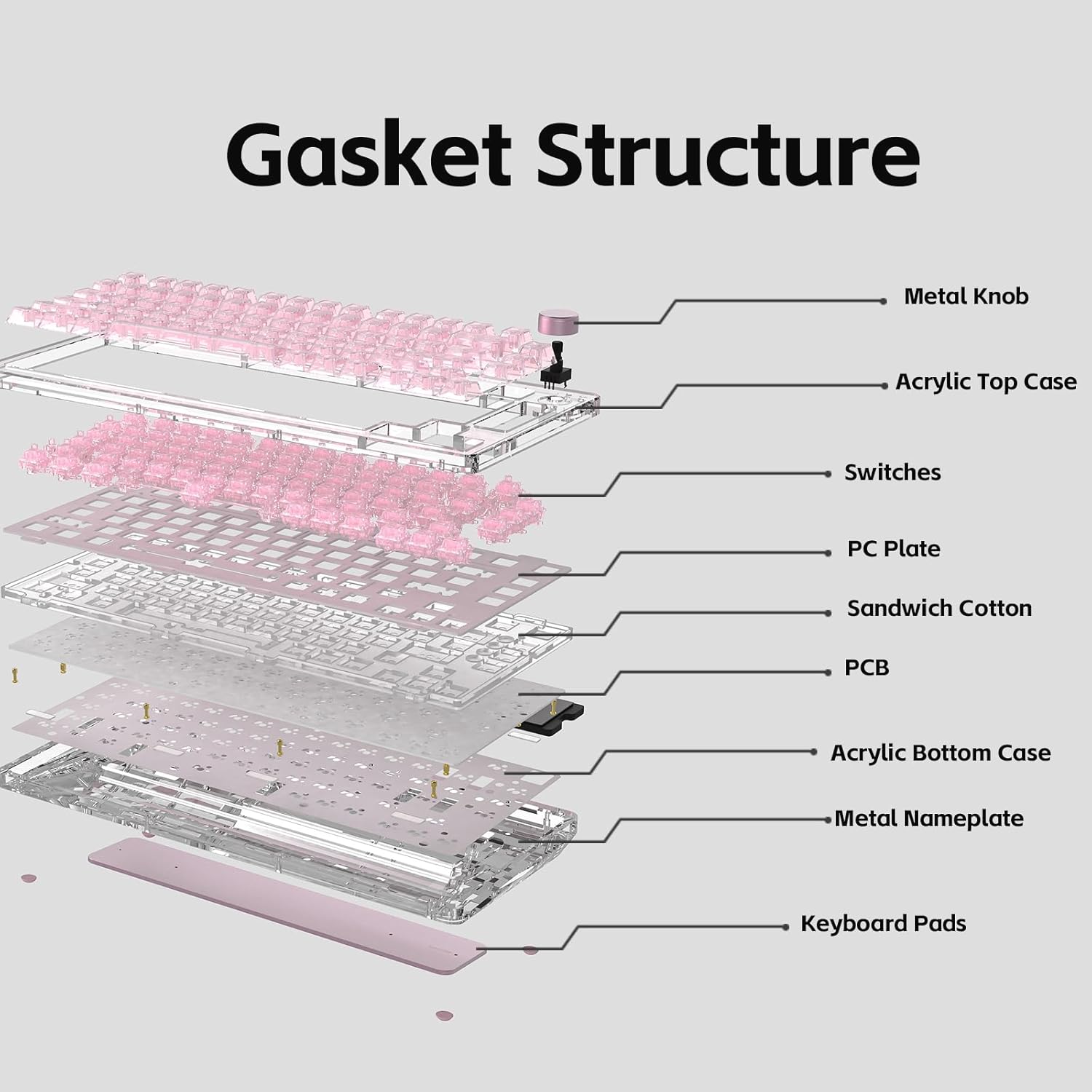
The KiiBoom Phantom 81 V3 features a unique transparent design and robust internal construction.
Acrylic Frame and Keycaps
The keyboard boasts a crystal-clear acrylic frame and transparent polycarbonate keycaps with UV printing, offering both durability and a distinctive aesthetic.


Gasket Mount Structure
The keyboard utilizes an enhanced gasket mount system with a PC (Polycarbonate) plate. This design provides a flexible, cushioned typing feel and contributes to a pleasant acoustic profile.

7. Spécifications
| Fonctionnalité | Détail |
|---|---|
| Modèle | Phantom 81 V3 Pink |
| Mise en page | 75% (82 keys + 1 knob) |
| Connectivité | Connexion filaire USB-C, Bluetooth 5.0, sans fil 2.4 GHz |
| Interrupteurs | Remplaçable à chaud (compatible 3 broches/5 broches) |
| Rétroéclairage | LED RVB orientées vers le sud |
| Keycaps | Transparent Polycarbonate with UV printing, ASA-Like Profile |
| Matériau du boîtier | Acrylique |
| Matériau de la plaque | PC (polycarbonate) |
| Style de montage | Support de joint |
| Capacité de la batterie | 8000mAh |
| Système opérateur | Windows, Mac |
| Dimensions | 332 mm x 149 mm x 47 mm (environ) |
| Poids | 1.45 kg (environ) |

8. Entretien
Nettoyage du clavier
- Débranchez le clavier de toutes les sources d'alimentation avant de le nettoyer.
- Utilisez un chiffon doux et non pelucheux dampened with a small amount of water or a mild cleaning solution to wipe down the keycaps and case.
- Pour un nettoyage plus approfondi, retirez les touches à l'aide de l'extracteur de touches fourni et utilisez de l'air comprimé pour éliminer les débris entre les interrupteurs.
- Avoid using harsh chemicals or abrasive materials, as these can damage the acrylic and keycap surfaces.
Soins généraux
- Évitez d'exposer le clavier à des températures extrêmes ou à la lumière directe du soleil.
- Do not spill liquids on the keyboard. In case of a spill, immediately disconnect power and allow it to dry completely before reconnecting.
- Handle switches and keycaps gently during removal and installation to prevent damage.
9. Dépannage
Le clavier ne répond pas
- Ensure the keyboard is properly connected via USB, Bluetooth, or 2.4GHz.
- Check the connectivity switch on the back of the keyboard to ensure it's set to the correct mode.
- Verify the battery level. If low, connect the keyboard to a power source.
- Essayez de redémarrer votre ordinateur ou votre appareil.
Les lumières RGB ne fonctionnent pas
- Assurez-vous que le clavier est sous tension.
- Check the RGB control key combinations (Fn + V/J/P/B) to ensure lights are not turned off or set to a very dim setting.
- If using customization software, ensure settings are correctly applied.
Les clés ne sont pas enregistrées
- If a specific key is not working, try removing and re-inserting its switch to ensure it's properly seated.
- Test with a spare switch if available to rule out a faulty switch.
- Assurez-vous qu'aucun débris n'obstrue le mécanisme de l'interrupteur.
Problèmes de connectivité Bluetooth
- Assurez-vous que le clavier est en mode de couplage Bluetooth.
- Retirez le clavier de la liste Bluetooth de votre appareil et essayez de le jumeler à nouveau.
- Vérifiez que le Bluetooth de votre appareil est activé et fonctionne correctement.
- Avoid excessive distance between the keyboard and the connected device.
10. Garantie et assistance
KiiBoom products are manufactured to high-quality standards. For warranty information, technical support, or service inquiries, please refer to the official KiiBoom webConsultez leur site web ou contactez directement leur service client. Conservez votre reçu d'achat comme preuve d'achat pour toute réclamation au titre de la garantie.