
1. Introduction
Thank you for choosing the roborock Q10 S5 Robot Vacuum and Mop Cleaner. This manual provides essential information for setting up, operating, and maintaining your device to ensure optimal performance and longevity. Please read this manual thoroughly before using the product and keep it for future reference.
2. Consignes de sécurité
To reduce the risk of injury, electric shock, fire, or damage, please observe the following safety precautions:
- Cet appareil peut être utilisé par des enfants âgés de 8 ans et plus et par des personnes ayant des capacités physiques, sensorielles ou mentales réduites ou manquant d'expérience et de connaissances s'ils ont reçu une surveillance ou des instructions concernant l'utilisation de l'appareil de manière sûre et comprennent les dangers encourus.
- Les enfants doivent être surveillés pour s’assurer qu’ils ne jouent pas avec l’appareil.
- Le nettoyage et l’entretien ne doivent pas être effectués par des enfants sans surveillance.
- N’utilisez pas le robot dans des zones où se trouvent des flammes nues ou des objets fragiles.
- Assurez-vous que la station de charge soit placée sur une surface plane contre un mur.
- Utilisez uniquement l'adaptateur secteur d'origine fourni avec l'appareil.
- Do not expose the robot to direct sunlight or moisture.
- Avant de procéder au nettoyage, retirez les cordons d'alimentation, les petits objets et les objets fragiles du sol.
3. Produit terminéview
Familiarize yourself with the components of your roborock Q10 S5 robot vacuum.
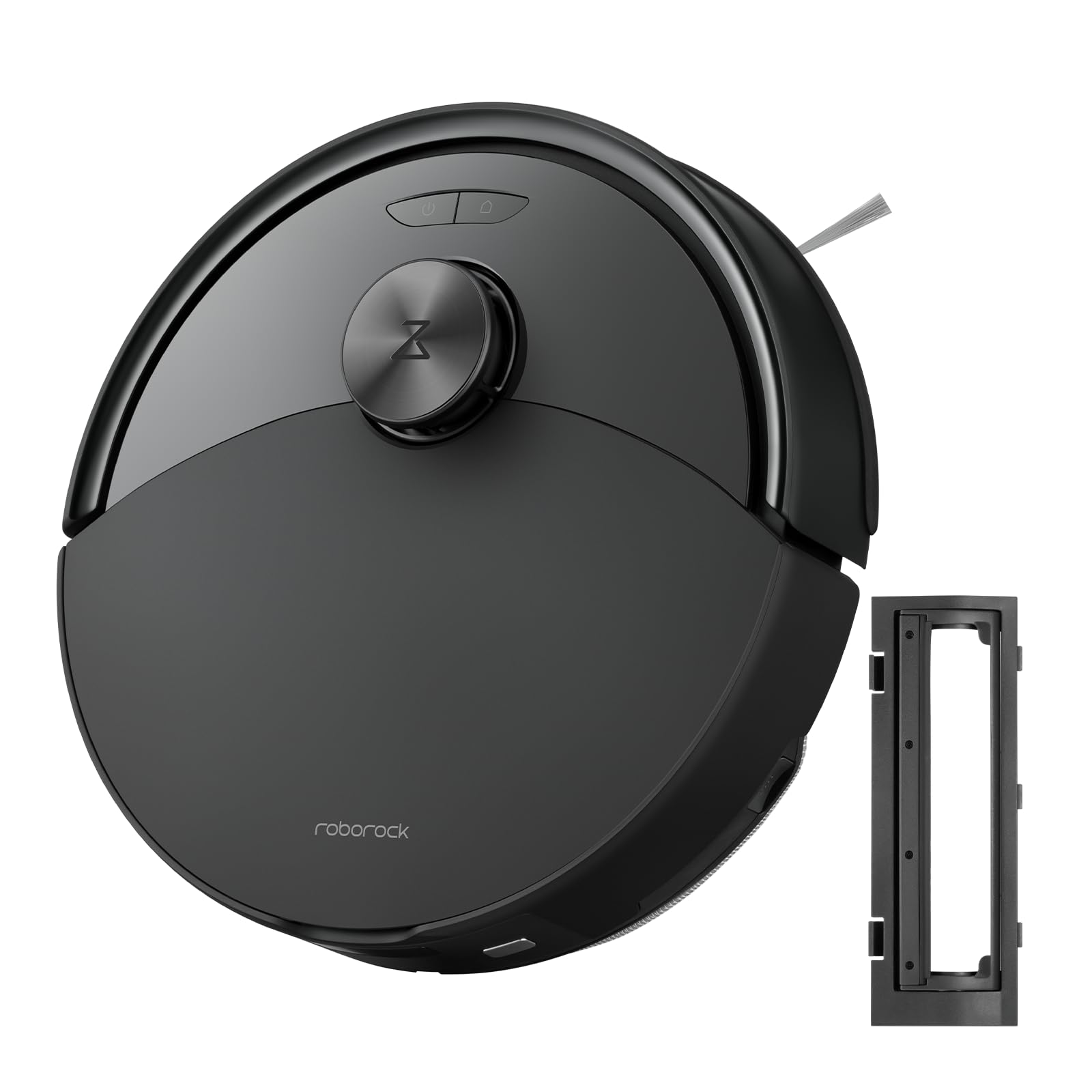
Figure 1 : The roborock Q10 S5 Robot Vacuum and Mop Cleaner. This image shows the top view of the robot, highlighting its sleek black design and main control buttons.
Composants du robot :
- Le couvercle supérieur: Lifts to reveal the dustbin and Wi-Fi indicator.
- Bouton Marche/Nettoyage : Press to start/pause cleaning, hold to turn on/off.
- Dock/Spot Clean Button: Press to send the robot back to the dock, hold for spot cleaning.
- LDS Sensor: Pour la navigation et la cartographie.
- Pare-chocs : Détecte les obstacles.
- Brosse latérale : Balayez les débris des bords et des coins.
- Brosse principale : Collects dirt and debris from floors. Features a floating design for better contact.
- Roue omnidirectionnelle : Pour le mouvement.
- Contacts de charge : Se connecte à la station de charge.
- Capteurs de falaise : Empêche le robot de tomber dans les escaliers.
- Réservoir d'eau et lingette de nettoyage : Pour la fonction de lavage des sols.
Station de chargement :
- Dock Location Beacon: Helps the robot locate the dock.
- Contacts de charge : Transfère l'énergie au robot.
- Port du câble d'alimentation : Connecte l'adaptateur secteur.
4. Installation
- Déballer le robot : Carefully remove the robot and all accessories from the packaging. Remove any protective films or shipping materials.
- Installer la brosse latérale : Press the side brush onto its post until it clicks into place.
- Placez la station de charge :
- Placez la station de charge sur une surface dure et plane, contre un mur.
- Assurez-vous qu'il y ait au moins 0.5 mètre (1.6 pied) d'espace libre de chaque côté et 1.5 mètre (4.9 pieds) devant le quai.
- Connect the power cable to the charging dock and plug it into a wall outlet.
- Charge initiale: Place the robot on the charging dock. The robot will automatically turn on and begin charging. For first-time use, fully charge the robot before operation (approximately 4-6 hours). The power indicator light will breathe white during charging and turn solid white when fully charged.
- Téléchargez l'application : Rechercher "Roborock" in the App Store or Google Play Store, or scan the QR code on the packaging to download and install the app.
- Se connecter au Wi-Fi :
- Open the Roborock app and follow the on-screen instructions to add your device.
- Assurez-vous que votre téléphone est connecté à un réseau Wi-Fi 2.4 GHz.
- Appuyez et maintenez enfoncé le Quai et Pouvoir buttons simultaneously for 3 seconds until you hear the "Resetting Wi-Fi" voice alert.
- Follow the app's instructions to complete the connection.
5. Mode d'emploi
Commencer un nettoyage :
- De la part de Robot : Appuyez sur le Pouvoir button once. The robot will start cleaning.
- Depuis l'application : Open the Roborock app and tap the "Clean" button.
Pausing/Resuming/Stopping:
- Pause: Appuyez sur n'importe quel bouton du robot ou appuyez sur « Pause » dans l'application.
- CV: Appuyez sur le Pouvoir button or tap "Resume" in the app.
- Stop: To stop a cleaning cycle, press the Quai button to send the robot back to the charging dock, or tap "Stop" in the app.
Fonction de nettoyage :
- Remplissez le réservoir d'eau : Open the water tank cover, fill with clean water, and close securely.
- Fixez la serpillière : Wet the mop pad and wring it out. Slide it into the mop pad slot until it is securely attached.
- Commencez à passer la serpillière : The robot will automatically detect the mop module and switch to mopping mode. You can adjust water flow levels in the app.
Fonctionnalités de l'application :
- Gestion des cartes : Create and save maps, set no-go zones, virtual walls, and invisible barriers.
- Selective Room Cleaning: Choisissez les pièces spécifiques à nettoyer.
- Nettoyage programmé : Set cleaning schedules for different times and days.
- Modes de nettoyage personnalisés : Réglez la puissance d'aspiration et le débit d'eau.
- Télécommande: Contrôlez manuellement les mouvements du robot.
6. Entretien
Regular maintenance ensures your roborock Q10 S5 operates efficiently. Always turn off the robot and unplug the charging dock before performing any maintenance.
Dustbin and Filter (Weekly):
- Soulevez le couvercle supérieur du robot.
- Retirez la poubelle.
- Ouvrez le couvercle de la poubelle et videz son contenu dans une poubelle classique.
- Remove the filter. Tap it gently to remove dust. The filter can be rinsed with water; ensure it is completely dry before reinstallation (allow 24 hours).
- Rinse the dustbin with water if necessary and allow it to dry completely.
- Reinstall the dry filter and dustbin.
Main Brush (Weekly):
- Retournez le robot.
- Press the tabs to remove the main brush cover.
- Retirez la brosse principale.
- Utilisez l'outil de nettoyage (s'il est fourni) ou des ciseaux pour couper et retirer les cheveux ou les débris emmêlés autour de la brosse.
- Reinstall the main brush and cover, ensuring it clicks into place.
Side Brush (Monthly):
- Dévissez la brosse latérale.
- Enlevez tous les cheveux et les débris.
- Reattach and tighten the screw.
Sensors and Charging Contacts (Monthly):
- Wipe all sensors (cliff sensors, wall sensor, LDS sensor window) and the charging contacts on both the robot and the dock with a soft, dry cloth.
Mop Pad (After Each Use):
- Retirez le tampon de vadrouille du réservoir d'eau.
- Rinse thoroughly with water and allow it to air dry completely before next use.
7. Dépannage
If you encounter issues with your robot, please refer to the following table before contacting support.
| Problème | Cause possible | Solution |
|---|---|---|
| Le robot ne s'allume pas. | Batterie faible ou non chargée. | Placez le robot sur sa station de charge et assurez-vous qu'il est en charge. |
| Le robot ne peut pas se connecter au Wi-Fi. | Mot de passe Wi-Fi incorrect, réseau 5 GHz ou signal faible. | Ensure correct 2.4GHz Wi-Fi, reset Wi-Fi on robot, move closer to router. |
| Le robot se bloque fréquemment. | Obstacles, câbles emmêlés ou capteurs sales. | Clear floor, clean sensors, use no-go zones in app. |
| Mauvaise performance de nettoyage. | Full dustbin, dirty filter, tangled brushes. | Empty dustbin, clean/replace filter, clean main/side brushes. |
| Le robot émet un bruit inhabituel. | Debris in main brush, side brush, or wheels. | Inspect and clean all brushes and wheels for obstructions. |
If the problem persists, please refer to the Roborock app for more detailed error messages or contact customer support.
8. Spécifications
| Fonctionnalité | Détail |
|---|---|
| Modèle | Q10 S5 |
| Dimensions | Environ 353 x 350 x 96.5 mm (13.9 x 13.8 x 3.8 pouces) |
| Poids | Environ 3.7 kg (8.16 lb) |
| Batterie | Lithium-Ion (Capacity not specified, typical for robot vacuums) |
| Puissance nominale | Approx. 60W (Typical for robot vacuums) |
| Capacité de la poubelle | Approx. 470 ml (Typical for robot vacuums) |
| Capacité du réservoir d'eau | Approx. 300 ml (Typical for robot vacuums) |
| Puissance d'aspiration | Up to 10,000 Pa (HyperForce Suction Power from feature bullets) |
| Connectivité Wi-Fi | 2.4 GHz |
Remarque: les spécifications peuvent être modifiées sans préavis.
9. Garantie et assistance
roborock products are manufactured to the highest quality standards. For detailed warranty information, please refer to the warranty card included in your product packaging or visit the official roborock website. For technical support, troubleshooting assistance, or to purchase replacement parts, please contact roborock customer service through the app or their official website.
Officiel Website: www.roborock.com