
1. Introduction
The VSYSTO F4.5K Bicycle Rear View Camera is designed to enhance cycling safety and convenience. This system features a 4.5-inch screen, 1080P infrared night vision, WiFi connectivity, and GPS functionality. This manual provides detailed instructions for installation, operation, and maintenance to ensure optimal performance and user satisfaction.
2. Contenu de la boîte
Déballez soigneusement tous les composants et assurez-vous que tous les éléments listés ci-dessous sont présents :
- Hôte avec support
- Caméra
- Câble d'alimentation
- Module GPS
- Contrôleur filaire
- Tail light with 2 meters/6.56ft extension cable
- Bouclier lumineux
- USB Test cable + cable ties + TF plug screw
- Support de caméra
- Support d'accueil
- Wired controller bracket
- Taillight bracket

Image: All components included in the VSYSTO F4.5K Bicycle Rear View Camera package.
3. Configuration et installation
Follow these steps to correctly install your VSYSTO F4.5K system on your bicycle.
3.1 Installation de la caméra
The camera can be mounted on the seat post or rear rack. Use the provided brackets and screws for a secure fit. Ensure the camera lens has a clear view de l'arrière.

Image: Rear camera mounted on the bicycle seat post.
3.2 Installation du moniteur
Mount the 4.5-inch display unit on your handlebar using the handlebar bracket. Adjust the angle for optimal viewing during your ride. Connect the camera and GPS modules to the main unit using the provided cables.

Image: Display unit mounted on the bicycle handlebar.
3.3 Connexion de câblage
Route the cables neatly along the bicycle frame using the provided cable ties. Ensure all waterproof plugs are securely connected. Avoid routing cables near moving parts or areas that could cause pinching or damage.

Image: Connection diagram for the VSYSTO F4.5K components.
3.4 Installation Reference Video
Pour un guide visuel du processus d'installation, veuillez consulter la vidéo officielle ci-dessous :
Video: A detailed guide demonstrating the installation of the VSYSTO F4.5K Bicycle Rear View Système de caméra.
4. Mode d'emploi
4.1 Mise sous/hors tension
The device supports intelligent vibration startup. If no vibration is detected within 5 minutes, it will automatically shut down. To manually power on/off, long press the function button on the wired controller.

Image: One-click and intelligent automatic power on/off functionality.
4.2 Fonctions de la manette filaire
The wired controller provides quick access to various functions:
- Touche haut: Turn on/off microphone.
- Touche vers le bas: Enter assisted driving mode, switch between different display interfaces.
- Touche OK : Enter menu to set functions, pause recording.
- Clé de fonction: Enter emergency recording mode, power on/off the camera.

Image: Multifunctional wired controller with button descriptions.
4.3 WiFi Connection and App Operation
Connect your smartphone to the camera's built-in WiFi to view, transfer, and edit videos via the "WiFi camera" app. The app allows real-time preview and easy sharing without removing the memory card.

Image: WiFi connection and app operation for the VSYSTO F4.5K.
4.3.1 Android App Operation
Video: Demonstration of the VSYSTO F4.5K app operation on an Android device.
4.3.2 iOS App Operation
Video: Demonstration of the VSYSTO F4.5K app operation on an iOS device.
4.4 Fonctionnalités GPS
The built-in GPS module allows riders to track their driving route, speed, and other data. This information can be viewed on the mobile app or computer software ("DV Player").
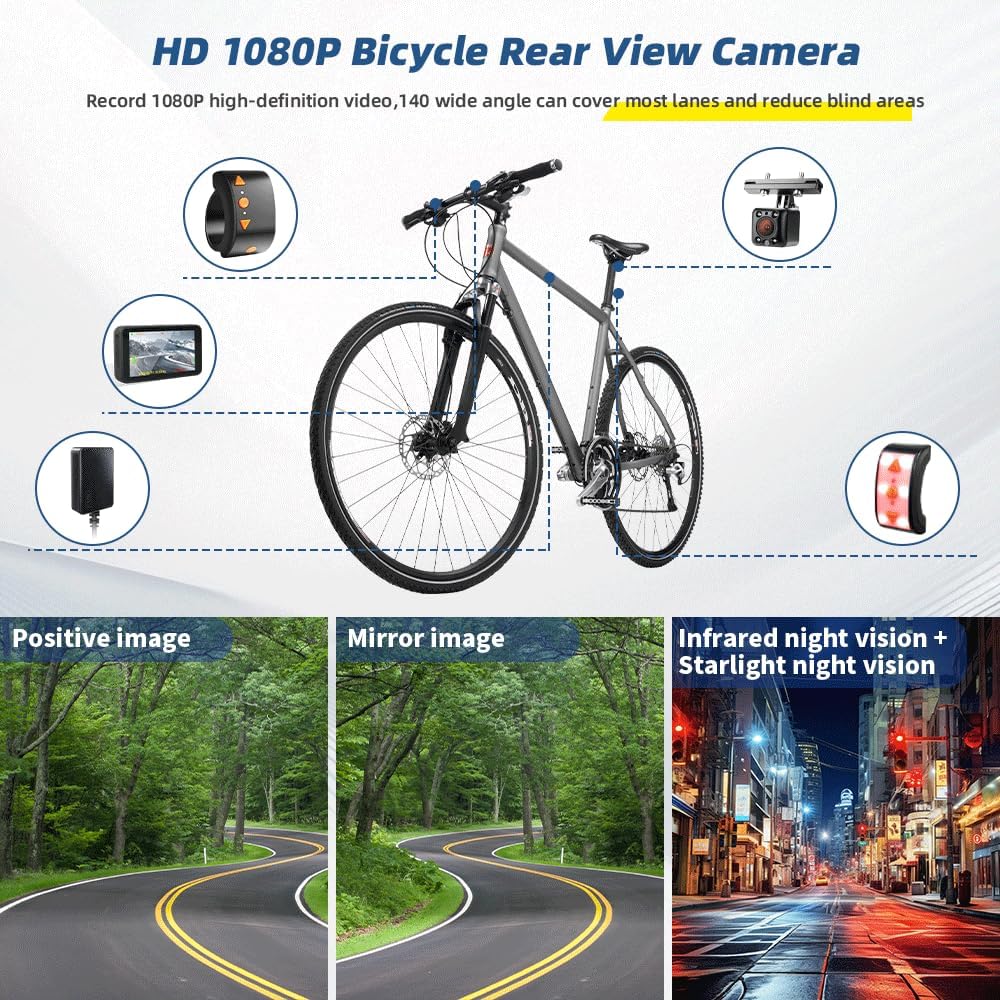
Image: GPS tracking feature displaying route and speed on mobile and computer.
4.5 Assisted Driving Mode
Access the assisted display mode via the wired controller's down button to view real-time data such as current vehicle speed, time, calorie consumption, mileage, altitude, longitude, latitude, and atmospheric pressure. It also tracks short-term and long-term memory driving speed and mileage.

Image: Assisted Driving Mode displaying various metrics.
4.5.1 Assisted Driving Operation Video
Video: Demonstration of the assisted driving mode features on the VSYSTO F4.5K.
5. Caractéristiques
5.1 HD 1080P Infrared Night Vision Camera
The camera system captures clear, high-resolution footage with a 140-degree wide-angle lens. Specialized night vision technologies (starlight night vision + infrared night vision) ensure visibility in low-light conditions, covering multiple lanes and reducing blind spots.

Image: Infrared Night Vision Camera performance.
5.2 Colorful Spectral Taillight
The integrated taillight offers six different light modes, enhancing visibility and safety for other road users, especially in low-light conditions. The wired controller allows you to freely choose lighting modes and turn the taillights on/off.

Image: Colorful Spectral Taillight with multiple modes.
5.3 Loop and Emergency Recording
The system supports loop recording (1/2/3/5 minute intervals), automatically overwriting older files when the memory card is full. A built-in G-sensor triggers emergency recording upon impact, saving critical video files that will not be overwritten. Up to 10 emergency files peuvent être sauvegardés.

Image: Loop and Emergency Recording features.
5.4 Conception étanche
The camera system features a fully waterproof construction, ensuring reliable operation in all weather conditions.

Image: Waterproof design for all-weather reliability.
5.5 Convenient Charging
The device is powered by a rechargeable 3000mAh battery, offering up to 3 hours of continuous use. It supports recording while charging and can be connected to a 5V 2A power bank or charger via USB. (Note: Input voltage exceeding 5V may damage the recorder).

Image: Rechargeable battery and convenient USB charging.
6. Entretien
- Regularly check all cable connections for security and damage.
- Clean the camera lens and display screen with a soft, damp tissu pour assurer une visibilité optimale.
- Periodically format the SD card to maintain optimal recording performance and prevent data corruption.
- Ensure the device is fully charged before long rides.
- Rangez l'appareil dans un endroit frais et sec lorsqu'il n'est pas utilisé.
7. Dépannage
7.1 Pas d'alimentation
- Vérifiez si la batterie est chargée.
- Assurez-vous que tous les câbles d'alimentation sont correctement connectés.
- Verify the power source (power bank/charger) is functioning correctly.
7.2 Mauvaise qualité d'image
- Clean the camera lens and display screen.
- Vérifiez qu'aucun obstacle ne bloque la caméra. view.
- Assurez-vous que la caméra est bien fixée et ne vibre pas excessivement.
7.3 Problèmes de connexion Wi-Fi
- Assurez-vous que le Wi-Fi de la caméra est activé.
- Verify you are connecting to the correct VSYSTO WiFi network.
- Redémarrez l'appareil photo et votre smartphone, puis essayez de vous connecter à nouveau.
7.4 Problèmes d'enregistrement
- Vérifiez si une carte SD est insérée et correctement formatée.
- Assurez-vous que la carte SD dispose de suffisamment d'espace libre.
- If using loop recording, older files will be overwritten; check for emergency files si nécessaire.
8. Spécifications
| Fonctionnalité | Spécification |
|---|---|
| Marque | VSYSTO |
| Nom du modèle | F4.5K |
| Taille de l'écran | 4.5 pouces |
| Type d'affichage | IPS |
| Résolution de capture vidéo | 1080p |
| Domaine de View | 140 degrés |
| Technologie de connectivité | Wifi |
| Caractéristiques spéciales | GPS, Handlebar Wired Controller, Auto power on/off, HD 1080P Infrared Night Vision Camera, Loop recording, Emergency recording, Waterproof, Rechargeable, Overspeed warning, Assisted Driving Mode, Shutdown reminder |
| Capacité de la batterie | 3000mAh |
| Type de cellule de batterie | Lithium Polymère |
| Type de mémoire flash | microSD (jusqu'à 256 Go) |
| Étanche | Oui |
| Dimensions de l'article (P x L x H) | 0.78"P x 4.72"L x 3.15"H |
9. Garantie et assistance
This VSYSTO product comes with a Garantie de 1 ans from the date of purchase. For technical support, troubleshooting assistance, or warranty claims, please contact VSYSTO customer service through the official channels provided in your product packaging or on the VSYSTO website.