
1. Introduction
Thank you for choosing the Veken 55 x 28 Inch Electric Standing Desk. This desk is designed to provide a versatile and ergonomic workspace, allowing you to easily switch between sitting and standing positions. Please read this manual carefully before assembly and use to ensure proper operation and safety.
2. Informations importantes sur la sécurité
- Always follow the user manual for proper assembly and use.
- Ne pas dépasser la limite de poids de 154 livres (70 kg) pour assurer la stabilité et prévenir les dommages.
- Use the desk in a well-lit area and keep it away from heat sources.
- Be cautious when adjusting the height to avoid injury or pinching.
- Always maintain proper ergonomics when using the desk to prevent strain.
- Veillez à ce que tous les câbles soient correctement rangés afin d'éviter les risques de trébuchement ou les dommages lors des réglages de hauteur.
3. Contenu du colis
Veuillez vérifier que tous les composants sont présents avant de commencer l'assemblage :
- Desktop (joined pieces)
- Desk Legs (cold-rolled steel frame)
- Panneau de contrôle avec préréglages de mémoire
- Tige de moteur et de transmission
- Clip de câble
- Feet Pads (4x)
- Crochet pour casque
- Manuel de l'utilisateur (ce document)
- All necessary assembly tools (hex key, screws)
4. Instructions de montage
Assembly is designed to be straightforward. All holes are pre-drilled, and accessories are pre-labeled for ease of installation. It is recommended to assemble the desk on a soft, clean surface to prevent scratches.
Guide d'assemblage étape par étape
- Déballer les composants : Carefully remove all parts from the packaging. Verify against the package contents list.
- Assembler les pieds du bureau : Attach the desk legs to the main frame using the provided screws. Ensure all connections are secure.
- Installer la tige de transmission : Insert the transmission rod between the two legs. Ensure it is correctly aligned and secured.
- Attacher un ordinateur de bureau : Carefully place the desktop onto the assembled frame. Align the pre-drilled holes and secure the desktop with the provided screws. Be careful not to overtighten screws to avoid stripping the particle board.
- Installation du panneau de commande et des accessoires : Attach the control panel to the underside of the desktop in the designated area. Install the headphone hook and cable clips as desired.
- Connecter l'alimentation : Connect the power cable to the control panel and then to a power outlet.

Figure 1: Quick and Simple Installation Overview
Guide vidéo d'assemblage
Video 1: Veken Electric Standing Desk - Installation Steps. This video provides a visual guide to the assembly process.
5. Mode d'emploi
The Veken Electric Standing Desk features an intuitive control panel for easy height adjustment and personalized settings.
Réglage de la hauteur
- The desk offers a wide height range from 27.9 pouces à 45.6 pouces.
- Utilisez le Haut (▲) et Bas (▼) Les boutons fléchés du panneau de commande permettent de régler manuellement la hauteur du bureau à la hauteur souhaitée.
Préréglages de mémoire
The control panel includes four memory preset buttons (1, 2, 3, 4) to save and quickly recall your preferred sitting and standing heights.
- Pour enregistrer un préréglage : Adjust the desk to your desired height using the arrow buttons. Press and hold one of the numbered preset buttons (1-4) until the display flashes or beeps, indicating the height has been saved.
- Pour rappeler un préréglage : Simply press the corresponding numbered preset button (1-4). The desk will automatically move to the saved height.
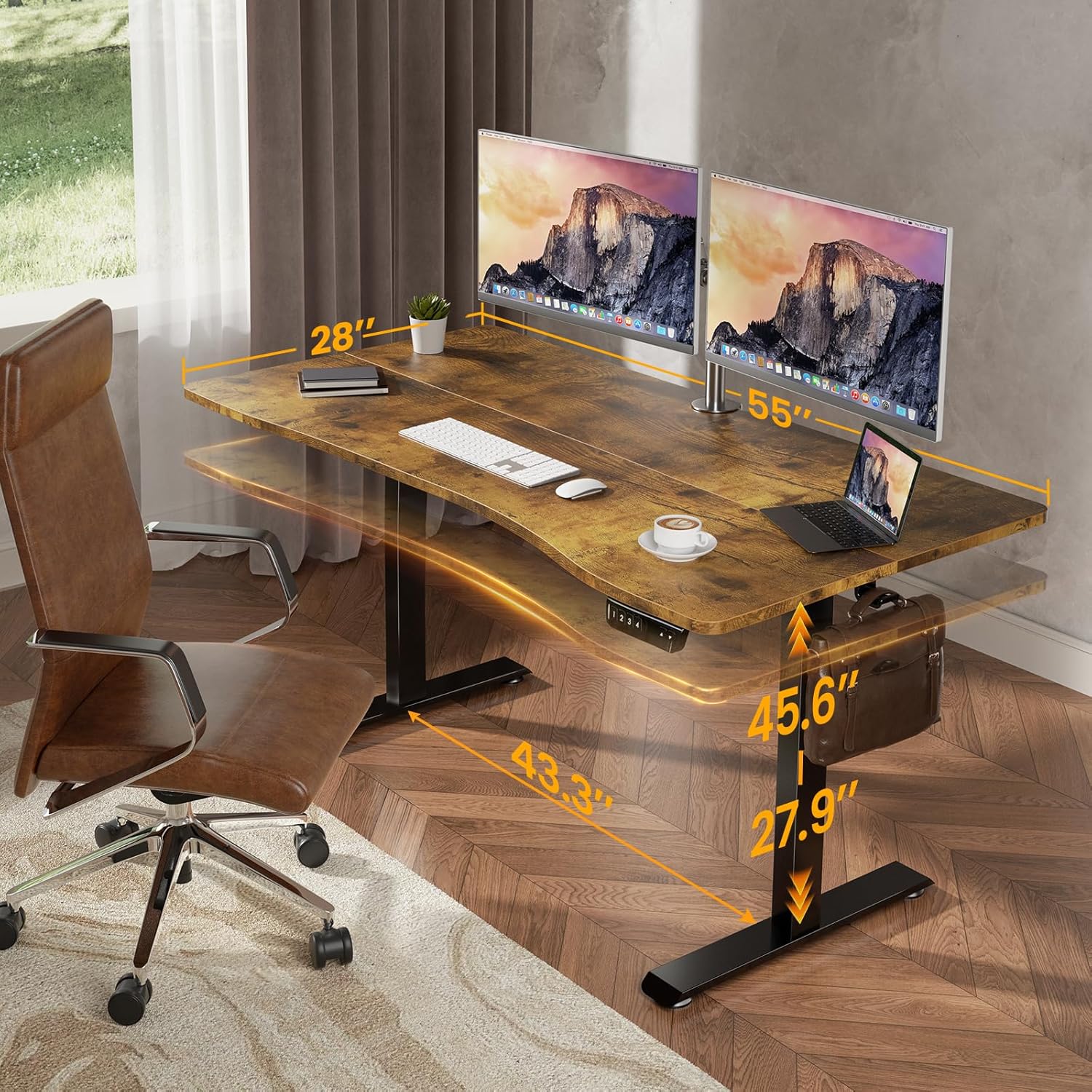
Figure 2 : Dimensions et hauteur du bureau
Ergonomic Design & Features
- Bord incurvé ergonomique : The desktop features a smooth, human-centric curved edge to reduce arm strain and allow easy access to items, enhancing comfort and productivity.
- Spacious Worksurface: The 55" x 28" desktop accommodates multiple monitors and office supplies, providing ample space for an organized workflow.
- Crochet pour casque : A convenient hook is included for hanging headphones or bags, keeping your workspace tidy.

Figure 3: Ergonomic Desktop Design
Video 2: Veken - Choose Your Favorite Standing Desk. This video demonstrates the desk's versatility in various settings.
6. Entretien
To ensure the longevity and optimal performance of your Veken Electric Standing Desk, follow these maintenance guidelines:
- Nettoyage: Essuyez le bureau et le cadre avec un chiffon doux et sec.amp Chiffon. Évitez les produits chimiques agressifs ou les nettoyants abrasifs qui pourraient endommager la finition.
- Gestion des câbles: Periodically check and adjust cable clips to keep wires tidy and prevent them from getting caught during height adjustments.
- Vérification des fixations : Occasionally inspect all screws and fasteners to ensure they are tight. Retighten if necessary, but avoid overtightening.
- Entretien du moteur : The motor is designed for durability. If you notice any unusual sounds or resistance during adjustment, refer to the troubleshooting section.
7. Dépannage
If you encounter any issues with your Veken Electric Standing Desk, please refer to the following common problems and solutions:
- Desk Not Adjusting / Uneven Legs: If one leg is not moving synchronously with the other, or the desk is not adjusting, it may indicate an incorrect installation of the transmission rod. Ensure the transmission rod is fully inserted into the hexagonal nut on the left leg's hole position.
- Vibration During Adjustment: A slight vibration when lowering the desk might occur. This is often due to the legs catching slightly. Regular use typically smooths this out. If persistent, ensure all connections are secure.
- Stripped Screw Holes: The desktop is made of particle board. When assembling, avoid overtightening screws to prevent stripping the pre-drilled holes. If a hole is stripped, consider using wood glue and a larger screw, or a repair kit.
Guide vidéo de dépannage
Video 3: Incorrect Installation Direction of the Side Plate. This video provides guidance on correcting common assembly errors related to the side plates.
8. Spécifications
| Fonctionnalité | Détail |
|---|---|
| Marque | Veken |
| Numéro de modèle | ODHOME123 |
| Dimensions du produit (P x L x H) | 28"P x 55"L x 27.9"H |
| Hauteur minimale | 27.9 pouces |
| Hauteur maximale | 45.6 pouces |
| Poids de l'article | 39.9 livres |
| Capacité de poids | 154 livres (70 kg) |
| Matériel de bureau | Blockboard (Laminated) |
| Matériau de base | Acier laminé à froid |
| Caractéristiques spéciales | Adjustable Height, Electric, Ergonomic, Memory Preset |
| Assemblage requis | Oui (outils inclus) |

Figure 4: Desk Load-Bearing Capacity
9. Garantie et assistance
Garantie du fabricant : This product comes with a limited manufacturer warranty. For specific details regarding the warranty period and coverage, please refer to the documentation included in your product packaging or contact Veken customer support.
Assistance clientèle : If you have any questions, suggestions, or require assistance with your Veken Electric Standing Desk, please do not hesitate to contact Veken customer support. Contact information can typically be found on the product packaging or the official Veken website.