
1. Produit terminéview
The SVITOO P108 is a 12-inch Android tablet designed for versatile use, from entertainment to productivity. It features a 2K Full HD display, an Octa-Core processor, ample RAM and storage, and a long-lasting battery.

Image 1.1: The SVITOO P108 tablet showcasing its 2K display, dual-band Wi-Fi, Bluetooth 5.0, GPS, 30GB RAM (6+24), 128GB ROM, 8800mAh battery, T7250 processor, Android 16, and 13MP rear / 8MP front cameras.
Contenu du colis :
- SVITOO P108 Tablet x 1
Disposition de l'appareil :

Image 1.2: A detailed diagram illustrating the location of the volume buttons, power button, front camera, flashlight, rear camera, 3.5mm headphone jack, TF card slot, Type-C port, and microphone on the SVITOO P108 tablet.
- Boutons de volume : Régler le niveau de sortie audio.
- Bouton d'alimentation : Turn the device on/off, or put it to sleep/wake it up.
- Caméra frontale : Pour les appels vidéo et les selfies.
- Caméra arrière : Pour la prise de photos et de vidéos.
- Lampe de poche: Fournit un éclairage pour la caméra arrière.
- Prise casque 3.5 mm: Branchez des écouteurs filaires.
- Emplacement pour carte TF: Insérez une carte microSD pour étendre la capacité de stockage.
- Port de type C: Pour le chargement et le transfert de données.
- Microphone: Pour la saisie audio pendant les appels ou les enregistrements.
- Haut-parleur: Pour la sortie audio.
2. Configuration initiale
2.1 Chargement de la tablette
Before first use, fully charge your tablet. Connect the provided USB Type-C cable to the tablet's Type-C port and the other end to a compatible power adapter. The battery indicator on the screen will show charging status.
2.2 Mise sous/hors tension
- Pour allumer : Press and hold the Power button until the SVITOO logo appears.
- Pour éteindre : Maintenez le bouton Marche/Arrêt enfoncé jusqu'à ce que les options d'alimentation apparaissent à l'écran, puis sélectionnez « Éteindre ».
- Recommencer: Appuyez sur le bouton d'alimentation et maintenez-le enfoncé jusqu'à ce que les options d'alimentation apparaissent, puis sélectionnez « Redémarrer ».
2.3 Configuration initiale
Lors de la première mise en marche, suivez les instructions à l'écran pour configurer votre tablette. Cela comprend le choix de la langue, la connexion à un réseau Wi-Fi, la création de votre compte Google et la configuration des paramètres de sécurité de base.
2.4 Insertion d'une carte microSD
To expand storage, insert a microSD card into the TF Card Slot. Ensure the tablet is powered off before inserting or removing the card. Gently push the card until it clicks into place.
3. Utilisation de la tablette
3.1 Navigation dans l'interface Android
The tablet runs on Android 15, offering a user-friendly interface. Swipe up from the bottom to access the app drawer, swipe down from the top for notifications and quick settings, and use the navigation buttons (back, home, recent apps) at the bottom of the screen.
3.2 Fonctions d'affichage
The 12-inch 2K Full HD display (2000x1200 resolution) provides a clear and vibrant viewing experience. The screen has a 5:3 aspect ratio and 380 nits brightness.
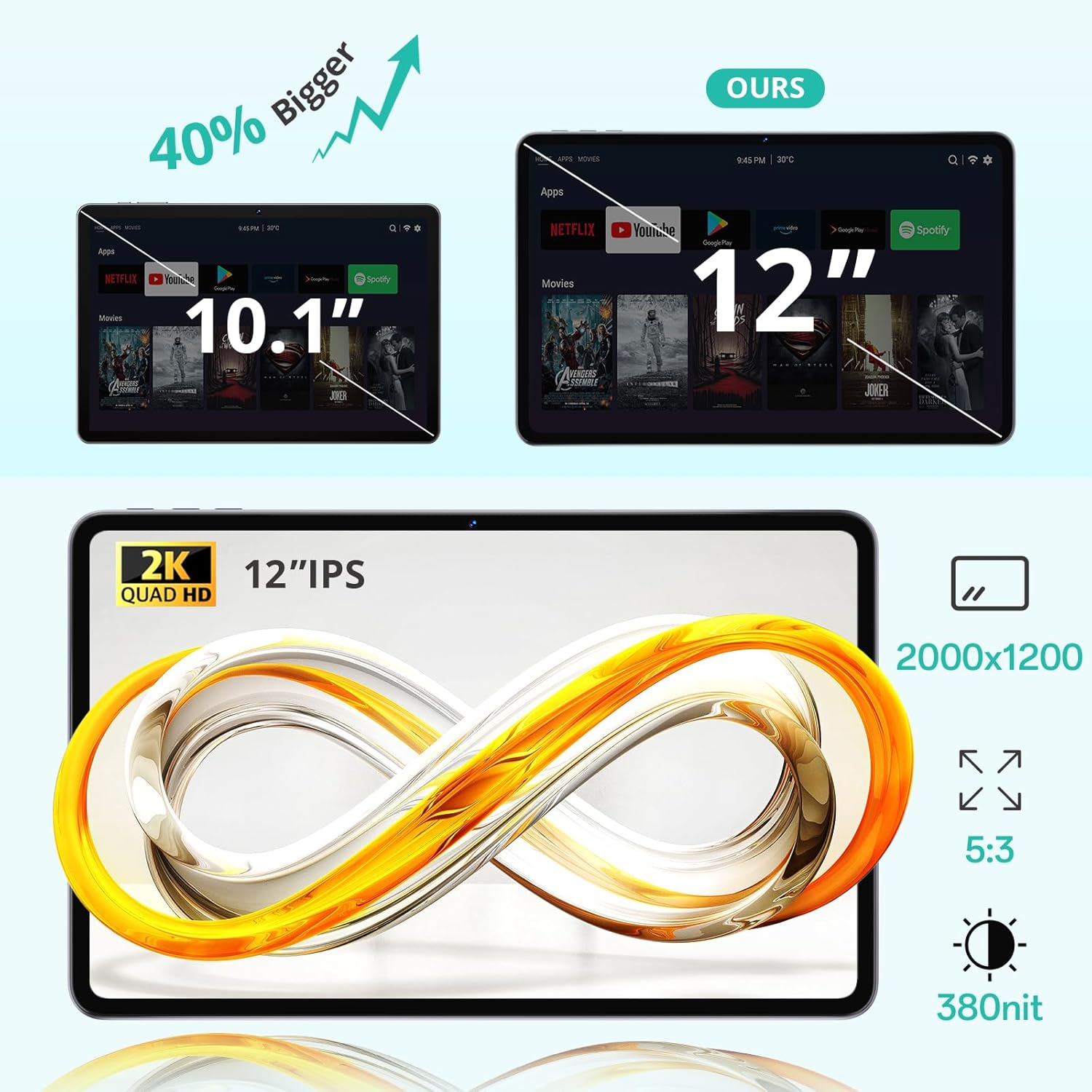
Image 3.1: The 12-inch display of the SVITOO P108 tablet, highlighting its 2K Quad HD resolution of 2000x1200, 5:3 aspect ratio, and 380 nit brightness, shown alongside a size comparison to a 10.1-inch tablet.
3.3 Prise en charge de Widevine L1
The tablet supports Widevine L1, enabling high-definition streaming from popular services like Netflix, YouTube, and Prime Video. This ensures a premium viewing experience with crisp visuals.

Image 3.2: The SVITOO P108 tablet displaying a high-definition image, indicating Widevine L1 support for streaming content from platforms such as Disney+, Netflix, YouTube, and Prime Video.
3.4 Multitâche avec écran partagé
Utilize the split-screen feature to run two applications simultaneously. This enhances productivity, allowing you to watch videos while chatting or browse the web while taking notes.

Image 3.3: Step-by-step guide on how to activate split-screen mode on the tablet, showing how to tap the recent apps button, select an app, and choose 'Split screen' to open a second app alongside it.
3.5 Mode de lecture
The tablet offers a dedicated reading mode that reduces blue light and optimizes brightness for a more comfortable and eye-friendly reading experience.

Image 3.4: The tablet displaying text in reading mode, emphasizing features like reduced blue light, optimized brightness, and overall eye-friendliness.
3.6 Parental Controls and Child-Friendly Interface
The tablet includes features for parental controls, allowing parents to manage content, screen time, and ensure a safe browsing environment for children. A child-friendly interface is also available for educational content.

Image 3.5: The tablet displaying a child-friendly interface with educational content and parental control options, indicating features like child-safe browsing and screen time management.
4. Maintenance et entretien
4.1 Nettoyage de la tablette
Utilisez un chiffon doux non pelucheux pour nettoyer l'écran et le boîtier de la tablette. Pour les traces tenaces, frottez légèrement avec un chiffon doux.ampNettoyez le chiffon avec de l'eau ou une solution de nettoyage pour écrans. Évitez d'utiliser des produits chimiques agressifs ou des matériaux abrasifs.
4.2 Entretien de la batterie
The tablet is equipped with an 8000 mAh lithium-ion battery. To prolong battery life:
- Évitez les températures extrêmes.
- Ne laissez pas la batterie se décharger complètement trop souvent.
- Utilisez le chargeur d'origine ou un chargeur compatible certifié.

Image 4.1: The tablet highlighting its 8800mAh battery, with icons indicating usage times for video, music, web navigation et mise en veille.
4.3 Mises à jour logicielles
Regularly check for and install software updates to ensure optimal performance, security, and access to the latest features. Go to Paramètres > Système > Mise à jour du système pour vérifier les mises à jour.
5. Dépannage
5.1 La tablette ne s'allume pas
- Assurez-vous que la batterie est chargée. Branchez le chargeur et attendez quelques minutes avant de tenter de rallumer l'appareil.
- Maintenez le bouton Marche/Arrêt enfoncé pendant 10 à 15 secondes pour effectuer un redémarrage forcé.
5.2 Performances lentes
- Fermez les applications d’arrière-plan inutiles.
- Clear cache for frequently used apps (Settings > Apps > [App Name] > Storage > Clear Cache).
- Assurez-vous de disposer d'un espace de stockage suffisant.
- Redémarrez la tablette.
5.3 Problèmes de connectivité Wi-Fi
- Toggle Wi-Fi off and on in Quick Settings.
- Redémarrez votre routeur Wi-Fi.
- Oubliez le réseau et reconnectez-vous (Paramètres > Réseau et Internet > Wi-Fi > [Nom du réseau] > Oublier).
5.4 Écran non réactif
- Effectuez un redémarrage forcé en maintenant le bouton d'alimentation enfoncé pendant 10 à 15 secondes.
- Assurez-vous que l'écran est propre et exempt d'humidité.
6. Spécifications
| Fonctionnalité | Détail |
|---|---|
| Nom du modèle | P108 |
| Taille de l'écran | 12 pouces |
| Résolution d'écran maximale | 2000 x 1200 pixels |
| Système opérateur | Android 15 |
| Processeur | Unisoc T606 Octa-Core (1.8 GHz) |
| BÉLIER | 6 Go (extensible à 24 Go) |
| Stockage | 128 GB (expandable via microSD up to 1TB) |
| Capacité de la batterie | 8000 mAh |
| Autonomie de la batterie | Up to 8 hours (general use) |
| Caméra arrière | 13 MP |
| Caméra frontale | 5 MP |
| Connectivité | Wi-Fi (2.4G/5G, 802.11ac/b/g/n), Bluetooth 5.0, GPS |
| Ports | 1x USB Type-C, 1x 3.5mm Audio Jack, 1x TF Card Slot |
| Dimensions | 28.23 x 17.84 x 0.98 cm |
| Poids | 940 g |
| Caractéristiques spéciales | Widevine L1, GPS |
7. Garantie et assistance
7.1 Informations sur la garantie
The SVITOO P108 tablet comes with a garantie constructeur d'un anCette garantie couvre les défauts de matériaux et de fabrication dans des conditions normales d'utilisation. Veuillez conserver votre preuve d'achat pour toute réclamation au titre de la garantie.
7.2 Assistance clientèle
For technical assistance, troubleshooting, or warranty inquiries, please contact SVITOO customer service. Support is available 24 hours a day, 7 days a week. Please refer to the contact information provided with your purchase or on the official SVITOO website.