
1. Introduction
The Hushing Sound Machine Alarm Clock F4 is a versatile 3-in-1 device designed to enhance sleep and simplify daily routines. It combines a sound machine with 30 soothing sounds, a dual alarm clock with 15 wake-up sounds, and a night light with 12 color options. This device features a backup battery for alarm functionality during power outages, a memory function to retain settings, and adjustable display brightness.

Figure 1 : Face avant view of the Hushing Sound Machine Alarm Clock F4.
2. caractéristiques du produit
- Fonctionnalité 3 en 1 : Integrates a sound machine, dual alarm clock, and night light.
- Machine à son : Offers 30 soothing sounds, including white noise, pink noise, brown noises, lullabies, and natural sounds (rain, thunderstorm, sea waves, river, campfire, water drop, singing birds).
- Double alarme : Two independent alarms for different schedules.
- Sons de réveil : 15 options, including classic beeps, light music, and ambient sounds.
- Fonction de répétition: Provides an additional 9 minutes of rest.
- Veilleuse: 12 colors with 10 adjustable brightness levels. Can be turned off independently.
- Affichage de l'heure : 12/24-hour mode with 4 levels of adjustable brightness.
- Contrôle du volume : 32 niveaux de volume réglables.
- Sleep Timers: Auto-off options for 30, 60, 90, or 120 minutes, or continuous playback.
- Fonction mémoire : Retains last settings after power failure or reboot.
- Batterie de secours : Assure le fonctionnement de l'alarme en cas de coupure de couranttages (device requires constant power for full operation).

Figure 2 : Plusview de la fonctionnalité 3 en 1.

Figure 3: Detailed list of 30 soothing sounds available.
3. Installation
- Connexion électrique : Connect the device to a power source using the provided USB cable and adapter. The device requires continuous power for full operation. The internal battery serves as a backup for the alarm function only.
- Charge initiale: For optimal performance, ensure the device is fully charged before first use.
- Réglage de l'heure :
- Press and hold the "12/24H Time Set" button to enter time setting mode.
- Utilisez les boutons « + » ou « - » pour régler l'heure.
- Press the "Next Song" button (right arrow) to move to minute adjustment.
- Utilisez les boutons « + » ou « - » pour régler les minutes.
- Press the "Next Song" button again to confirm and exit time setting.
- Format 12/24 heures : Short press the "12/24H Time Set" button to toggle between 12-hour (AM/PM) and 24-hour formats.
Video 1: Guide on how to set the alarm clock and other settings.
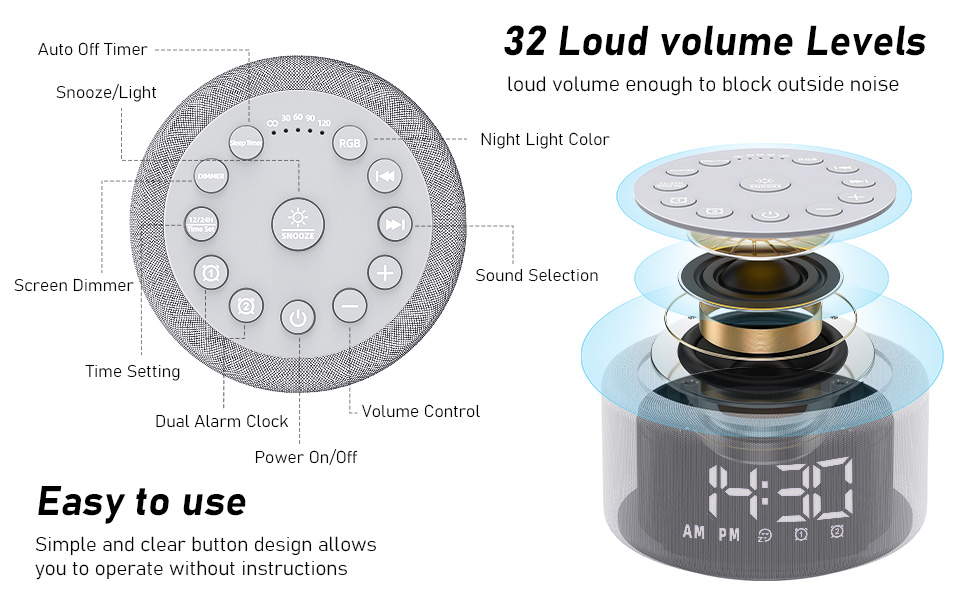
Figure 4: Button layout and functions for easy operation.
4. Mode d'emploi
4.1. Réglage des alarmes
- Set Alarm 1 or 2:
- Press and hold the "Alarm 1" or "Alarm 2" button to enter alarm setting mode.
- Utilisez les boutons « + » ou « - » pour régler l'heure de l'alarme.
- Press the "Next Song" button (right arrow) to move to minute adjustment.
- Utilisez les boutons « + » ou « - » pour régler les minutes de l'alarme.
- Press the "Next Song" button again to select the alarm sound (15 options). Use "+" or "-" to cycle through sounds.
- Press the "Next Song" button again to adjust alarm volume. Use "+" or "-" to set the volume.
- Press the "Next Song" button again to confirm and exit alarm setting. The alarm icon will appear on the display.
- Activer/Désactiver l'alarme : Short press the "Alarm 1" or "Alarm 2" button to activate or deactivate the alarm. The alarm icon will appear/disappear on the display.
- Répéter: When the alarm sounds, press the "Snooze" button to temporarily silence it for 9 minutes.
- Arrêter l'alarme : To turn off the alarm completely, press any button other than "Snooze" when the alarm is sounding.
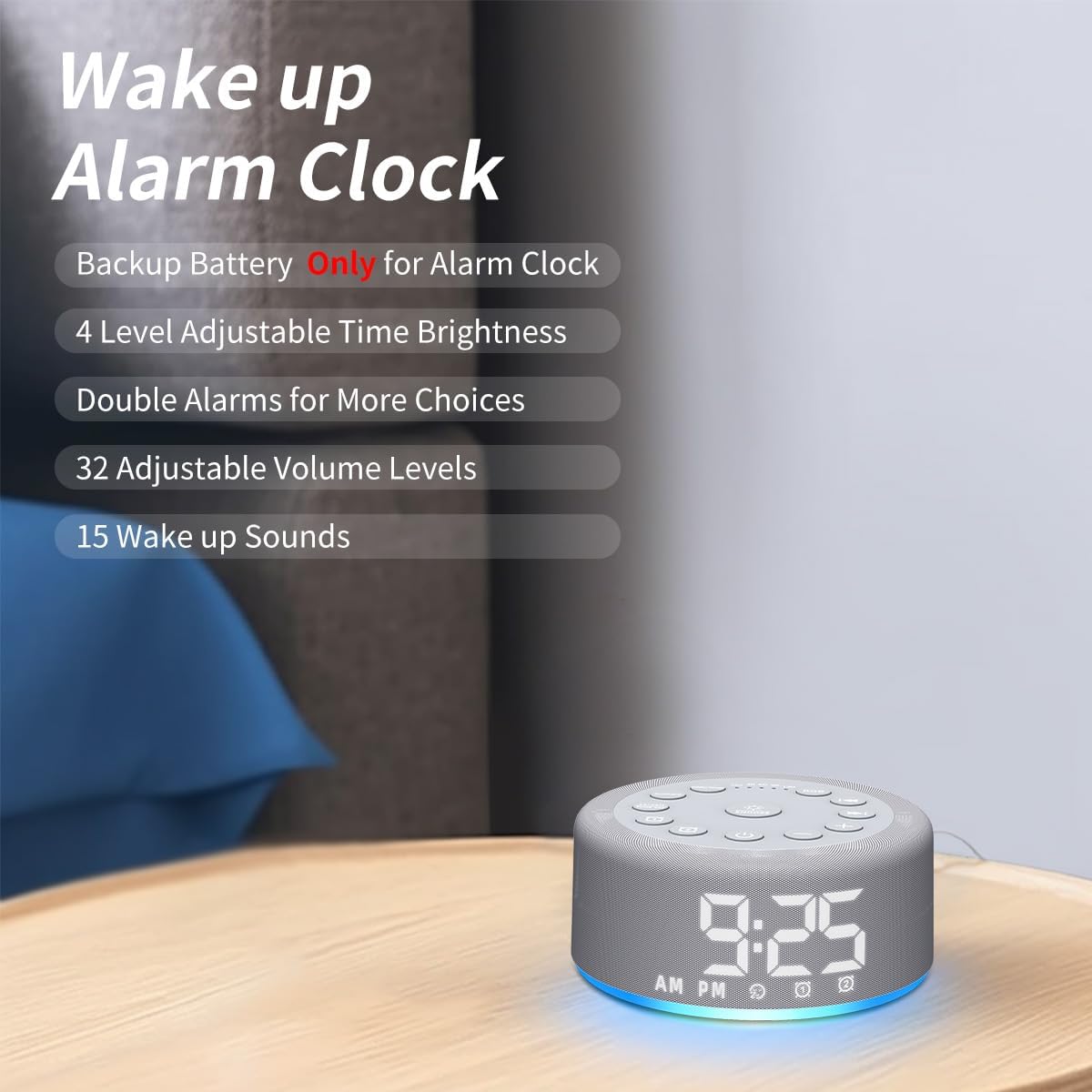
Figure 5: Key features of the alarm clock function.

Figure 6 : Examples of wake-up sounds.
4.2. Utilisation de la machine à sons
- Activer/désactiver : Press the power button (bottom center) to turn the sound machine on or off.
- Sélectionnez Son : Use the "Previous Song" (left arrow) or "Next Song" (right arrow) buttons to cycle through the 30 available sounds.
- Régler le volume : Use the "+" or "-" buttons to increase or decrease the volume (32 levels).
- Régler la minuterie de mise en veille : Short press the "Sleep Timer" button to set an auto-off timer for 30, 60, 90, or 120 minutes. Press repeatedly to cycle through options or select continuous play (indicated by "CO").

Figure 7: Internal speaker design and volume capabilities.
4.3. Fonctionnement de la veilleuse
- Activer/désactiver : Press the "RGB" button to turn the night light on or off.
- Changer de couleur : Short press the "RGB" button to cycle through 12 different colors.
- Régler la luminosité : Use the "+" or "-" buttons to adjust the brightness of the night light (10 levels).

Figure 8: Night light features and benefits.
4.4. Luminosité de l'affichage
- Ajuster la luminosité de l'affichage : Short press the "Dimmer" button to cycle through 4 levels of display brightness (low, medium, high, off).
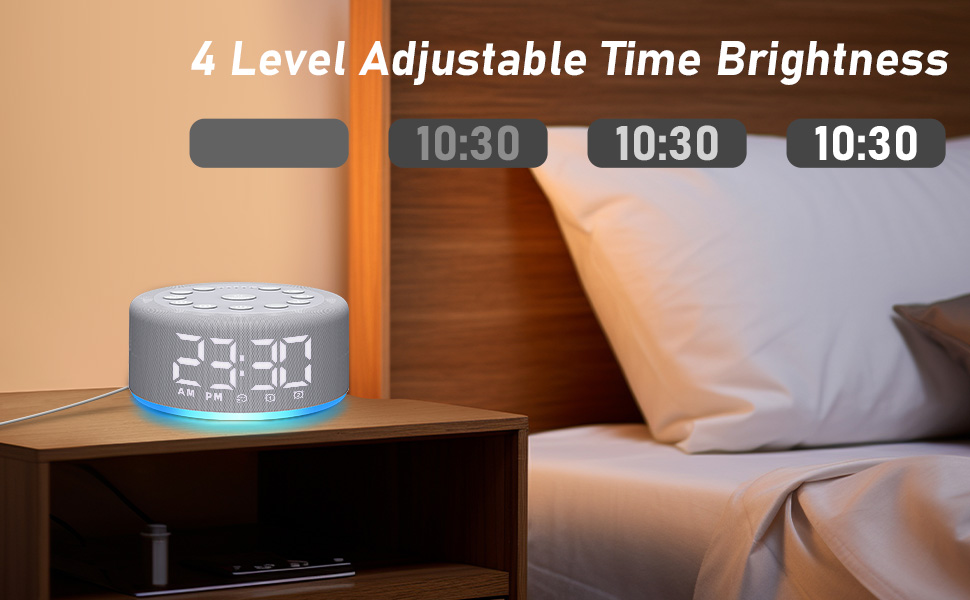
Figure 9: Adjustable time display brightness levels.
5. Entretien
- Nettoyage: Essuyez l'appareil avec un chiffon doux et sec. N'utilisez pas de nettoyants liquides ni de produits abrasifs.
- Stockage: Conserver dans un endroit frais et sec lorsqu'il n'est pas utilisé pendant une période prolongée.
- Pouvoir: Ensure the device remains plugged into a power source for continuous functionality, especially for the sound machine and night light features. The backup battery is solely for the alarm function during power interruptions.
6. Dépannage
- L'appareil ne s'allume pas : Ensure the device is properly plugged into a working power outlet. Check the USB cable and adapter for damage.
- L'alarme ne sonne pas : Verify that the alarm is set and activated (alarm icon visible on display). Check the alarm volume setting. Ensure the device is plugged in, as the backup battery only supports the alarm function for a limited time during power outaget.
- Problèmes de qualité sonore : Ensure the device is placed on a flat, stable surface. The speaker is located on the bottom of the unit, so avoid placing it on soft surfaces that might muffle the sound.
- Écran trop lumineux/sombre : Use the "Dimmer" button to adjust the display brightness to your preference.
- Les paramètres ne sont pas enregistrés : The device has a memory function. If settings are not retained, ensure the device is not completely losing power for extended periods beyond the backup battery's capacity.
7. Spécifications
- Dimensions du produit : 4.25 x 4.25 x 2.2 pouces
- Poids de l'article : 7.68 onces
- Nom du modèle : HAC-F4
- Piles : 1 Lithium Polymer battery required (included, for backup alarm function)
- Fabricant: Chut
8. Garantie et assistance
For warranty information or technical support, please refer to the contact details provided with your purchase or visit the official Hushing webConsultez le site. Conservez votre reçu d'achat pour toute réclamation au titre de la garantie.