
1. Introduction
Merci pour votre achatasing the IEE P3200 Portable Power Station. This device is designed to provide reliable and versatile power for both indoor and outdoor applications, featuring a high-capacity LiFePO4 battery, multiple output ports, and smart control capabilities. Please read this manual thoroughly before operating the device to ensure safe and optimal performance.
2. Consignes de sécurité
To prevent injury, damage to the device, or damage to other property, observe the following safety precautions:
- Ne démontez pas, ne réparez pas ou ne modifiez pas l'unité.
- Tenez l'appareil éloigné des sources de chaleur, de la lumière directe du soleil et des matériaux inflammables.
- Ne pas immerger l'appareil dans l'eau ni l'exposer à de fortes pluies.
- Assurez une ventilation adéquate pendant l'utilisation et la charge afin d'éviter toute surchauffe.
- Tenir hors de portée des enfants et des animaux domestiques.
- Utilisez uniquement des accessoires et des câbles de charge homologués.
- En cas d'incendie, utilisez un extincteur à poudre. L'eau peut provoquer une électrocution.
- Évitez de faire tomber l'appareil ou de le soumettre à des chocs violents.
3. Contenu du colis
Vérifiez que tous les articles sont inclus dans votre colis :
- 1 x IEE P3200 Portable Power Station
- 2 x IEE 200W Solar Panels
- 1 x 4-in-1 Data Cable
- 1 x câble de charge CA
- 1 câble de charge solaire
- 1 x Manuel d'utilisation
- 1 x carte de garantie

Image: Contents of the IEE P3200 package, including the power station, solar panels, and various cables.
4. Produit terminéview
4.1. Caractéristiques de l'unité principale
- Capacité et rendement élevés : 2048Wh capacity with 3200W AC output (6400W peak).
- Batterie durable : Utilizes LiFePO4 battery cells, offering over 4000 charge cycles to 80% capacity, ensuring a lifespan of 10+ years.
- Charge rapide : Supports ultra-fast charging, reaching 80% in 50 minutes via AC input.
- Sorties multiples : Equipped with 16 output ports including AC, USB-A, USB-C, and DC5521.
- Contrôle intelligent: Integrated Wi-Fi and Bluetooth for remote monitoring and control via the IEE App.
- Fonction UPS : Uninterruptible Power Supply (UPS) with a switchover time of less than 10ms.
- Fonctionnement silencieux : Designed for low noise levels, typically below 40dB during use and charging.
- Conception portable : Features a retractable handle and durable wheels for easy transport.
4.2. Composants et ports

Image : Avant view of the IEE P3200 Portable Power Station with included solar panels, highlighting its compact design and multiple ports.
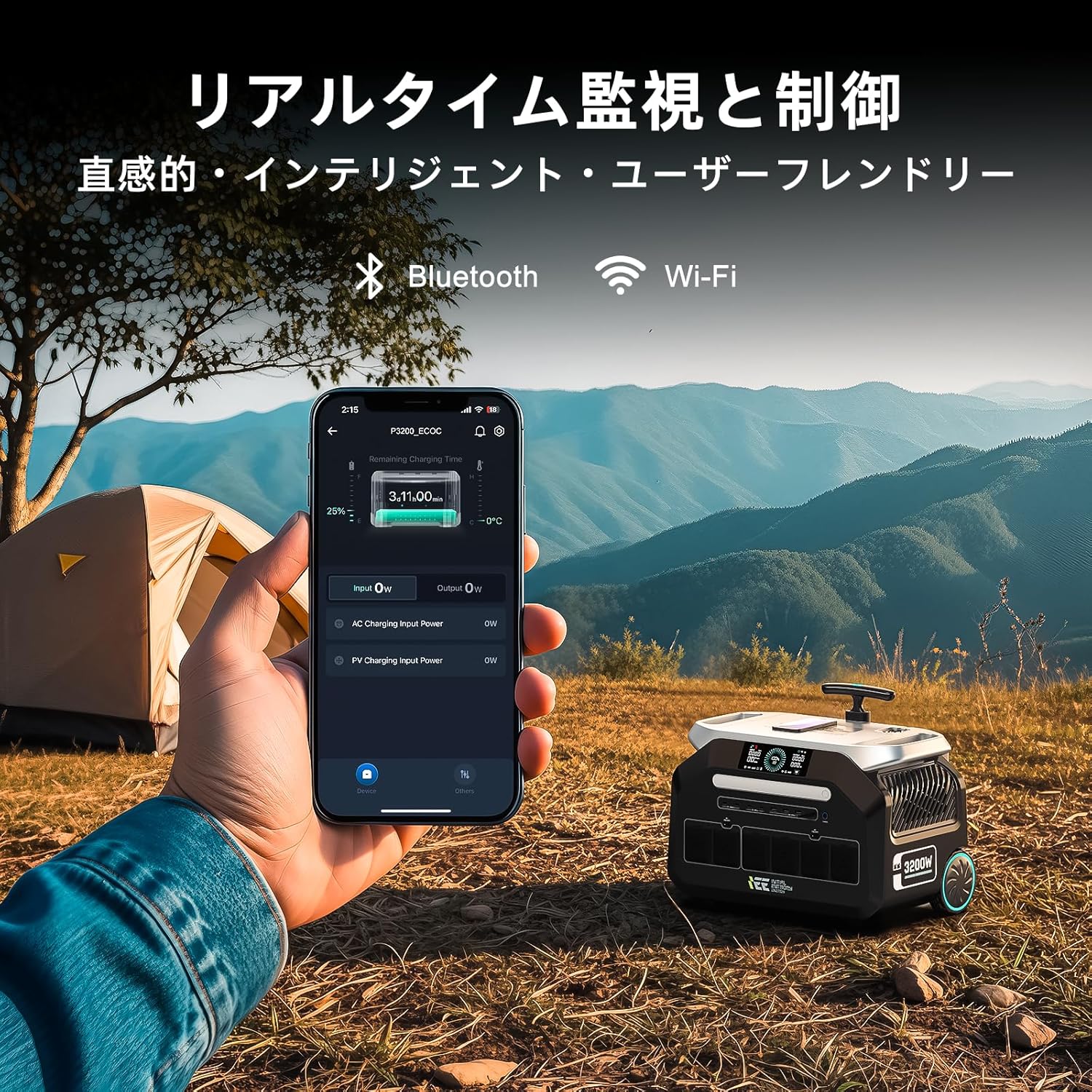
Image : Gros plan view of the IEE P3200's display and various output ports, including AC, USB, and DC outlets.
The IEE P3200 features a clear display panel showing battery status, input/output power, and remaining charge time. Output ports are conveniently located on the front and side for easy access.
5. Installation
5.1. Frais initiaux
Before first use, fully charge the IEE P3200. Connect the AC charging cable to the AC input port on the unit and then to a wall outlet. The display will indicate charging status. For optimal battery health, it is recommended to fully charge the unit upon receipt.

Image: The IEE P3200 connected to a wall outlet for AC charging, demonstrating the fast charging capability.
5.2. Raccordement du panneau solaire
To charge using solar panels, connect the solar charging cable to the solar input port on the P3200 and then to your IEE 200W solar panels. Position the solar panels in direct sunlight for maximum efficiency. The unit supports up to 1000W solar input.

Image: The IEE P3200 connected to solar panels for charging, set up in an outdoor environment.
6. Mode d'emploi
6.1. Mise sous/hors tension
Press and hold the main power button for 3 seconds to turn the unit on or off. The display will illuminate upon power-on.
6.2. Using AC/DC/USB Outputs
Once the unit is powered on, press the respective AC, DC, or USB button to activate the desired output ports. Connect your devices to the appropriate ports. Ensure the total power consumption of connected devices does not exceed the unit's rated output (3200W).

Image: The IEE P3200 powering various household appliances and electronic devices simultaneously, demonstrating its high output capability.
6.3. IEE App Remote Control
Download the official IEE App from your smartphone's app store. Connect the P3200 via Wi-Fi or Bluetooth. The app allows you to:
- Monitor real-time battery status, input/output power.
- Remotely control input speed (charging rate).
- Schedule charging times to optimize electricity costs.
- Access general settings and device information.

Image: A smartphone displaying the IEE app interface, showing real-time monitoring of the P3200 power station in an outdoor campscénario.

Image: Screenshots of the IEE app interface, showing real-time status and general settings for the power station.
6.4. Fonctionnement de l'alimentation sans interruption (ASI)
The P3200 features an EPS (Emergency Power Supply) function. When connected to a wall outlet and devices are powered through the P3200, it acts as a pass-through. In the event of a power outage, the unit will automatically switch to battery power within 0.01 seconds, ensuring uninterrupted operation for connected devices.

Image: The IEE P3200 connected to a medical device, illustrating its UPS function providing continuous power during an outage.
7. Entretien
- Nettoyage: Utilisez un chiffon doux et sec pour nettoyer l'appareil. N'utilisez pas de nettoyants abrasifs ni de solvants.
- Stockage: If storing for extended periods, charge the unit to 50-80% every 3-6 months to maintain battery health. Store in a cool, dry place away from direct sunlight.
- Température: Operate and store the unit within the recommended temperature range (refer to specifications).
8. Dépannage
| Problème | Cause possible | Solution |
|---|---|---|
| L'unité ne s'allume pas. | La batterie est épuisée. | Charge the unit using AC or solar input. |
| Aucune sortie des ports AC/DC/USB. | Output ports are not activated. | Press the corresponding AC/DC/USB button to activate. |
| Avertissement de surcharge affiché. | Connected devices exceed rated output. | Disconnect some devices or use lower power devices. |
| L'unité ne charge pas. | Charging cable not properly connected or power source issue. | Check cable connections and ensure power source is active. For solar, ensure panels are in direct sunlight. |
Si le problème persiste, veuillez contacter le service client.
9. Spécifications
| Fonctionnalité | Détail |
|---|---|
| Modèle | P3200 |
| Type de batterie | LiFePO4 (lithium fer phosphate) |
| Capacité | 2048 Wh (640000 mAh) |
| Sortie CA | 3200 W (nominale), 6400 W (crête) |
| Entrée CA | Jusqu'à 1500 W (charge rapide) |
| Entrée solaire | Jusqu'à 1000 W |
| Sortie USB-A | 4 ports |
| Sortie USB-C | 4 ports |
| Sortie DC5521 | 2 ports |
| Sortie allume-cigare | 2 ports |
| Durée de vie | 4000+ cycles to 80% capacity (approx. 10-15 years) |
| Niveau de bruit | ≤40 dB |
| Dimensions (L x l x H) | 44.5 cm x 29.8 cm x 36.7 cm (environ) |
| Poids | 24 kg (52.91 lb) |
10. Garantie et assistance
The IEE P3200 Portable Power Station comes with a Garantie constructeur d'un anCette garantie couvre les défauts de matériaux et de fabrication dans des conditions normales d'utilisation.
For warranty claims, technical support, or any inquiries, please contact IEE customer support through the following channels:
- Refer to the contact information provided on your Warranty Card.
- Visit the official IEE webSite regroupant les ressources d'assistance et les formulaires de contact.
- Contact the seller directly via your purchase platform.
Please have your product model number (P3200) and purchase details ready when contacting support.