
1. Introduction
Thank you for choosing the NIMO 15.6" IPS FHD-Gaming-Laptop. This manual provides essential information for setting up, operating, maintaining, and troubleshooting your new laptop. Designed for versatile performance, this laptop is equipped with an AMD Ryzen 5 6600H processor, 32GB DDR5 RAM, and a 1TB SSD, making it suitable for work, gaming, and everyday use. Please read this manual thoroughly before using your device to ensure optimal performance and longevity.

Figure 1.1: NIMO 15.6" IPS FHD-Gaming-Laptop
The NIMO 15.6" IPS FHD-Gaming-Laptop features a sleek design with a vibrant Full HD IPS display, ideal for both productivity and entertainment.
2. Contenu de la boîte
Veuillez vérifier que tous les articles sont présents dans le colis :
- 1 x ordinateur portable Nimo N153
- 1 chargeur rapide USB-C 100 W PD
- 1 x Manuel d'utilisation
- Windows 11 Famille (préinstallé)
- Garantie de 2 ans, informations de retour sous 90 jours
3. Guide de configuration
3.1 Mise sous tension et charge initiales
Before first use, ensure your laptop is fully charged. Connect the provided Type-C 100W PD Fast Charger to the laptop's Type-C port and a power outlet. The charge LED indicator will illuminate.
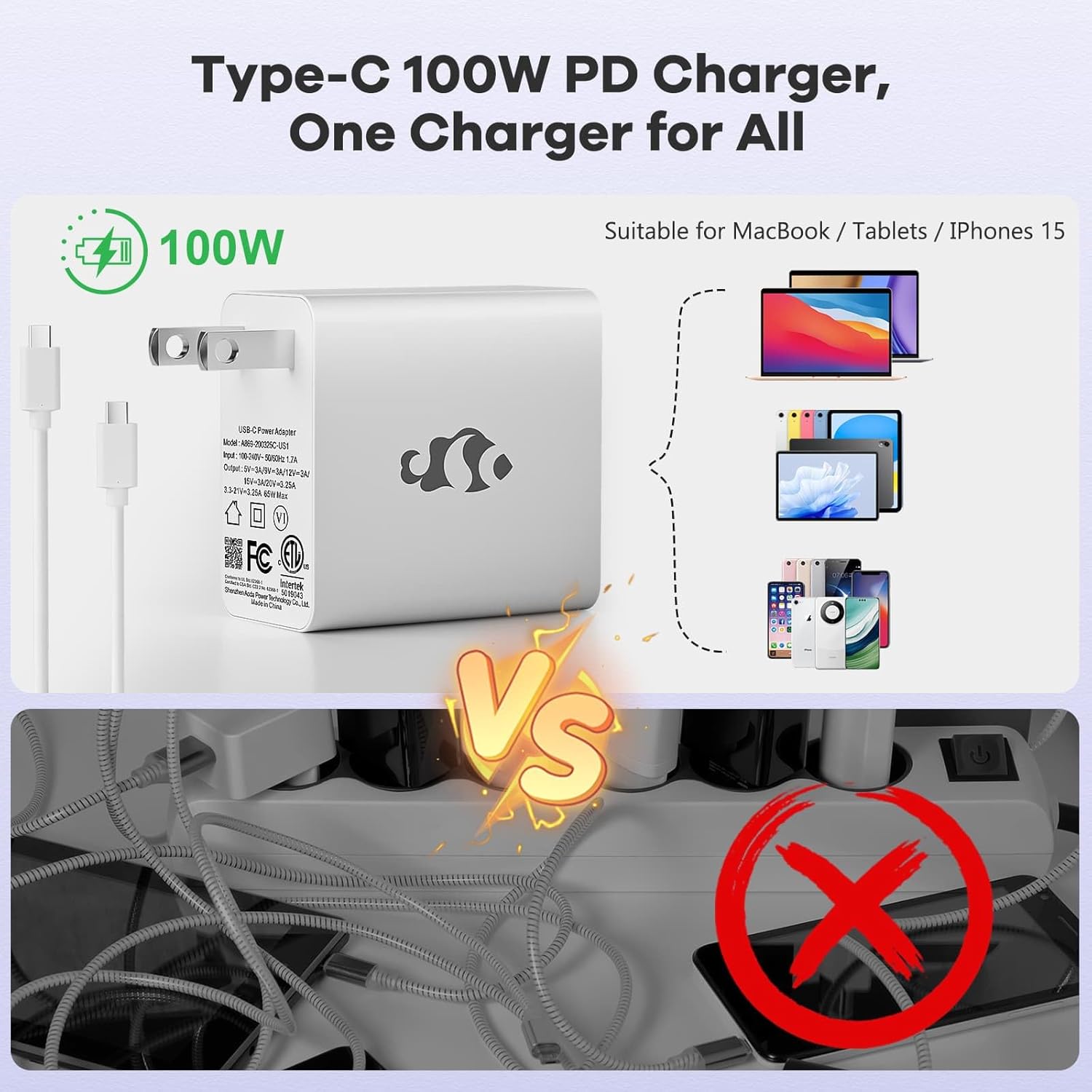
Figure 3.1 : Chargeur rapide USB-C PD 100 W
The compact 100W USB-C PD fast charger and 6.56ft cable provide efficient power delivery, compatible with various devices.
3.2 Connexion de périphériques
Your NIMO laptop offers multiple ports for enhanced versatility. Refer to the diagram below for port locations and types:
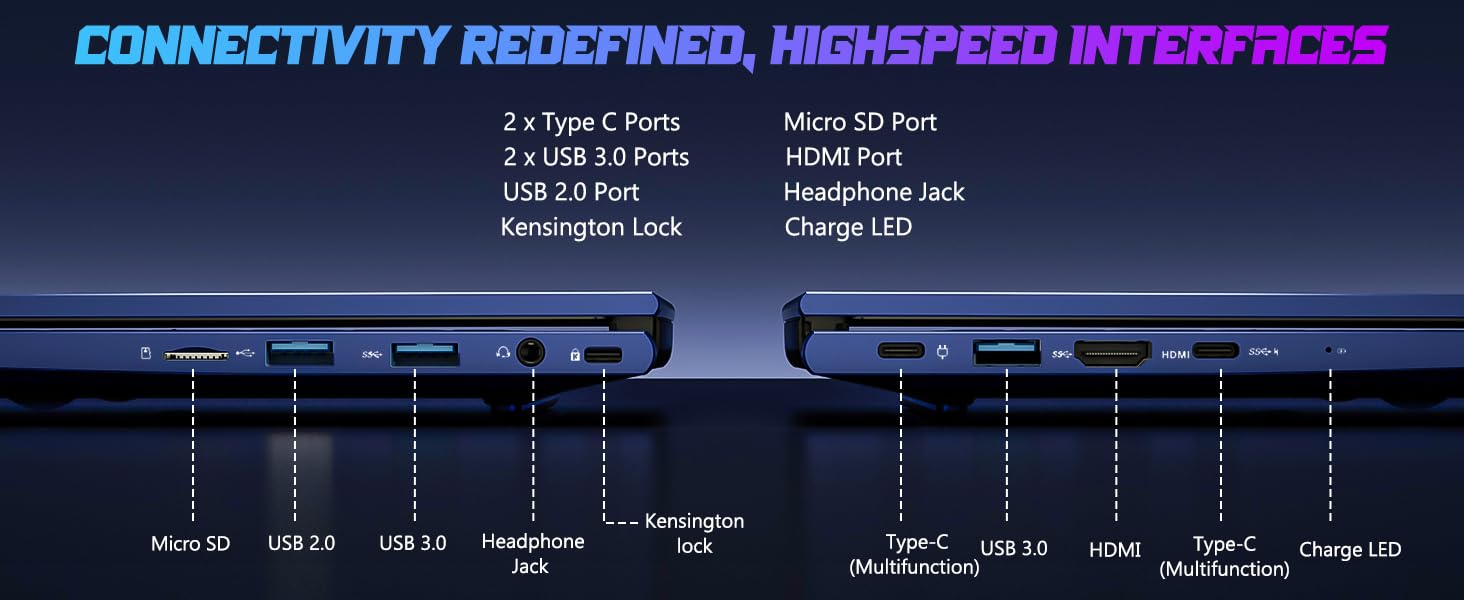
Figure 3.2 : Ports de connectivité
The laptop includes 2x Type-C ports, 2x USB 3.0 ports, 1x USB 2.0 port, Micro SD port, HDMI port, Headphone Jack, and Kensington Lock for comprehensive connectivity.
- Ports USB : Connect external devices such as mice, keyboards, or external storage drives.
- Port HDMI: Connectez-vous à un moniteur externe ou à un téléviseur pour un affichage plus grand.
- Prise casque: Pour la sortie audio vers des écouteurs ou des haut-parleurs externes.
- Emplacement micro SD : Insérez une carte Micro SD pour augmenter le stockage ou transférer des données.
4. Utilisation de votre ordinateur portable
4.1 Fonctions d'affichage
The NIMO laptop features a 15.6" FHD IPS (1920x1080) anti-glare display with an 85% screen-to-body ratio, providing clear and vibrant visuals for all your tasks.
4.2 Clavier et lecteur d'empreintes digitales
The laptop is equipped with a backlit keyboard for comfortable typing in various lighting conditions and a multi-touch touchpad for precise navigation. The built-in fingerprint reader allows for secure, one-touch login.

Figure 4.1: Backlit Keyboard and Fingerprint Reader
The backlit keyboard enhances visibility, while the integrated fingerprint reader provides quick and secure access to your system.
4.3 WebConfidentialité de la caméra
For enhanced privacy, the laptop includes a built-in privacy camera switch, allowing you to easily disable the 2.0M webcame lorsqu'elle n'est pas utilisée.

Figure 4.2 : Webcam Shield
The physical webcam shield provides an extra layer of privacy, ensuring your camera is off when you need it to be.
4.4 Performancesview
The NIMO laptop is powered by an AMD Ryzen 5 6600H CPU (6 cores, 12 threads, up to 4.5 GHz) and an integrated AMD Radeon 660M GPU (6nm process, 6 GPU cores, 1900 MHz). This configuration provides balanced performance for productivity and light gaming.

Figure 4.3: Outstanding Performance
The AMD Ryzen 5 6600H processor and Radeon 660M iGPU deliver robust performance for various computing tasks.
With 32GB of DDR5 RAM and a 1TB PCIe 4.0 SSD, the laptop ensures seamless multitasking, faster load times, and ample rangement pour votre files and applications. The memory is upgradable to 64GB and the SSD is detachable for future expansion.

Figure 4.4: Seamless Multitasking and Ample Stockage
The combination of 32GB DDR5 RAM and a 1TB PCIe 4.0 SSD provides lightning-fast performance and significant storage capacity.
4.5 Autonomie de la batterie
The laptop is equipped with a 54Wh smart battery, providing up to 5 hours of active use and up to 10 hours of standby time. A 15-minute charge can provide up to 2 hours of standby time with the 100W PD fast charger.

Figure 4.5: 54Wh Smart Battery
The efficient 54Wh smart battery offers extended usage and quick charging capabilities.
5. Entretien
Pour garantir la longévité et les performances optimales de votre ordinateur portable NIMO, suivez ces consignes d'entretien :
- Gardez-le propre : Nettoyez régulièrement l'écran avec un chiffon en microfibre et le clavier avec de l'air comprimé pour éliminer la poussière et les débris.
- Mises à jour logicielles : Keep your Windows 11 operating system and drivers updated to ensure security and performance improvements.
- Entretien de la batterie: Avoid completely draining the battery frequently. For long-term storage, charge the battery to about 50-60%.
- Ventilation adéquate : Ensure the laptop's vents are not obstructed to prevent overheating. Use it on a hard, flat surface.
- Manipulation sécuritaire : Évitez de faire tomber l'ordinateur portable ou de le soumettre à des chocs violents.
6. Dépannage
Cette section aborde les problèmes courants que vous pourriez rencontrer avec votre ordinateur portable NIMO.
| Problème | Cause possible | Solution |
|---|---|---|
| L'ordinateur portable ne s'allume pas. | Batterie faible ; problème d’adaptateur secteur | Connect the charger and wait a few minutes. Ensure the power adapter is securely connected to both the laptop and the outlet. |
| Performances lentes | Too many applications running; Low disk space; Outdated drivers | Fermez les applications inutiles. Libérez de l'espace disque. Mettez à jour Windows et les pilotes de périphériques. |
| Problèmes de connectivité Wi-Fi | Wi-Fi adapter off; Router issue; Driver issue | Vérifiez que le Wi-Fi est activé dans les paramètres Windows. Redémarrez votre routeur. Mettez à jour les pilotes Wi-Fi. |
| Le rétroéclairage du clavier ne fonctionne pas. | Backlight disabled; Driver issue | Press the dedicated backlight key (usually Fn + F key). Check keyboard drivers in Device Manager. |
Si vous rencontrez des problèmes non mentionnés ici ou si vous avez besoin d'aide supplémentaire, veuillez contacter le service client de NIMO.
7. Spécifications
Detailed technical specifications for the NIMO 15.6" IPS FHD-Gaming-Laptop:
| Fonctionnalité | Détail |
|---|---|
| Taille d'affichage de l'écran debout | 15.6 pouces |
| Résolution d'écran maximale | 1920 x 1080 pixels (FHD IPS) |
| Processeur | AMD Ryzen 5 6600H (6 cœurs, jusqu'à 4.5 GHz) |
| BÉLIER | 32 Go DDR5 (4800 MHz) |
| Disque dur | SSD de 1 To (PCIe 4.0) |
| Coprocesseur graphique | AMD Radeon 660M (intégrée) |
| Système opérateur | Windows 11 |
| Type sans fil | Normes 802.11a/b/g/n/ac |
| Ports USB | 1 ports USB 2.0, 3 port USB 3.0, 2 port USB Type-C |
| Durée de vie moyenne de la batterie | 5 Hours (active use) |
| Poids de l'article | 3.8 livres |
| Dimensions du produit | 14.07 x 8.98 x 0.76 pouces |
| Couleur | Bleu |
| Caractéristiques spéciales | Clavier rétroéclairé, lecteur d'empreintes digitales, audio HD, pavé numérique |
8. Garantie et assistance
NIMO is committed to providing high-quality products and excellent customer service.
8.1 Informations sur la garantie
Your NIMO laptop comes with a comprehensive Garantie constructeur de 2 ans. This warranty covers defects in materials and workmanship under normal use. Additionally, we offer a Politique de retour sans tracas de 90 jours à compter de la date d'achat.
8.2 Assistance clientèle
Our dedicated support team is ready to assist you with any questions or issues. For technical support, warranty claims, or general inquiries, please contact us via:
- E-mail: service@nimopc.com
- En ligne: Visitez le site officiel de NIMO webSite de FAQ et de ressources d'assistance.
We strive to resolve any issues swiftly and ensure your satisfaction.
8.3 Produit terminéview Vidéo
Regardez cette vidéo officielle pour un aperçu rapide.view of the NIMO laptop's features and benefits:
Video: NIMO Laptop Overview
This video provides a brief look at the NIMO 15.6" laptop, highlighting its key features and user experience, including its display, camera, and overall performance.