
1. Introduction
This manual provides detailed instructions for the assembly, operation, maintenance, and troubleshooting of your FLEXISPOT EB2 electric height-adjustable desk frame. Please read this manual thoroughly before installation and use to ensure proper function and safety.
The FLEXISPOT EB2 desk frame features dual motors for smooth and quiet height adjustments, a wide height adjustment range, and a smart control panel with memory functions. It is designed to support various desktop sizes, offering flexibility for your workspace.
2. Consignes de sécurité
- Suivez toujours attentivement les instructions de montage.
- Ensure the desk frame is securely mounted to the tabletop to prevent tipping.
- Do not exceed the maximum weight recommendation of 100 kg (dynamic load) or 125 kg (static load) to maintain stability and safety.
- Tenez les enfants et les animaux domestiques éloignés du bureau pendant son utilisation.
- Veillez à ce qu'aucun obstacle ne se trouve sur le passage du bureau lors des réglages de hauteur.
- Do not open the motor housing or attempt to repair the unit yourself. Contact customer support for assistance.
- Coupez l'alimentation électrique avant de procéder au nettoyage ou à toute opération de maintenance.
3. Contenu du colis
Vérifiez que tous les composants sont présents avant de commencer l'assemblage. L'emballage comprend généralement :
- Desk Legs (2) with integrated motors
- Crossbar/Frame (adjustable width)
- Control Panel with digital display
- Adaptateur secteur et câble
- Toutes les vis, boulons et outils nécessaires au montage
- Cable management accessories (e.g., clips, hooks)
4. Configuration et assemblage
Assembly is required for this product. Please follow the step-by-step instructions provided in the separate assembly guide included with your purchase. Ensure you have adequate space and assistance if needed.
Considérations clés relatives à l'assemblage :
- Compatibilité de bureau : The frame is designed for tabletops with a width of 120 cm to 180 cm and a depth of 60 cm to 80 cm. The frame width is adjustable from 107 cm to 160 cm.
- Fixation sécurisée : Ensure all screws are tightened securely, especially those connecting the desktop to the frame.
- Gestion des câbles: Utilize the provided cable management solutions to keep wires tidy and prevent interference with desk movement.
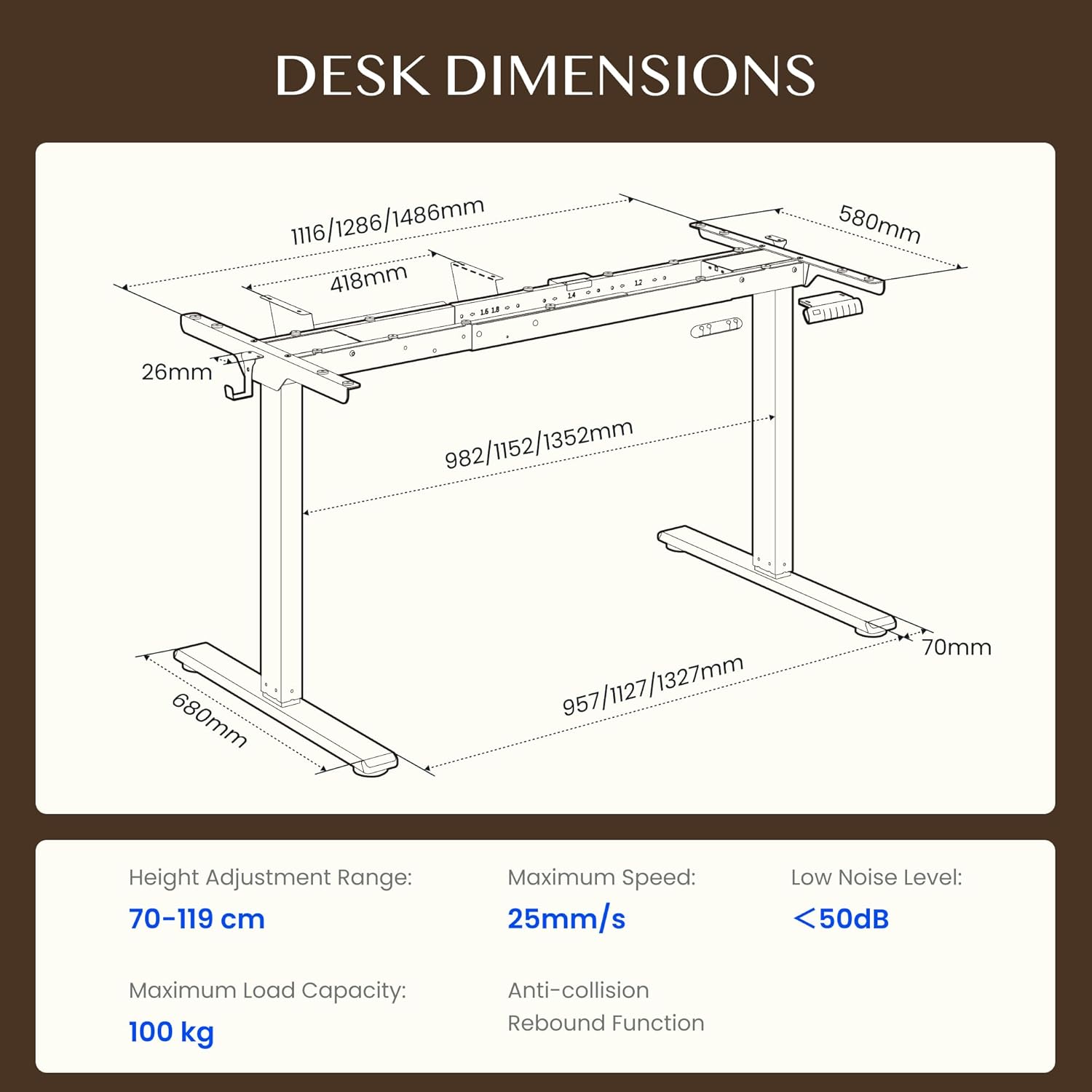
Figure 4.1: Detailed dimensions of the FLEXISPOT EB2 desk frame, showing adjustable width and height ranges, and overall structural measurements.

Figure 4.2: Illustration demonstrating the adaptable desktop size range for the FLEXISPOT EB2 frame, indicating minimum and maximum dimensions for compatible tabletops.
5. Mode d'emploi
5.1 Mise sous tension
Connect the power cable to the desk frame and then to a standard electrical outlet. The digital display on the control panel should illuminate.
5.2 Réglage de la hauteur
Utilisez le Up et Vers le bas arrow buttons on the control panel to manually adjust the desk height. The height range is from 70 cm to 119 cm.

Figure 5.1: Visual representation of the desk's height adjustment range, illustrating the minimum and maximum heights achievable with the FLEXISPOT EB2 frame.
5.3 Préréglages de mémoire
The control panel features 4 memory preset buttons (1, 2, 3, 4) to save and recall your preferred sitting and standing heights.
- Réglez le bureau à la hauteur souhaitée à l'aide des boutons Haut/Bas.
- Press and hold one of the memory buttons (1, 2, 3, or 4) until the display flashes or beeps, indicating the height has been saved.
- Pour rappeler une hauteur enregistrée, appuyez simplement sur le bouton de mémoire correspondant. Le bureau se déplacera automatiquement dans cette position.

Figure 5.2 : Gros plan view of the smart control panel, highlighting the Up/Down buttons, 4 memory presets, and LED display for effortless height adjustment.
5.4 Sit/Stand Reminder
The control panel may include a sit/stand reminder button. Consult your specific control panel's instructions for activation and customization of reminder intervals.
5.5 Système anti-collision
The desk frame is equipped with an anti-collision system. If the desk encounters an obstruction during height adjustment, it will automatically stop and reverse slightly to prevent damage.

Figure 5.3: Diagram illustrating the powerful dual motor system of the FLEXISPOT EB2, emphasizing stability, quiet operation, and efficiency.

Figure 5.4 : Examples of simple desk helpers, including under-desk cable management, side hooks, and adhesive cable clips, designed to keep your workspace organized.
6. Entretien
- Nettoyage: Essuyez le cadre du bureau avec un chiffon sec. Évitez d'utiliser des nettoyants abrasifs ou des produits chimiques agressifs qui pourraient endommager la finition.
- Inspection: Vérifiez régulièrement le serrage de toutes les vis et fixations. Resserrer si nécessaire.
- Gestion des câbles: Ensure cables are not pinched or tangled, which could impede desk movement or cause damage.
7. Dépannage
If you encounter issues with your FLEXISPOT EB2 desk frame, refer to the following common troubleshooting steps:
- Bureau immobile : Check if the power cable is securely connected to both the desk and the wall outlet. Ensure the outlet is functional.
- Mouvements irréguliers ou bruits étranges : Ensure the desk is not overloaded. Check for any obstructions under or around the desk. Verify that all assembly screws are tight.
- Codes d'erreur affichés : Refer to the specific error code in your detailed assembly guide or contact customer support for assistance.
- Réinitialisation du système : Some issues can be resolved by performing a system reset. Consult your assembly guide for specific reset procedures, which often involve holding down certain buttons.
If the problem persists after attempting these steps, please contact FLEXISPOT customer support.
8. Spécifications
| Fonctionnalité | Spécification |
|---|---|
| Marque | FLEXIPOT |
| Numéro de modèle | EB2B-EU |
| Plage de réglage de la hauteur | 70 cm à 119 cm (27.56" à 46.85") |
| Frame Width (Adjustable) | 107 cm à 160 cm (42.13" à 62.99") |
| Largeur de plateau recommandée | 120 cm à 180 cm (47.24" à 70.87") |
| Recommended Tabletop Depth | 60 cm à 80 cm (23.62" à 31.50") |
| Capacité de charge maximale | 100 kg (220 lbs) dynamic, 125 kg (275 lbs) static |
| Type de moteur | Moteurs doubles |
| Vitesse de réglage | 2.5 cm/s (1 inch/s) |
| Niveau de bruit | <50 dB |
| Consommation d'énergie en veille | <0.5 W |
| Panneau de contrôle | 7-button digital display with 4 memory presets |
| Matériel | Acier allié |
| Poids de l'article | 28 kilogrammes (61.7 livres) |
| Caractéristiques spéciales | Anti-collision system, Sit/Stand reminder |
9. Garantie
The FLEXISPOT EB2 desk frame comes with a limited warranty. Please refer to the warranty card included with your product or visit the official FLEXISPOT webConsultez le site pour connaître les conditions générales détaillées concernant la couverture et la durée.
10. Assistance clientèle
For technical assistance, warranty claims, or any questions regarding your FLEXISPOT EB2 desk frame, please contact FLEXISPOT customer support through their official website ou les coordonnées fournies dans l'emballage de votre produit.
Please have your model number (EB2B) and purchase information ready when contacting support.