
1. Produit terminéview
The IHFMPFKJ T-CON Board T420HW04 V0 42T06-C03 is a crucial component designed for various 42-inch television models, including those from Changhong, TCL, and Hisense. This Timing Controller (T-CON) board is responsible for processing video signals from the main board and converting them into a format suitable for the TV's display panel, ensuring proper image display, color accuracy, and resolution.
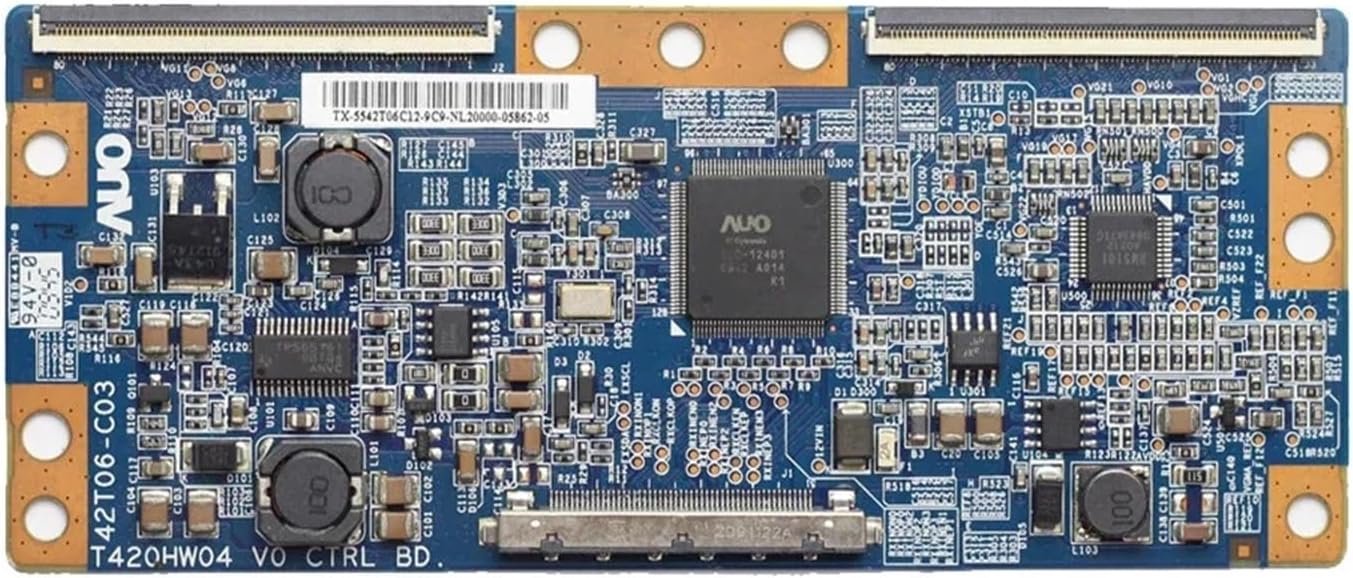
Figure 1.1 : De haut en bas view of the T-CON Board T420HW04 V0 42T06-C03, showing its various integrated circuits and connectors.
Replacing a faulty T-CON board can resolve common display issues such as no picture, distorted images, or lines on the screen, extending the lifespan of your television and providing a cost-effective repair solution compared to purchasing a new TV.
2. Configuration et installation
Installation of the T-CON board requires careful handling and basic technical knowledge. It is recommended that this procedure be performed by a qualified technician. Always prioritize safety during installation.
2.1 Précautions de sécurité
- Débrancher l'alimentation : Always unplug the TV from the power outlet before beginning any repair work.
- Décharge statique : Portez un bracelet antistatique ou touchez fréquemment un objet métallique mis à la terre pour dissiper l'électricité statique, qui peut endommager les composants électroniques sensibles.
- À manipuler avec précaution : Évitez de toucher directement les circuits intégrés et les connecteurs. Tenez la carte par ses bords.
2.2 étapes d'installation
- Access the TV's Interior: Carefully remove the back cover of your television to expose the internal components. Refer to your TV's specific service manual for instructions on how to do this.
- Locate the Existing T-CON Board: The T-CON board is typically located at the top or bottom center of the display panel, often covered by a metal shield. It connects to the main board via a ribbon cable (LVDS cable) and to the display panel via two or more flat flexible cables (FFC).
- Débranchez les câbles : Gently unlatch and disconnect all ribbon cables and FFCs from the old T-CON board. Note their orientation for reinstallation.
- Retirer l'ancienne carte : Unscrew any mounting screws securing the old T-CON board to the TV chassis. Carefully lift and remove the board.
- Installer la nouvelle carte : Place the new IHFMPFKJ T-CON Board T420HW04 V0 42T06-C03 into position, ensuring it aligns with the mounting holes. Secure it with the screws removed earlier.
- Rebranchez les câbles : Reconnect all ribbon cables and FFCs to the new T-CON board. Ensure they are fully seated and latched securely. Incorrect connection can cause display issues or damage.
- Réassembler le téléviseur : Once all connections are secure, replace the TV's back cover and any other components removed during disassembly.

Figure 2.1 : Gros plan view of a flexible flat cable (FFC) connector on the T-CON board, illustrating the connection points for the display panel.
3. Principes de fonctionnement
Once installed and the TV is powered on, the T-CON board operates automatically. Its primary function is to receive the Low-Voltage Differential Signaling (LVDS) data from the TV's main board, which contains the raw video information. The T-CON board then processes this data, generating timing signals and control voltages necessary to drive the individual pixels of the LCD or LED panel. This precise timing ensures that the image data is sent to the correct pixels at the correct time, resulting in a clear and stable picture on the screen.

Figure 3.1 : Incliné view of the T-CON Board, highlighting the various components involved in signal processing.
4. Entretien
The T-CON board is a sealed electronic component and generally requires no routine maintenance. However, following these guidelines can help ensure its longevity and optimal performance:
- Garder au sec : Ensure the TV's environment is dry and free from excessive humidity to prevent moisture damage to electronic components.
- Évitez l’accumulation de poussière : Periodically clean the interior of the TV (when powered off and unplugged) with compressed air to remove dust, which can impede heat dissipation.
- Prévenir les dommages physiques : Avoid dropping or subjecting the TV to impacts, as this can damage internal components, including the T-CON board.
5. Dépannage
Si vous rencontrez des problèmes d'affichage après l'installation de la carte T-CON, veuillez suivre les étapes de dépannage suivantes :
- Pas d'image / Écran noir :
- Verify all cables (LVDS, FFCs) are securely connected to the T-CON board and the main board/panel.
- Vérifiez que le téléviseur est alimenté et que la carte mère fonctionne.
- Distorted Image / Incorrect Colors:
- Check FFC connections to the display panel for proper seating and orientation.
- Ensure the T-CON board is compatible with your specific TV model and panel.
- Horizontal or Vertical Lines on Screen:
- This often indicates a problem with the FFCs or the display panel itself. Re-seat the FFCs. If the problem persists, the panel or the T-CON board might be faulty.
- Problèmes d'affichage intermittents :
- Check for loose connections or signs of physical damage on the board or cables.
Si les étapes de dépannage ne résolvent pas le problème, il est conseillé de consulter un technicien professionnel en réparation de téléviseurs.
6. Spécifications
| Fonctionnalité | Spécification |
|---|---|
| Marque | IHFMPFKJ |
| Numéro de modèle | T420HW04 V0 42T06-C03 |
| Tailles de téléviseurs compatibles | 42 pouces |
| Marques de téléviseurs compatibles | Changhong, TCL, Hisense, and others |
| Poids | 50 gramme |
| Dimensions (approximatives) | 5 x 5 x 5 (WxHxD, units not specified, typical for small board) |

Figure 6.1 : Dos view of the T-CON Board, showing solder points and circuit traces.
7. Garantie et assistance
For warranty information and technical support regarding your IHFMPFKJ T-CON Board T420HW04 V0 42T06-C03, please refer to the documentation provided at the time of purchase or contact the seller directly. Ensure you have your purchase details and the product model number available when seeking support.