
Introduction
This manual provides detailed instructions for the installation, operation, and maintenance of your AirheadStorm CLB084-4D 12V Remote Control and Receiver Kit. This kit is designed as a replacement part for specific children's electric ride-on cars, offering a 2.4G remote control system with a slow start function for enhanced safety.
Veuillez lire attentivement ce manuel avant l'installation et l'utilisation afin de garantir un fonctionnement correct et une sécurité optimale.
Consignes de sécurité
- Ensure the electric vehicle's power is OFF before installing or replacing any components.
- Always verify that the replacement parts match the original specifications (e.g., model number, voltage) to prevent damage.
- Regularly inspect the vehicle's motor, battery, and wiring for any signs of wear or damage. Replace faulty components immediately.
- Keep electronic components away from water and excessive moisture.
- Adult supervision is required during installation and when children operate the ride-on car.
Contenu du colis
The AirheadStorm CLB084-4D kit includes the following components:
- 1 x Receiver (CLB084-4D 12V Control Box)
- 1 x Remote Control (2.4G White Remote Control)

Image: The CLB084-4D receiver and its corresponding 2.4G remote control. The receiver is a black box with wiring, and the remote is white with black buttons.
Configuration et installation
1. Vérification de compatibilité
Before installation, ensure that the CLB084-4D 12V control box is compatible with your children's ride-on toy. This model is compatible with CLB084-4C 12V systems. Visually compare the appearance and model number of the new parts with your original components.

Image: A comparison showing the CLB084-4A/4C/4D remote (white light indicator) and receiver on the left, and the CLB084-4F remote (red light indicator) and receiver on the right. This helps identify the correct model for replacement.
2. Vérifications préalables à l'installation
Verify that other essential functions of the ride-on car, such as the motor and battery, are in normal working condition before installing the new controller and remote.
3. Étapes d'installation
- Turn off the power to the children's electric vehicle.
- Carefully remove the old receiver (control box) from the vehicle. Note the wiring connections.
- Connect the new CLB084-4D receiver to the vehicle's wiring harness, ensuring all connections are secure and match the original configuration.
- Secure the receiver in its designated location within the vehicle.
Mode d'emploi
1. Fonctionnement de la télécommande
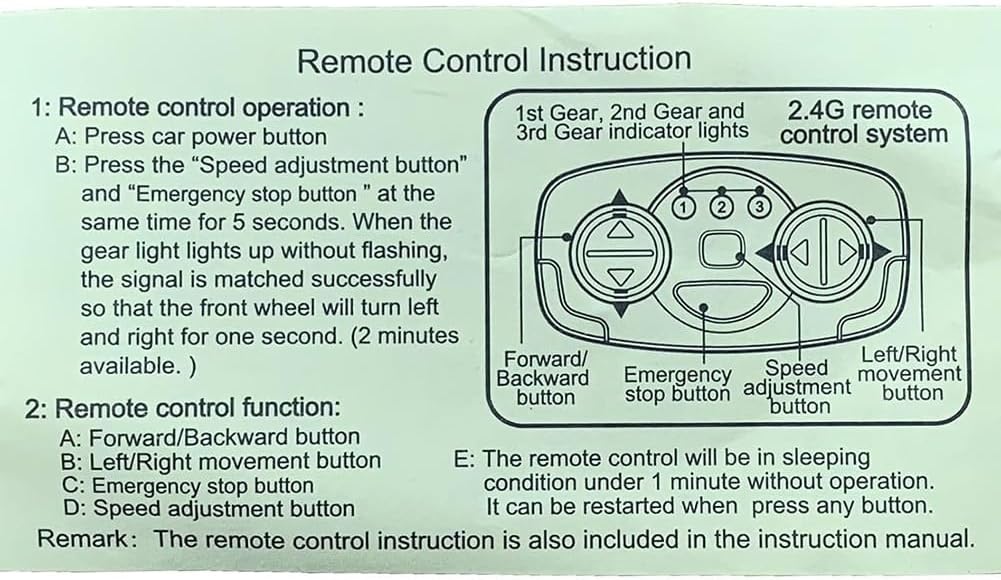
Image: Diagram illustrating the buttons on the 2.4G remote control, including Forward/Backward, Left/Right movement, Emergency Stop, and Speed Adjustment buttons, along with gear indicator lights.
- Bouton d'alimentation : Appuyez pour allumer la télécommande.
- Signal Matching: To match the remote control with the receiver:
- Ensure the vehicle's power is OFF.
- Appuyez et maintenez la touche "Bouton de réglage de la vitesse" et "Bouton d'arrêt d'urgence" simultaneously for 5 seconds.
- While holding, turn on the vehicle's power.
- When the gear indicator light on the remote control illuminates steadily (does not flash), the signal is successfully matched. The front wheels of the vehicle will turn left and right for one second to confirm.
- The matching process is available for approximately 2 minutes after the vehicle is powered on.
2. Fonctions de la télécommande
- Forward/Backward Button: Controls the vehicle's movement direction.
- Left/Right Movement Button: Controls the vehicle's steering.
- Bouton d'arrêt d'urgence : Immediately stops the vehicle.
- Bouton de réglage de la vitesse : Cycles through different speed settings (1st, 2nd, 3rd gear, indicated by lights).
3. Mode veille
The remote control will enter sleep mode if there is no operation for approximately 1 minute. To reactivate, press any button.
Entretien
- Keep the remote control and receiver clean and dry. Wipe with a soft, dry cloth.
- Évitez de faire tomber les composants ou de les soumettre à des chocs violents.
- Rangez le kit dans un endroit frais et sec lorsqu'il n'est pas utilisé.
- Check battery compartment of the remote control periodically for corrosion and replace batteries as needed.
Dépannage
| Problème | Cause possible | Solution |
|---|---|---|
| La télécommande ne répond pas. |
|
|
| Vehicle not moving after remote is matched. |
|
|
Caractéristiques
| Modèle | CLB084-4D |
| Voltage | 12V |
| Fréquence | 2.4 GHz |
| Matériel | ABS + Métal |
| Dimensions du produit | 3.94 x 1.97 x 1.18 pouces (Récepteur) |
| Poids de l'article | 6.5 onces (kit total) |