
Imprimante XP-420B
Manuel d'utilisation de l'imprimante d'étiquettes thermique directe USB Xprinter XP-420B
Modèle : XP-420B
1. Produit terminéview
The Xprinter XP-420B is a high-speed direct thermal label printer designed for various applications, including shipping labels. It offers a maximum print speed of 152 mm/s (6 inches/second) and a resolution of 203 DPI, ensuring clear and precise prints. Its robust double-walled clamshell design enhances durability, and the intelligent print head temperature control system ensures stable output. This printer is compatible with both Windows and Mac operating systems, making it a versatile solution for your labeling needs.
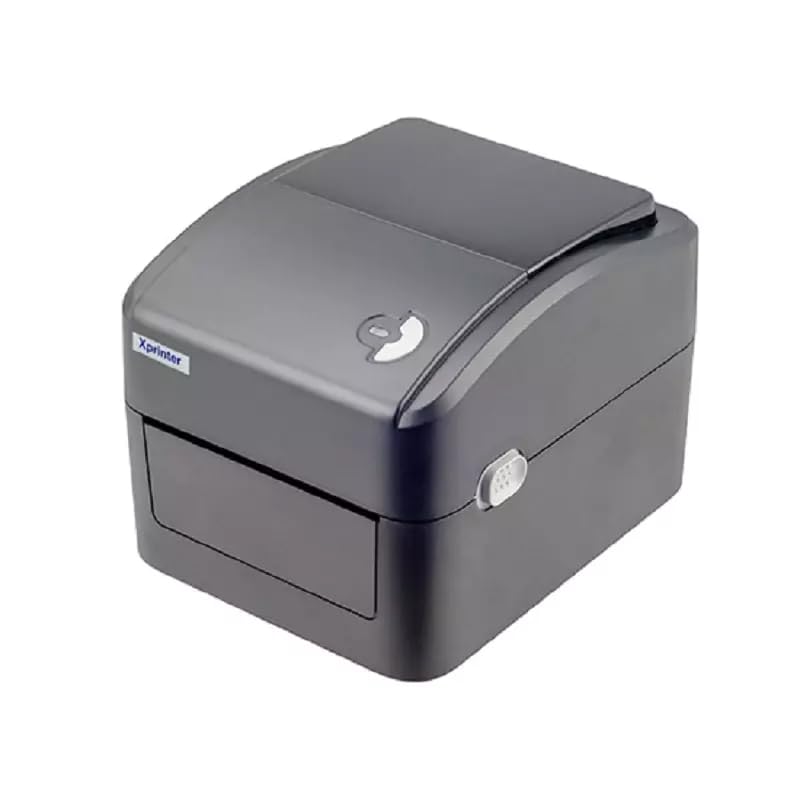
Figure 1 : Face avant view of the Xprinter XP-420B thermal label printer.
2. Guide de configuration
2.1 Déballage et inspection initiale
- Retirez soigneusement l'imprimante et tous ses accessoires de leur emballage.
- Verify that all components are present: printer unit, power adapter, USB cable, and user manual.
- Inspect the printer for any visible damage that may have occurred during transit.
2.2 Connexion de l'imprimante
- Branchez l'adaptateur secteur au port d'alimentation de l'imprimante, puis branchez-le à une prise de courant.
- Connect one end of the provided USB cable to the printer's USB port and the other end to an available USB port on your computer.
- Power on the printer using the power switch, usually located on the side or rear.

Figure 2: Xprinter XP-420B showing USB connectivity.
2.3 Chargement des étiquettes
- Ouvrez le capot supérieur de l'imprimante en appuyant sur les loquets de déverrouillage situés des deux côtés.
- Place the roll of thermal labels onto the label spindle, ensuring the labels feed from the bottom of the roll.
- Feed the leading edge of the labels through the label guide until it extends slightly past the print head.
- Adjust the movable label guides to fit the width of your labels snugly, without pinching them.
- Close the top cover firmly until it latches securely.
- The printer will automatically calibrate and detect the label size.
2.4 Installation du pilote
Before printing, you must install the appropriate printer drivers on your computer. Drivers are typically provided on a CD included with the printer or can be downloaded from the official Xprinter website. The XP-420B supports both Windows and Mac operating systems.
- Pour Windows : Run the setup executable from the driver CD or downloaded file et suivez les instructions à l'écran.
- Pour Mac : Download the Mac driver from the Xprinter website and follow the installation prompts.
3. Mode d'emploi
3.1 Impression de base
- Assurez-vous que l'imprimante est allumée et connectée à votre ordinateur.
- Ouvrez le document ou l'application à partir duquel vous souhaitez imprimer (par exemple, un logiciel d'expédition, un traitement de texte).
- Sélectionnez « Imprimer » dans le menu de l'application.
- Choose "Xprinter XP-420B" as your printer.
- In the printer settings or preferences, ensure the correct label size is selected. The printer supports adjustable label sizes.
- Cliquez sur « Imprimer » pour envoyer la tâche à l'imprimante.
3.2 Adjusting Label Size
The XP-420B allows for adjustable label sizes. This adjustment is primarily done through the printer driver settings on your computer and by physically adjusting the label guides within the printer.
- Réglage logiciel : In your printing application or printer driver settings, navigate to the "Page Setup" or "Paper Size" options. Select or define the custom dimensions for your labels (e.g., 4x6 inches for shipping labels).
- Physical Adjustment: As described in Section 2.3, ensure the internal label guides are set correctly to the width of your loaded labels.
4. Entretien
4.1 Nettoyage de la tête d'impression
Regular cleaning of the print head is crucial for maintaining print quality and extending the printer's lifespan. It is recommended to clean the print head after every roll of labels or if print quality degrades.
- Éteignez l'imprimante et débranchez le cordon d'alimentation.
- Ouvrez le capot supérieur de l'imprimante.
- Si l'imprimante a été utilisée récemment, attendez quelques minutes que la tête d'impression refroidisse.
- Gently wipe the print head surface with an alcohol swab or a lint-free cloth lightly dampenrichi avec de l'alcool isopropylique.
- Laissez la tête d'impression sécher complètement avant de refermer le couvercle et de rebrancher l'alimentation.
4.2 Nettoyage général
- Utilisez un chiffon doux et sec pour essuyer l'extérieur de l'imprimante.
- Remove any dust or label debris from the inside of the printer using a soft brush or compressed air.
- N'utilisez pas de nettoyants abrasifs ni de solvants.
5. Dépannage
| Problème | Cause possible | Solution |
|---|---|---|
| L'imprimante ne répond pas. | Power off; USB cable disconnected; Driver issue. | Ensure power is on and connected. Check USB cable. Reinstall printer driver. |
| Qualité d'impression médiocre (délavée, lignes) | Tête d'impression sale ; type d'étiquette incorrect ; densité d'impression faible. | Clean the print head (Section 4.1). Ensure you are using direct thermal labels. Adjust print density in driver settings. |
| Les étiquettes ne s'alimentent pas correctement | Labels improperly loaded; Label guides not adjusted; Sensor obstruction. | Reload labels correctly. Adjust label guides. Clean any dust or debris from sensors. |
| L'imprimante imprime des étiquettes vierges | Labels loaded upside down; Not a direct thermal label. | Ensure labels are loaded with the printable side facing up. Verify labels are direct thermal. |
6. Spécifications du produit
| Fonctionnalité | Détail |
|---|---|
| Marque | Imprimante X |
| Nom du modèle | XP-420B |
| Technologie de connectivité | USB |
| Technologie d'impression | Thermique directe |
| Résolution | 203 DPI |
| Max Vitesse d'impression | 152 mm/s (6 pouces/seconde) |
| Mémoire | 8 Mo de SDRAM, 8 Mo de Flash |
| Sortie de l'imprimante | Monochrome |
| Poids de l'article | 3 kilogrammes |
| Dimensions du produit | 20 cm (P) x 6 cm (L) x 10 cm (H) |
| Compatibilité | Windows, Mac |
7. Garantie et assistance
7.1 Informations sur la garantie
L'imprimante Xprinter XP-420B est livrée avec un Garantie d'un an À compter de la date d'achat, cette garantie couvre les défauts de fabrication et les dysfonctionnements dans des conditions normales d'utilisation. Veuillez conserver votre preuve d'achat pour toute réclamation au titre de la garantie.
7.2 Assistance clientèle
For technical assistance, troubleshooting beyond this manual, or warranty service, please contact Xprinter customer support. Refer to the contact information provided with your product packaging or visit the official Xprinter website pour les détails de support les plus récents.
Ask a question about this manual
Ask about setup, troubleshooting, compatibility, parts, safety, or missing instructions. Manuals+ will review the question and use this page’s manual context to help answer it.