
Informations importantes sur la sécurité
Please read all safety instructions before using this product to ensure proper and safe operation.
- N’exposez pas les écouteurs ou l’étui de chargement à des températures extrêmes.
- Évitez de laisser tomber l’appareil ou d’appliquer une force excessive sur celui-ci.
- Tenir hors de portée des enfants et des animaux domestiques.
- Use only a 5V adapter to charge the charging case to prevent battery damage.
- Do not use the earbuds in the bath or while swimming.
Contenu du colis
Vérifiez que tous les éléments sont présents dans votre colis :
- ZIUTY A1 Wireless Earbuds (x1 pair)
- Portable Charging Case (x1)
- Câble de chargement USB-C (x1)
- Eartips (pre-installed size M, plus 2 extra pairs in sizes S & L)
- Manuel de l'utilisateur (ce document)
Produit terminéview
Familiarize yourself with the components of your ZIUTY A1 Wireless Earbuds.
Écouteurs et étui de charge
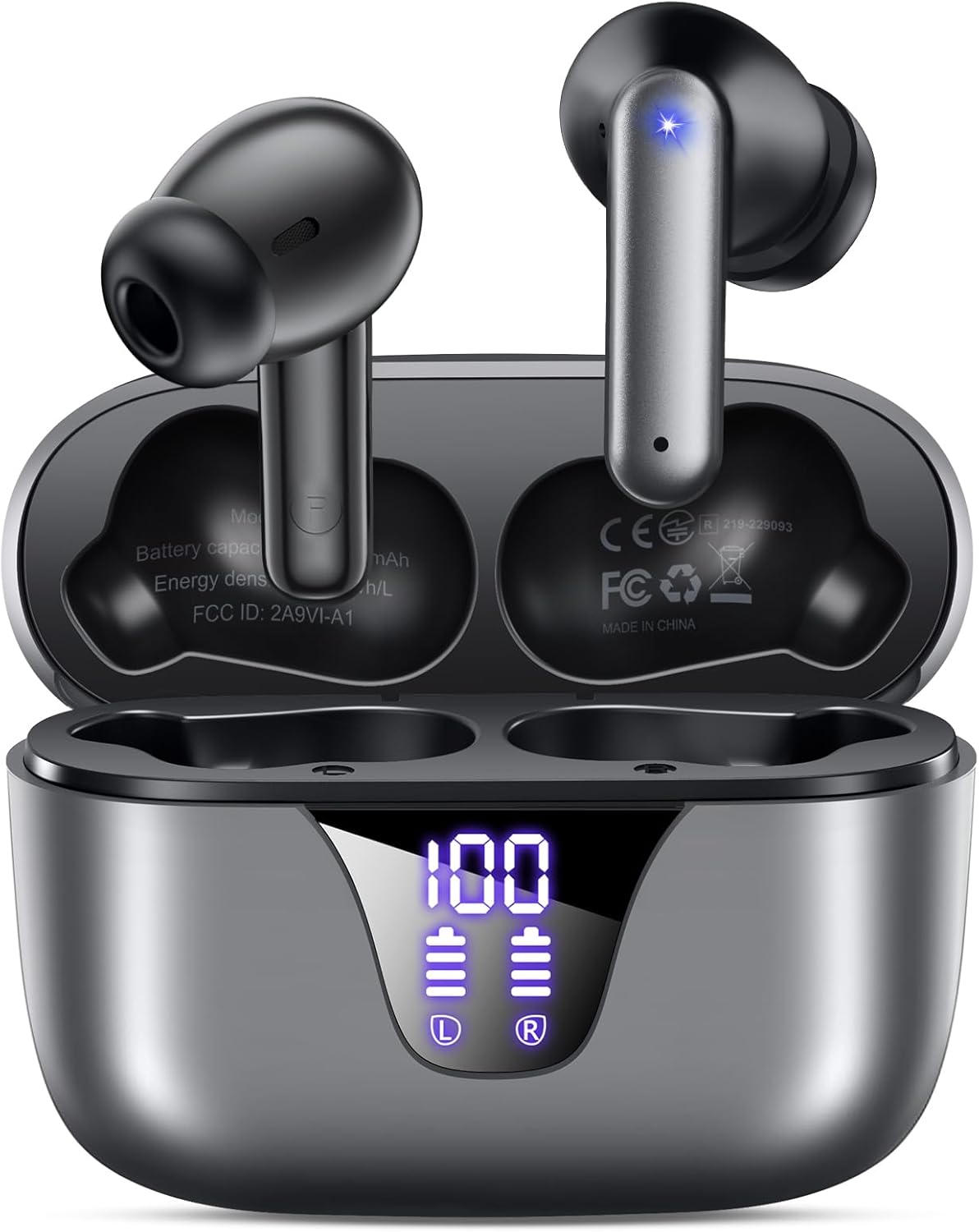
Image: ZIUTY A1 Wireless Earbuds shown inside their open charging case. The case features an LED digital display indicating battery levels for both the case and individual earbuds.
Affichage de puissance LED

Image: Close-up of the ZIUTY A1 charging case's LED display, showing '100' for the case battery and individual battery icons for the left (L) and right (R) earbuds.
The charging case features an LED digital display that shows the exact remaining power percentage (0-100%) for the case and individual battery levels for each earbud.
Installation
1. Chargement des écouteurs et de l'étui
Avant la première utilisation, chargez complètement les écouteurs et l'étui de chargement.
- Placez les écouteurs dans l'étui de chargement. Assurez-vous qu'ils sont correctement positionnés dans leurs emplacements respectifs (L pour gauche, R pour droite).
- Connect the USB-C charging cable to the charging port on the case and the other end to a 5V USB power adapter (not included).
- The LED display on the case will show the charging status. A full charge typically takes approximately 2 hours.

Image: ZIUTY A1 earbuds resting in their charging case, with the LED display showing battery levels.

Image: Diagram illustrating how to connect the USB-C cable to the charging case and a 5V power adapter for charging.
2. Port des écouteurs
Pour une qualité sonore et un confort optimaux, choisissez la taille d'embout auriculaire appropriée et assurez-vous d'un maintien sûr.
- Choose the ear tips (S, M, L) that provide the best seal and comfort for your ears.
- Insert the earbuds into your ears, gently twisting them to find a snug and stable position.
- The ergonomic semi-in-ear design is intended for a comfortable fit during various activities.

Image: Diagram showing the ergonomic design of the earbuds and the three available ear tip sizes (S, M, L) for a customized fit.

Image: Step-by-step visual guide on how to correctly insert and adjust the earbuds for a secure fit.
3. Couplage avec un appareil Bluetooth
Les écouteurs passeront automatiquement en mode appairage lorsqu'ils seront retirés de l'étui de chargement.
- Ouvrez le boîtier de charge et retirez les deux écouteurs. Ils s'allumeront automatiquement et tenteront de se connecter entre eux.
- Sur votre appareil (smartphone, tablette, ordinateur portable), activez le Bluetooth et recherchez les appareils disponibles.
- Select "A1" from the list of found devices.
- Une fois la connexion établie, vous entendrez une confirmation sonore et les écouteurs seront prêts à l'emploi.
- Les écouteurs se reconnecteront automatiquement au dernier appareil apparié lorsqu'ils seront retirés de leur étui.

Image: Illustration showing the ZIUTY A1 earbuds connecting via Bluetooth 5.3 to a smartphone, indicating a stable and fast connection.

Image: Diagram demonstrating the one-step auto-pairing process when the earbuds are removed from the charging case.
Mode d'emploi
Commandes tactiles
The ZIUTY A1 earbuds feature intuitive touch controls for managing audio playback and calls.

Image: Diagram illustrating the touch control area on the earbuds and various functions like Play/Pause, Voice Assistant, Answer/Hang up, Previous/Next Track, and Volume adjustment.

Image: A more detailed visual guide to the touch controls, showing specific tap and hold gestures for different commands.
| Action | Fonction |
|---|---|
| Appui simple (G/D) | Lecture/Pause de la musique, Répondre/Raccrocher |
| Appuyez deux fois (L) | Piste précédente |
| Appuyez deux fois (R) | Piste suivante |
| Triple Tap (G/D) | Activer l'assistant vocal (Siri, Google Assistant) |
| Press and Hold (L) | Baisser le volume |
| Press and Hold (R) | Augmenter le volume |
| Press and Hold (L/R) during incoming call | Rejeter l'appel |
Passer et recevoir des appels
Use the touch controls to manage your phone calls:
- Répondre/Terminer l'appel : Appuyez une fois sur l'un des écouteurs.
- Rejeter l'appel : Maintenez la pression sur l'un ou l'autre écouteur pendant un appel entrant.

Image: Illustration showing a user interacting with a voice assistant (Siri) via the earbuds for clear call support.
Assistant vocal
Activate your device's voice assistant by triple-tapping either earbud. This allows you to issue commands such as making calls or checking information hands-free.
Entretien
Nettoyage
Un nettoyage régulier contribue à maintenir des performances et une hygiène optimales.
- Clean the charging contacts on both the earbuds and inside the charging case with a dry cotton swab or alcohol pad.
- Gently clean the mesh of the ear tips to remove any dust or earwax that might affect sound volume.
- Wipe the exterior of the earbuds and case with a soft, dry cloth.

Image: Visual guide demonstrating how to clean the earbud charging contacts and ear tip mesh to resolve potential volume or charging issues.
Stockage
Lorsqu'ils ne sont pas utilisés, rangez les écouteurs dans leur étui de chargement pour les protéger et garantir qu'ils restent chargés.
Dépannage
If you encounter issues with your ZIUTY A1 earbuds, refer to the following common solutions:
- Les écouteurs ne parviennent pas à se connecter entre eux : Place both earbuds back into the charging case, close the lid, wait a few seconds, then open the lid and remove them again. They should automatically pair.
- Les écouteurs ne se connectent pas à l'appareil : Ensure Bluetooth is enabled on your device and the earbuds are in pairing mode. Forget the device from your Bluetooth list and attempt to re-pair.
- Pas de son ou volume faible : Check the volume levels on both your device and the earbuds. Ensure the ear tips are clean and properly seated in your ears. Refer to the cleaning instructions in the Maintenance section.
- Problèmes de charge : Ensure the charging cable is securely connected and the power adapter is 5V. Clean the charging contacts on both the earbuds and the case.
- Activation accidentelle des commandes tactiles : When adjusting the earbuds in your ear, grasp them by the sides to avoid touching the control area.
Caractéristiques
Key technical specifications for the ZIUTY A1 Wireless Earbuds:
| Fonctionnalité | Spécification |
|---|---|
| Nom du modèle | A1 |
| Technologie de connectivité | Sans fil (Bluetooth 5.3) |
| Portée Bluetooth | Jusqu'à 15 mètres (49 pieds) |
| Durée de vie de la batterie des écouteurs | Jusqu'à 8 XNUMX heures |
| Durée totale de lecture (avec étui) | Jusqu'à 50 XNUMX heures |
| Capacité de la batterie du boîtier de chargement | 500 mAh |
| Temps de charge | Environ 2 heures |
| Taille du pilote audio | Haut-parleur dynamique 14.5 mm |
| Gamme de fréquences | 20 Hz - 20,000 XNUMX Hz |
| Niveau de résistance à l'eau | IPX7 (résistance à l'eau) |
| Type de contrôle | Contrôle tactile |
| Poids des écouteurs | Environ 3.9 g par écouteur |
| Composants inclus | Écouteurs intra-auriculaires, étui de chargement, câble USB-C, embouts auriculaires, manuel d'utilisation |
Garantie et assistance
Informations sur la garantie
ZIUTY provides an 18-month battery promise for this product. This warranty covers defects in materials and workmanship under normal use.
Assistance clientèle
For any questions, technical assistance, or warranty claims, please contact ZIUTY customer service. Refer to the product packaging or the official ZIUTY webConsultez le site pour obtenir les coordonnées actuelles.