
1. Introduction
Thank you for choosing the Ströme Gliding Grille Bladeless 2-in-1 Tower Fan and Air Purifier. This innovative appliance combines efficient air circulation with advanced air purification, providing a healthier and more comfortable indoor environment. Please read this manual thoroughly before use to ensure proper operation and maintenance.
2. Consignes de sécurité
Pour réduire les risques d'incendie, d'électrocution ou de blessure, suivez toujours ces précautions de sécurité de base :
- Assurez-vous que l'alimentation électrique correspond au voltage spécifié sur l'appareil.
- Ne faites pas fonctionner le ventilateur avec un cordon ou une prise endommagés.
- Gardez l'appareil à l'écart de l'eau ou d'autres liquides.
- Do not insert fingers or objects into the grille while the fan is operating.
- Débranchez le ventilateur avant de le nettoyer ou d'effectuer toute opération de maintenance.
- Cet appareil est destiné à un usage intérieur uniquement.
- Tenir hors de portée des enfants.
3. Contenu du colis
Vérifiez que tous les éléments sont présents dans le colis :
- Ströme Gliding Grille Bladeless 2-in-1 Tower Fan and Air Purifier
- Télécommande
- Manuel d'utilisation
4. Produit terminéview
Familiarize yourself with the components of your new appliance.
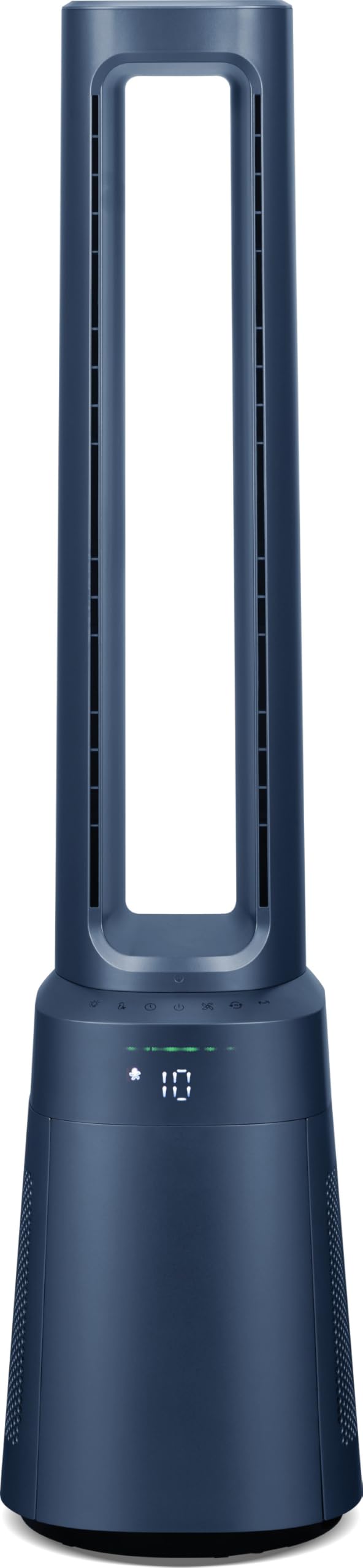
Figure 4.1 : Face avant view of the Ströme Gliding Grille Bladeless 2-in-1 Tower Fan and Air Purifier, showing the sleek, dark blue bladeless design and the digital display on the base.

Figure 4.2 : Côté view of the Ströme Gliding Grille Bladeless 2-in-1 Tower Fan and Air Purifier, highlighting its slim profile and air intake grille.

Figure 4.3: Close-up of the touch control panel and LED display, showing various function icons and the current fan speed setting.

Figure 4.4 : View of the open filter compartment, revealing the HEPA H13 filter ready for installation or replacement.
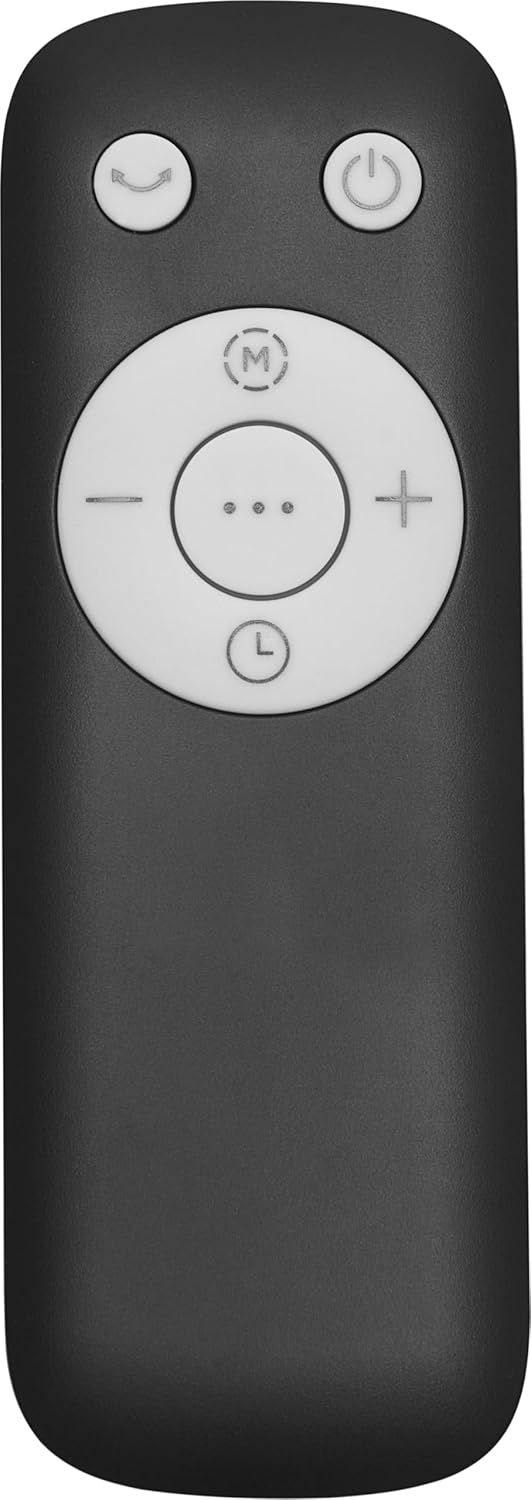
Figure 4.5: The compact remote control with clearly labeled buttons for power, oscillation, mode selection, and fan speed adjustment.
5. Installation
- Déballage: Retirez soigneusement l'appareil et tous ses accessoires de l'emballage. Conservez l'emballage pour un stockage ou un transport ultérieur.
- Installation du filtre:
- Locate the filter compartment cover on the lower part of the fan (refer to Figure 4.4).
- Open the cover and insert the HEPA H13 filter(s) according to the 'FRONT' markings.
- Fermez bien le couvercle.
- Placement: Place the fan on a firm, level surface. Ensure there is adequate space around the unit for proper air intake and circulation. Avoid placing it near curtains or other objects that could obstruct airflow.
- Connexion électrique : Branchez le cordon d’alimentation sur une prise électrique standard.
6. Mode d'emploi
The fan can be controlled via the touch panel on the unit or the magnetic remote control.
6.1. Marche/Arrêt
- Appuyez sur le Bouton d'alimentation () on the touch panel or remote control to turn the unit on or off.
6.2. Réglage de la vitesse du ventilateur
- Utilisez le '+' et '-' buttons on the remote or the corresponding icons on the touch panel to adjust the fan speed. There are 10 speed levels available.
6.3. Fonction d'oscillation
- Appuyez sur le Bouton d'oscillation () to activate or deactivate the 60° oscillation feature, which distributes air evenly.
6.4. Réglage de la minuterie
- Appuyez sur le Bouton de minuterie () to set the automatic shut-off timer. The timer can be set for up to 12 hours.
7. Modes et paramètres
The fan offers three distinct operating modes:
- Mode normal : Standard operation with adjustable fan speeds.
- Mode nuit : Designed for quiet operation during sleep. The fan speed will automatically decrease, and the display will dim or turn off after 60 seconds of inactivity.
- Mode bébé : Provides gentle airflow and purification, ideal for sensitive environments.
Pour changer de mode, appuyez sur Bouton de mode () on the control panel or remote control.
7.1. Digital Air Quality Display
The LED screen displays real-time air quality information. The display automatically turns off after 60 seconds of inactivity to save energy and reduce light disturbance, especially in Night Mode. The unit also features a memory function that recalls your last settings upon restart.
8. Entretien
Un entretien régulier garantit des performances optimales et une longue durée de vie à votre appareil.
8.1. Nettoyage de l'extérieur
- Débranchez toujours le ventilateur avant de le nettoyer.
- Essuyez les surfaces extérieures avec un chiffon doux, damp chiffon. N'utilisez pas de nettoyants abrasifs ou de solvants.
- Veillez à ce qu'aucune eau ne pénètre dans les composants internes.
8.2. HEPA Filter Replacement
The Ströme Gliding Grille uses two HEPA H13 filters for effective air purification. The filters are not washable and must be replaced periodically.
- The filter life depends on usage and air quality. Replace filters when the air quality indicator consistently shows poor readings despite operation, or approximately every 6-12 months.
- To replace, open the filter compartment cover (refer to Figure 4.4), remove the old filters, and insert new ones, ensuring correct orientation.
- Dispose of used filters responsibly.
9. Dépannage
If you encounter issues, refer to the following table before contacting support.
| Problème | Cause possible | Solution |
|---|---|---|
| Le ventilateur ne s'allume pas | Pas d'alimentation électrique | Vérifiez que le cordon d'alimentation est bien branché dans une prise de courant fonctionnelle. |
| Faible débit d'air | Les filtres sont sales ou obstrués | Check and replace the HEPA filters if necessary. Ensure air intake is not obstructed. |
| Bruit inhabituel | Obstruction in the air outlet or base | Turn off and unplug the unit. Carefully check for any foreign objects and remove them. |
| La télécommande ne fonctionne pas | Les piles sont épuisées ou mal insérées | Replace the remote control batteries (sold separately) and ensure correct polarity. |
10. Spécifications
| Fonctionnalité | Spécification |
|---|---|
| Marque | Ströme |
| Nom du modèle | Gliding Grille Bladeless 2-in-1 |
| Couleur | Bleu |
| Dimensions du produit | 25.5 x 25.5 x 105.6 cm |
| Matériel | Plastique |
| Nombre de vitesses | 10 |
| Niveau de bruit | 59.8 décibels |
| Type de montage | Montage au sol |
| Type de contrôle | Télécommande, écran tactile |
| Utilisation recommandée du produit | Résidentiel |
| Facteur de forme | Tour |
| Purification de l'air | 2x HEPA H13 Filters |
| Angle d'oscillation | 60° |
| Minuteur | 12 heures |
11. Garantie et assistance
This Ströme product comes with a standard manufacturer's warranty. For detailed warranty information, please refer to the warranty card included with your purchase or visit the official Ströme website. For technical support, troubleshooting assistance, or to inquire about replacement parts, please contact your retailer or the Ströme customer service department.