
YZ YZ-A30D3I4D
YZ 12-inch Electronic Scoreboard User Manual
Model: YZ-A30D3I4D
Introduction
This manual provides detailed instructions for the setup, operation, and maintenance of your YZ 12-inch Electronic Scoreboard. Please read this manual thoroughly before using the product to ensure proper function and longevity.
Produit terminéview
Caractéristiques principales
- Multi-function Scoreboard: Supports 12/24h clock mode, count up mode, count down mode, and score mode.
- Audible Score Change: Emits a sound when the score changes, providing clear notification.
- Utilisation facile : Full control via remote control (up to 100ft range) and direct touch screen input for score adjustments.
- Affichage haute visibilité : Features a 600cd/m² ultra-bright LED display with a 70ft viewing distance and 5 levels of brightness adjustment.
- Longue durée de vie de la batterie : Rechargeable battery provides up to 8 hours of operation on a single 3-hour charge.
- Application polyvalente : Portable design suitable for various indoor and outdoor games such as basketball, ping pong, and other yard sports.
Composants inclus
- YZ Electronic Scoreboard
- Remote Control (requires 2*AAA batteries, not included)
- Câble de chargement USB-C
- Manuel d'utilisation
- Accessories (as packaged)
Installation
1. Charging the Scoreboard
Before first use, fully charge the scoreboard. Connect the provided USB-C charging cable to the scoreboard's charging port and to a compatible USB power source. A full charge takes approximately 3 hours and provides up to 8 hours of operation.

Figure 1: Scoreboard charging options. The scoreboard can be charged via a USB-C cable, compatible with power banks or wall adapters.
2. Installation des piles de la télécommande
Open the battery compartment on the back of the remote control. Insert two (2) AAA batteries, ensuring correct polarity. Close the compartment securely.
3. Placement
Place the scoreboard on a stable, flat surface. Ensure it is positioned where all participants can clearly see the display. The scoreboard is designed for portability and can be used in various indoor and outdoor settings.
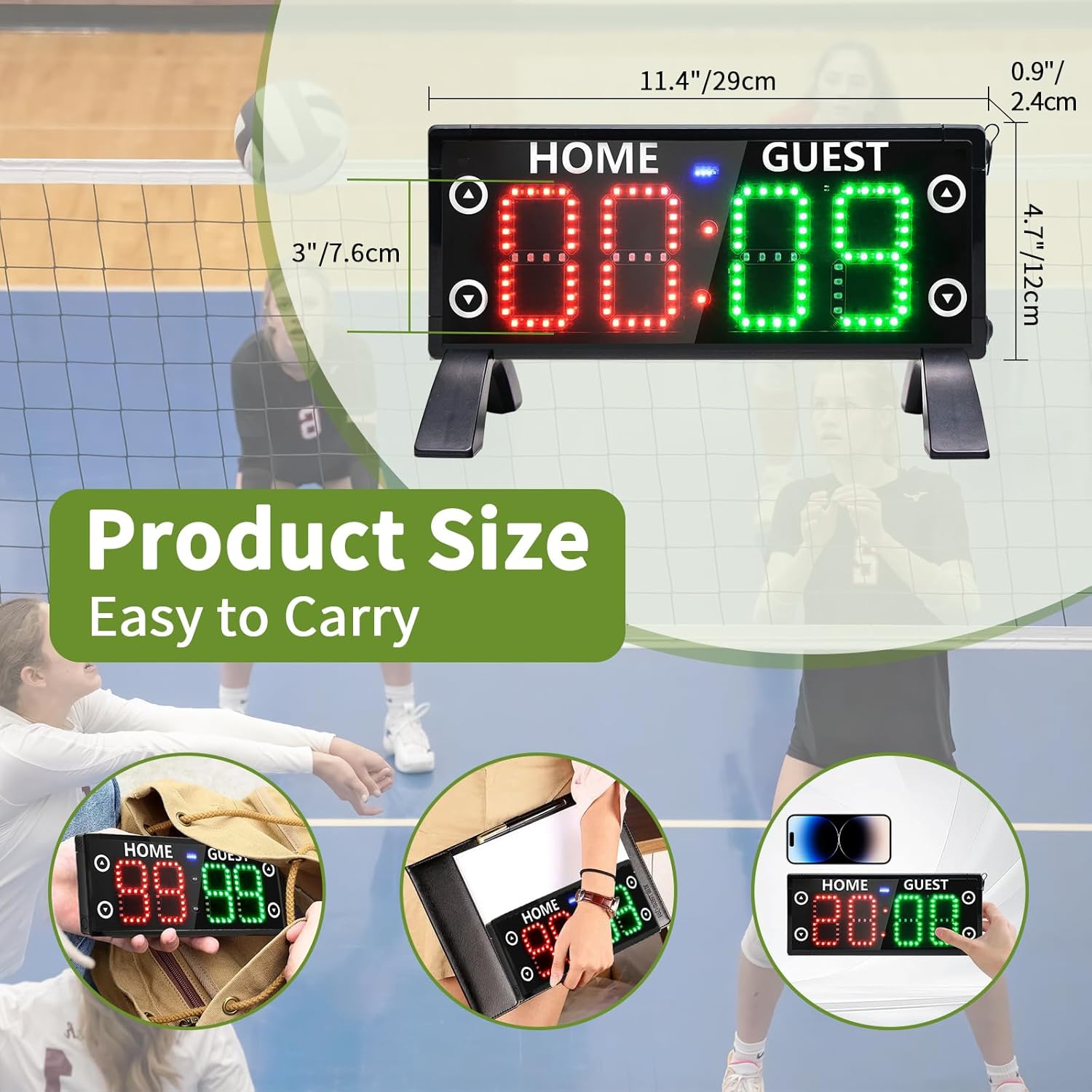
Figure 2: Product dimensions and portability. The scoreboard measures approximately 11.4 inches (29 cm) in width and 4.7 inches (12 cm) in height, making it easy to transport.
Mode d'emploi
1. Marche/Arrêt
Press the power button located on the scoreboard or the corresponding button on the remote control to turn the device on or off.
2. Réglage de la luminosité
The scoreboard features 5 levels of brightness adjustment. Use the brightness control buttons on the remote control to cycle through the levels (LV.1 to LV.5) to suit ambient lighting conditions. The display is designed for clear visibility even in direct sunlight.

Figure 3: Brightness adjustment levels. The scoreboard offers five distinct brightness settings to ensure optimal visibility in various lighting environments.
3. Score Mode Operation
In score mode, you can adjust scores using either the remote control or the touch-sensitive areas on the scoreboard itself.
- Télécommande: Use the designated buttons on the remote to add or subtract points for "HOME" and "GUEST" teams.
- Commandes tactiles: Directly touch the '+' or '-' icons next to the "HOME" or "GUEST" scores on the scoreboard to adjust points. The scoreboard will emit a sound when a score changes.

Figure 4: Touch intuitive controls. Users can directly interact with the scoreboard's touch-sensitive areas to modify scores, accompanied by an audible confirmation.
4. Clock Modes (12/24h, Count Up, Count Down)
Refer to the remote control's specific buttons for switching between 12-hour and 24-hour clock displays, and for initiating count-up or count-down timers. Detailed instructions for setting times and starting/stopping timers are available on the remote control's diagram (if provided) or through on-screen prompts.
Entretien
Nettoyage
Wipe the scoreboard surface with a soft, dry, or slightly damp cloth. Avoid using abrasive cleaners, solvents, or harsh chemicals, as these can damage the display and plastic components.
Entretien de la batterie
To prolong battery life, avoid fully discharging the scoreboard frequently. Recharge the battery when the low battery indicator appears. If storing the scoreboard for an extended period, ensure it is partially charged (around 50%) and recharge it every few months.
Dépannage
- Scoreboard does not power on:
- Ensure the scoreboard is fully charged. Connect it to a power source using the USB-C cable.
- Vérifiez que le bouton d'alimentation est bien enfoncé.
- La télécommande ne fonctionne pas :
- Check if the AAA batteries are correctly installed and not depleted. Replace if necessary.
- Ensure there are no obstructions between the remote control and the scoreboard.
- Confirm you are within the 100ft operating range.
- L'écran est sombre ou illisible :
- Adjust the brightness settings using the remote control (LV.1 to LV.5).
- Ensure the scoreboard is not exposed to extreme glare that exceeds its brightness capabilities.
- Score changes are not audible:
- Check if the sound function is enabled (if applicable, refer to remote control instructions).
- Ensure the scoreboard's speaker is not obstructed.
Caractéristiques
| Numéro de modèle | YZ-A30D3I4D |
| Marque | YZ |
| Taille de l'écran | 12 inches (approx. 29 cm width, 12 cm height) |
| Luminosité | 600 cd/m² (5 adjustable levels) |
| Viewdistance | Jusqu'à 70 pieds |
| Autonomie de la batterie | Jusqu'à 8 XNUMX heures |
| Temps de charge | Environ 3 heures |
| Portée de la télécommande | Jusqu'à 100 pieds |
| Type de matériau | Plastique |
| Couleur | Noir |
| Dimensions du colis | 39.4 x 15.01 x 9.4 cm; 912 g |
| Piles | 1 Lithium Polymer battery (included) for scoreboard, 2 AAA batteries (not included) for remote. |
| Fabricant | HANGZHOU YIZHI TECHNOLOGY CO.,LTD. |

Figure 5: Versatile applications of the scoreboard. The portable design makes it suitable for various sports and recreational activities.
Garantie et assistance
For warranty information or technical support, please refer to the contact details provided with your purchase documentation or visit the official YZ product support website. Please have your model number (YZ-A30D3I4D) and purchase date available when contacting support.