
Introduction
The Surfans F28 is a high-fidelity portable music player designed to deliver an immersive audio experience. Featuring dual ESS9018 DACs, a 4.4mm balanced output, and comprehensive Bluetooth 5.2 support including LDAC and aptX HD, the F28 supports a wide range of lossless audio formats. This manual provides detailed instructions for setting up, operating, maintaining, and troubleshooting your device to ensure optimal performance and longevity.

Figure 1 : Face et dos view of the Surfans F28 HiFi Music Player.
Contenu du colis
Veuillez vérifier que tous les articles énumérés ci-dessous sont présents dans votre colis :
- 1x Surfans F28 HiFi Music Player
- 1x câble de chargement USB-C
- 1 carte Micro SD de 128 Go (préinstallée ou fournie séparément)
- 1x Manuel d'utilisation (ce document)

Figure 2 : Illustration du contenu typique d'un emballage.
Produit terminéview
Familiarize yourself with the various components and controls of your F28 music player.
Caractéristiques principales :
- Dual ESS9018 DACs: For high-resolution audio decoding and minimal distortion.
- Sortie équilibrée de 4.4 mm : Provides enhanced audio quality and power for demanding headphones.
- Sortie asymétrique 3.5 mm : Standard audio output for common headphones.
- Bluetooth 5.2 bidirectionnel : Supports LDAC and aptX HD for high-quality wireless audio transmission and reception.
- Écran tactile IPS de 3.5 pouces : Pour une navigation et un contrôle intuitifs.
- ALPS Analog Volume Knob: For precise volume adjustments.
- Stockage extensible : Prend en charge les cartes Micro SD jusqu'à 512 Go.
- Port USB-C : Pour le chargement et le transfert de données.

Figure 3: The F28 player showcasing its display and audio capabilities.

Figure 4: The dual ESS9018K2M DAC chips, central to the F28's high-fidelity audio.

Figure 5: Top panel with 4.4mm balanced and 3.5mm single-ended audio outputs, and the ALPS analog volume knob.
Installation
1. Chargement de l'appareil
Before first use, fully charge the F28. Connect the included USB-C cable to the player's USB-C port and the other end to a USB power adapter (5V/1A recommended) or a computer's USB port. The charging indicator will show the charging status. A full charge typically takes several hours.
2. Insertion de la carte Micro SD
The F28 supports Micro SD cards up to 512GB. Locate the Micro SD card slot on the bottom of the device. Gently insert the Micro SD card with the gold contacts facing down until it clicks into place. To remove, push the card in slightly until it springs out.

Figure 6: Inserting the Micro SD card and connecting via USB-C for data transfer.
3. Transfert de musique Files
Connect the F28 to your computer using the USB-C cable. The player will appear as a removable storage device. You can then drag and drop your music files directly into the Micro SD card's folders. The F28 supports various lossless formats including DSD (DSF/DFF), FLAC/WAV (up to 384kHz), AIFF/APE, as well as MP3/AAC.

Figure 7 : Audio pris en charge file formats for the F28 player.
Mode d'emploi
1. Marche/Arrêt
- Mise sous tension : Maintenez le bouton d'alimentation (situé sur le côté) enfoncé jusqu'à ce que l'écran s'allume.
- Éteindre: Maintenez le bouton d'alimentation enfoncé jusqu'à ce qu'un message d'arrêt apparaisse, puis confirmez.
2. Navigation de base
The F28 features a 3.5-inch IPS touchscreen for primary navigation. Swipe gestures and taps are used to select options and move between menus. Physical buttons on the side provide additional control for playback (play/pause, next/previous track) and menu navigation.
3. Lecture de musique
From the main menu, select "My Music" or "Folder" to browse your audio files. Tap on a song to begin playback. The playback screen displays track information, progress, and playback controls.
4. Contrôle du volume
Adjust the volume using the gold-colored ALPS analog knob located on the top right of the device. Rotate clockwise to increase volume and counter-clockwise to decrease. The volume level will be displayed on the screen.
5. Connectivité Bluetooth
The F28 supports Bidirectional Bluetooth 5.2 with LDAC and aptX HD codecs for high-quality wireless audio. To pair with Bluetooth headphones or speakers:
- Go to "System Settings" and select "Bluetooth".
- Activez le Bluetooth.
- Le lecteur va rechercher les appareils disponibles. Sélectionnez votre appareil dans la liste pour le jumeler.
The F28 can also act as a Bluetooth receiver, allowing you to stream audio from your phone or PC to the player.

Figure 8: The F28 features a Bluetooth 5.2 chip for stable and high-quality wireless connections.
6. Paramètres de l'égaliseur
The F28 includes an equalizer to customize your sound. Navigate to the "Equalizer" option in the settings. You can choose from various presets or create a custom sound profile by adjusting the frequency bands.
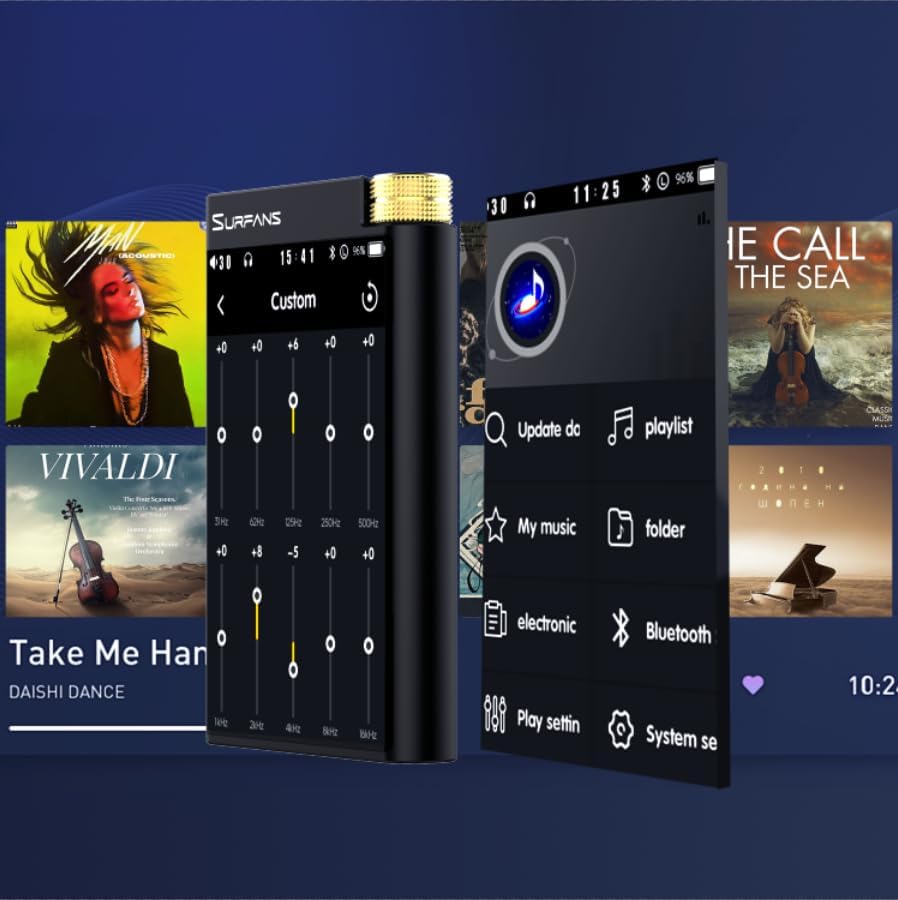
Figure 9: Customizing audio with the built-in equalizer.
7. Connexion à des appareils externes
Use the 4.4mm balanced or 3.5mm single-ended output to connect to headphones, amplifiers, or speakers. The USB-C port also supports USB DAC functionality, allowing the F28 to act as an external sound card for your computer.

Figure 10: The F28 can be connected to various audio systems, including acting as a USB DAC for computers.
Entretien
- Nettoyage: Utilisez un chiffon doux et sec pour nettoyer l'appareil. Évitez d'utiliser des nettoyants abrasifs ou des solvants.
- Stockage: Conservez le lecteur dans un endroit frais et sec, à l'abri de la lumière directe du soleil et des températures extrêmes.
- Entretien de la batterie: Pour prolonger la durée de vie de la batterie, évitez de la décharger complètement et fréquemment. En cas de stockage prolongé, rechargez-la à environ 50 % tous les deux ou trois mois.
Dépannage
| Problème | Cause possible | Solution |
|---|---|---|
| L'appareil ne s'allume pas. | Batterie faible ; appareil bloqué. | Charge the device for at least 30 minutes. If still unresponsive, try holding the power button for 10-15 seconds for a hard reset. |
| Touchscreen is unresponsive or slow. | Problème logiciel temporaire ; interférence avec le protecteur d’écran. | Restart the device. Ensure the screen is clean and free of debris. If using a screen protector, ensure it is properly applied and not too thick. |
| Problèmes de jumelage Bluetooth. | Device not in pairing mode; distance; interference. | Ensure both devices are in pairing mode and within range. Turn off and on Bluetooth on both devices. Clear previous pairings if necessary. |
| Low volume via Bluetooth. | Volume settings on both devices; codec compatibility. | Increase volume on both the F28 and the connected Bluetooth device. Ensure optimal codec (LDAC/aptX HD) is selected if supported by the receiving device. |
| Musique files not recognized or played in incorrect order. | Corrompu files; file system indexing issue. | Assurer files are in supported formats. Re-scan the music library from the player's settings. If issues persist, try reformatting the Micro SD card (backup data first) and re-transferring files. Note: Some players may sort by filename alphabetically rather than track number metadata. |
Caractéristiques
| Fonctionnalité | Détail |
|---|---|
| Nom du modèle | F28 128G |
| Dimensions du produit | 0.7 x 2.6 x 4.7 pouces |
| Poids de l'article | 9.6 onces |
| Puce CNA | Dual ESS9018K2M |
| Formats audio pris en charge | DSD (DSF/DFF), FLAC/WAV (up to 384kHz/32-bit), AIFF/APE, MP3/AAC, WMA Lossless |
| Version Bluetooth | 5.2 (Bidirectional, supports LDAC/aptX HD) |
| Taille de l'écran | Écran tactile IPS de 3.5 pouces |
| Stockage interne | 128GB (included Micro SD card) |
| Stockage extensible | Jusqu'à 512 Go via carte microSD |
| Batterie | 1x 12V battery (included), approx. 12-hour playback |
| Ports de sortie | 4.4 mm équilibré, 3.5 mm asymétrique |
| Technologie de connectivité | Aux, Bluetooth 5.2, USB-C |
| Dossier spécial | Égaliseur |
Garantie et assistance
For warranty information and technical support, please refer to the official Surfans webConsultez leur site web ou contactez directement leur service client. Conservez votre reçu d'achat comme preuve d'achat pour toute réclamation au titre de la garantie.
You can visit the official Surfans Store on Amazon for more information and support: Surfans Audio Store