
Introduction
Thank you for choosing the INFINMIND K618 Wireless Bluetooth TouchPad Keyboard. This manual provides essential information for the proper setup, operation, and maintenance of your new device. Please read it thoroughly before use to ensure optimal performance and longevity.

Image: The INFINMIND K618 Wireless TouchPad Keyboard, showcasing its sleek design and wireless capabilities.

Image: The INFINMIND K618 keyboard being used in various scenarios including home, office, travel, and meetings, highlighting its portability and versatility.
Contenu du colis
- INFINMIND K618 Wireless Bluetooth TouchPad Keyboard
- Récepteur USB 2.4 G
- Manuel d'utilisation
- (Batteries not included, requires 2x AAA batteries)
Produit terminéview
Familiarize yourself with the key components of your INFINMIND K618 keyboard.

Image : Vue de dessus view of the INFINMIND K618 keyboard, highlighting the integrated touchpad and the included 2.4G USB receiver.
- Clavier: Standard QWERTY layout with function keys.
- Pavé tactile intégré : Located on the right side for navigation.
- Connection Mode Indicators: Lights for 2.4G, Bluetooth 1 (BT1), and Bluetooth 2 (BT2).
- Interrupteur: On/Off switch (usually on the back or side).
- Compartiment à piles : For AAA batteries (on the back).
- Stockage du récepteur USB : Compartment for the 2.4G USB receiver (on the back).
Installation
1. Mise sous/hors tension
- Insert 2x AAA batteries into the battery compartment on the back of the keyboard, ensuring correct polarity.
- Slide the power switch to the "ON" position. The keyboard will power on.
- Pour éteindre l'appareil, faites glisser l'interrupteur d'alimentation sur la position « ARRÊT ».
2. Connexion sans fil 2.4G
- Locate the 2.4G USB receiver in the battery compartment or a dedicated slot on the keyboard.
- Plug the USB receiver into an available USB port on your computer, laptop, or smart TV.
- Appuyez sur le 2.4 G connection button on the keyboard (often labeled with a USB icon or 'A'). The indicator light for 2.4G will illuminate.
- The device should automatically recognize the keyboard. No additional drivers are typically required.
3. Bluetooth Connection (BT1 & BT2)
The K618 supports two independent Bluetooth connections, allowing you to switch between two Bluetooth-enabled devices.

Image: Diagram illustrating the multi-device connection capability of the INFINMIND K618 keyboard, showing connections to a laptop, monitor (via 2.4G), and tablet (via Bluetooth).
- Activez le Bluetooth sur votre appareil : Ensure Bluetooth is turned on for your laptop, tablet, smartphone, or smart TV.
- Select a Bluetooth channel: Appuyez et maintenez soit le BT1 or BT2 connection button on the keyboard for 3-5 seconds until the corresponding indicator light starts blinking rapidly. This indicates pairing mode.
- Associez-le à votre appareil : On your device, search for Bluetooth devices. You should see "INFINMIND K618" or a similar name appear in the list. Select it to pair.
- Confirmer la connexion : Once paired, the indicator light on the keyboard will stop blinking and remain solid for a few seconds, then turn off to save power. Your keyboard is now connected.
- Repeat these steps for the second Bluetooth channel (BT2) if you wish to connect another device.
Mode d'emploi
1. Commutation multi-appareils
Pour basculer entre les appareils connectés :
- Appuyez sur le 2.4 G button to switch to the device connected via the USB receiver.
- Appuyez sur le BT1 bouton pour basculer vers l'appareil connecté via le canal Bluetooth 1.
- Appuyez sur le BT2 bouton pour basculer vers l'appareil connecté via le canal Bluetooth 2.

Image: Visual representation of the INFINMIND K618 keyboard's ability to switch between three devices (2.4G, BT1, BT2) with a single click.
2. Gestes du pavé tactile
The integrated touchpad supports multi-touch gestures for enhanced navigation:
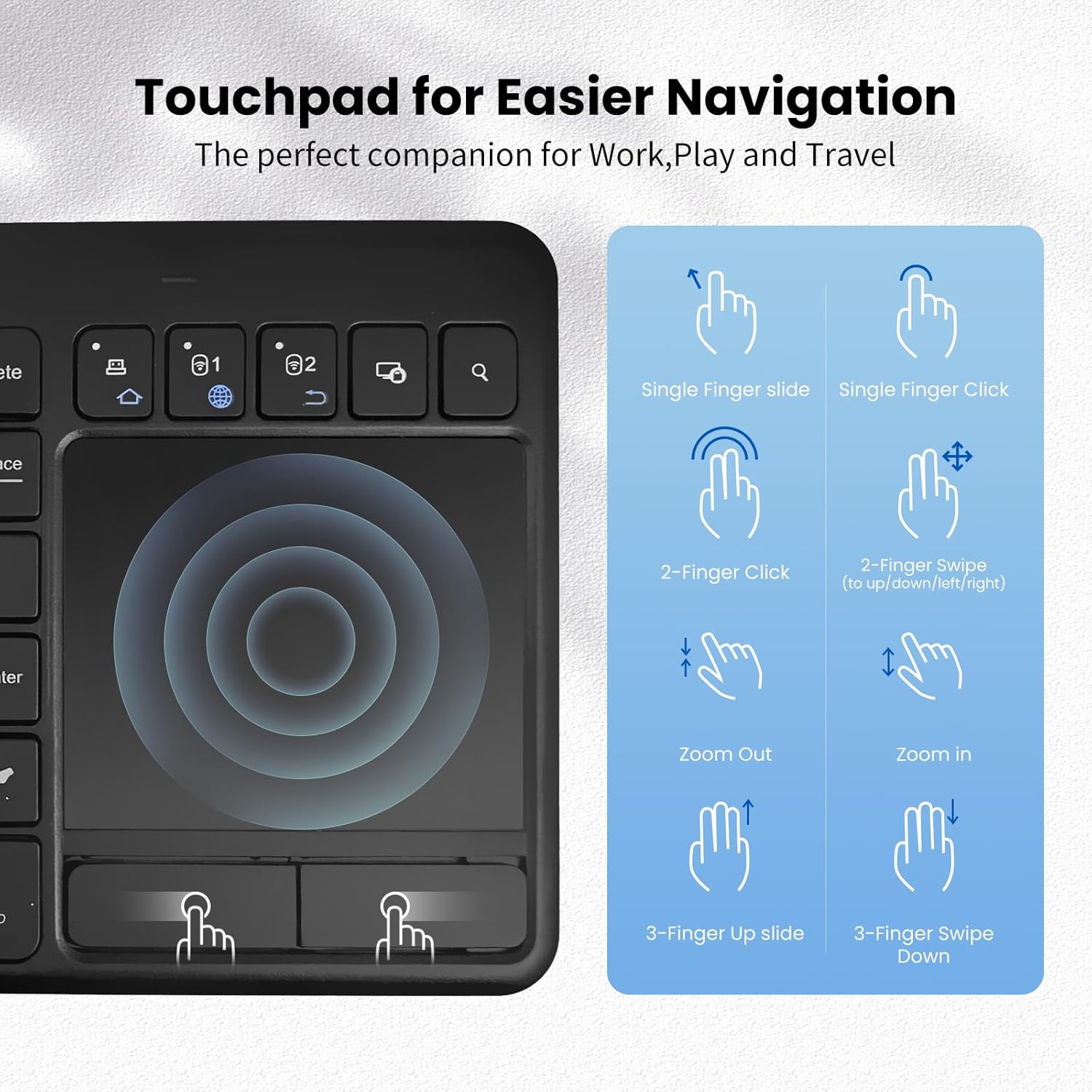
Image: A guide illustrating various touchpad gestures supported by the INFINMIND K618, including single-finger slide/click, two-finger click/swipe, zoom in/out, and three-finger slide/swipe.
- Glissement à un doigt : Déplacer le curseur.
- Clic à un seul doigt : Click gauche.
- Clic à deux doigts : Clic-droit.
- Two-Finger Swipe (Up/Down/Left/Right): Scroll content or navigate.
- Pincer vers l'intérieur/l'extérieur : Zoom in or out (if supported by the operating system/application).
- Three-Finger Slide Up: (Specific OS function, e.g., Task View on Windows).
- Three-Finger Slide Down: (Specific OS function, e.g., Show Desktop on Windows).
Note: Specific gesture functionality may vary depending on the operating system and application.
3. Touches de fonction
The keyboard includes dedicated function keys (F1-F12) and multimedia shortcuts. Use the Fn key in combination with other keys to access secondary functions, if applicable.
Compatibilité
The INFINMIND K618 keyboard is designed for broad compatibility across various operating systems and devices.

Image: Chart detailing the wide compatibility of the INFINMIND K618 keyboard with various devices (smartphones, laptops, tablets, PCs, Smart TVs) and operating systems (Mac OS, Windows 7/8/10, iOS, Android).
- Systèmes d'exploitation : Windows (7/8/10/11), Android, Chrome OS, iOS, Mac OS.
- Appareils compatibles : Laptops, Desktop PCs, Tablets (iPad, Android tablets), Smartphones (iPhone, Android phones), Smart TVs.
Note: Full functionality, especially for advanced touchpad gestures, may depend on the specific operating system version and device support.
Entretien
- Nettoyage: Utilisez un chiffon doux et sec pour nettoyer la surface du clavier. Pour les saletés tenaces, un chiffon légèrement plus sec peut être utile.amp On peut utiliser un chiffon imbibé de savon doux, en veillant à ce qu'aucun liquide ne pénètre dans l'appareil.
- Remplacement de la batterie : Replace AAA batteries when the low battery indicator (if present) illuminates or when performance degrades.
- Stockage: When not in use for extended periods, turn off the keyboard and remove the batteries to prevent leakage. Store in a cool, dry place.
- Évitez les extrêmes : Do not expose the keyboard to extreme temperatures, direct sunlight, or excessive moisture.
Dépannage
| Problème | Solution possible |
|---|---|
| Le clavier ne répond pas |
|
| Le pavé tactile ne fonctionne pas correctement |
|
| Difficulty switching between devices |
|
Caractéristiques
| Fonctionnalité | Détail |
|---|---|
| Modèle | K618 |
| Connectivité | 2.4 GHz sans fil, Bluetooth (BT1, BT2) |
| Plage de fonctionnement | Jusqu'à 33 pieds (10 mètres) |
| Source d'énergie | 2 piles AAA |
| Systèmes d'exploitation compatibles | Windows, Android, Chrome OS, iOS, Mac OS |
| Dimensions | 13.39 x 5.12 x 1.18 pouces (environ) |
| Poids | 12.6 onces (environ) |
Garantie et assistance
INFINMIND products are designed for reliability and performance. For warranty information and technical support, please refer to the warranty card included in your package or visit the official INFINMIND website.
If you encounter any issues not covered in this manual, please contact INFINMIND customer support for assistance.