
1. Introduction
This instruction manual provides essential information for the proper installation and maintenance of your IHFMPFKJ replacement kit for the Eureka NER600 robotic vacuum cleaner. Regular replacement of these components is crucial for maintaining the vacuum cleaner's optimal performance and extending its lifespan. Please read this manual thoroughly before proceeding with any installation or maintenance.
2. Contenu du colis
Vérifiez que tous les composants énumérés ci-dessous sont inclus dans votre colis :
- 1 x Main Brush: Designed for deep cleaning carpets and hard floors.
- 2 x Filtres : High-efficiency filters to capture fine dust and allergens.
- 3 x Mop Cloths: Reusable cloths for wet mopping functions.
- 4 x Side Brushes: Sweeps debris from edges and corners into the cleaning path.
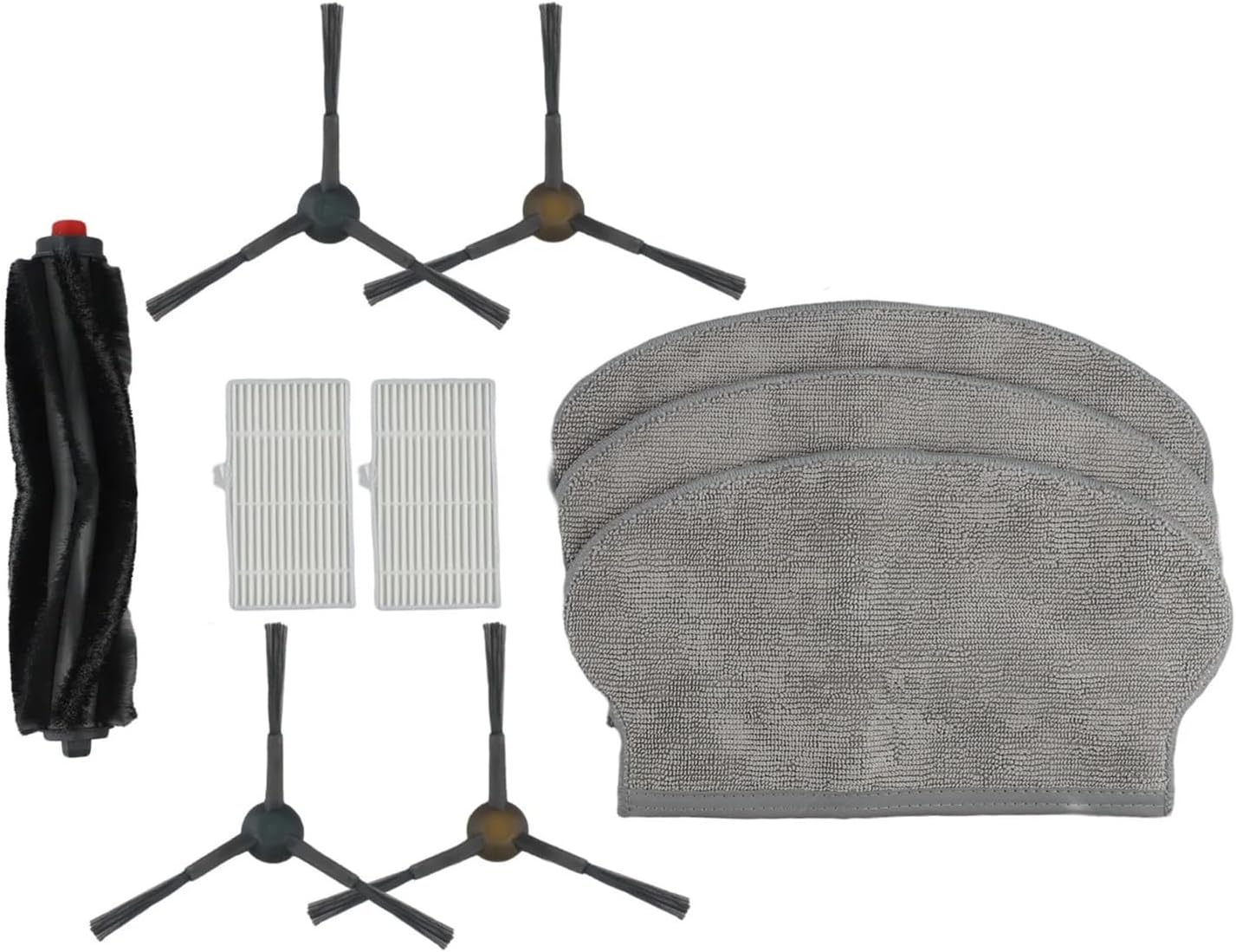
Image 2.1 : Terminéview of the IHFMPFKJ Replacement Kit components.
3. Guide d'installation
Follow these general steps to replace the components. For detailed, model-specific instructions, refer to your Eureka NER600 vacuum cleaner's original user manual.
3.1. Remplacement du pinceau principal
- Turn off the vacuum cleaner and place it upside down on a clean, flat surface.
- Repérez le couvercle principal de la brosse, généralement fixé par des loquets ou des vis. Ouvrez ou retirez le couvercle.
- Retirez délicatement l'ancienne brosse principale.
- Insert the new main brush into its slot, ensuring the ends align with the brush bearings.
- Refermez bien le couvercle principal de la brosse.

Image 3.1: The main brush, designed for effective debris collection.
3.2. Remplacement des filtres
- Open the dustbin compartment of your vacuum cleaner.
- Retirez le bac à poussière et repérez le bloc filtre.
- Carefully remove the old filters. Dispose of them properly.
- Insert the new filters into the designated slots, ensuring a snug fit.
- Reinstall the dustbin and close the compartment.

Image 3.2: High-efficiency filters for capturing fine particles.
3.3. Remplacement des chiffons de la serpillière
- If your vacuum cleaner has a mopping module, remove it from the device.
- Detach the used mop cloth from the module, typically via Velcro or a sliding mechanism.
- Attach a new mop cloth to the mopping module, ensuring it is securely fastened.
- Reinstall the mopping module onto the vacuum cleaner.
3.4. Remplacement des brosses latérales
- Turn off the vacuum cleaner and place it upside down.
- Locate the side brushes, usually held in place by a screw.
- Use a screwdriver to remove the screw and detach the old side brush.
- Place a new side brush into position, aligning the screw hole.
- Fixez la nouvelle brosse latérale avec la vis.

Image 3.3: Side brushes for cleaning edges and corners.
4. Considérations opérationnelles
Once replacement parts are installed, ensure they are correctly seated before operating the vacuum cleaner. Improper installation can lead to reduced cleaning efficiency or damage to the device. Always refer to your Eureka NER600 vacuum cleaner's manual for specific operating instructions.
5. Entretien
Regular maintenance of your vacuum cleaner's accessories is vital for its longevity and performance.
- Brosse principale : Inspect the main brush weekly for tangled hair or debris. Use a cleaning tool (often provided with the vacuum) to remove any obstructions.
- Filtres : Tap filters gently to remove dust after each use. Filters should be replaced every 1-3 months, depending on usage, to maintain strong suction and air quality.
- Chiffons à serpillière : Wash mop cloths after each use. They are typically machine washable. Replace them when they show signs of wear or reduced cleaning effectiveness.
- Brosses latérales : Check side brushes regularly for wear, bending, or damage. Replace them if bristles are splayed or broken, as this affects their ability to sweep effectively.
Timely replacement of worn accessories prevents issues such as jamming, abnormal noise, and reduced cleaning power, thereby protecting the performance of your Eureka NER600 vacuum cleaner.
6. Dépannage
If you encounter issues after replacing components, consider the following:
- Performances de nettoyage réduites : Ensure all new components are installed correctly and securely. Check for any remaining debris in the brush or filter compartments.
- Bruits inhabituels : Verify that the main brush and side brushes are properly seated and not obstructed by hair or foreign objects.
- Pièces non adaptées : Double-check the compatibility of the replacement kit with your specific Eureka NER600 model.
If problems persist, consult the original Eureka NER600 user manual or contact the vacuum cleaner manufacturer's support.
7. Spécifications
| Attribut | Détail |
|---|---|
| Marque | IHFMPFKJ |
| Modèle compatible | Eureka NER600 Vacuum Cleaner |
| Contenu du colis | 1 Main Brush, 2 Filters, 3 Mop Cloths, 4 Side Brushes |
| Poids de l'article (approx.) | 50 grammes (poids total de l'emballage) |
| ASIN | B0F6DFYWWM |
8. Garantie et assistance
This product is a third-party replacement kit. For specific warranty information regarding these replacement parts, please refer to the seller's policy on the purchase platform. For support related to the Eureka NER600 vacuum cleaner itself, please contact Eureka customer service directly.