
1. Introduction
The RX-350 Infrared Thermal Imager is a high-performance device designed for precise temperature measurements using infrared technology. It is ideal for monitoring areas where identifying temperature variations is crucial. The RX-350 offers excellent thermal resolution, allowing detection of even small temperature differences on objects and surfaces.
This manual provides essential information for the safe and effective operation of your thermal imager. Please read it thoroughly before use and keep it for future reference.

2. Consignes de sécurité
Always observe the following safety precautions to prevent injury and avoid damage to the device:
- Do not point the camera directly at high-intensity light sources (e.g., sun, lasers) as this may damage the infrared sensor.
- Évitez d'exposer l'appareil à des températures extrêmes, à l'humidité ou à des environnements corrosifs.
- Ne tentez pas de démonter ou de modifier l'appareil. Confiez toute réparation à un personnel qualifié.
- Use only the provided charger and battery type.
- Gardez l’appareil hors de portée des enfants.
3. Produit terminéview
3.1. Composants et commandes

Familiarize yourself with the following parts:
- Lentille infrarouge : Capture le rayonnement thermique.
- Objectif d'appareil photo numérique : Captures visible light images for fusion mode.
- Lumière LED : Provides illumination for visible light photography in dark environments.
- Camera Screen: Displays thermal and visible images, menu, and data.
- Touche MARCHE/ARRÊT : Allume ou éteint l'appareil.
- Touche menu: Permet d'accéder aux paramètres et options de l'appareil.
- Touche Sélection/Entrée : Confirme les sélections effectuées dans le menu.
- Touches de navigation (Haut, Bas, Gauche, Droite) : Permet de naviguer dans les options du menu.
- Déclenchement: Used to capture images or videos.
- Port micro-USB : For charging and data export to a computer.
- Dragonne: Pour une manipulation sécurisée.
3.2. Screen Elements Explanation

The screen displays various information during operation:
- Emissivité: Current emissivity setting.
- Niveau de batterie : Indique la charge restante de la batterie.
- Highest Temperature Cursor: Marks the hottest point in the image.
- Code couleur : Represents the temperature scale.
- Central Point Temperature Cursor: Affiche la température au centre de l'écran.
- Temps: Heure actuelle.
- Date: Date actuelle.
- Lowest Temperature Cursor: Marks the coldest point in the image.
- Central Temperature: Numerical value of the central point temperature.
3.3. Description de la palette de couleurs
The device offers several color palettes to visualize temperature differences:
- Arc-en-ciel: A common palette showing a full spectrum of colors for temperature variations.
- Oxyde de fer rouge : Highlights hotter areas in red/yellow tones.
- Rock Red: Similar to Iron Oxide Red, with slightly different color mapping.
- Chaleur blanche : Displays hotter areas as white and colder areas as black.
- Chaleur noire : Displays hotter areas as black and colder areas as white.
- Couleur froide : Emphasizes colder temperatures.
The radiation coefficient (emissivity) can be adjusted to increase the measurement accuracy of objects with half-reflection surfaces. The highest and lowest temperature cursors guide users to areas with the highest and lowest temperatures in the thermal images. Selectable color palettes are provided to meet various imaging needs.
4. Installation
4.1. Déballage et inspection initiale
Upon receiving your RX-350 Thermal Imager, carefully unpack all components and inspect them for any signs of damage. The package should contain:
- 1x RX-350 Thermal Imager
- 1x étui de protection
- 1 chargeur (adaptateur secteur)
- 1x USB Cable (Micro USB)
- 1x Manuel d'utilisation (ce document)

4.2. Chargement de la batterie
Before first use, fully charge the device's removable 18650 Lithium Battery. Connect the Micro USB cable to the camera's USB port and the other end to the charger. Plug the charger into a power outlet. The charging indicator on the screen will show the charging status. A full charge typically takes 2 to 3 hours.

4.3. Mise sous/hors tension
- Pour allumer : Press and hold the Power ON/OFF key until the screen illuminates.
- Pour éteindre : Press and hold the Power ON/OFF key until the device shuts down.
The device features an automatic shutdown function, configurable for 5 minutes, 20 minutes, or disabled.
5. Mode d'emploi
5.1. Mesure de température de base
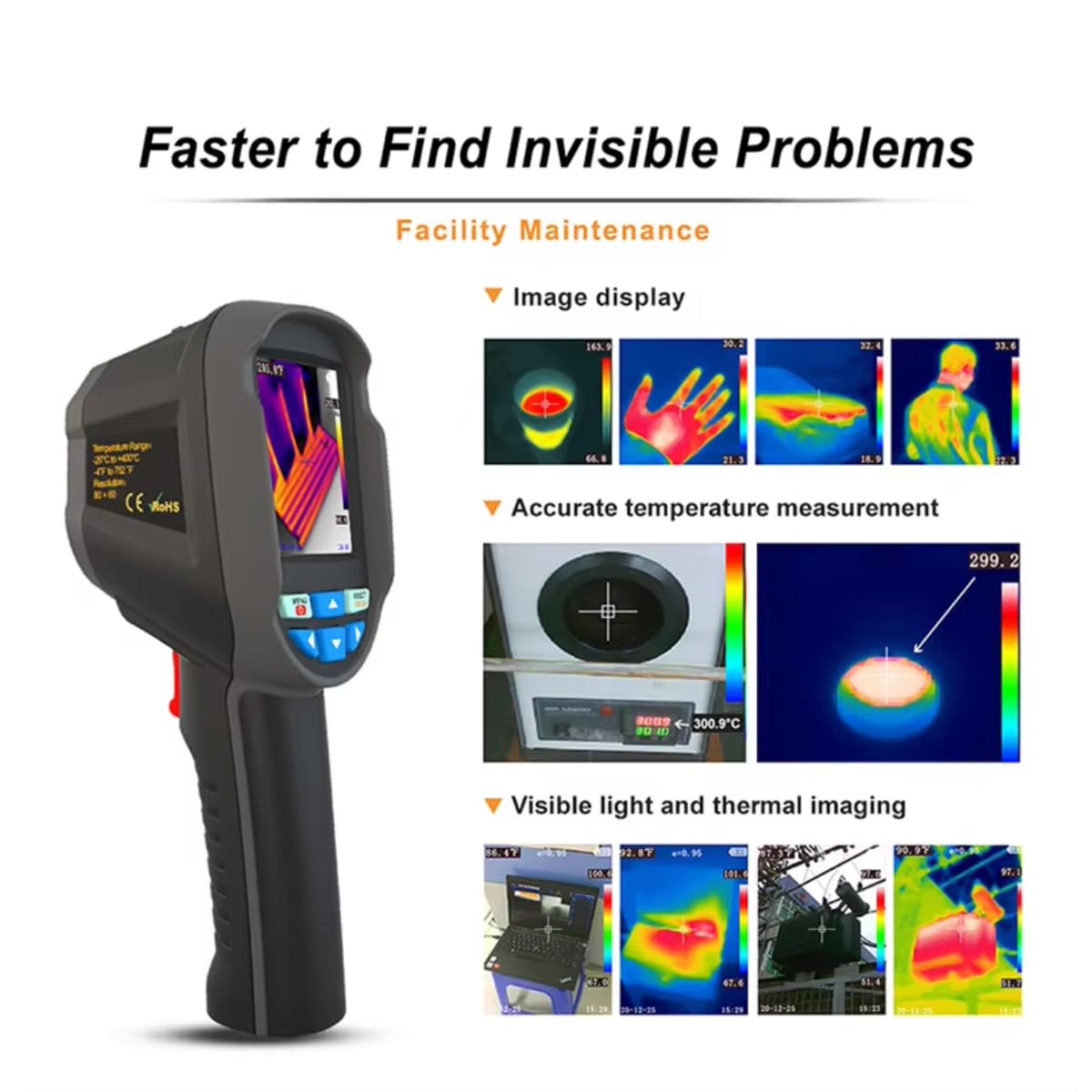
Once powered on, the camera will display a thermal image. Point the infrared lens towards the object or area you wish to measure. The screen will show real-time temperature readings, including the central point temperature, and the highest and lowest temperatures detected within the field of view.
5.2. Réglage de l'émissivité
Emissivity is a crucial setting for accurate temperature measurement. Different materials have different emissivities. To adjust:
- Appuyez sur le Menu clé.
- Navigate to the 'Emissivity' setting using the Navigation keys.
- Appuyez sur le Selection/Enter clé.
- Adjust the value between 0.01 and 1.00 using the Navigation keys.
- Appuyez sur le Selection/Enter touche pour confirmer.
Consult a reference table for common material emissivities if precise measurements are required.
5.3. Modification des palettes de couleurs
To change the visual representation of temperature:
- Appuyez sur le Menu clé.
- Navigate to the 'Color Palette' setting.
- Appuyez sur le Selection/Enter clé.
- Select your desired palette (e.g., Rainbow, Iron, Cold Color, White Hot, Black Hot) using the Navigation keys.
- Appuyez sur le Selection/Enter touche pour confirmer.
5.4. Image/Video Capture and Storage
The device supports image (JPG) and video (MP4) storage on its built-in 4GB eMMC memory (approximately 3GB user available space).
- Pour capturer une image : Aim the camera and press the Déclenchement bouton brièvement.
- Pour enregistrer une vidéo : Appuyez et maintenez enfoncé le Déclenchement button to start recording, and press it again to stop.
5.5. Connecting to PC for Data Export
To export captured images and videos:
- Connect the camera to your computer using the provided Micro USB cable.
- The camera will appear as a removable storage device on your computer.
- You can then copy the JPG images and MP4 videos to your computer.
The device also supports standalone image analysis on a PC.

6. Entretien
6.1. Nettoyage
- Use a soft, dry cloth to clean the device's body.
- Pour la lentille, utilisez un chiffon et une solution de nettoyage spécialisés pour éviter les rayures.
- N'utilisez pas de nettoyants abrasifs ni de solvants.
6.2. Entretien de la batterie
- Rechargez régulièrement la batterie, même si l'appareil n'est pas utilisé, afin de préserver sa durée de vie.
- Store the device with a partially charged battery (around 50%) if it will not be used for an extended period.
- Évitez de décharger complètement la batterie fréquemment.
7. Dépannage
If you encounter issues with your RX-350 Thermal Imager, try the following:
- L'appareil ne s'allume pas : Ensure the battery is fully charged. Try connecting the charger and powering on.
- Relevés de température inexacts : Check the emissivity setting for the material being measured. Ensure the lens is clean.
- L'écran est blanc ou figé : Essayez de redémarrer l'appareil en maintenant le bouton d'alimentation enfoncé. S'il ne répond toujours pas, laissez la batterie se décharger complètement, puis rechargez-la.
- Impossible de se connecter au PC : Vérifiez que le câble USB est bien branché à la fois à l'appareil photo et à l'ordinateur. Essayez un autre port USB ou un autre câble.
Si les problèmes persistent, contactez le support client pour obtenir de l'aide.
8. Spécifications
| Fonctionnalité | Spécification |
|---|---|
| Modèle | RX-350 |
| Résolution infrarouge | 160x120 (76 800 pixels) |
| Domaine de View (FOV) | 35°(H) × 27°(V) |
| Bande de réponse spectrale | 8 ~ 14um |
| Taille des pixels | 12 µm |
| NETD (différence de température équivalente au bruit) | ≤ 50 mK |
| Fréquence d'images | 25 Hz |
| Plage de mesure de la température | -20 ℃ ~ +550 ℃ (-4 ℉ ~ +1022 ℉) |
| Précision de mesure | (-15 ℃ ~ +550 ℃) ± 2 ℃ or ± 2%; (-20 ℃ ~ -15 ℃) ± 4 ℃ or ± 4% |
| Unités de mesure | °C / °F |
| Distance focale de l'objectif | 3.2 mm |
| Réglage de l'émissivité | Adjustable from 0.01 ~ 1.00 |
| Distance mesurable | 0m ~ 3m |
| Optimal Measurable Distance | 0.5 ~ 1.2m |
| Mode de mise au point | Mise au point gratuite |
| Points de mesure de température | Center point / Hot spot and Cold spot |
| Palettes de couleurs | Rainbow, Iron, Cold Color, White Hot, Black Hot |
| Taille de l'écran | 2.8 inches (240 × 320) |
| Mode d'affichage des images | Infrared / Visible Light / Dual Fusion |
| Système d'éclairage | Lumière de remplissage LED |
| Stockage de l'appareil | 4GB built-in eMMC (approx. 3GB user available) |
| Format image/vidéo | JPG/MP4 |
| Méthode d'exportation d'images/vidéos | Connexion USB à l'ordinateur |
| Fonction d'analyse d'image | Supports standalone analysis on PC |
| Langue du menu | English, German, Italian, Chinese |
| Type de batterie | Batterie au lithium rechargeable amovible (18650) |
| Capacité de la batterie | 2000mAh |
| Durée d'utilisation | 2 à 3 heures |
| Interfaces de courant | Micro USB |
| Paramètres de mise hors tension automatique | 5 minutes / 20 minutes / None |
| Température de fonctionnement | -10 ℃ ~ +45 ℃ (-14 ℉ ~ +122 ℉) |
| Température de stockage | -20 ℃ ~ +60 ℃ (-4 ℉ ~ +140 ℉) |
| Humidité relative | 10% ~ 85% RH (sans condensation) |
| Poids du produit | 375g |
| Dimensions du produit | 9.6 × 7.2 × 22.6 cm |
9. Garantie et assistance
Pour toute information relative à la garantie et pour obtenir une assistance technique, veuillez consulter la documentation fournie avec votre achat ou contacter directement le vendeur. Conservez votre preuve d'achat pour toute réclamation au titre de la garantie.