
1. Produit terminéview
The Baseus Mini MagSafe Powerbank 5000 mAh is a compact, Qi2 certified portable charger designed for convenience and efficiency. It features a 5000 mAh capacity, 20W Power Delivery (PD) via USB-C, and 15W wireless charging. The integrated foldable stand allows for hands-free viewing while charging. Its strong magnetic attachment ensures secure connection to compatible devices.
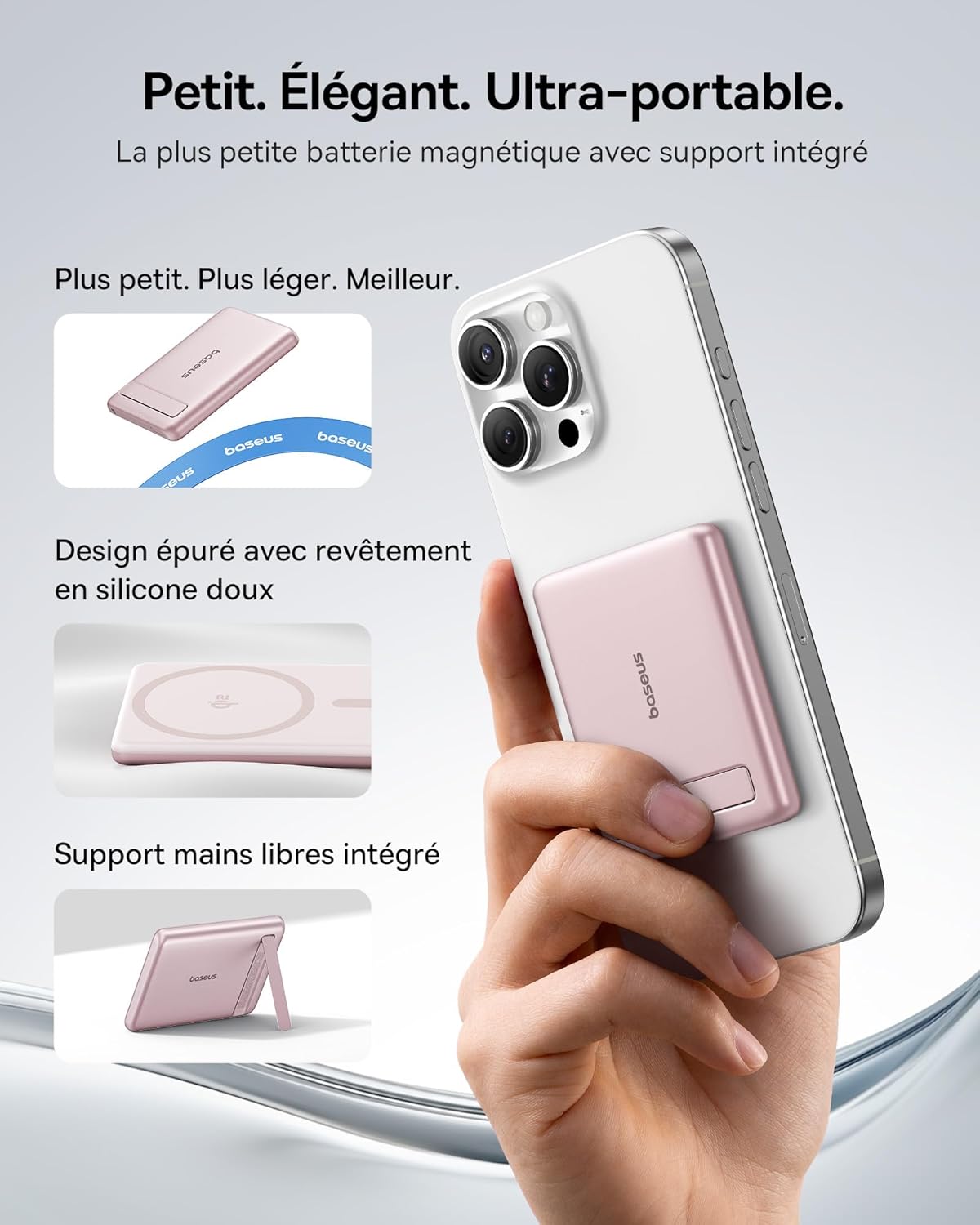
Image: The Baseus Mini MagSafe Powerbank securely attached to an iPhone, demonstrating its compact form factor and the convenience of the integrated kickstand for hands-free use.
2. Contenu du colis
- Baseus Mini MagSafe Powerbank (Model: PPKPC-0520S)
- USB-C to USB-C Charging Cable (30 cm)
- Manuel d'utilisation

Image: The Baseus Mini MagSafe Powerbank and its accompanying USB-C charging cable, highlighting the included accessories.
3. caractéristiques du produit
- Compact and Premium Design: Smaller than a credit card with a 5000 mAh capacity, featuring a thin aluminum casing and soft-touch silicone finish. Ergonomic curved edges enhance grip, and an LED display indicates battery status.
- Qi2 Fast Charging: Provides up to 15W wireless fast charging for iPhones and other Qi2-compatible devices. Qi2 technology ensures secure magnetic alignment for faster and more reliable power delivery.
- Support pliable intégré : The built-in aluminum kickstand allows for hands-free viewing in both portrait and landscape modes while your phone charges wirelessly.
- Fixation magnétique puissante : Equipped with N52 rubidium magnets offering 3500 GS magnetic power, ensuring a secure lock for instant charging without obstructing the camera lens.
- Wired and Wireless Charging with Advanced Cooling: Charge two devices simultaneously via wireless and USB-C. A three-layer cooling system maintains optimal temperature during extended use.

Image: An iPhone receiving 15W wireless fast charging from the Baseus MagSafe Powerbank, demonstrating the Qi2 certification and efficient power transfer.
4. Installation
- Charge initiale: Before first use, fully charge the power bank using the included USB-C cable and a compatible power adapter (not included). The LED indicators will show the charging progress.
- Mise sous tension : The power bank typically activates automatically when a device is attached or connected. Some models may have a power button to initiate charging.
5. Mode d'emploi
5.1 Chargement de la batterie externe
- Connect the included USB-C cable to the power bank's USB-C port.
- Connect the other end of the cable to a USB-C power adapter (e.g., 20W PD charger) or a computer's USB-C port.
- The LED indicators will illuminate to show the current battery level and charging status.
5.2 Recharge sans fil (MagSafe/Qi2)
- Ensure your device is compatible with MagSafe or Qi2 wireless charging (e.g., iPhone 12 series and newer).
- Align the back of your compatible device with the magnetic surface of the power bank. The magnets will snap into place, ensuring proper alignment.
- Wireless charging will begin automatically. The LED indicators may show charging activity.
5.3 Chargement filaire (USB-C)
- Connect your device to the power bank's USB-C port using a compatible USB-C to USB-C cable (or your device's charging cable).
- Wired charging will begin automatically, supporting up to 20W Power Delivery.
5.4 Utilisation du support pliable
- Déployez délicatement le support intégré à l'arrière de la batterie externe.
- Place your wirelessly charging device onto the power bank.
- Ajustez le support à votre guise viewangle de prise de vue pour une orientation portrait ou paysage.

Image: The Baseus MagSafe Powerbank simultaneously charging two iPhones, one via USB-C cable and another wirelessly, demonstrating its dual-charging capability.
6. Entretien
- Nettoyage: Essuyez la batterie externe avec un chiffon doux et sec. Évitez d'utiliser des produits chimiques agressifs ou des matériaux abrasifs.
- Stockage: Rangez la batterie externe dans un endroit frais et sec, à l'abri de la lumière directe du soleil et des températures extrêmes.
- Entretien de la batterie: Pour une durée de vie optimale de la batterie, chargez et déchargez complètement la batterie externe au moins une fois tous les trois mois si vous ne l'utilisez pas régulièrement.
- Évitez les chutes : Protégez l'appareil des chutes et des chocs, qui peuvent endommager ses composants internes.
7. Dépannage
- L'appareil ne charge pas :
- Assurez-vous que la banque d’alimentation est suffisamment chargée.
- Vérifiez les connexions des câbles pour la charge filaire.
- For wireless charging, ensure proper alignment and that your device is Qi2/MagSafe compatible. Remove any thick phone cases that might interfere.
- Charge lente :
- Ensure you are using a compatible cable and power adapter for optimal charging speeds (e.g., PD 20W for wired, Qi2 for wireless).
- Charger plusieurs appareils simultanément peut réduire la vitesse de charge individuelle.
- L'adhérence magnétique est faible :
- Ensure your phone or case has MagSafe compatibility.
- Remove any non-MagSafe compatible cases or accessories that might block the magnetic connection.
- Surchauffe de la batterie externe :
- While the power bank has advanced cooling, prolonged high-power usage can generate heat. If it becomes excessively hot, disconnect it and allow it to cool down.
- Évitez de recharger l'appareil en plein soleil ou dans des espaces clos.
8. Spécifications
| Numéro de modèle | PPKPC-0520S |
| Type de batterie | Lithium Polymère |
| Capacité | 5000 mAh |
| Sortie filaire (USB-C) | Puissance de service (PD) jusqu'à 20 W |
| Sortie sans fil | Jusqu'à 15 W (certifié Qi2) |
| Vol d'entréetage | 20 volts (max.) |
| Dimensions (L x l x H) | 10 x 6.7 x 0.9 cm |
| Poids | 180 grammes |
| Appareils compatibles | Smartphones (iPhone 12-17 Pro/Pro Max, Android compatible) |
| Norme de recharge sans fil | Qi |

Image: The Baseus Mini MagSafe Powerbank positioned next to an iPhone and a soda can, illustrating its ultra-compact and portable size.
9. Consignes de sécurité
Veuillez lire et suivre ces consignes de sécurité afin d'éviter d'endommager le produit ou de vous blesser :
- N’exposez pas la batterie externe à l’eau, à l’humidité ou à des températures extrêmes.
- Avoid disassembling, puncturing, or modifying the device.
- Tenir hors de portée des enfants.
- Ne pas utiliser si la batterie externe est visiblement endommagée ou gonflée.
- Éliminez le produit de manière responsable conformément aux réglementations locales.
10. Garantie et assistance
This Baseus Mini MagSafe Powerbank comes with a Garantie de 2 ans À compter de la date d'achat, cette garantie couvre les défauts de fabrication et de main-d'œuvre dans des conditions normales d'utilisation.
For technical support, warranty claims, or any product-related inquiries, please contact Baseus customer service through the retailer where you purchased the product or visit the official Baseus website pour les coordonnées.

Image: A display of various iPhone models and Android devices, all compatible with the Baseus MagSafe Powerbank, highlighting its broad device compatibility.