
Introduction
The ORIA Bluetooth Auxiliary Adapter (Model CP329) is a versatile 2-in-1 device functioning as both a Bluetooth transmitter (TX) and receiver (RX). It enables wireless audio connectivity for a wide range of devices, transforming non-Bluetooth equipment into Bluetooth-enabled systems. Featuring Bluetooth 5.3 technology, it offers stable connections, low latency, and supports hands-free calling in receiver mode.
Contenu du colis
- 1 x ORIA Bluetooth Auxiliary Adapter (CP329)
- 1 x câble de chargement de type C
- 1 x Manuel d'utilisation
Produit terminéview
Familiarize yourself with the components of your ORIA Bluetooth Auxiliary Adapter:
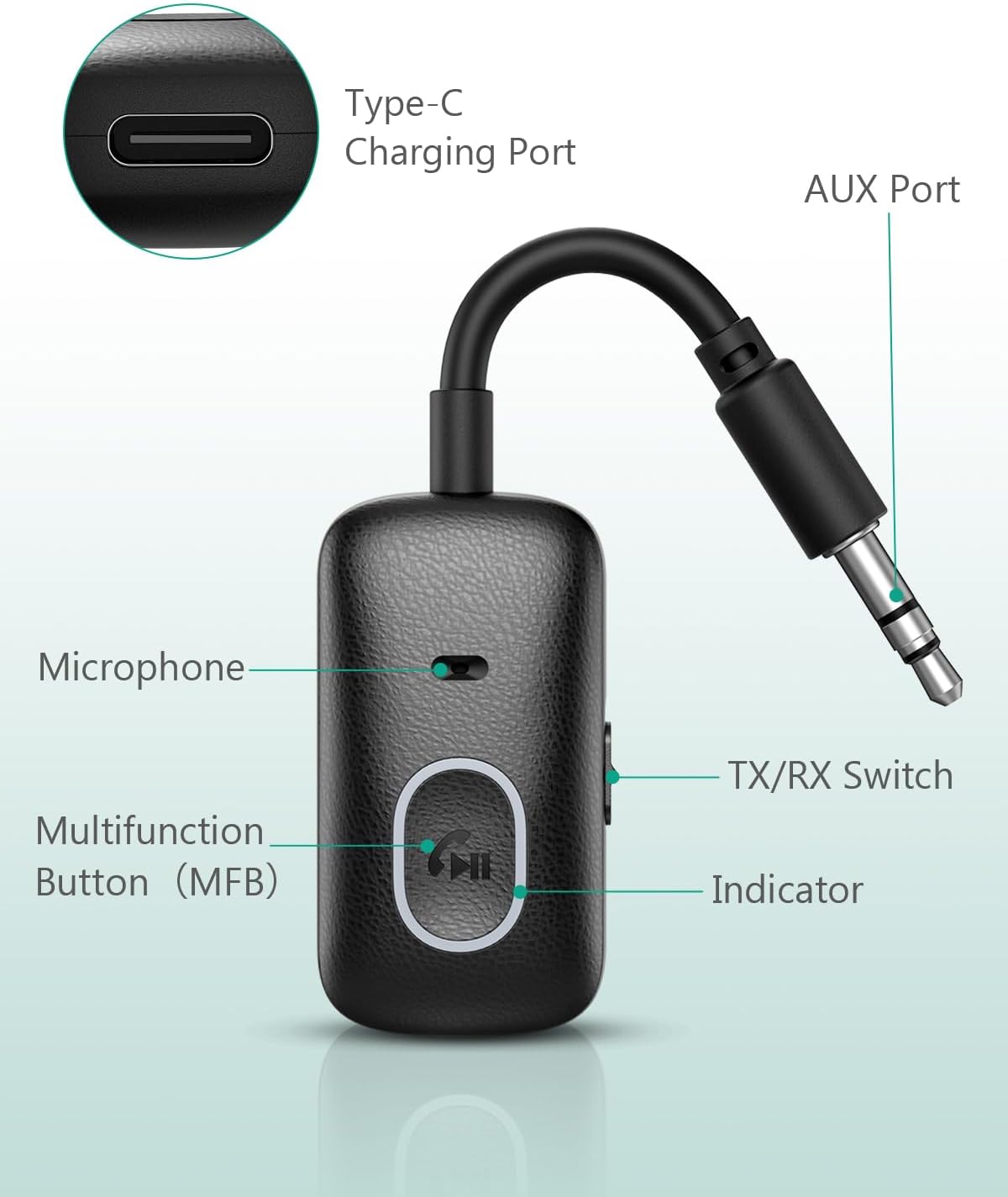
Image: Labeled components of the ORIA Bluetooth Auxiliary Adapter.
- Bouton multifonction (MFB) : Power on/off, Play/Pause, Answer/End/Reject calls, Redial.
- Commutateur TX/RX : Permet de basculer entre les modes Émetteur (TX) et Récepteur (RX).
- Voyant lumineux : Affiche l'état de l'appareil (appairage, connecté, en charge).
- Microphone: Pour passer des appels mains libres en mode RX.
- AUX Port (3.5mm Jack): Connects to audio input/output devices.
- Port de charge de type C : Pour charger l'appareil.
Caractéristiques
| Fonctionnalité | Détail |
|---|---|
| Numéro de modèle | CP329 |
| Version Bluetooth | 5.3 |
| Technologie de connectivité | Bluetooth |
| Type de connecteur | Prise jack 3.5 mm |
| Modes de fonctionnement | Émetteur (TX) et récepteur (RX) |
| Dossier spécial | Appels mains libres |
| Battery Life (Receiver Mode) | Jusqu'à 7 XNUMX heures |
| Battery Life (Transmitter Mode) | Jusqu'à 5 XNUMX heures |
| Temps de charge | Environ 1 heure (via USB-C) |
| Portée sans fil | Jusqu'à 10 mètres (33 pieds) sans obstacles |
| Poids | 43 gramme |
| Couleur | Noir |
Configuration et chargement
Charger l'appareil
Before first use, fully charge the adapter. Connect the provided Type-C charging cable to the adapter's Type-C port and the other end to a USB power source (e.g., wall adapter, computer USB port). The indicator light will show charging status and turn off when fully charged. The device can be used while charging.

Image: Charging the ORIA Bluetooth Auxiliary Adapter.
Marche/Arrêt
- Mise sous tension : Press and hold the Multifunction Button (MFB) for approximately 3 seconds until the indicator light flashes.
- Éteindre: Press and hold the MFB for approximately 3 seconds until the indicator light turns off.
Mode d'emploi
The ORIA Bluetooth Auxiliary Adapter has two operating modes: Transmitter (TX) and Receiver (RX). Use the TX/RX switch on the side of the device to select the desired mode.
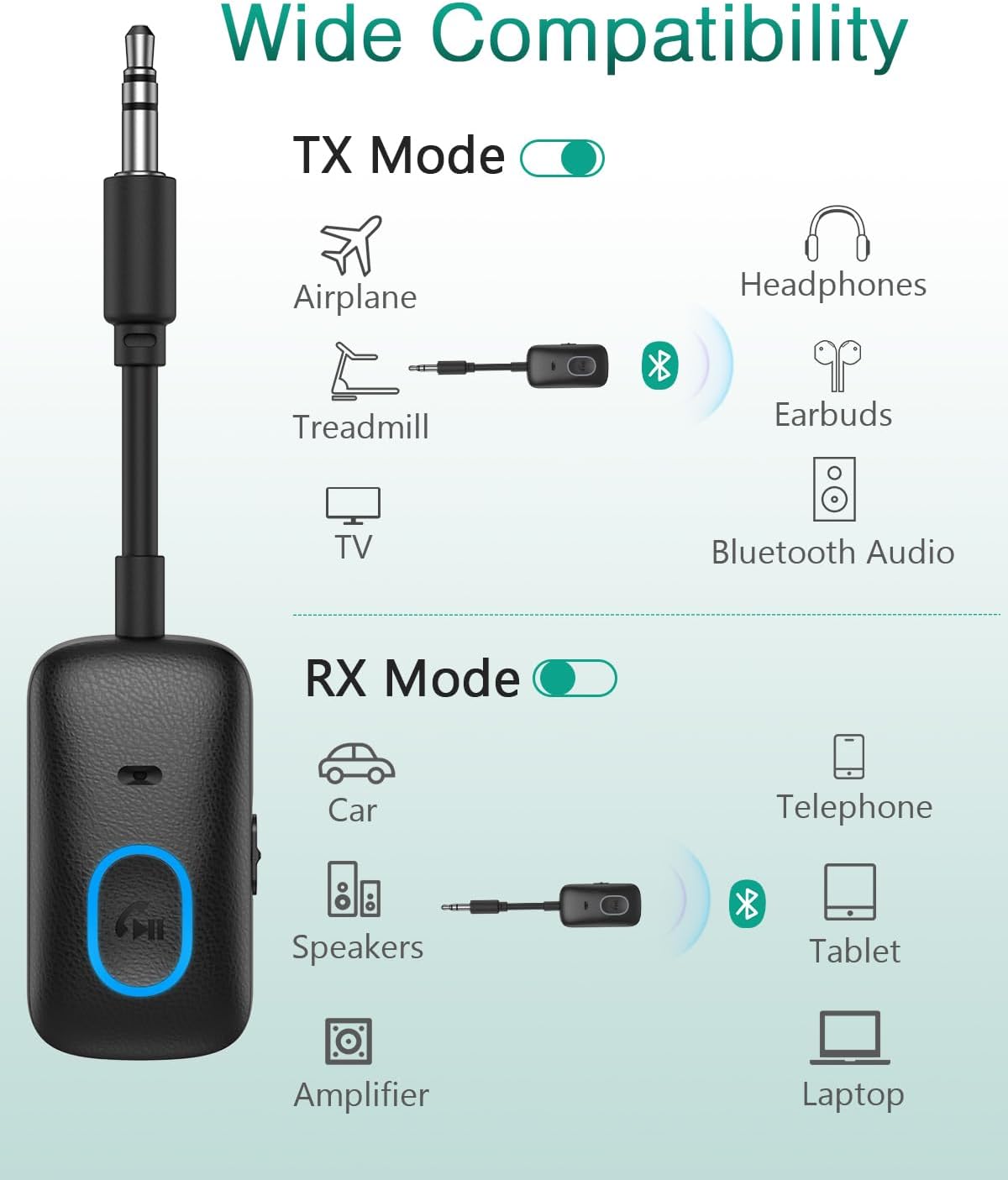
Image: Wide compatibility of the ORIA Bluetooth Auxiliary Adapter in TX and RX modes.

Image: Steps for powering on, selecting mode, pairing, and enjoying audio.
Emetteur (TX) Mode
In TX mode, the adapter converts non-Bluetooth audio sources (e.g., TV, PC, treadmill, airplane audio system) into Bluetooth signals, allowing you to stream audio wirelessly to Bluetooth headphones or speakers.
- Basculez l'adaptateur vers Mode émission en utilisant le commutateur TX/RX.
- Plug the 3.5mm AUX jack of the adapter into the audio output port of your non-Bluetooth device (e.g., TV headphone jack).
- Assurez-vous que vos écouteurs ou votre enceinte Bluetooth sont en mode de couplage.
- The adapter will automatically search for and connect to nearby Bluetooth receiving devices. The indicator light will show a stable blue light once connected.
- Adjust the volume on your receiving device (headphones/speaker) or the source device.

Image: ORIA Bluetooth Adapter in TX mode connected to a TV.

Image: Using the ORIA Bluetooth Adapter for airplane audio.

Image: Connecting the adapter to single or double 3.5mm airplane audio jacks.
Mode récepteur (RX)
In RX mode, the adapter receives Bluetooth audio signals from your smartphone, tablet, or laptop and outputs them to non-Bluetooth audio systems (e.g., car stereo, home speakers, wired headphones).
- Basculez l'adaptateur vers Mode RX en utilisant le commutateur TX/RX.
- Plug the 3.5mm AUX jack of the adapter into the audio input port of your non-Bluetooth audio system (e.g., car AUX input, speaker AUX input).
- On your smartphone or other Bluetooth device, enable Bluetooth and search for "CP329" (or similar device name).
- Select "CP329" to pair. The indicator light will show a stable blue light once connected.
- Diffusez du contenu audio depuis votre appareil Bluetooth. Le son sera transmis à votre système audio connecté.

Image: ORIA Bluetooth Adapter in RX mode for car audio.
Appel mains libres (mode RX uniquement)
When in RX mode and connected to your smartphone, the adapter supports hands-free calling via its built-in microphone.
- Répondre à l'appel : Short press the MFB once.
- Fin d'appel : Short press the MFB once during a call.
- Rejeter l'appel : Maintenez le bouton multifonction enfoncé pendant environ 2 secondes.
- Recomposer le dernier numéro : Double-cliquez sur le MFB.
- Activer l'assistant vocal (Siri/Google Assistant) : Triple-cliquez sur le bouton multifonction.
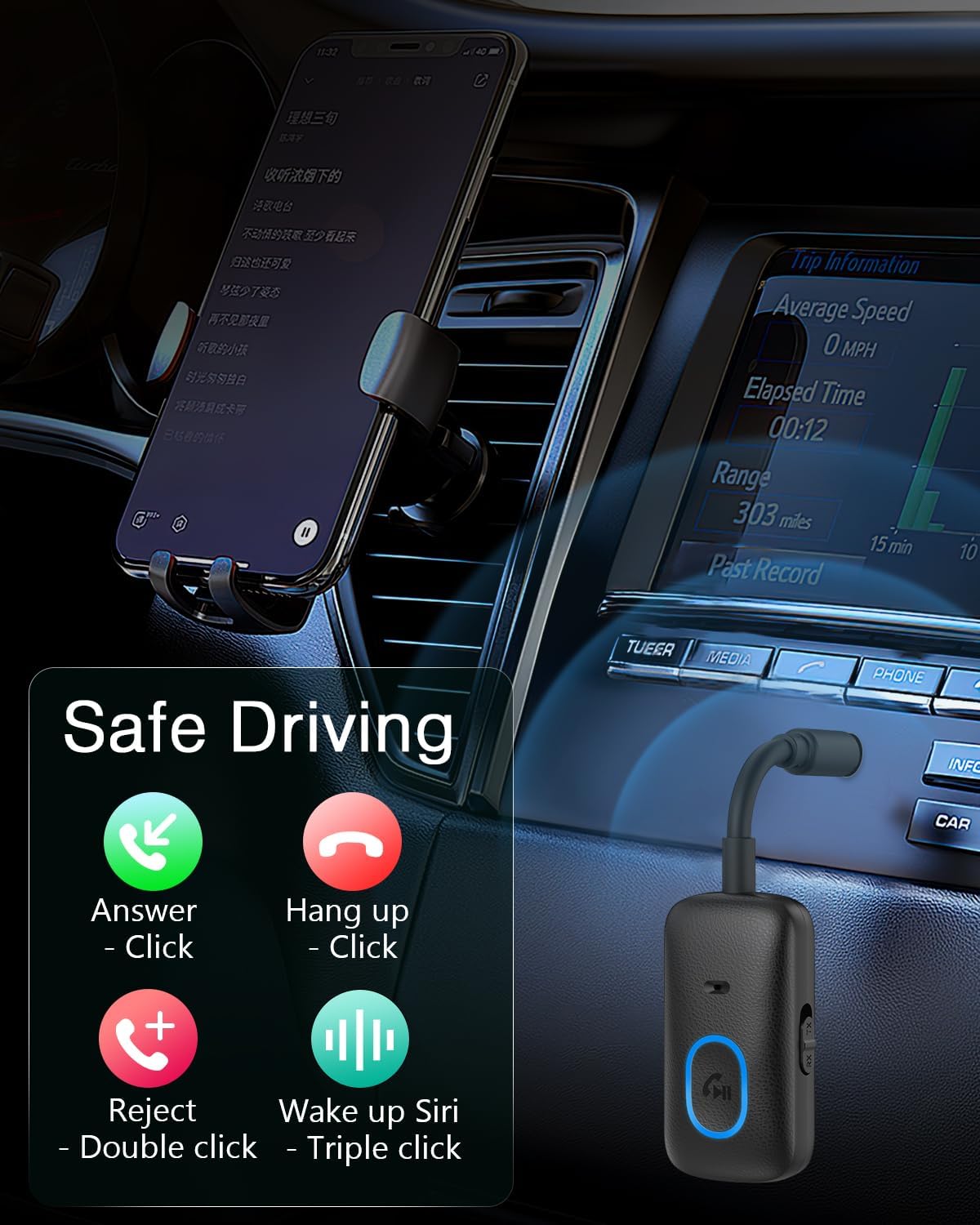
Image: Hands-free calling controls using the Multifunction Button.
Entretien
- Gardez l'appareil au sec. Évitez tout contact avec l'humidité ou les liquides.
- N'essayez pas de démonter ou de modifier l'appareil.
- Nettoyez l'appareil avec un chiffon doux et sec. N'utilisez pas de produits chimiques agressifs ni de nettoyants abrasifs.
- Rangez l'appareil dans un endroit frais et sec lorsqu'il n'est pas utilisé.
Dépannage
- L'appareil ne s'allume pas :
- Assurez-vous que l'appareil est complètement chargé. Branchez-le à une source d'alimentation à l'aide du câble USB-C.
- Press and hold the MFB for at least 3 seconds to power on.
- Impossible de connecter un appareil Bluetooth :
- Assurez-vous que l'adaptateur est dans le mode correct (TX pour la transmission, RX pour la réception).
- Assurez-vous que l'adaptateur est en mode appariement (voyant clignotant).
- Ensure the target Bluetooth device (headphones/speaker in TX mode, smartphone/tablet in RX mode) is also in pairing mode and within range (10 meters).
- Éteignez puis rallumez les deux appareils et essayez de les appairer à nouveau.
- Effacez les connexions Bluetooth précédentes sur votre appareil si nécessaire.
- Aucun son ou mauvaise qualité audio :
- Check if the 3.5mm AUX cable is securely connected to both the adapter and the audio device.
- Assurez-vous que le volume est suffisamment élevé à la fois sur l'adaptateur et sur le périphérique audio connecté.
- Verify that the adapter is correctly paired and connected.
- Reduce the distance between the adapter and the paired Bluetooth device, and remove any obstacles.
- Assurez-vous qu'il n'y ait pas d'interférences provenant d'autres appareils sans fil.
- La fonction d'appel mains libres ne fonctionne pas :
- Ensure the adapter is in RX mode and successfully paired with your smartphone.
- Check your smartphone's Bluetooth settings to ensure "Call Audio" is enabled for the adapter.
- Assurez-vous que le microphone n'est pas obstrué.
Garantie et assistance
The ORIA Bluetooth Auxiliary Adapter (CP329) comes with a Garantie constructeur d'un an. For technical support, warranty claims, or any product-related inquiries, please contact ORIA customer support through your purchase platform or the official ORIA website.

Image: ORIA Customer Support details.